How to Calculate YoY and Period-over-period Without Date Fields
Scenario
Some datasets have no date fields, or dates are stored in text format. When creating cards in Guandata BI and calculating year-over-year or period-over-period values, the advanced calculation options do not show those options. How can these calculations be performed in such cases?
Implementation Method
The built-in YoY and period-over-period feature can only be based on date-type fields. Therefore, use functions to convert text dates into date fields, or generate date-type fields based on the time logic in existing data.
Case 1
The dataset has no date field, but stores year and quarter in text format, with store counts summarized by quarter.
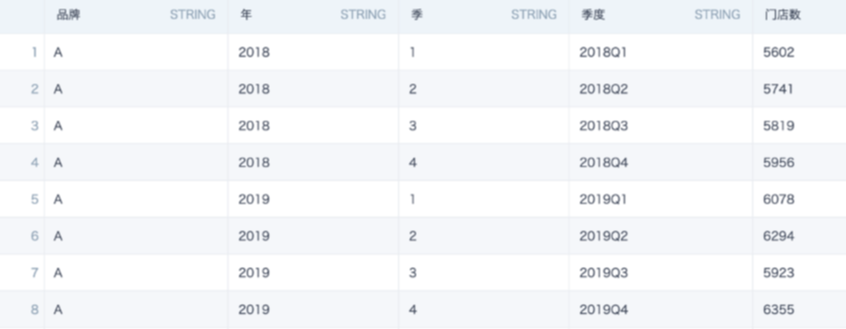
Steps:
- Create a calculated field on the dataset overview page or in ETL, and use a function to generate the first day of each quarter.
When Year and Quarter fields are available, use this formula:
case when [Quarter]='1' then [Year]||'-01-01'
when [Quarter]='2' then [Year]||'-04-01'
when [Quarter]='3' then [Year]||'-07-01'
when [Quarter]='4' then [Year]||'-10-01'
end
When only a Quarter field is available, use this formula:
case when right([Quarter],1)='1' then left([Quarter],4)||'-01-01'
when right([Quarter],1)='2' then left([Quarter],4)||'-04-01'
when right([Quarter],1)='3' then left([Quarter],4)||'-07-01'
when right([Quarter],1)='4' then left([Quarter],4)||'-10-01'
end
YoY and Period-over-period Setup Method 1
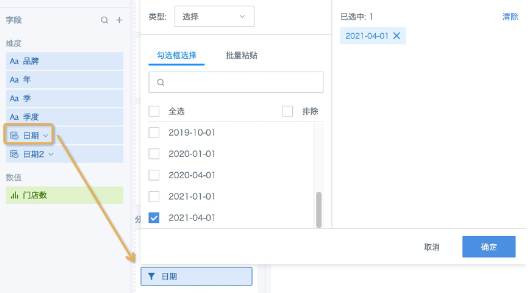
- Create a card, drag the date field created in the previous step directly to the filter area, and apply filtering.
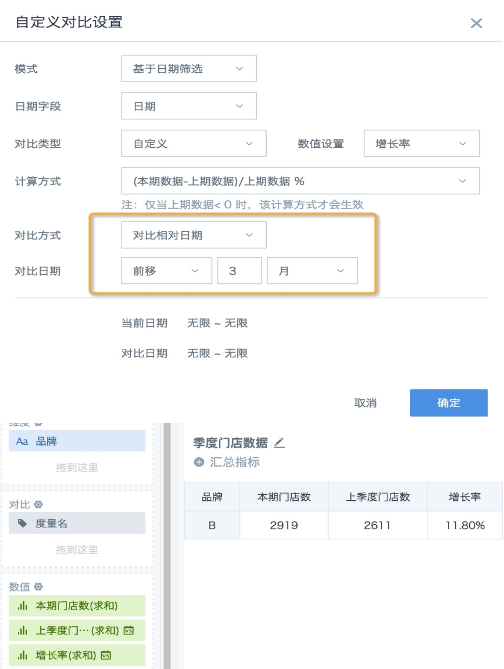
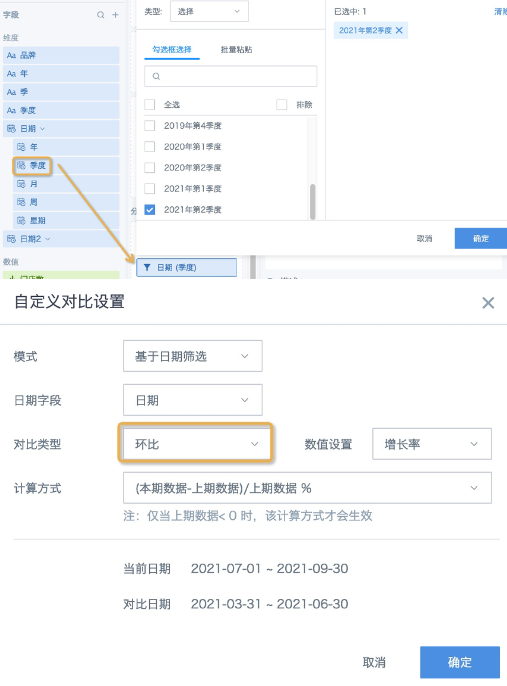
- Drag the numeric field to the value area, click Advanced Calculation - YoY/Period-over-period, and select Based on Date Filter in the pop-up window. To calculate year-over-year, set Comparison Type to Year-over-year (Year/Month/Day) and configure other settings as needed. To calculate quarter-over-quarter, because the date is only the first day of each quarter and no suitable comparison type is available, set Comparison Type to Custom and set Comparison Method to Compare Relative Date - Move Back 3 Months. Finally, set an alias for the field. The final effect is shown below:
YoY and Period-over-period Setup Method 2: using quarter-over-quarter as an example After creating the date field, click the arrow after Date, drag Quarter to the filter area, and select any quarter. Drag the numeric field to the value area, select Advanced Calculation - YoY/Period-over-period, choose Based on Date Filter in the pop-up window, and set Comparison Type to Period-over-period.
Case 2
An order status dataset has no date fields, but the order number itself is a long number in text format, and the leading digits are actually date, hour, minute, and second. In this case, use formulas to extract date and time, then calculate YoY and period-over-period.
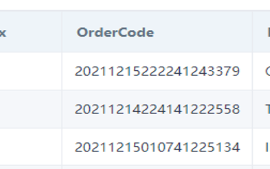
Create a calculated field with the following conversion formulas:
to_timestamp(left([OrderCode],14),’yyyyMMddHHmmss’)
to_date(left([OrderCode],8),’yyyyMMdd’)
After conversion, the field becomes a standard time or date format. Calculate YoY and period-over-period as needed. For more date conversion functions, see Spark SQL Date Processing Functions and Case Sharing.
Case 3
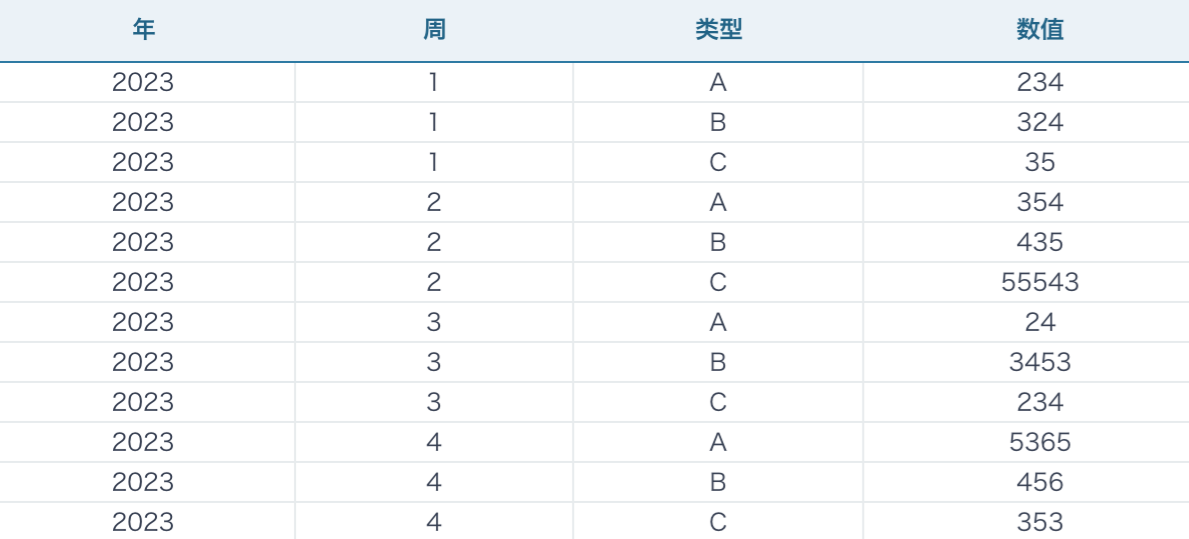
The dataset has no date field, but stores the natural week number of the current year and needs weekly YoY or period-over-period calculation.
Method 1
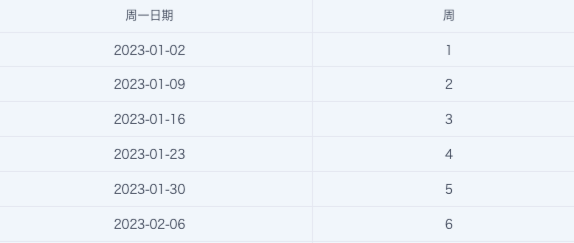
Idea: Use today as the base date, calculate the Monday date of each week in the current year, and use the Monday date to calculate YoY and period-over-period.
- Calculate the Monday date of the current system date (today):
DATE_TRUNC('WEEK',CURRENT_DATE()) or TRUNC(CURRENT_DATE(),'WEEK')
-
Based on the difference between today's week number and the Week field in the dataset, calculate the day difference between the current week and the Week field: (WEEKOFYEAR(CURRENT_DATE()) - [Week]) * 7
-
Subtract the day difference from the Monday date of the current system date (today), using the DATE_SUB function, to get the Monday date corresponding to Week.
Reference function syntax (case-insensitive):
DATE_SUB(DATE_TRUNC('week',CURRENT_DATE()),(WEEKOFYEAR(CURRENT_DATE())-[Week])*7)
Data preview:
YoY and Period-over-period Settings:
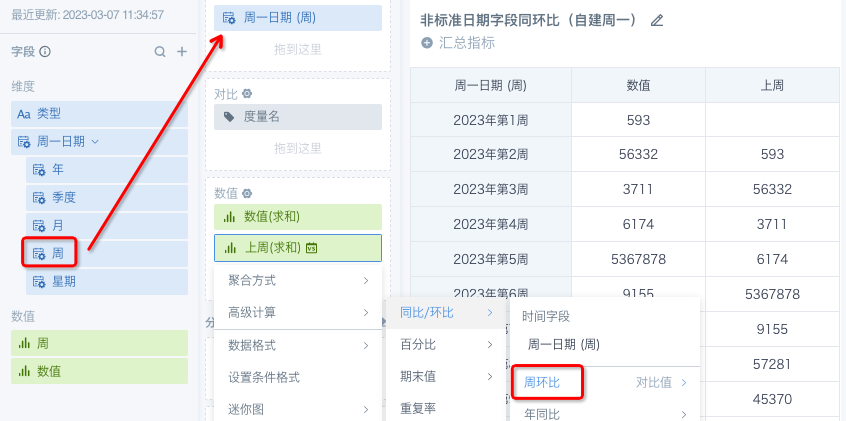
- If the newly created Monday date is used as a dimension, select Week-over-week for YoY/period-over-period. The operation is as follows:
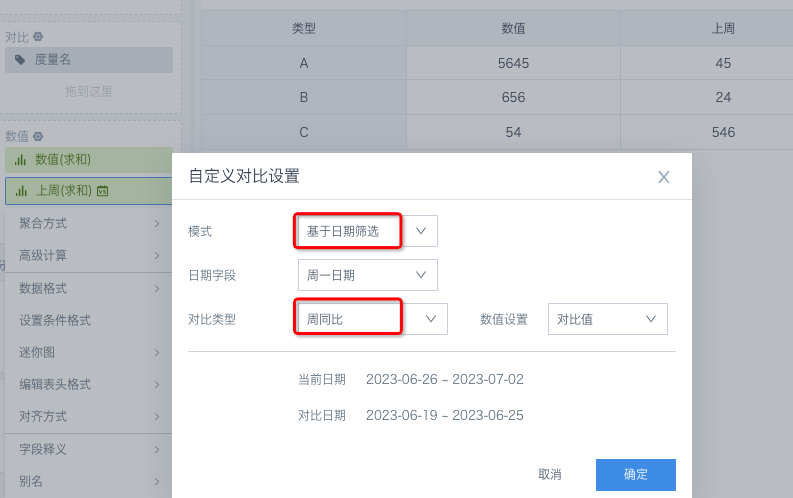
- In date filter scenarios, set the YoY/period-over-period comparison type to Week-over-week to compare with the previous week.
If the dataset contains multiple years of data, do not use today (current_date) or dates near the start or end of the year, such as January 1 or December 30, as the base date for calculating Monday dates, because cross-year calculations are error-prone. Recommended approach: use a fixed date in each year to calculate the Monday date of that year.
Reference function syntax (base date: 02-01):
DATE_SUB(DATE_TRUNC('week',DATE(CONCAT([Year],'-02-01'))),(WEEKOFYEAR(DATE(CONCAT([Year],'-02-01')))-[Week])*7)
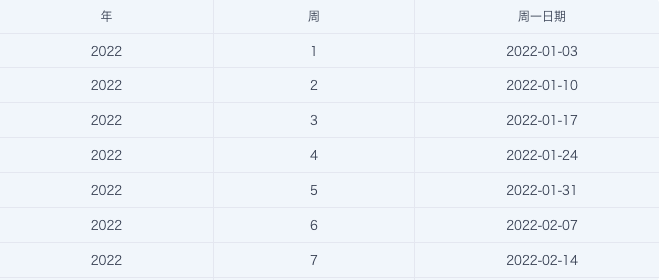
Data preview:
Method 2
If the dataset has no date field, has already been aggregated to the granularity used by the card, has complete data (row count = product of all primary key values), and has fewer than millions of rows, not exceeding ten million, you can also consider using offset window functions (lead/lag) to calculate period-over-period. All four conditions are required. If any condition is not met, use Method 1 whenever possible.
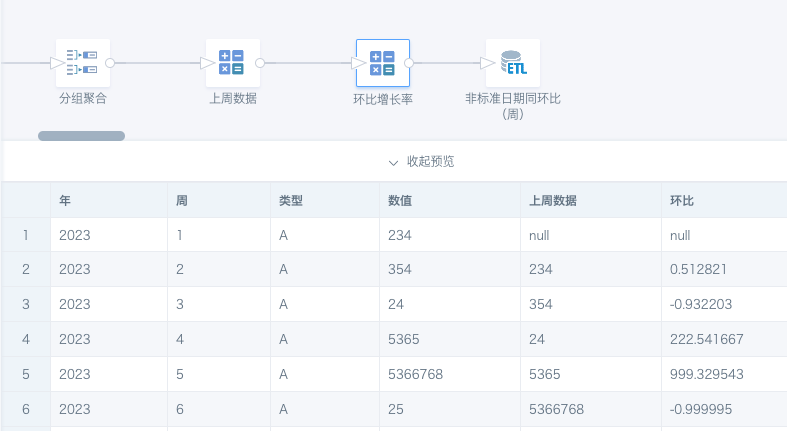
Idea: Group data by Type, sort by Year and Week in ascending order, and take the Value from the previous row. The result is the week-over-week value. Because window functions consume more resources and time, perform the calculation in ETL whenever possible.
Offset Function Usage:
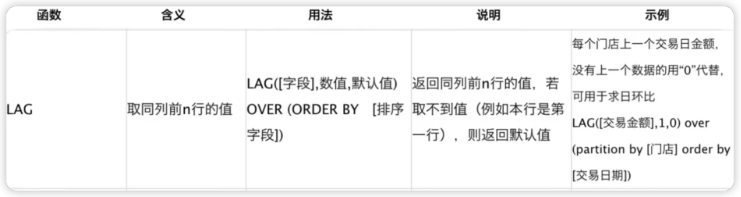
For more window function usage, see Spark Window Functions and Applications.
Steps:
-
Use ETL to group, aggregate, and complete the dataset so that it meets the four requirements.
-
Create a calculated field: [Previous Week Data] ==> use the offset function lag() to obtain [Previous Week Data].
lag([Value],1)over(partition by [Type] order by [Year],[Week])
- Create a calculated field: [Period-over-period] ==> ([Value] - [Previous Week Data]) / [Previous Week Data]
ETL reference: