Smart ETL Overview
Overview
Introduction
This section introduces what Guandata Smart ETL is, explains its use cases and functional modules, and provides beginner-friendly getting started guidance.
For Smart ETL video courses, see: ETL Basics and Advanced ETL
Related practice dataset: Product Practice Data
What Is Smart ETL
Smart ETL is a no-code, fully drag-and-drop self-service data preparation and lightweight data warehouse construction tool provided by Guandata. Before performing analytics and visualization, Smart ETL allows users to efficiently process datasets through easy-to-use, low-threshold, and intelligent workflows. Powered by powerful processing operators and nodes, users can cleanse, transform, and load data through configuration-based drag-and-drop operations, preview and troubleshoot any node in real time, and build complete processing workflows. It helps enterprises and departments build lightweight data warehouses, enabling even business users without SQL knowledge to achieve professional-grade data processing.
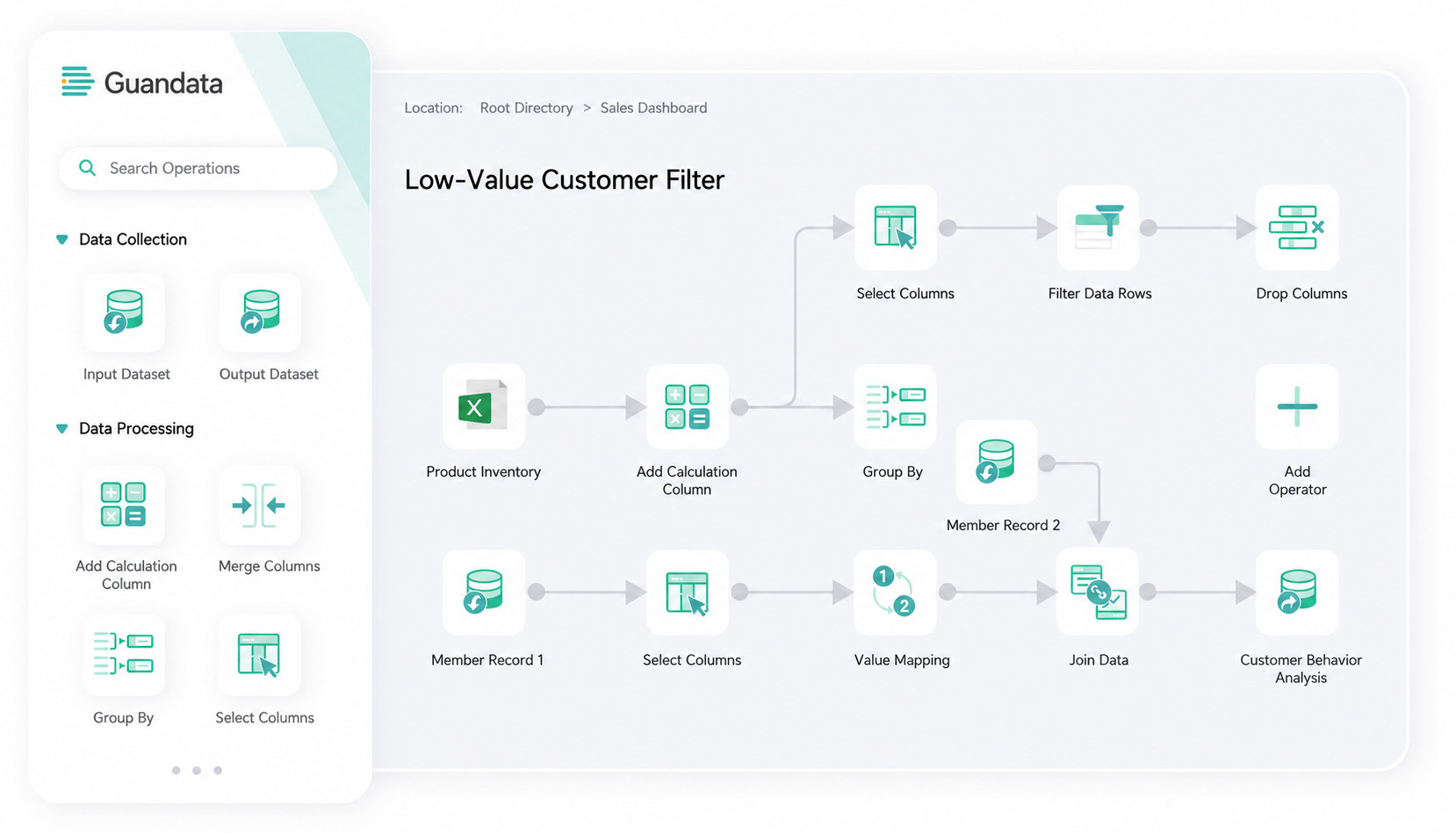
Compared with traditional ETL tools, Guandata Smart ETL provides stronger automation, intelligence, visualization, and security when handling complex data, improving processing efficiency, data quality, and data consistency, and effectively meeting enterprise data processing needs.
- No-code visual configuration makes every step of business logic visible and easy to understand.
- Smart ETL includes five major categories of operators: input/output, column editing, data editing, data combination, and advanced calculation, with 15+ common operators.
- Data can be previewed and saved in real time during processing so users can validate results and correct issues online, reducing rework.
- For complex data sources, the platform supports 35+ integration types, and any node in the data flow can be output at any time to maximize data value.
- Based on a Spark big data architecture, Smart ETL handles massive-scale analytics scenarios and supports billion-row enterprise data processing workloads.
Use Cases
-
Data Warehouse Construction
For large and medium-sized enterprise groups with fragmented information systems and no unified group-wide information system yet in place, Smart ETL can centralize multi-source heterogeneous data on one platform to enable unified group-level data management and decision support. For example, financial data can be extracted from ledgers, reports, and even vouchers to build a warehouse. Data is first preprocessed into the warehouse and then further mined downstream, without affecting the source business systems while still supporting offline warehouse services.
-
Unlocking Data Value
Many enterprises dealing with tens of billions of rows of inventory data face a dilemma: keeping the data is costly, but discarding it is risky. A common solution is to store a full daily snapshot with a date key and allow users to query it. However, this stores a large amount of unchanged information, wastes storage, and if designed poorly, can severely impact query efficiency.
For example, if a chain pharmacy has 3,000 stores and 1,000 SKUs, daily inventory snapshots generate 3 million rows per day and about 1 billion rows per year. If five years of historical data must be available, close to 5 billion rows must be stored. In these scenarios, Guandata Smart ETL can support compression, storage, and querying of massive historical data. It preserves historical state while minimizing storage costs and improving query performance.
-
Data Cleansing and Transformation
In real-world analytics and decision-making, data often contains inconsistencies, duplicates, and missing values. ETL is used to cleanse and transform the data so that high-quality, consistent data can support reliable downstream analysis and decision-making.
Functional Overview
The Smart ETL editing interface consists of five major areas: the ETL operator area, canvas editing area, data preview area, and more.
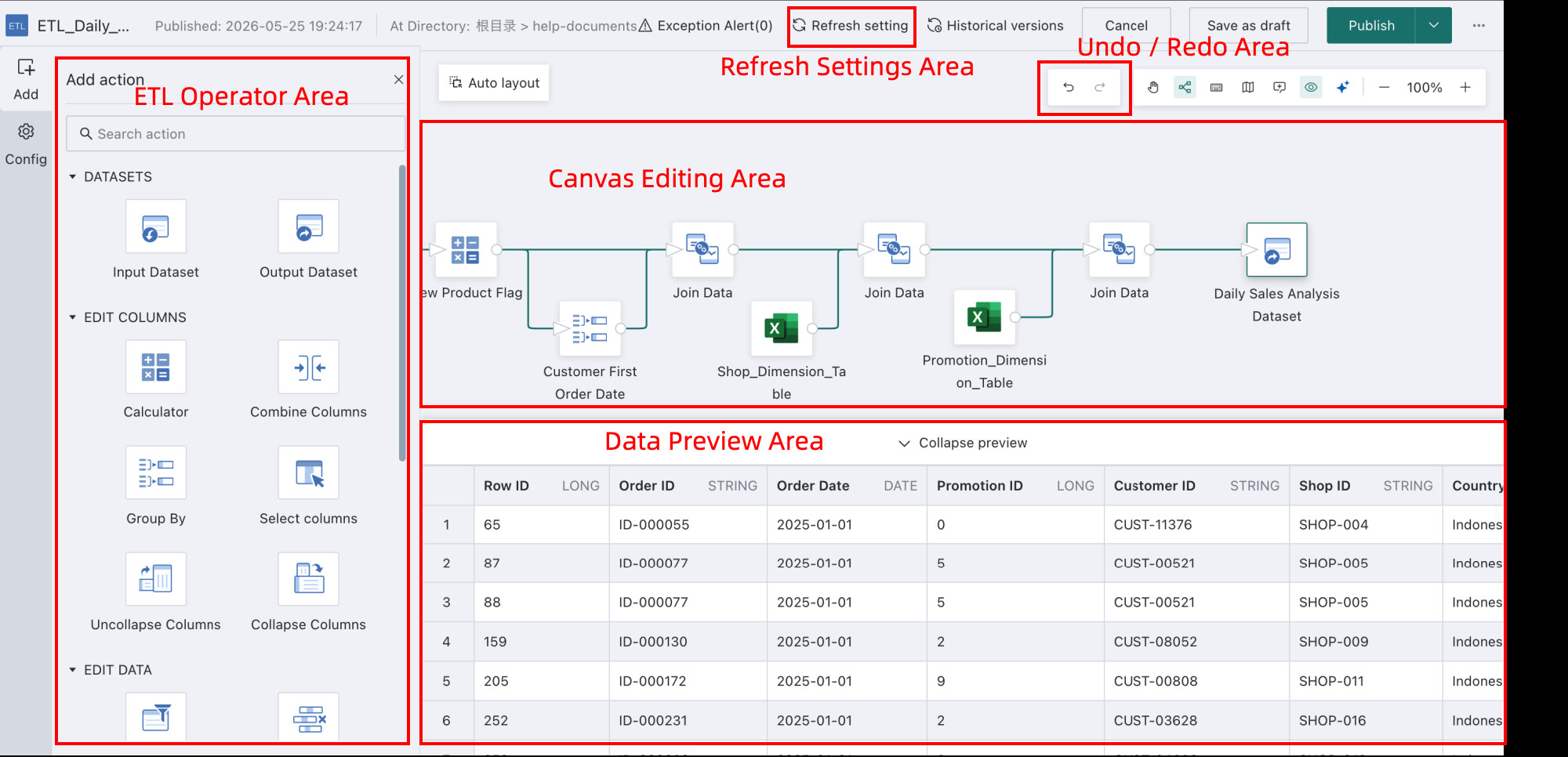
The main areas are described below:
| Area | Description |
|---|---|
| ETL Operator Area | Contains a series of predefined ETL operators, including dataset, column editing, data editing, and dataset combination operators, covering data cleansing, transformation, loading, and more. By selecting operators and dragging them onto the canvas, users can construct a complete ETL workflow and define each data processing step. |
| Canvas Editing Area | The area where users design and configure ETL workflows. Users can drag, connect, and configure ETL operators visually to define the data processing flow. |
| Data Preview Area | Used to preview data. After configuring the ETL workflow, users can preview the effect at each node in real time and confirm the correctness of the process online. |
| Refresh Settings Area | Used to configure the ETL job scheduling strategy in more detail, including refresh mode, task priority, timeout limits, and similar settings. |
| Undo / Redo Area | Allows users to move backward or forward across specific states in the workflow design process, with up to 30 steps tracked in each direction, improving flexibility and fault tolerance. |
Getting Started
To help you systematically build data processing skills, we have organized the following learning path. You can start with the hands-on beginner case below and complete your first ETL task.
Core Path | Guide | Description |
Create a New ETL Task | A beginner-friendly hands-on example | |
Use ETL Operators | Includes input and output dataset operators representing source datasets and result datasets Supports fast fusion of heterogeneous multi-source data through multi-input workflows and flexible output from any node through multi-output workflows | |
Supports extending existing dimensions, combined calculations, and similar column-based operations on current datasets | ||
Used to remove dirty data from source data or replace data values as needed | ||
Joins common key columns from two datasets to form a more comprehensive combined dataset | ||
Supports querying, extracting, and combining data, as well as one-time output of dataset statistics and similar operations Within this feature, SQL Input is a free operator, while the others are paid add-on modules. Contact sales if you would like to try them. | ||
Canvas Editing Tools | Helps collaborators understand complex ETL steps and reduces maintenance and handoff costs | |
Helps users quickly understand upstream and downstream node relationships during ETL troubleshooting | ||
Allows users to move backward or forward to a specific operation state conveniently | ||
Management and Maintenance | View ETL task details such as execution history, last modified time, last run time, and runtime duration for later review | |
Edit ETL tasks as needed, such as adding or removing operators and changing processing logic | ||
Control ETL task execution through scheduling, including start time, run cycle, and trigger conditions | ||
Users can clean up ETL tasks that are no longer needed | ||
Set resource permissions for ETL tasks, including owners and viewers | ||
Supports refined runtime parameter settings for individual ETL tasks to ensure stable and efficient execution. For example, enabling intermediate result caching can significantly improve task performance. |
Common Questions
If you encounter issues while using Smart ETL, see ETL FAQ.
For more Smart ETL learning resources, visit the Guandata video learning site.