Multi-source Data Integration Overview
Overview
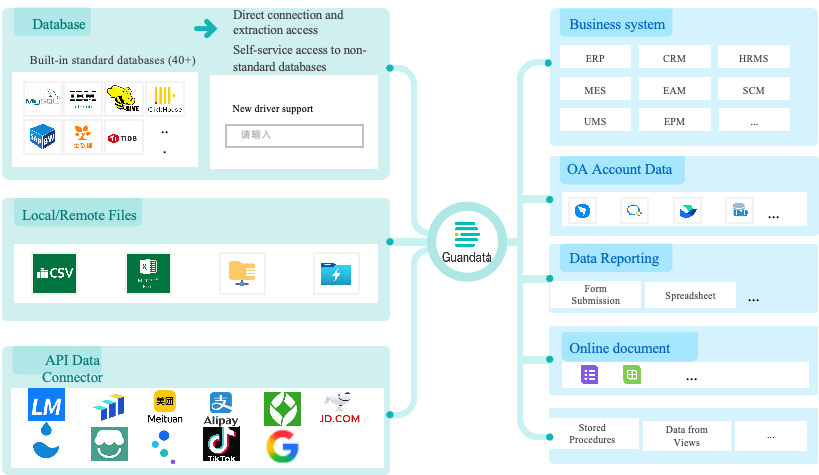
For scattered, heterogeneous enterprise data from multiple sources, Guandata BI provides comprehensive data integration capabilities. By unifying data standards and building a data pool with a full view of enterprise data, it helps eliminate data silos.
Guandata currently supports integrating databases, business applications, files, and other data sources through JDBC, API connections, and remote file services, providing a unified solution for multi-source data integration.
Getting Started
Concepts:
A connector is a tool used to connect different data sources and data processing platforms, ensuring that datasets can be accessed and used correctly. Connectors support a wide range of data source types.
A dataset is the basic unit used to store and manage data. Through connectors, users can retrieve data from various sources and form a dataset, which can then be used in Guandata BI for calculation, analysis, and processing.
Core Workflow

1. Select a Data Account: Guandata BI provides multiple connector types, including database, file, and application data sources. Users can filter by source type and select a Data Account they are authorized to use.
During system deployment, unnecessary connection methods can be hidden so that only the required connectors are displayed.
2. Select Data Tables: After successfully connecting to a Data Account, users can view the available tables and choose one or more tables to work with. These may be sheets in a file or tables in a database, depending on the data source type. In some cases, this step may not appear.
3. Configure Data Connection and Refresh Settings: Users configure details such as connection mode (direct connection or extraction), schedule status, and refresh frequency. Different database types and connection modes affect the available options, and these settings help ensure accurate and efficient data updates.
4. Confirm Table Information: Finally, users confirm field information for the selected table, and can review or edit field names, data types, and other attributes to ensure the imported data is parsed and displayed as expected.
Learning Path
Category | Data Source Type | Description |
Files | Import data from Excel, CSV, and similar files for downstream analysis and processing. | |
Supports integration with Feishu Sheets, allowing users to seamlessly import and synchronize spreadsheet data into online document datasets. | ||
Supports file data integration from remote file storage servers such as FTP, SFTP, and ADLS Gen2. | ||
Databases | Supports connectivity to 40+ databases including MySQL, PostgreSQL, Greenplum, SQL Server, and Oracle, and also supports self-service integration with cloud vendor and localized external databases. | |
Supports integration with stored procedures from Oracle, MySQL, SQL Server, and similar systems through parameterized creation, and also supports parameterized dynamic queries for stored procedure datasets in the UI. | ||
Applications | Imports API data through Web Service integration and supports flexible configuration of parsing rules and field selection for returned API data. | |
Supports synchronizing account data from common OA systems, enabling seamless account integration between enterprise OA systems and the Guandata analytics platform. Currently supports WeCom, DingTalk, LDAP, Feishu, and more. | ||
Guandata BI supports using a card as a data source to create a dataset, allowing card analysis results to be used for further processing and analysis. | ||
Guandata BI supports ingesting data directly from the Universe database. | ||
A dynamic dataset based on SparkSQL with parameterized execution. Users can dynamically join and calculate one or more non-direct datasets, excluding real-time datasets, and rebuild them into a new dataset. | ||
Provides multi-terminal form entry for data collection. Users can submit data directly in Guandata BI, including template maintenance, data collection, and summarization. The collected data can be quickly integrated into the Guandata BI analytics platform for further visualization and analysis, creating a closed loop from collection to ETL to presentation. |