Spark Date Functions and Applications
Time or Date Extraction Functions
The source field is a date or datetime/timestamp.
Return Non-Date Values
| Purpose | Function | Example | Result |
| Extract the year | year() | year('2009-07-30') | 2009 |
| Extract the quarter number | quarter() | quarter('2021-08-18') | 3 |
| Extract the month | month() | month('2009-07-30') | 7 |
| Extract the day of month (1-31) | dayofmonth() | dayofmonth('2009-07-30'); dayofmonth('2020-07-30 13:39:37') | 30 |
| Extract the day of year (1-365) | dayofyear() | dayofyear('2022-02-01') | 32 |
| Extract the weekday | dayofweek(): Sunday is 1; weekday(): Monday is 0 | dayofweek('2021-08-18')-1; weekday('2021-08-18')+1 | 3 |
| Extract the hour | hour() | hour('2018-12-11 11:12:13') | 11 |
| Extract the minute | minute() | minute('2018-12-11 11:12:13') | 12 |
| Extract the second | second() | second('2018-12-11 11:12:13') | 13 |
| Extract the week number | weekofyear() | weekofyear('2008-02-20') | 8 |
| Extract hours, minutes, and seconds | date_format(ts,'HH:mm:ss') | date_format('2018-12-11 11:12:13','HH:mm:ss') | 11:12:13 |
Return Date or Time Values
date_trunc(format, [Field])  -- Truncates a date or datetime by the target format and returns timestamp format.
trunc([Field], format)       -- Truncates a date or datetime by the target format and returns date format.
Available format values:
| Formatter | Meaning |
| "YEAR","YYYY","YY" | Year |
| "QUARTER" | Quarter |
| "MONTH","MM","MON" | Month |
| "WEEK" | Week |
| "DAY","DD" | Day |
| "HOUR" | Hour |
| "MINUTE" | Minute |
| "SECOND" | Second |
| "MILLISECOND" | Millisecond |
| "MICROSECOND" | Microsecond |
Notes:
- Case-insensitive.
- Quotation marks must be half-width. Single and double quotation marks are both supported.
- Day (
'day'/'dd') and smaller units, such as hour, minute, and second, cannot be used in trunc().
Purpose | Function | Example | Result |
Get the Monday of the current week | trunc(date,'week') | trunc('2021-07-30', 'week') | 2021-07-26 |
date_trunc('week',ts) | date_trunc('week', '2021-07-30 15:48:08') | 2021-07-26 00:00:00 | |
Get the first day of the current month | trunc(date,'MM') | trunc('2021-07-30', 'MM') | 2021-07-01 |
date_trunc('MM',ts) | date_trunc('MM', '2021-07-30 15:48:08') | 2021-07-01 00:00:00 | |
Get the last day of the current month | last_day(date) | last_day('2021-07-30 15:48:08') | 2021-07-31 |
Get the first day of the current quarter | trunc(date,'quarter') | trunc('2021-07-30', 'quarter') | 2021-07-01 |
date_trunc('quarter', ts) | date_trunc('quarter', '2021-07-30 15:48:08') | 2021-07-01 00:00:00 | |
Get the first day of the current year | trunc(date,'year') | trunc('2021-07-30','year') | 2021-01-01 |
date_trunc('yyyy', ts) | date_trunc('yyyy', '2021-07-30 15:48:08') | 2021-01-01 00:00:00 | |
Truncate a datetime to the day; later parts are reset to zero | date_trunc('day', ts) | date_trunc('day', '2021-07-30 15:48:08') | 2021-07-30 00:00:00 |
Truncate a datetime to the hour; later parts are reset to zero | date_trunc('hour', ts) | date_trunc('hour', '2021-07-30 15:48:08') | 2021-07-30 15:00:00 |
Truncate a datetime to the minute; later parts are reset to zero | date_trunc('minute', ts) | date_trunc('minute', '2021-07-30 15:48:08') | 2021-07-30 15:48:00 |
Date or Datetime Generation Functions
Purpose | Function | Result |
Generate the current time | now() | 2021-08-21 14:43:09 |
current_timestamp() | ||
Generate today's date | current_date() | 2021-08-21 |
Generate the current timestamp | unix_timestamp() | 1629528189 |
Date and Time Calculation
Purpose | Function | Example | Result |
Add or subtract date and time values | [Field] +/- INTERVAL 1 YEAR/MONTH/WEEK/DAY/HOUR/MINUTE (the middle numeric value cannot reference another field) | '2021-07-30 15:48:08' - interval 1 year | 2020-07-30 15:48:08 |
'2021-07-30 15:48:08' + interval 2 hour | 2021-07-30 17:48:08 | ||
Calculate a future date (time part is not retained) | date_add([Field], numeric value) | date_add('2021-07-30 17:48:08',3) | 2021-08-02 |
add_months([Field], numeric value) numeric value is positive | add_months('2021-07-30',1) | 2021-08-30 | |
Calculate a past date (time part is not retained) | date_sub([Field], numeric value) | date_sub('2021-07-30 17:48:08',3) | 2021-07-27 |
add_months([Field], numeric value)numeric value is negative | add_months('2021-07-30',-1) | 2021-06-30 | |
Calculate date difference | datediff(endDate, startDate) result is an integer | datediff('2021-07-30', '2021-07-31') | -1 |
Calculate month difference | months_between(endTime, startTime) result is a floating-point number | months_between('2021-07-07 14:14:01', '2021-04-22 15:57:59') | 2.5138 |
Calculate minute difference | *Custom function: MINUTEDIFF() | MINUTEDIFF('2021-07-02 14:28:53', '2021-07-02 12:00:16') | 148 |
Calculate second difference | *Custom function: SECONDDIFF() | SECONDDIFF('2021-07-02 14:28:53', '2021-07-02 12:00:16') | 8917 |
Case 1: Duration Calculation
Requirement: In a dataset, one field is the event start time and another field is event duration in minutes. Different events have different durations, and you need to calculate the event end time. In this case, a method such as [Field] + INTERVAL 1 MINUTE cannot calculate the end time.
Logic: unix_timestamp converts a timestamp to a numeric value in seconds, making it easy to perform mathematical calculations on timestamps. Then convert the calculated result back to timestamp format. Conversely, the time difference between two times can also be calculated in the same way.
Implementation:
timestamp(unix_timestamp([Start Time])+[Duration]*60);
to_timestamp(to_unix_timestamp([Start Time])+[Duration]*60)
Final Result:

Date and Datetime Conversion
Purpose | Function | Example | Result |
Convert a string date to the date type | to_date(date_str[, fmt]) When the value is already in standard format, [, fmt] can be omitted. In this case, it is interchangeable with date(date_str) and cast(date_str as date). | to_date('2009-07-30 04:17:52') | 2009-07-30 |
date('2009-07-30 04:17:52') | |||
cast('2009-07-30 04:17:52' as date) | |||
Convert a string datetime to the timestamp type | to_timestamp(ts_str[, fmt]) When the value is already in standard format, [, fmt] can be omitted. In this case, it is interchangeable with timestamp(ts_str) and cast(ts_str as timestamp). | to_timestamp('2016-12-31', 'yyyy-MM-dd') | 2016-12-31 00:00:00 |
timestamp('2016-12-31') | |||
cast('2016-12-31' as timestamp) | |||
Convert numeric, date, and other formats to strings | string(expr) | string('2021-07-30 15:48:08') | 2021-07-30 15:48:08 |
CAST([Field] AS string) | cast('2021-07-30 15:48:08' as string) | ||
Convert datetime format. The result is usually a string. | date_format(timestamp, fmt) | date_format(now(), 'HH:mm:ss') | 22:04:50 |
Convert a datetime or string datetime to a timestamp | to_unix_timestamp([timeExp[, fmt]]) | to_unix_timestamp('2021/7/30 01:30 PM','yyyy/M/dd hh:mm a') | 1627623000 |
unix_timestamp([timeExp[, fmt]]) When the datetime is in standard format, [, fmt] can be omitted. | unix_timestamp('2021-07-30 13:30:00') | 1627623000 | |
Convert a timestamp to datetime | from_unixtime(unix_time[, fmt]) (automatically converted to the current time zone) | from_unixtime(1) | 1970-01-01 08:00:01 |
Time zone offset conversion | from_utc_timestamp(timestamp, timezone) Calculate another time zone's time from UTC | from_utc_timestamp('2021-08-08', 'Asia/Shanghai') | 2021-08-08 08:00:00 |
from_utc_timestamp('2021-08-08 00:00:00', 'GMT+8') | |||
to_utc_timestamp(timestamp, timezone) Calculate UTC from the specified time zone's time | to_utc_timestamp('2021-08-08 00:00:00', 'Asia/Shanghai'); to_utc_timestamp('2021-08-08 00:00:00', 'GMT+8') | 2021-08-07 16:00:00 | |
Common DateFormatter parameters for date and time formatting (case-sensitive):
| Symbol | Meaning | Example |
| yy/yyyy | yy: year without era; yyyy: four-digit year including era. | 21; 2021 |
| M/MM | Month number. M: one-digit month without leading zero; MM: one-digit month with a leading zero. | 1; 01 |
| MMM/MMMM | MMM: abbreviated month name; MMMM: full month name | Jan; January |
| d/dd | Day of the month. d: one-digit day without leading zero; dd: one-digit day with a leading zero. | 01~31 |
| D/DD | Day of the year. D: one-digit day without leading zero; DD: one-digit day with a leading zero. | 01~365 |
| h/hh | 12-hour clock hour. h: one-digit hour without leading zero; hh: one-digit hour with leading zero. | 1~12 |
| H/HH | 24-hour clock hour. H: one-digit hour without leading zero; HH: one-digit hour with leading zero. | 0~23 |
| m/mm | Minute. m: one-digit minute without leading zero; mm: one-digit minute with a leading zero. | 0~59 |
| s/ss | Second. s: one-digit second without leading zero; ss: one-digit second with leading zero. | 0~60 |
| S | Fractional seconds, used for finer-grained statistics and display of seconds. | 978 |
| E/EEEE | 1 to 3 E characters: abbreviated weekday name; 4 E characters: full weekday name. | Tue; Tuesday |
| a | AM-PM | AM; PM |
| z/zzzz | Current time zone name. z: time zone abbreviation; zzzz: full time zone name. | CST; China Standard Time |
| Z | Current time zone offset | +0800 |
| X | Current time zone offset. X: +08; XX: +0800; XXX: +08:00 | +08:00 |
| F | The nth natural week in the current month. Starting from the 1st, every 7 days counts as a natural week. | date_format('2021-08-22','EEEE') returns Sunday; date_format('2021-08-22','F') returns 4, meaning 2021-08-22 is the 4th Sunday of August 2021. |
For more parameters and usage, see the official documentation: https://spark.apache.org/docs/latest/sql-ref-datetime-pattern.html
Case 2: Time Zone Conversion
Requirement: The original time is in UTC+8 and needs to be converted to UTC+9, with an offset of one time zone.
from_utc_timestamp([UTC+8 Time],'UTC+1'); from_utc_timestamp([UTC+8 Time],'GMT+1')
Logic: Temporarily treat the current UTC+8 time as UTC, and calculate the time offset by one time zone.
Final Result: Before conversion: 2021-08-08 15:16:00. After conversion: 2021-08-08 16:16:00.
Case 3: Convert Text Dates to Standard Dates
| Text Date | Standard Format | Function |
| 07/30/2021 | 2021-07-30 | to_date([Text Date],'MM/dd/yyyy') |
| 2021/7/30 13:30:00 | 2021-07-30 13:30:00 | to_timestamp([Text Date],'yyyy/M/dd HH:mm:ss') |
| 2021/7/30 01:30 PM | 2021-07-30 13:30:00 | to_timestamp([Text Date],'yyyy/M/dd hh:mm a') |
| 2021 年 7 月 30 日 | 2021-07-30 | to_date([Text Date],'yyyy 年 M 月 dd 日 ') |
| 2021-07-30T16:00:00.000Z | 2021-07-31 08:00:00 | from_utc_timestamp([Text Date],'GMT+8') |
| 2021-07-30T17:25:53+00:00 | 2021-07-31 09:25:53 | from_utc_timestamp([Text Date],'GMT+8') |
| July 30, 2021 | 2021-07-30 | to_date([Text Date],'MMMM dd, yyyy') |
| Aug 8, 2021 | 2021-08-08 | to_date([Text Date],'MMM d, yyyy') |
| 20210808121600 | 2021-08-08 12:16:00 | to_timestamp([Text Date],'yyyyMMddHHmmss') |
Case 4: Convert Standard Dates to Text Dates
Date | Target Format (Text) | Function |
2021-08-08 15:16:00 | 2021-08 | substr(string([Date]),1,7) |
202108 (numeric) | YEAR([Date])*100+MONTH([Date]) | |
08-08 | substr(string([Date]),6,5) | |
15:16 | date_format([Date], 'HH:mm') | |
03:16 PM | date_format([Date], 'hh:mm a') | |
Aug 8, 2021 | date_format([Date],'MMM d, yyyy') | |
Sunday | date_format([Date],'EEEE') | |
2021年8月8日 | date_format([Date],'yyyy年M月d日') | |
2021-08-08 15:16:00 (+08:00) | date_format([Date],'yyyy-MM-dd HH:mm:ss (XXX)') |
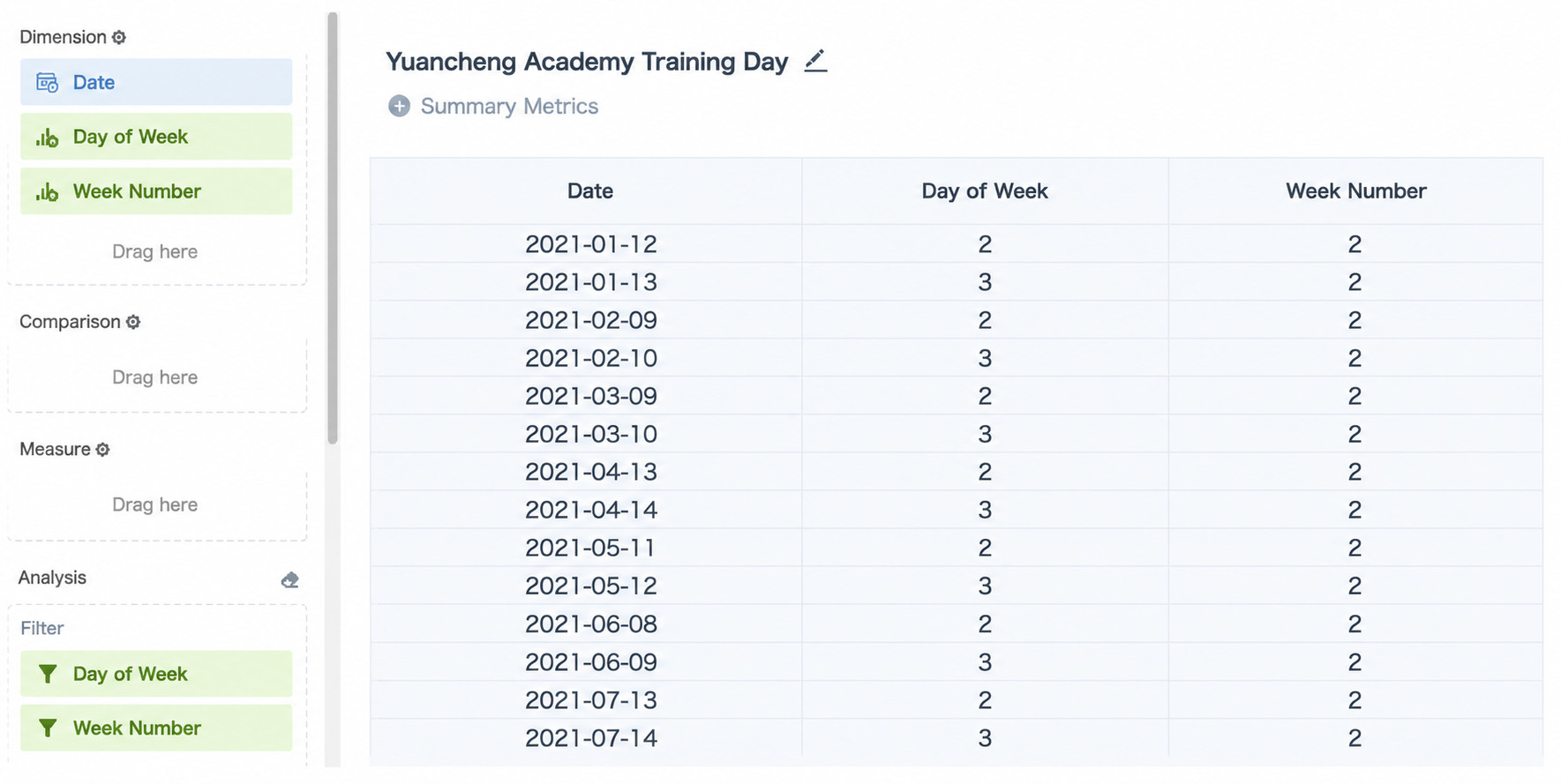
Case 5: Get the Dates of the Second Tuesday and Wednesday of Each Month
Requirement: From a date table, find the dates of the second Tuesday and Wednesday of each month (monthly Guandata Academy product training days).
Logic:
- Create a calculated field "Weekday" to get which day of the week each date is:
dayofweek([Date]) -1. - Create a calculated field "Week Number" to get which natural week of the month the date falls in:
date_format([Date],'F'). - Filter "Weekday" to the range greater than or equal to 2 and less than or equal to 3, or directly select 2 and 3.
- Filter "Week Number" to 2 to get all dates of the second Tuesday and Wednesday for every month of the year.
Final Result: