Mobile Mini App FAQ
Why can't I see a page I have permission to access on mobile?
Possible causes: 1) The page has not been published to mobile. 2) The user properties do not include a DingTalk ID or WeCom ID, so password-free login for the mini app integrated with DingTalk or WeCom fails, and the mini app page cannot be displayed.
If a mobile mini app is embedded into DingTalk or WeCom, does it conflict with the original configuration?
Answer: One micro app can correspond to only one redirect link. You can use a page link, mini app link, or mobile data portal link. To view multiple effects, create multiple micro apps and configure different redirect links.
If each mobile mini app has its own micro app, there will be too many. Can they be summarized into one micro app?
Answer: Use the mobile data portal. It supports categorized and centralized display of mobile mini apps. For instructions, see Mobile Portal Creation and Management.
Does mobile support only the selectable phone models?
Answer: No. Mobile basically supports all phone models. The models selectable on the platform only provide screen aspect ratio references. The actual display adapts to the screen. Selecting a non-matching phone model can still produce a good display effect.
How many levels of navigation does a mobile mini app support?
Answer: It currently supports two levels. More levels can be implemented with tab components inside the page, though adding too many is not recommended.
How do I locate a specified page directly when opening a mobile mini app?
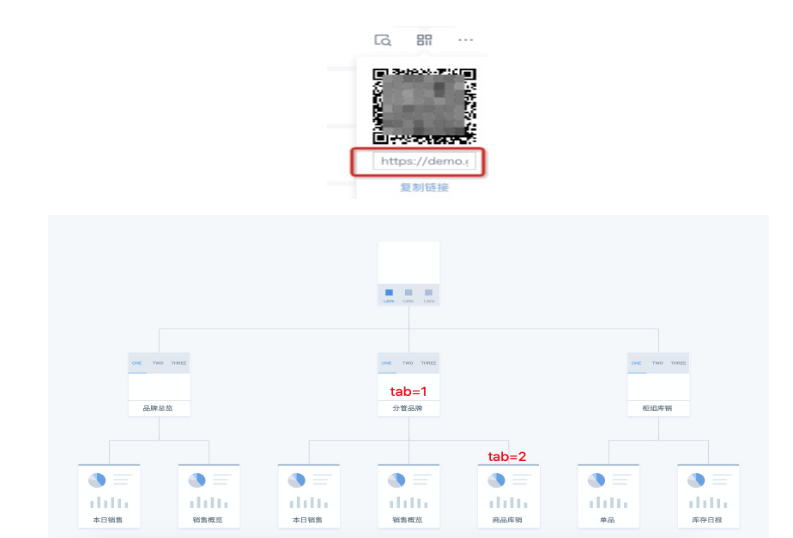
Answer: The mini app URL format is: {$domain}/m/app/{$appid}. Add the parameter ?tab1=n\&tab2=m to locate the n+1 item in the first-level navigation and the m+1 item in the second-level navigation. The n and m indexes start from 0. Example: https://demo.guandata.com/m/app/vcf3d8d2xxxxxxxae4ac29?tab1=1&tab2=2
Example:
Can a mobile mini app be subscribed to?
Answer: Not directly, but you can use page subscription. When a page subscription uses a non-email notification method, such as DingTalk or WeCom, the notification redirect link can reference the mobile mini app for that page.
If multiple pages in one mini app have different page permissions, can users see pages they do not have permission to access?
Answer: No. When users access a mini app, they can see only pages they have permission to access. For example, if a mini app contains 5 pages and User A has access to 3 of them, the mini app displays only those 3 pages to User A.
After tapping the Back button in mobile BI, why does it sometimes return to the directory page and sometimes exit BI directly?
Answer: If you access a BI mobile page from mobile, Back returns to the personal directory navigation page by default. If you access a mobile mini app, Back exits BI. If you access a mobile portal, tapping Back from a single mini app in the portal returns to the portal homepage, while tapping Back from the portal homepage exits BI.