Spark Window Functions and Applications
Window Functions
Definition
A window function, also called an analytics function or OLAP function (Online Analytical Processing), can perform real-time analytical processing on database data.
Features
- It supports both grouping (
partition by) and sorting (order by). - It does not reduce the number of rows in the original table.
The partition by and order by clauses in a window function sort the grouped results, similar to group by and order by in ordinary SQL queries. The difference is that group by changes the number of rows after grouped aggregation, while partition by does not reduce the number of rows in the original table. Window functions operate on the results after where or group by clauses are processed. Therefore, window functions should generally be written only in the select clause. In Guandata BI, they can be used in newly created calculated fields.
Applicable Scenarios
Scenario 1: Built-in aggregate calculations in Guandata BI, or newly created aggregate measures, are grouped and aggregated based on the fields in the dimension area. If you need to aggregate without grouping by fields in the dimension area, use window functions.
Scenario 2: Data produced by direct aggregate calculations in BI cannot be filtered or used for secondary calculations. If you need to filter or perform secondary calculations on aggregate results, use window functions.
Basic Syntax
over (partition by
                order by )
-----------------------------------------------------------------------------
over (partition by xxx) groups by xxx. If there is no grouping, write over (partition by 1/null).
over (partition by xxx order by xx) groups by xxx and sorts by xx.
The <window function> position can contain either of the following two types of functions:
Dedicated window functions: Dedicated window functions such as rank, dense_rank, and row_number.
Aggregate functions: Such as sum, avg, count, max, min, and collect_set.
partition by: the grouping clause, indicating the calculation scope of the window function. Different groups are independent of each other.
order by: the sorting clause, indicating the sorting method within each group after grouping. The default order is ascending (asc).
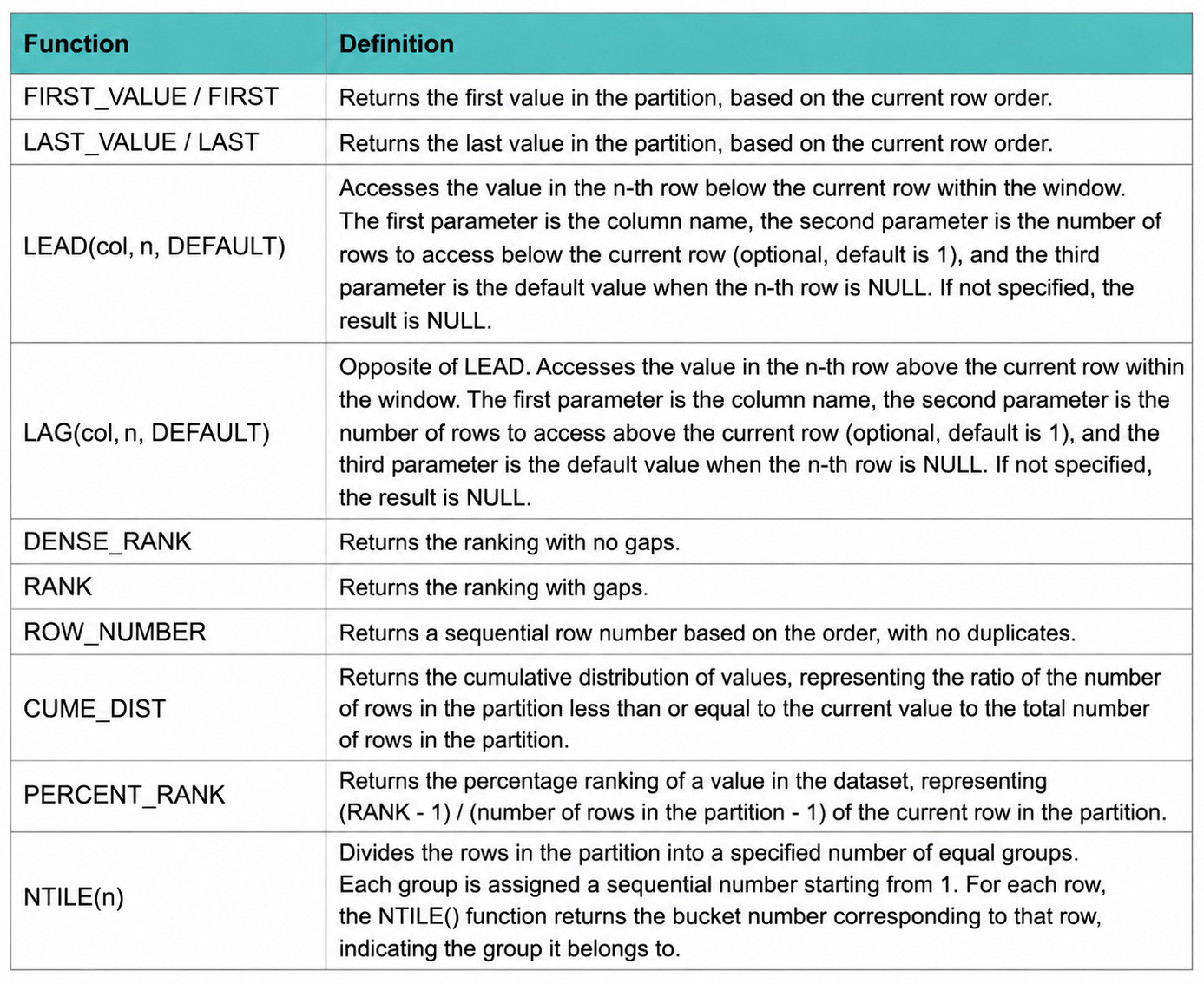
Common Dedicated Window Functions
The following describes Spark SQL window functions. Other database types may use different syntax.
Case Sharing
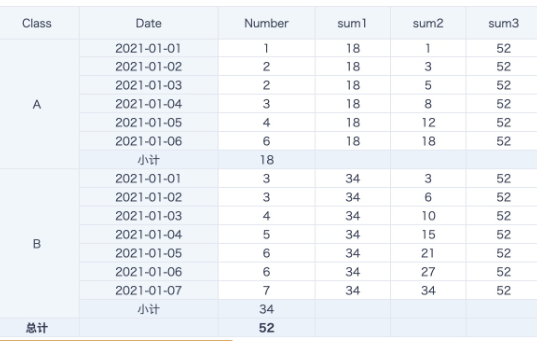
Case 1: Grouped Sum and Cumulative Sum
sum1: sum([Number])over(partition by [Class])  Sums by Class, equivalent to a subtotal.
sum2: sum([Number])over(partition by [Class] order by [Date])  Calculates cumulative sum by Class.
sum3: sum([Number])over(partition by 1)/ sum([Number])over(partition by null)  Calculates total without grouping, equivalent to a grand total.
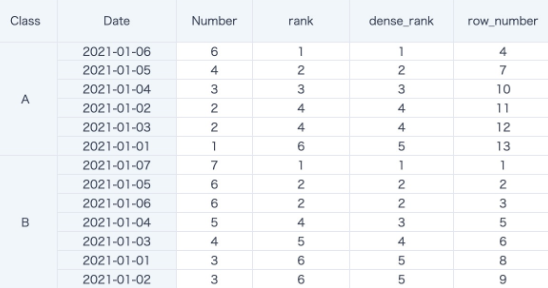
Case 2: Grouped Ranking
dense_rank() over(partition by [Class] order by [Number] desc)
row_number() over(partition by 1 order by [Number] desc)
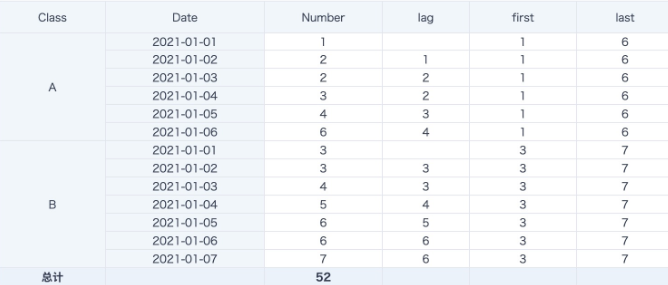
Case 3: Row Offset
lag([Number])over(partition by [Class] order by [Date] )
    -- After sorting by date within each Class group, get the previous row. If no value is found, the default is null. In the following figure, the data is equivalent to period-over-period comparison.
first([Number])over(partition by [Class] order by [Date])
    -- After sorting by date within each Class group, get the first row. order by [Date] is equivalent to getting the beginning-period data.
last([Number])over(partition by [Class])
    -- After sorting by date within each Class group, get the last row.
last([Number])over(partition by [Class] order by [Date])
    -- After sorting by date within each Class group, get the current row.
Advanced Usage
over (partition by
                order by
                rows/range window clause)
rows/range: A window clause. After grouping with partition by, it defines a subgroup within the group, also called a window.
There are two types of windows: rows and range. They are mainly used to limit the number of rows and the data range. A window clause must be used together with an order by clause. If an order by clause is specified but no window clause is specified, the default is range between unbounded preceding and current row, from the start of the current group to the current row. Row comparison analysis functions lead and lag do not have window clauses.
Common Syntax for Window Clauses
PRECEDING: before
FOLLOWING: after
CURRENT ROW: current row
UNBOUNDED: unbounded (start or end)
UNBOUNDED PRECEDING: from the preceding start
UNBOUNDED FOLLOWING: to the following end
Difference between rows and range:
rowsis a physical window. After sorting by theorder byclause, it takes the previous N rows and following N rows for calculation. It is unrelated to the current row's value and only related to row numbers after sorting.
sum([Number]) over (partition by 1 order by [Date] rows between 2 preceding and current row)
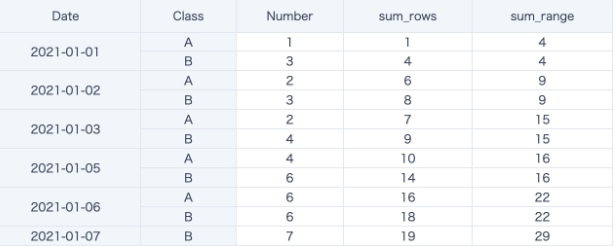
In the following example, sum_rows sums the previous 2 rows and the current row after sorting by date. Although many dates have more than one row of data and two Classes exist, by default the window sorts Class in ascending order and then selects the previous 2 rows and the current row for cumulative sum calculation.
rangeis a logical window. It specifies a value range for the current row's corresponding value and includes all rows in the subgroup, or window, that have the sameorder byvalue as the current row. If more rows have the sameorder byvalue, more rows participate in the calculation whenrangeis used.
sum([Number]) over (partition by 1 order by [Date] range between 2 preceding and current row)
In the following example, sum_range sums data from the previous 2 days and the current date, meaning 3 consecutive days, after sorting by date. Data for 2021-01-04 is filtered out in the card.
When Date = 2021-01-01, there is no data for the previous two dates, so only the 2 rows for the current day are read: sum = 1 + 3 = 4.
When Date = 2021-01-03, data for 2021-01-01, 2021-01-02, and 2021-01-03 is taken, for 6 rows across 3 consecutive days: sum = (1+3) + (2+3) + (2+4) = 15.
When Date = 2021-01-05, there is no data for 2021-01-04, so only 4 rows from 2021-01-03 and 2021-01-05 are taken: sum = (2+4) + (4+6) = 15. The same logic continues, and the result is shown below.
Case: Calculate Moving Average and Moving Cumulative Values
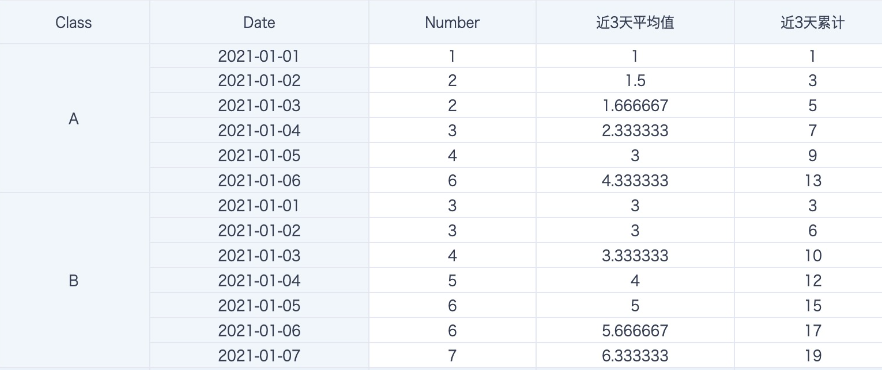
avg([Number]) over (partition by [Class] order by [Date] rows between 2 preceding and current row)  -- Average of the last 3 days, including the current day
sum([Number]) over (partition by [Class] order by [Date] rows between 2 preceding and current row)  -- Cumulative value of the last 3 days, including the current day
Notes
- Filter conditions take effect before window functions. Filtered-out data does not participate in calculation, so even
over (partition by 1/null)does not calculate filtered-out data. - If a field in the
partition bygrouping clause is used in a page filter, that filter must always have selected options and be linked to the card. Selecting all or leaving it empty may cause incorrect calculation results, because the configured grouping cannot be automatically canceled. - When the data volume is large, approximately more than 1 million rows, window function calculation consumes more resources. Use it carefully as needed.