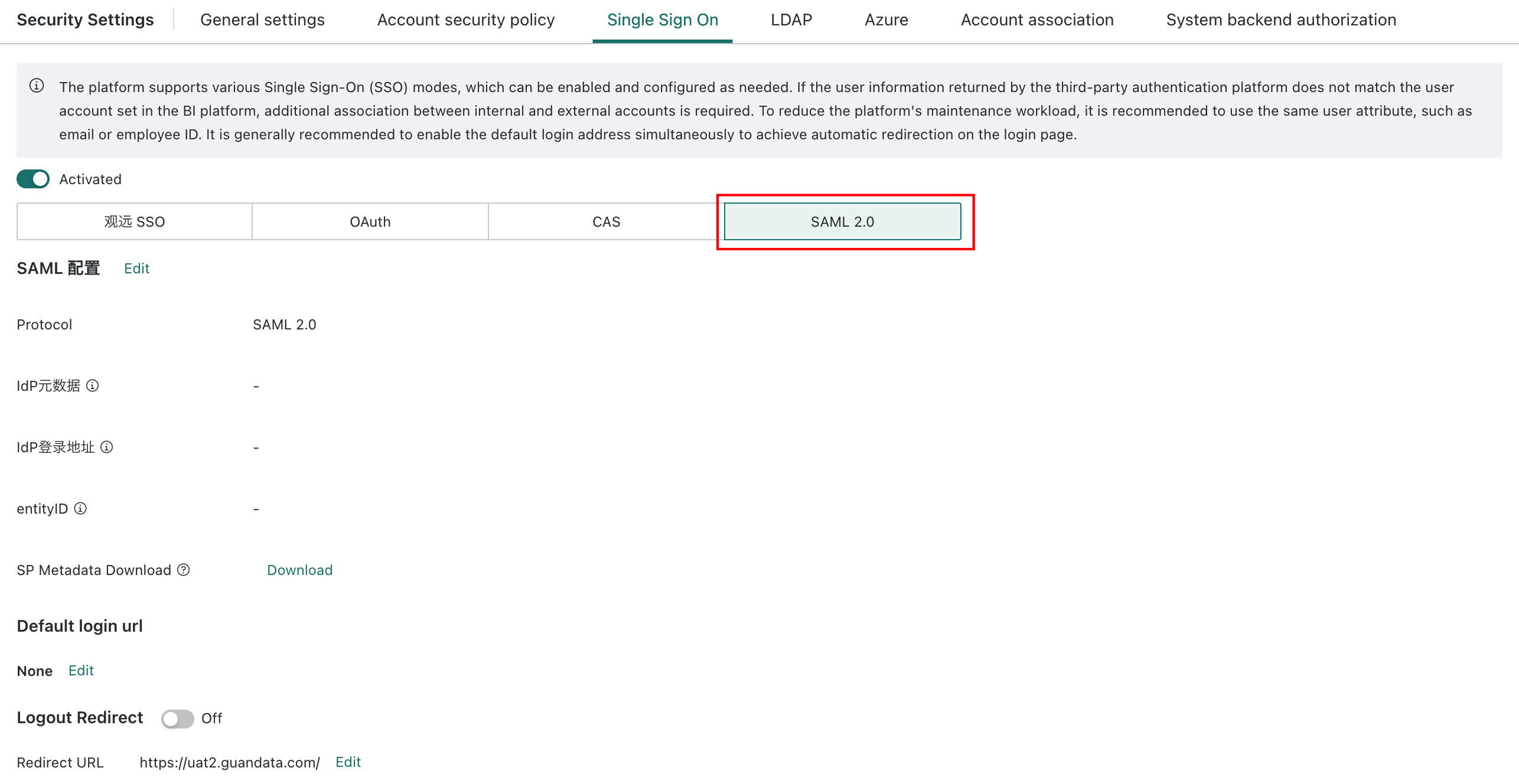
Single Sign-On - SAML 2.0
SAML 2.0 Overview
SAML is an XML-based open standard data format. SAML 2.0 enables cross-domain single sign-on, SSO, over the web, reducing the management overhead of issuing multiple authentication tokens to one user. Its standard protocol is widely used in password-free login integration scenarios.
Standard SAML 2.0 Configuration Steps
1. Feature path: Admin Center > System Settings > Login Settings > Single Sign-On, then choose SAML 2.0 as the single sign-on method.
2. Configuration items:
| Configuration Item | Description |
|---|---|
| Authentication Protocol | Defaults to the SAML 2.0 protocol. |
| IdP Metadata | The metadata document provided by the external identity provider, IdP. It must include the IdP login address and X.509 public key. |
| IdP Login Address | Parsed from the metadata. |
| Download SP Metadata | Download service provider, SP, metadata for upload into the IdP system to manage the SP. |
| Default Login Address | The address users are redirected to for authentication when not logged in. |
| Logout Redirection | Logout redirection address. |