OAuth 2.0 Authorization Code Mode API Documentation
Integration Notes
Guandata BI supports OAuth 2.0 integration using the authorization code mode. This document is intended for implementation or for evaluating whether the interfaces of the authentication and authorization center meet the requirements. The interface design complies with the OAuth 2.0 standard protocol.
Process Diagram
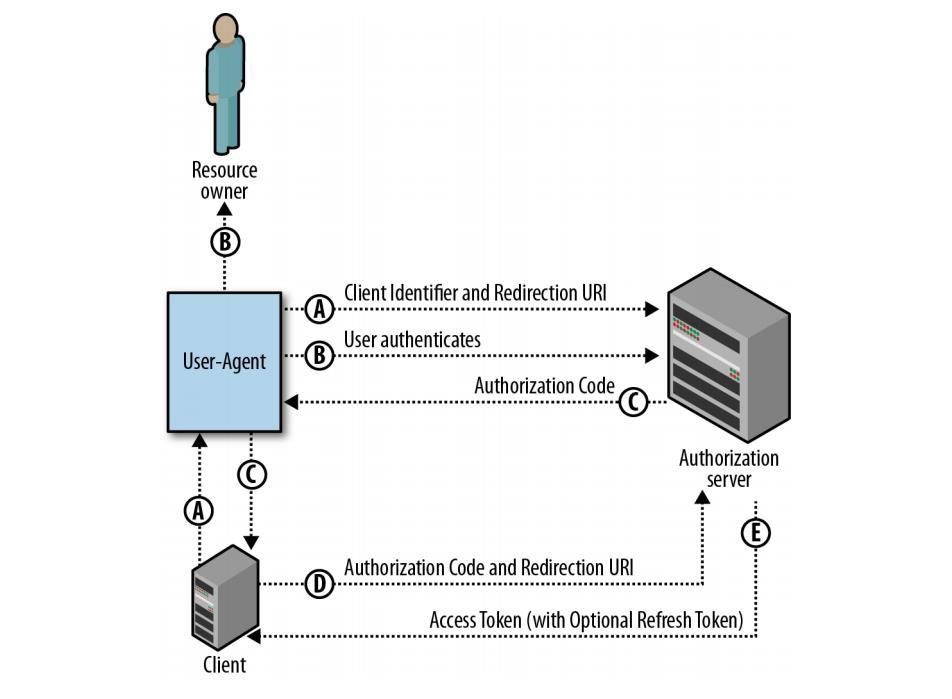
Obtain Authorization Code
Request
Request Method: GET
Endpoint URL: configurable in BI
Content-Type: application/x-www-form-urlencoded
| Parameter | Required | Description |
|---|---|---|
| response_type | Yes | Authorization type, which must be code. |
| client_id | Yes | The client ID of your application. |
| redirect_uri | No | The URI to which the authorization server redirects the user. It is included only if the Callback URL is configured in BI. Whether this parameter is required depends on the authorization system. It is usually configured as BI domain + /standard-oauth2/authenticate. |
| state | Yes | A random string used to prevent cross-site request forgery, CSRF. |
GET /{authorize_url}?response_type=code&client_id={client_id}&redirect_uri={redirect_uri}&state={state}
- If other fixed parameters are required, they can be configured in the URL.
Response
If the user authorizes successfully, the authorization server redirects to redirect_uri and appends the authorization code, code, and the original state as URL query parameters.
{redirect_uri}?code={authorization_code}&state={state}
- Pay special attention to the fact that
statemust be returned unchanged. Many OAuth 2.0 systems either do not provide this parameter or do not return the original value.
Obtain Access Token Through Authorization Code
Request Method: POST
Endpoint URL: configurable in BI
Content-Type: application/x-www-form-urlencoded
Request
| Parameter | Required | Description |
|---|---|---|
| grant_type | Yes | Authorization type, which must be authorization_code. |
| code | Yes | The obtained authorization code. |
| redirect_uri | No | The URI to which the authorization server redirects the user. It must be the same as the URI used when requesting the authorization code. It is included only if the Callback URL is configured in BI. Whether this parameter is required depends on the authorization system. |
| client_id | Yes | The client ID of the application. |
| client_secret | Yes | The client secret of the application. |
grant_type=authorization_code&code={authorization_code}&redirect_uri={redirect_uri}&client_id={client_id}&client_secret={client_secret}
- If other fixed parameters are required, contact Guandata support staff for configuration.
Response
Content-Type: application/json;charset=UTF-8
| Parameter | Required | Description |
|---|---|---|
| access_token | Yes | The access token used to access protected resources. |
| token_type | No | The token type. |
| expires_in | No | The validity duration of the access token in seconds. |
| refresh_token | No | The refresh token used to obtain a new access token after the current one expires. |
{
  "access_token": "{access_token}",
  "token_type": "Bearer",
  "expires_in": 3600,
  "refresh_token": "{refresh_token}"
}
Obtain User Information
- This interface is not part of the standard protocol.
- BI supports flexible configuration of request method, URL, headers, request body, and so on.
- BI supports parsing the unique user identifier field from the response data.
Single Logout
- Logout redirection can be configured.
FAQ
Common Interface Mismatch Cases
- The request method, Content-Type, or parameter names of the two interfaces, obtaining the authorization code and obtaining the access token, do not match:
- Whether the callback interface for the authorization code includes the
stateparameter - Whether
access_tokenin the response of the access token interface is located at the first level of the JSON structure - Whether the request Content-Type for obtaining access token is
application/x-www-form-urlencodedrather thanapplication/json
- Whether the callback interface for the authorization code includes the