Guandata BI SSO Integration
Overview of Guandata SSO Integration
Guandata SSO Integration is a simple SSO integration solution based on RSA asymmetric encryption and decryption. This solution allows third-party system accounts to authenticate users of the Guandata platform and log them in.
The integration process includes:
- Generate an RSA public-private key pair.
- Configure the RSA public key in Guandata BI.
- Use the RSA private key to encrypt the login information and generate
ssoToken. - Carry
ssoTokenin the Guandata link to log in and access the system.
Log In to and Access Guandata Through SSO
Generate and Configure the RSA Key Pair
You can generate an RSA public-private key pair in several ways:
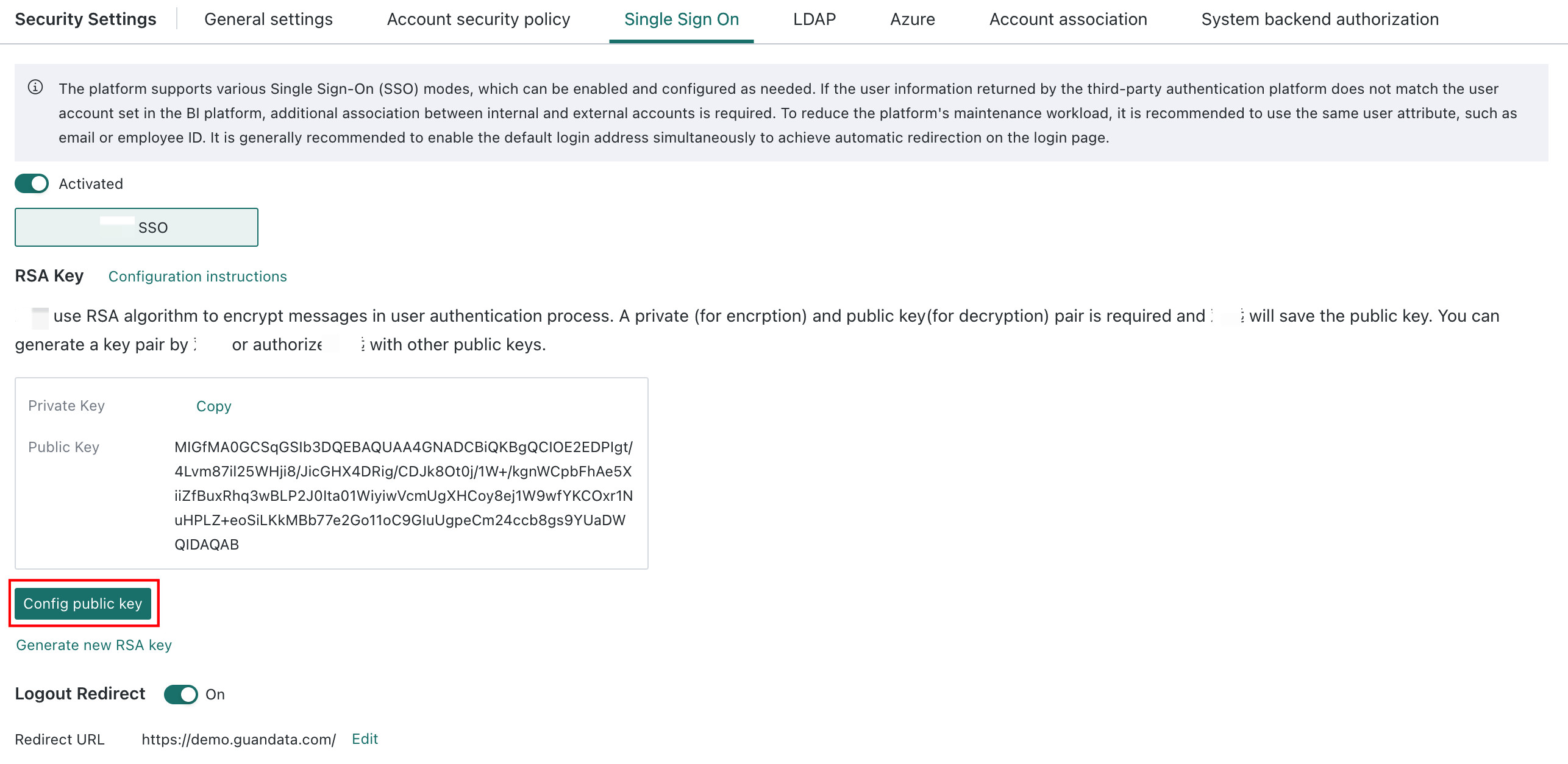
- Generate the RSA key pair on the Admin Center > System Settings > Login Settings > Single Sign-On page in Guandata BI.
- Generate it using the program in Java Example Code.
- Create it manually. The format must be
PKCS#8, and the key length must be1024bits.
Then configure the public key in Guandata BI, as shown below:
Encrypt the Login Information and Generate ssoToken
Parameters to Encrypt
| Name | Type | Meaning | Required | Remarks |
| domainId | String | Domain ID | No | Since version 5.9, this parameter is no longer required. Before version 5.9, the default domainId was guanbi. For how to obtain it, see How to Obtain domainId Information. |
| externalUserId | String | Third-party system user ID | Yes | Must be unique. It is recommended to keep it consistent with the account in Guandata. If they differ, the mapping relationship must be maintained manually. |
| timestamp | Integer | Current timestamp | No | If the timestamp parameter is passed, login must be completed within 5 minutes after that timestamp, otherwise login fails. If omitted, ssoToken remains permanently valid and does not expire. |
| expiredTimeSeconds | Integer | Expiration time in seconds | No | If expiredTimeSeconds is passed, login must be completed within that duration after the timestamp, otherwise login fails. |
Example content before encryption:
{
  "domainId":"abcbi",
  "externalUserId":"userId",
  "timestamp":1502079219
}
Encryption Logic
After encrypting the login information with the RSA private key, you obtain ssoToken. The encryption process is as follows:
- Encrypt the content in JSON format with the RSA private key.
- Encode the encrypted content with Base64.
- Because the encoded string may contain special characters such as
=, convert the encrypted string to hex format.
For the code, see 3. RSA Encryption and Decryption Code Example.
Carry ssoToken to Access the BI Link
Carry provider and the encrypted ssoToken in the BI link to achieve password-free login.
URL:
?provider={provider}&ssoToken={ssoToken}
Method: GET
Parameters:
| Name | Location | Type | Meaning | Remarks |
| provider | Path | String | Provider | A string agreed upon by both parties to identify the customer system. After 2019/12, provider is the customer's domainId in Guandata and the letter case must also match. For how to obtain it, see How to Obtain domainId Information. It is generally guanbi. |
| ssoToken | Path | String | Encrypted login information | The token generated through encryption in step 2.2. |
Response:
The return result is the Guandata home page. If the base URL is a page link, the corresponding page is returned.
Password-Free Login to Form Entry, Optional
If you need password-free login to Form Entry, you must append a fixed route after host_url in the configured link as shown below, and then add other parameters according to third-party integration requirements.
?path_url=survey-engine/
For example:
Replace the domain in the examples below with your organization's actual BI domain.
https://bi.example.com?path_url=survey-engine%2Fm%2Fsurvey%2F4bd86aa5-89d3-4b72-8186-a06170cdddbd
Notes for constructing password-free login links for Form Entry:
-
Add the required parameter
path_url=beforesurvey-engine.Note: the parameter cannot be placed directly after
/; it can only follow?. -
The Form Entry link must be URL-encoded.
Note: you can use tools such as https://www.bejson.com/enc/urlencode for encoding.
Example:
Form link:
https://bi.example.com/survey-engine/survey/1b36b7ff-d470-475e-931f-df1ce53b3ed5
Constructed password-free login link:
https://bi.example.com?path_url=survey-engine%2Fsurvey%2F1b36b7ff-d470-475e-931f-df1ce53b3ed5&……(other parameters)
RSA Encryption and Decryption Code Example
Java Example Code
import javax.crypto.Cipher;
import java.io.ByteArrayOutputStream;
import java.security.*;
import java.security.interfaces.RSAPrivateKey;
import java.security.interfaces.RSAPublicKey;
import java.security.spec.InvalidKeySpecException;
import java.security.spec.PKCS8EncodedKeySpec;
import java.security.spec.X509EncodedKeySpec;
import java.util.ArrayList;
import java.util.HashMap;
import java.util.List;
import java.util.Map;
import org.apache.commons.codec.binary.Base64;

public class Main {

    public static final String CHARSET = "UTF-8";
    public static final String RSA_ALGORITHM = "RSA";
    public static final int KEY_SIZE = 1024;

    public static Map createKeys() {
        // Create a KeyPairGenerator object for the RSA algorithm
        KeyPairGenerator kpg;
        try {
            kpg = KeyPairGenerator.getInstance(RSA_ALGORITHM);
        } catch (NoSuchAlgorithmException e) {
            throw new IllegalArgumentException("No such algorithm-->[" + RSA_ALGORITHM + "]");
        }
        // Initialize the KeyPairGenerator object with the key size
        kpg.initialize(KEY_SIZE);
        // Generate the key pair
        KeyPair keyPair = kpg.generateKeyPair();
        // Get the public key
        Key publicKey = keyPair.getPublic();
        String publicKeyStr = Base64.encodeBase64String(publicKey.getEncoded());
        // Get the private key
        Key privateKey = keyPair.getPrivate();
        String privateKeyStr = Base64.encodeBase64String(privateKey.getEncoded());
        Map keyPairMap = new HashMap<>();
        keyPairMap.put("publicKey", publicKeyStr);
        keyPairMap.put("privateKey", privateKeyStr);
        return keyPairMap;
    }

    public static RSAPublicKey getPublicKey(String publicKey) throws NoSuchAlgorithmException, InvalidKeySpecException {
        // Get the public key object from the X509-encoded key specification
        KeyFactory keyFactory = KeyFactory.getInstance(RSA_ALGORITHM);
        X509EncodedKeySpec x509KeySpec = new X509EncodedKeySpec(Base64.decodeBase64(publicKey));
        return (RSAPublicKey) keyFactory.generatePublic(x509KeySpec);
    }

    public static RSAPrivateKey getPrivateKey(String privateKey) throws NoSuchAlgorithmException, InvalidKeySpecException {
        // Get the private key object from the PKCS#8-encoded key specification
        KeyFactory keyFactory = KeyFactory.getInstance(RSA_ALGORITHM);
        PKCS8EncodedKeySpec pkcs8KeySpec = new PKCS8EncodedKeySpec(Base64.decodeBase64(privateKey));
        return (RSAPrivateKey) keyFactory.generatePrivate(pkcs8KeySpec);
    }

    public static String privateEncrypt(String data, RSAPrivateKey privateKey) {
        try {
            Cipher cipher = Cipher.getInstance(RSA_ALGORITHM);
            cipher.init(Cipher.ENCRYPT_MODE, privateKey);
            return Base64.encodeBase64String(rsaSplitCodec(cipher, Cipher.ENCRYPT_MODE, data.getBytes(CHARSET), privateKey.getModulus().bitLength()));
        } catch (Exception e) {
            throw new RuntimeException("Exception occurred while encrypting string [" + data + "]", e);
        }
    }

    public static String publicDecrypt(String data, RSAPublicKey publicKey) {
        try {
            Cipher cipher = Cipher.getInstance(RSA_ALGORITHM);
            cipher.init(Cipher.DECRYPT_MODE, publicKey);
            return new String(rsaSplitCodec(cipher, Cipher.DECRYPT_MODE, Base64.decodeBase64(data), publicKey.getModulus().bitLength()), CHARSET);
        } catch (Exception e) {
            throw new RuntimeException("Exception occurred while decrypting string [" + data + "]", e);
        }
    }

    private static byte[] rsaSplitCodec(Cipher cipher, int opMode, byte[] data, int keySize) {
        int blockSize = (opMode == Cipher.DECRYPT_MODE) ? keySize / 8 : keySize / 8 - 11;
        int offset = 0;
        List resultList = new ArrayList<>();

        try (ByteArrayOutputStream outputStream = new ByteArrayOutputStream()) {
            while (data.length > offset) {
                int length = Math.min(data.length - offset, blockSize);
                byte[] encryptedBlock = cipher.doFinal(data, offset, length);
                resultList.add(encryptedBlock);
                offset += blockSize;
            }

            for (byte[] block : resultList) {
                outputStream.write(block);
            }

            return outputStream.toByteArray();
        } catch (Exception e) {
            throw new RuntimeException("Exception occurred while processing RSA segmented encryption or decryption", e);
        }
    }
}