Resource Management
Resource Management Overview
Resources include Data Accounts, Datasets, data processing objects such as ETL, View Datasets, high-performance datasets, and Card Datasets, as well as Pages such as Dashboards, big screens, custom lists, and custom reports, and data applications such as mobile lightweight apps and web applications.
Through Resource Management, administrators can better maintain and manage data, permissions, and related assets within the enterprise domain.
Entry to Resource Management Settings
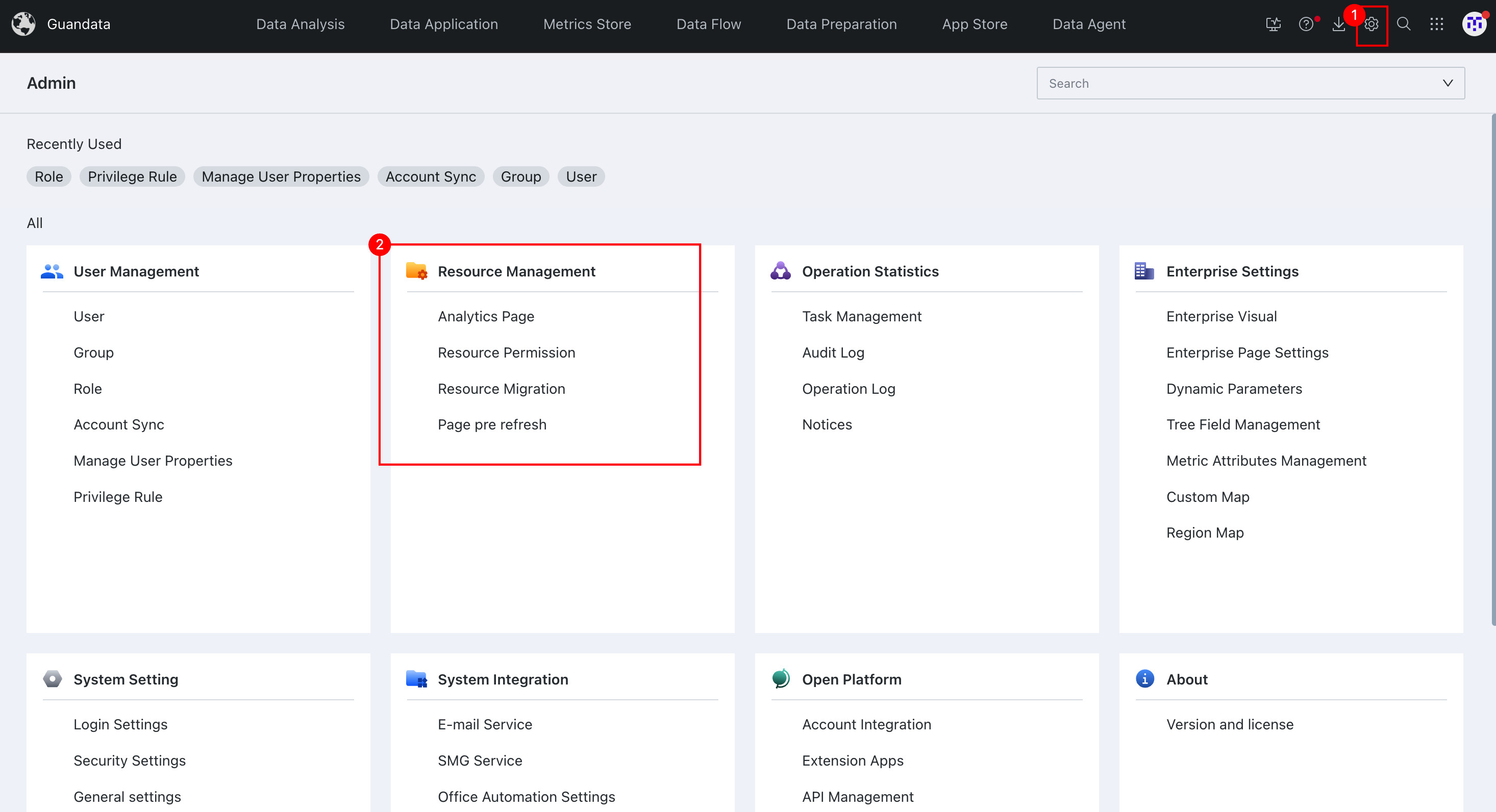
The entry to Resource Management is located in the Admin Center.
- Click Admin Center in the upper-right corner of the page to enter the Admin Center.
- Locate the Resource Management section and select the specific operation module you want to use.
Introduction to Resource Management Modules
| Module Name | Module Overview |
|---|---|
| Analysis Pages | Used to manage permissions for Pages after they have been created and optimized. |
| Resource Permission Management | Controls permissions for Pages, Datasets, and folders by setting Resource Owners and Visitors (users). |
| Resource Migration | Supports online and offline migration of Resources and allows you to view migration records. |
| Page Pre-Refresh | Preloads Dashboards for users so they do not need to wait for data loading when viewing them. |