General settings
Overview
General Settings provides system administrators with global configuration capabilities, covering system rule settings, runtime parameter settings, export settings, driver and connector settings, and administrator contact settings, so the system can maintain optimal performance while meeting enterprise security standards.
System Rule Settings
To meet differentiated enterprise data security requirements, the product provides a variety of switches that administrators can enable or disable as needed.
Pages
Administrators can choose whether to enable specific page-related capabilities.
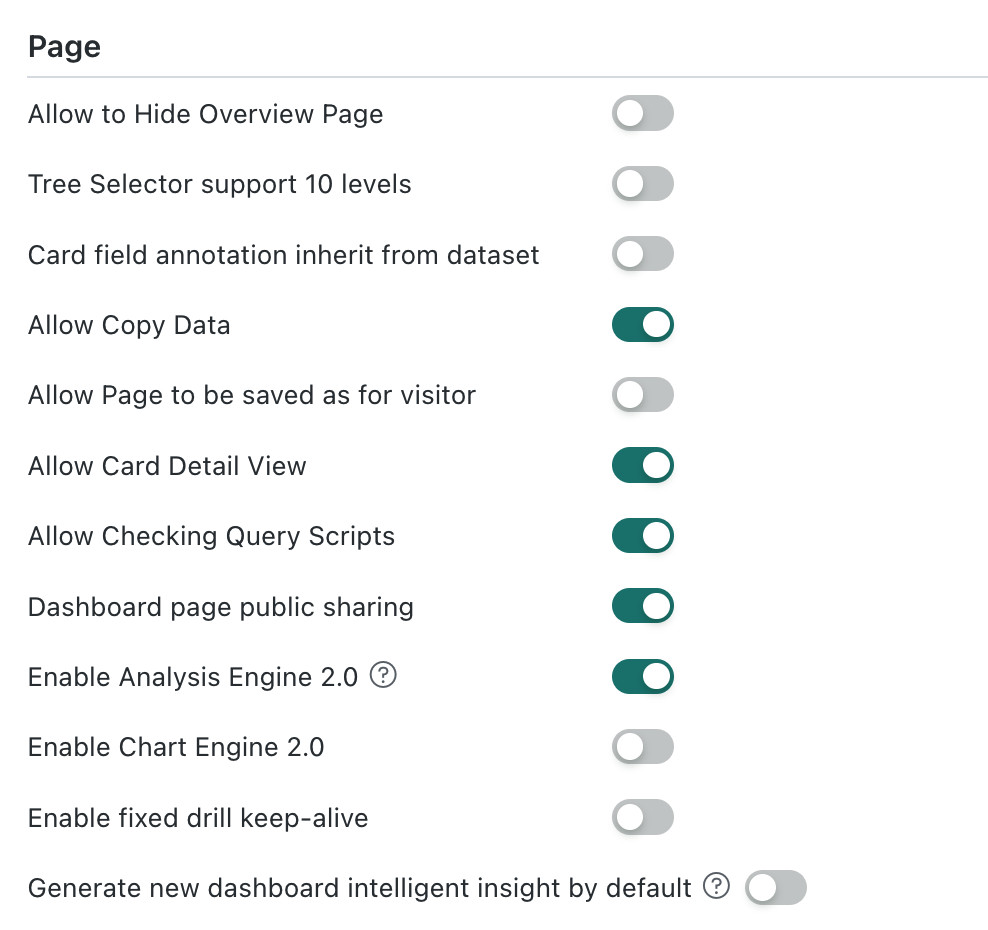
The switches in the Pages section work as follows:
- Hide Overview Page: Hides the Overview page from the system home page.
- Tree Filter Supports 10 Levels: Allows tree filters to contain up to 10 hierarchy levels.
- Card Field Descriptions Inherit from Dataset: Makes field descriptions in cards inherit the descriptions configured in the dataset.
- Copy Data from Dashboard Pages: Allows users to copy card data from dashboard pages.
- Page Visitors Can Save Pages As: Allows page visitors to save a page as a new page.
- Access Card Details Pages: Allows users to access card details pages.
- View Query SQL or Spark Scripts: Allows users to view the SQL or Spark script generated for a card query.
- Public Dashboard Sharing: Allows dashboard pages to be shared through public links.
- Enable Analysis Engine 2.0: Uses Analysis Engine 2.0 for card calculations. The new calculation system improves performance and fixes calculation accuracy issues in specific scenarios.
- Enable Drawing Engine 2.0: Switches the chart rendering solution. Before enabling it, verify the display, interaction, and export results of existing charts. For details, see Drawing Engine 2.0.
- Enable Fixed Drill State Persistence: Restores the upper-level chart to its pre-drill state when users return from a drill-down level.
- Generate a New Dashboard Insight by Default: When enabled, the system regenerates an insight report whenever a user opens Dashboard Insights. When disabled, the last generated report is displayed by default.
Datasets
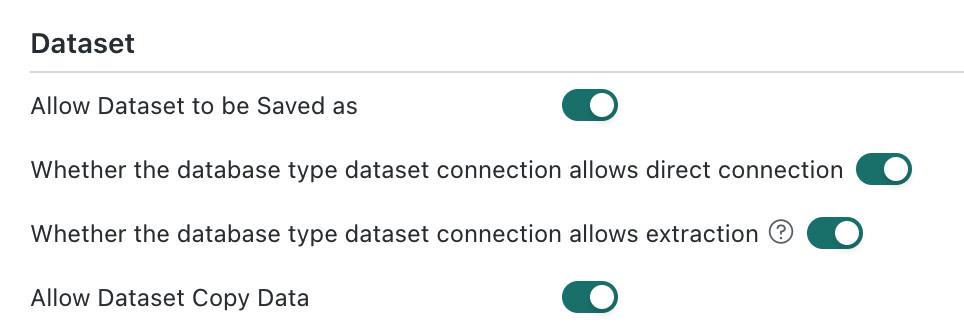
- Whether Save As is allowed for Datasets
- Whether direct connections are allowed for database-type Datasets
- Whether extraction is allowed for database-type Datasets
- Database types that support only extraction, such as MongoDB, SAP BW, DLI, Spark, and Access, are not affected by the Allow Extraction for Database-Type Dataset Connections switch.
- The Allow Direct Connections for Database-Type Dataset Connections switch and the Allow Extraction for Database-Type Dataset Connections switch cannot both be turned off at the same time.
Smart ETL
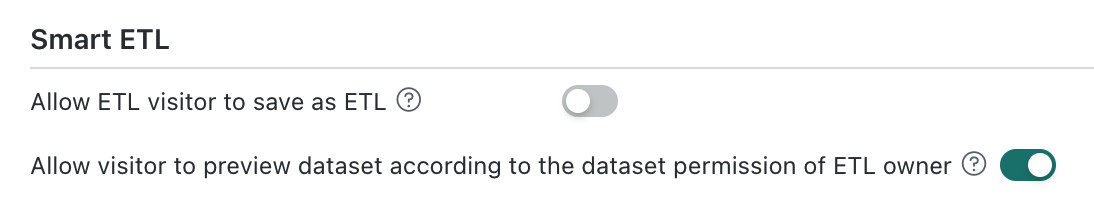
-
Allow ETL viewers to save as: When enabled, ETL viewers can save a copy of an ETL they can view. When disabled, they cannot save a copy.
-
Allow viewers to preview data with the ETL owner's permissions: When enabled, ETL viewers preview the datasets in an ETL using the owner's permissions. When disabled, the ETL owner, viewers, and system administrators preview datasets using their own dataset permissions.
Assume that an ETL references a dataset with row- and column-level permissions enabled. The ETL owner has full access to the dataset, while a viewer has access to only part of the data:
- When enabled:
- ETL owner preview: displays all data, based on the owner's permissions.
- ETL viewer preview: displays all data, based on the owner's permissions.
- Administrator preview: uses the administrator's own dataset permissions.
- When disabled: the ETL owner, viewers, and administrators all preview data using their own dataset permissions.
- When enabled:
Bulk Data Format Settings
To reduce repeated percentage-format settings across Cards and Pages, the platform supports centralized data format configuration in the management backend.
Add a Data Format
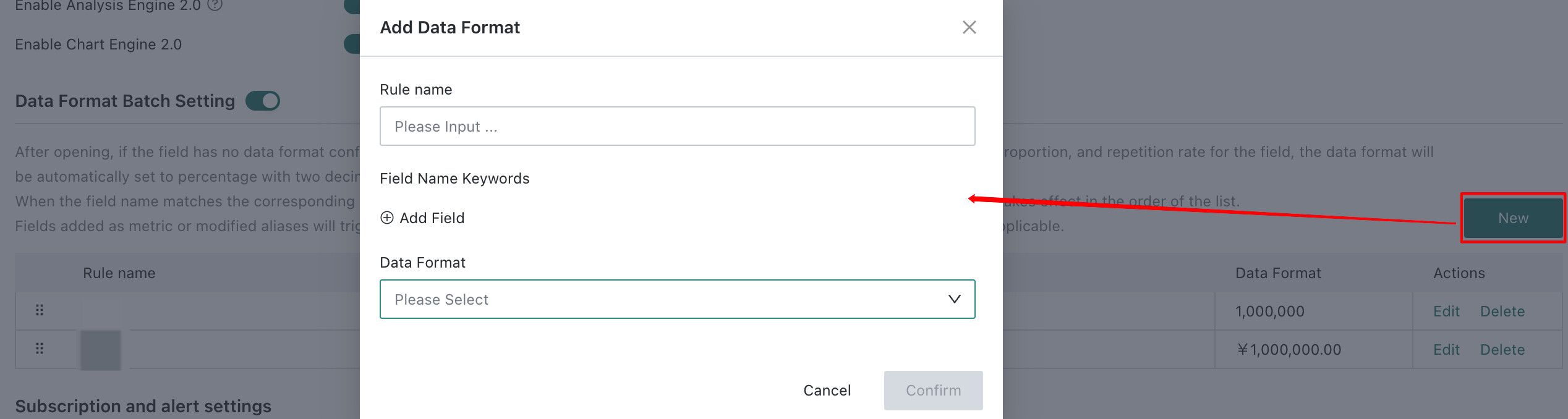
Click Create on the right side of the Bulk Data Format Settings section. Configure the settings as shown below, then click OK. Newly added data formats support editing, drag-and-drop sorting, and deletion.
Up to 10 data formats are supported.
Data Format Matching Rules
- This feature is disabled by default. After it is enabled, if a field in the value area has no data format configured and does not match any configured rule, then after advanced calculations such as period-over-period growth rate, percentage of total, or duplicate rate are applied, the data format will automatically be set to percentage with two decimal places.
- When the field name in the value area matches a configured rule, the data format defined in that rule takes effect. If multiple rules match, the first rule in list order is applied.
- Dragging a field into the value area or modifying its alias triggers automatic data matching rules. Fields that already have a data format configured are excluded.
Subscription and Alert Parameter Settings
-
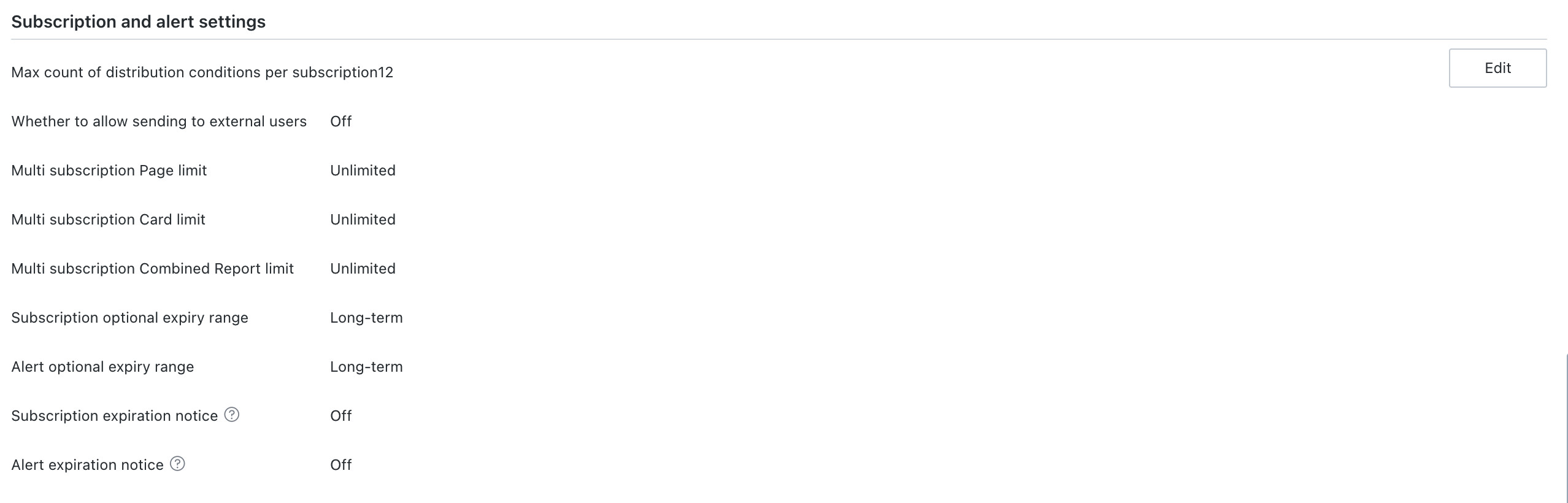
Maximum number of distribution conditions supported by a single subscription: configures the upper limit of conditions for a single subscription. The maximum configured here is 100.
-
Whether sending to external users is allowed: when enabled, subscriptions and alerts can be sent by email to external users. If a suffix is specified, external email suffix validation is enforced. If no suffix is specified, you can select No Restriction.
-
Upper limit for Pages / Cards / composite reports in merged subscriptions: configures how many Pages, Cards, or composite reports can be included in a merged subscription. The default is unlimited.
DescriptionIf an upper limit is configured, once the number of Pages, Cards, or composite reports in a merged subscription reaches that limit, no more can be added. Validation is also performed when saving. If the limit is reached, the system will prompt, for example:
The upper limit of Pages supported by merged subscriptions has been reached, and no more can be added. -
Selectable validity period range for subscriptions and alerts: by default, subscriptions and alerts are permanently valid. If a validity period in days is configured, that value becomes the effective upper limit.

After the system validity period is configured, the selectable validity range on the subscription and alert configuration page cannot exceed the system limit.
-
Subscription / alert expiration notification: disabled by default. After manual enabling, you must configure when notifications begin.
Description- Expiration notifications are required only for subscriptions and alerts triggered by After Data Update or Scheduled Execution.
- Only enabled subscriptions and alerts will notify the creator, starting on the day when the expiration reminder should take effect, through the configured subscription channels such as email or other message channels.

Offline Development Parameter Settings
When the inactive time of an offline development instance reaches or exceeds the configured number of days, which is 180 by default, the system automatically cleans it up.

Domain Configuration
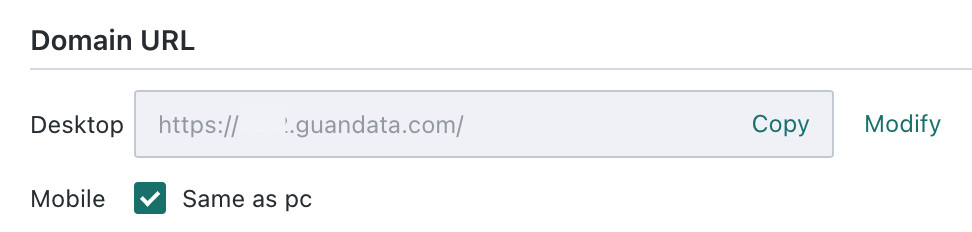
Environment domain names can be configured here. This affects automatically generated links such as lightweight app links, subscription and alert links, and homepage links used in third-party integrations.
For customers whose mobile and PC domains differ, separate domain names can be configured here for the two endpoints.
This setting is environment-level. In a multi-domain environment, changes in any one domain affect the others. Currently, only the primary domain can configure it.
Map Service Configuration
The system supports configuring chart map service addresses centrally in the Management Center to meet enterprise requirements for map service compliance, private deployment, or unified service management.

- Default map service: the Amap service is provided by default in Map Display Settings in the chart properties area.
- Custom map service: if a custom map service is required (for example, to replace it with a self-deployed map service), administrators can fill in the custom service address in the Map Service Configuration area.
Configuration Methods and Priority
Custom map services support the following two methods. When both exist, the Management Center configuration takes priority.
| Configuration Method | Scope | Operation Path | Applicable Scenario |
|---|---|---|---|
| Management Center configuration | Takes effect only for the current domain | Management Center > System Settings > General Settings > Map Service Configuration | Scenarios requiring independent map service configuration by domain |
| Operations configuration | Takes effect globally for the platform | Modified by operations personnel in the server-side configuration file | Scenarios requiring unified map service deployment at the platform level |
Baidu Maps Configuration
In version 7.4 and later, Map Display Settings in the chart properties area supports only Amap by default.
If Baidu Maps is required, administrators can add the Baidu Maps service address in Map Service Configuration. For details on how to obtain the address, refer to the Baidu Maps Configuration Guide.
Impact Description
- Chart cards created before version 7.4 that use Baidu Maps will default to switching to Amap display after upgrading if no custom configuration is performed. If Baidu Maps is still required, administrators need to add the Baidu Maps service address in Map Service Configuration.
- Amap is not affected.
Real-Time Settings
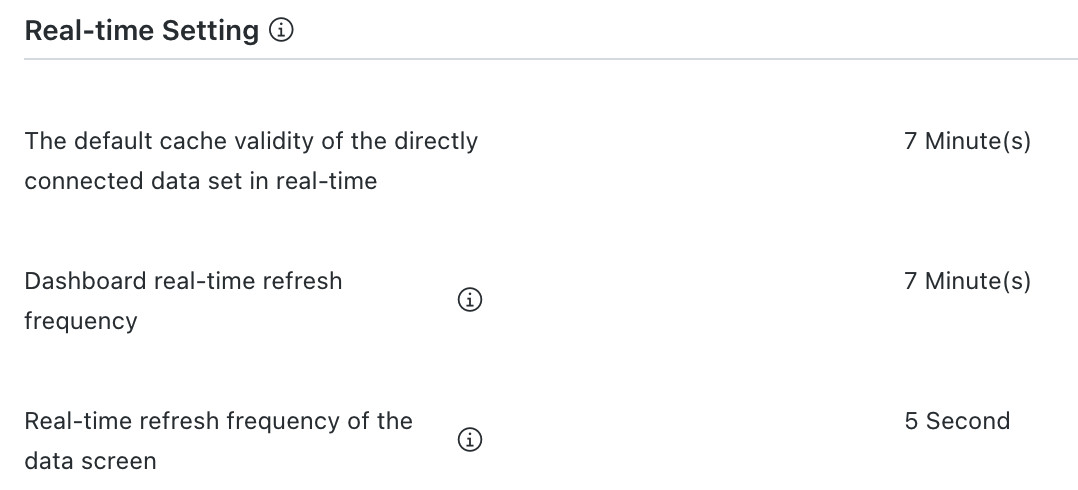
Real-Time Settings can be used to configure the default cache validity duration for live Datasets in real-time mode, the real-time refresh frequency of Dashboards, and the real-time refresh frequency of big screens. For live Datasets in real-time mode, the default cache validity period can be configured at the minute level. The Dashboard refresh frequency in real-time mode follows the default cache validity period of live Datasets, while the big screen refresh frequency can be configured at the second level.
Runtime Parameter Settings
Runtime parameter settings include ETL parameters, Spark parameters, Card parameter settings, Dataset parameter settings, database parameter settings, recycle bin parameter settings, thread pool optimization, offline development parameter settings, and Data Writeback parameter settings.
In most enterprises, users focus more on data analysis during the day, so timeout control for tasks needs to be stricter. To avoid ETL tasks consuming performance resources during business hours, daytime parameters should be configured more aggressively, such as killing tasks after 5 minutes. At night, usage is usually lighter, so looser settings, such as killing tasks after 120 minutes, may be more appropriate.
ETL Parameter Settings
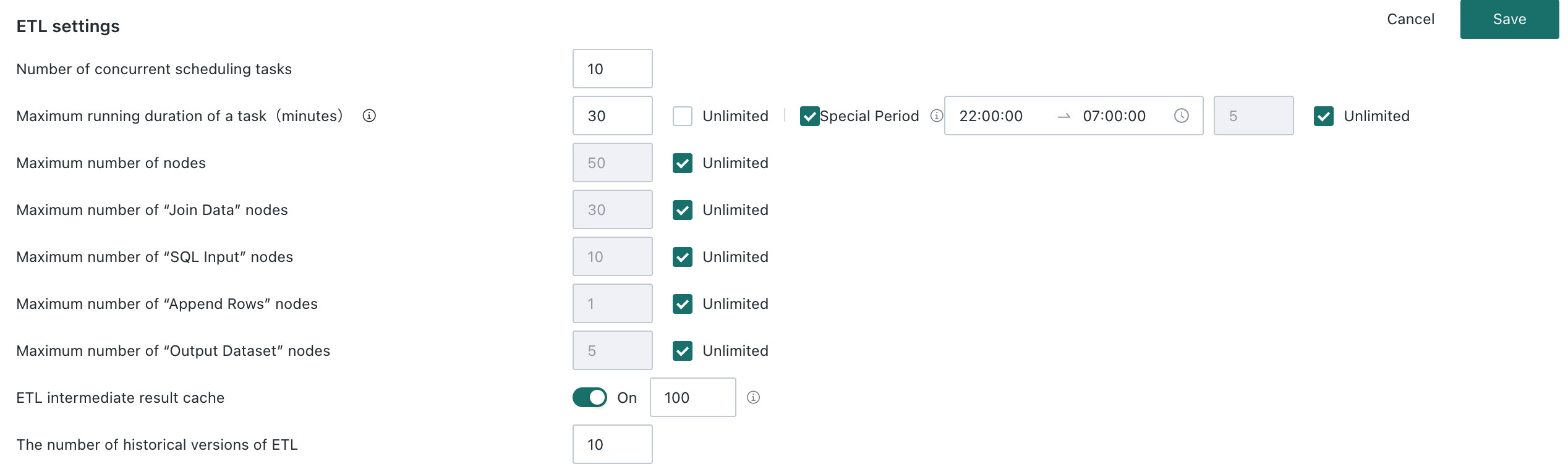
- Parallel task invocation count: controls how many ETL scheduling tasks the system executes concurrently. The current setting is 20 to balance load and efficiency.
- Maximum task runtime: special periods can be selected. After enabling them, you can configure runtime limits for those periods according to business needs.
- Maximum supported node count: defines the maximum total number of nodes allowed in an ETL flow. You can enter a specific limit or select Unlimited.
- Maximum supported Related Data node count: limits the number of Related Data nodes allowed in an ETL flow.
- Maximum supported SQL Input node count: limits the number of SQL Input nodes allowed in an ETL flow.
- Maximum supported Row Append node count: limits the number of Row Append nodes allowed in an ETL flow.
- Maximum output Dataset count: controls how many output Datasets a single ETL task can generate.
- ETL intermediate result caching: controls whether the system retains ETL intermediate results. The current range is
50-999, which helps optimize repeated calculations and debugging. - Number of ETL history versions: controls how many historical versions of ETL flows the system retains. The current setting is 10.
Spark Parameter Settings

Spark single-job timeout: limits the maximum runtime of a single Spark job. Special periods are supported. The maximum setting is 120 minutes.
Card Limit Parameter Settings
-
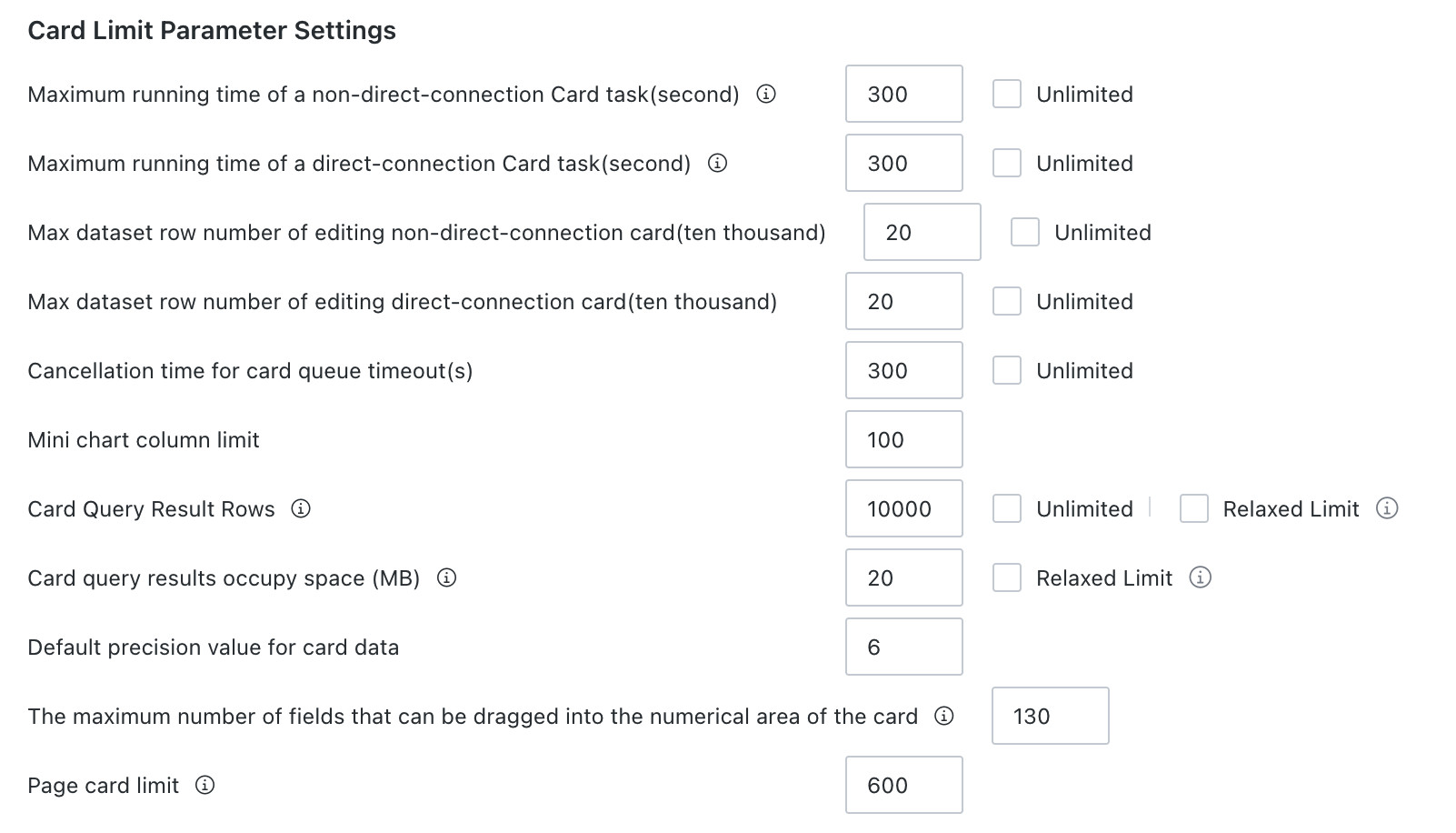
Non-live Card runtime timeout in seconds: limits the maximum runtime for a single execution of a non-live Card. This setting applies only to Guan-Index Cards, excludes queueing time, and causes the run to fail automatically after timeout.
-
Live Card runtime timeout in seconds: if a live Card exceeds the configured runtime, the system automatically cancels that run. This applies only to some databases, including
MYSQL,POSTGRESQL,GREENPLUM,SQLSERVER,MAXCOMPUTE, andIMPALA. -
Maximum Dataset row count supported for auto-refresh when editing non-live Cards: controls how much data can be automatically refreshed while editing a non-live Card.
-
Maximum Dataset row count supported for auto-refresh when editing live Cards: controls how much data can be automatically refreshed while editing a live Card.
-
Card queue timeout cancellation duration in seconds: defines how long a Card can wait in the execution queue before it is automatically canceled.
-
Maximum number of dimension values supported by sparklines: limits how many dimension values can be displayed in sparkline components.
-
Card query result row count: controls the maximum number of rows returned by a Card query.
- General limit: you can enter a value directly or select Unlimited. If Unlimited is selected, Relaxed Limit is automatically disabled and cannot be turned on.
- Relaxed limit: if relaxed limit is enabled and the general limit is later adjusted above it, the relaxed limit is automatically reset to the system maximum.
DescriptionThis controls only the final number of rows displayed in a Card query result. It affects Card queries only and does not affect Card export or Dataset queries. Even after a row limit is configured, the Card still computes based on the full dataset, but only the configured number of rows is displayed in the frontend. The value range is
10000 ~ Unlimited. -
Card query result space usage in MB: controls Card query limits by result data size and supports adjustment by business requirement. The default limit is
50 MB. If the result exceeds the maximum limit of1024 MB, the following behavior occurs:- Card viewing: if the amount of data involved in the calculation exceeds the limit, frontend Card data is not loaded, and an error such as
Card query data volume has reached xxMB, exceeding the 50MB limit. Please reduce the data volume or contact the administrator.is shown. Administrators can raise the limit in the Card parameter settings section. - Card export: Card export is not affected by this setting. Within export limits, even if the Card query exceeds the query limit, full data can still be exported.
Users can choose General Limit / Relaxed Limit on the Card Editing Page > Advanced Settings > Query Result Parameter Limit page. This parameter limit is supported by visual charts, metric analysis, custom charts, and Spreadsheet-style Data Entry.
- Card viewing: if the amount of data involved in the calculation exceeds the limit, frontend Card data is not loaded, and an error such as
-
Default precision value for Card data: defines the default precision for numeric data displayed in Cards. Up to 15 digits are supported.
-
Maximum number of fields that can be dragged into the value area of a Card: limits how many fields can be added to the value display area. This applies to regular tables, Spreadsheet-style Data Entry, Chinese-style Reporting Pro, and custom charts in standard Cards.
-
Page Card count limit: limits how many Cards can be added to a single Page to prevent performance degradation from excessive Cards. The default value is
600, with an input range of100-9999. Values below 100 are automatically corrected to 100 when focus is lost, and values above 9999 are corrected to 9999. When a Page already contains Cards at or above the limit, users cannot create new Cards.
Dataset Parameter Settings
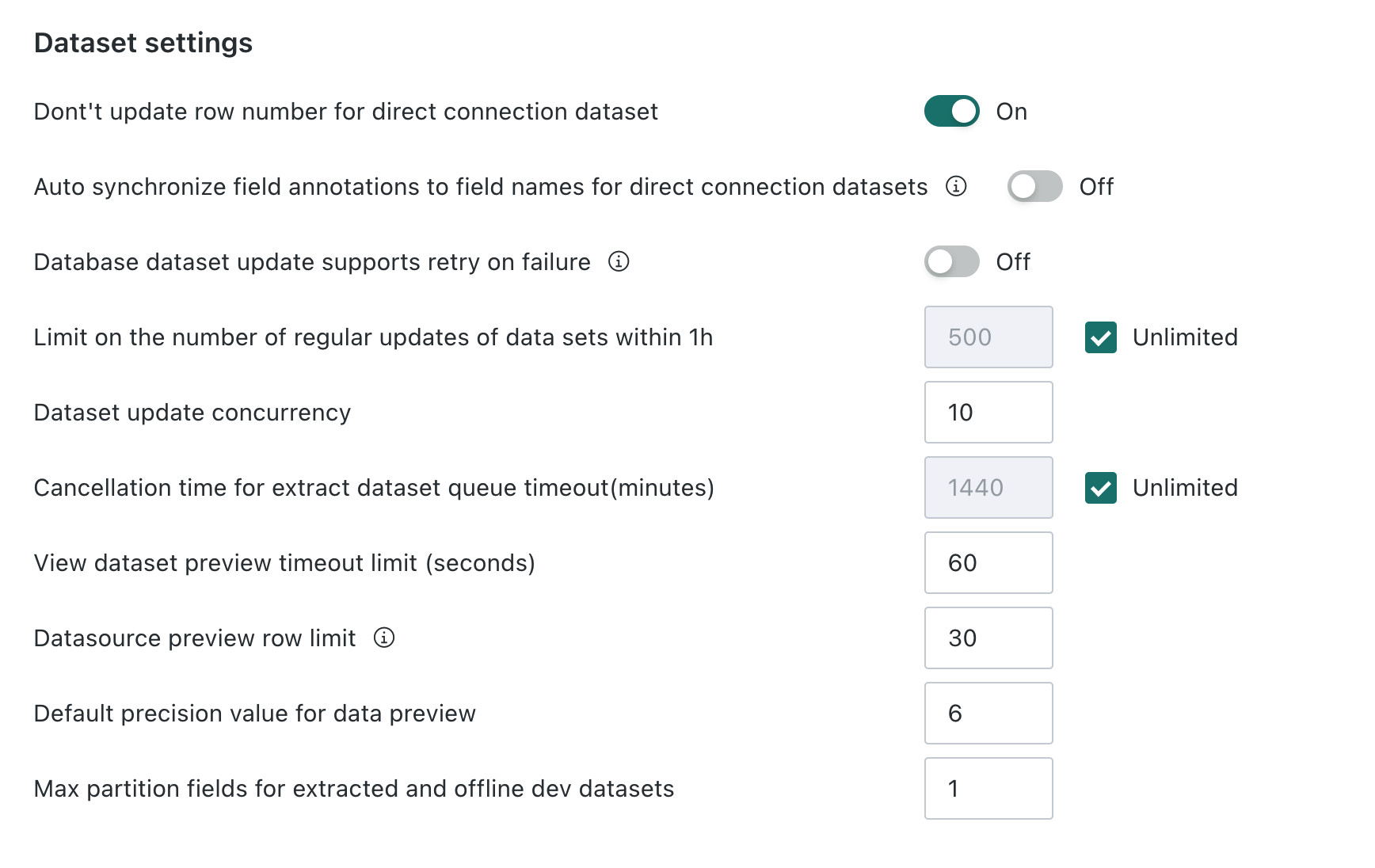
- Don't update row number for direct connection dataset: controls whether to actively update the displayed row count when updating a direct connection dataset.
- Auto synchronize field annotations to field names for direct connection datasets: sets whether to automatically synchronize annotation information of direct connection datasets to the corresponding field names.
- Database dataset update supports retry on failure: configures whether to automatically retry after a database dataset update fails, and supports setting the interval in minutes before retrying (retry only once).
- Limit on the number of regular updates of data sets within 1h: limits the number of scheduled dataset update operations the system can perform within one hour.
- Dataset update concurrency: controls the maximum concurrency of dataset update tasks that can run simultaneously.
- Queue timeout cancellation duration for extraction datasets (minutes): controls the maximum waiting time for extraction datasets in the update queue; when this time is exceeded, the update task is automatically cancelled; the default is
Unlimited. - View dataset preview timeout limit (seconds): defines the maximum allowed time for view dataset preview operations.
- Datasource preview row limit: controls the maximum number of rows displayed in preview results when querying a data source.
- Default precision value for data preview: sets the default display precision for numeric data when previewing data; the configurable precision limit is 15 digits.
- Max partition fields for extracted and offline dev datasets: sets the maximum number of partition fields that can be selected when configuring partitions for extracted datasets and offline development datasets.
Database Parameter Settings

- Default upper limit of the connection pool for a single live database
- Database connection timeout in minutes,
Socket timeout
Recycle Bin Parameter Settings

Automatic cleanup cycle in days: configures the interval for automatic cleanup of deleted data in the recycle bin. Cleanup runs daily at 23:59.
Thread Pool Optimization Settings

Data Accounts for independently managed runtime thread pools: specifies the Data Accounts used to manage and schedule system thread pool resources independently.
Offline Development Parameter Settings

- Maximum concurrency of runnable offline development tasks
- Maximum concurrency of runnable offline development nodes
Data Writeback Parameter Settings

SR high-performance mode submission interval in seconds: configures the interval between data submission operations in SR high-performance mode.
Export Settings
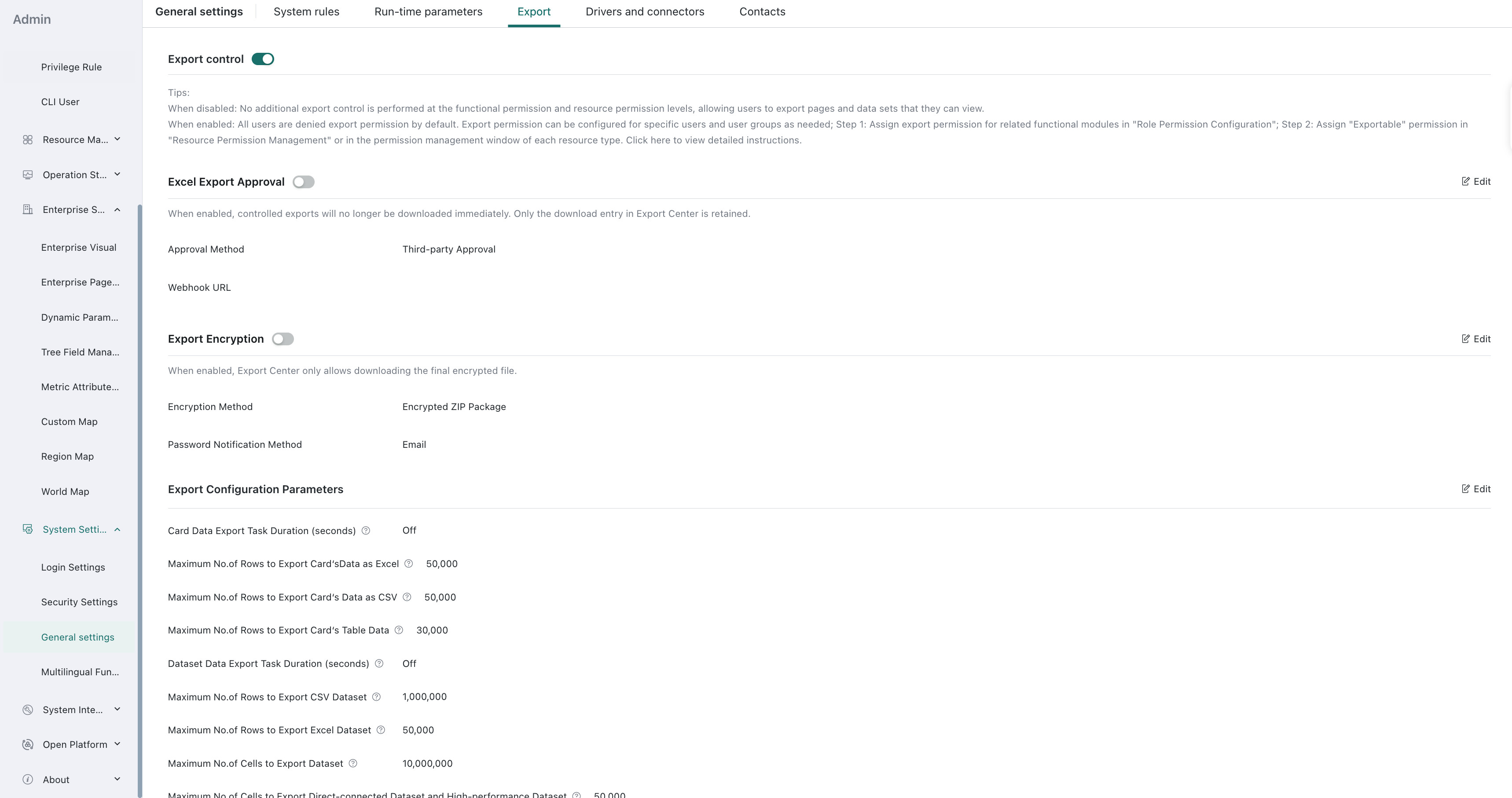
After Export Control is enabled, you can configure export parameters for related Cards and Datasets.
- When the switch is disabled: no additional export control is enforced at either the feature permission or Resource Permission level. Users are allowed to export Pages, Datasets, and other Resources they can view.
- When the switch is enabled: all users are denied export permissions by default. Export permissions can then be granted to specific users or user groups as needed.
- Assign export permissions for relevant functional modules in Role Permission Configuration.
- Assign Allow Export permissions in Resource Permission Management or in permission management windows for individual Resources.
Excel Export Approval
After Excel Export Approval is enabled, when users initiate controlled exports, the system does not download files directly. Instead, it submits the export task to the Export Center. After approval, users can download files from the Export Center; after rejection, the export task cannot be downloaded.
Excel Export Approval is disabled by default. After enabling it, administrators can configure the Webhook URL for third-party approval. The system pushes export requests to the enterprise's external approval system. After the external approval system processes the request, it synchronizes the approval result back to Guandata BI via callback.
Export tasks subject to approval include Excel, CSV, and table data exports for Cards, Dashboards, Self-Service Data Extraction, resources within Data Apps, and Datasets. Users must have export permissions for the corresponding resources before the system creates an export approval request.
Third-party approval pushes export context to the external system, including the exporting user, export time, file information, export row count, resource information, and current view filter conditions. After approval is enabled, the Export Center displays statuses such as Pending Approval, Approved, and Rejected.
- After Excel Export Approval is disabled, newly submitted export tasks follow the original export logic.
- Previously submitted approval applications continue to be processed according to the approval configuration at the time of submission. Subsequent configuration changes do not affect historical approval tasks.
- The approval capability only controls whether export results can be downloaded and does not replace the validation of functional permissions, resource permissions, and data permissions.
Export Encryption
After Export Encryption is enabled, the system encrypts the export result after the export file is generated but before allowing the user to download it. Export Encryption is disabled by default. After enabling it, you need to select an encryption method.
-
Encrypted ZIP Package: The system packages the export result into a
.zipfile and generates an independent extraction password for each export file. Users need to enter the extraction password to open the file after downloading.When Encrypted ZIP Package is selected, password notification can be configured. The system displays the extraction password in the Export Center by default; after password notification is enabled, the password can be sent to the export applicant through the notification channels supported by the environment. Passwords in the Export Center are only visible or copyable by the export applicant and administrators.
-
Third-party Encryption: The system sends the export file to the enterprise's external encryption system for processing. After the external system callback succeeds, the Export Center provides the encrypted file for download.
When Third-party Encryption is selected, you need to configure the Webhook URL and Application Token. The Webhook URL is used to receive export encryption requests, and the Application Token is used for request and callback verification. Before third-party encryption is completed, the export task remains in Processing status; when encryption or callback fails, the task cannot be downloaded and a failed status is displayed in the Export Center.
Export encryption applies to export tasks that go through the Export Center, including exports of Cards, Dashboards, Self-Service Data Extraction, resources within Data Apps, and Datasets.
- After Encrypted ZIP Package is enabled, the Export Center only provides the encrypted
.zipfile and does not provide a download entry for the unencrypted original file. - When password notification fails to be sent, it does not affect the download of export files; users can still view the password in the Export Center.
- Previously submitted export tasks are processed according to the encryption configuration at the time of submission. Subsequent configuration changes do not affect historical export tasks.
Export Configuration Parameters
Export configuration parameters include:
-
Maximum duration in seconds for Card data export tasks
-
Maximum number of rows when exporting Card data to Excel, range
1~1,000,000 -
Maximum number of rows when exporting Card data to CSV, range
1~5,000,000 -
Maximum number of rows when exporting Card table data, range
1~1,000,000 -
Maximum duration in seconds for Dataset data export tasks
-
Maximum number of rows when exporting Datasets to CSV, range
1~5,000,000 -
Maximum number of rows when exporting Datasets to Excel, range
1~1,000,000 -
Maximum number of cells when exporting Datasets, range
1~50,000,000 -
Maximum number of rows when exporting live and high-performance Datasets, range
1~100,000 -
Maximum number of rows when exporting Dataset subscriptions to CSV, range
1~50,000,000 -
Maximum number of rows when exporting Dataset subscriptions to Excel, range
1~1,000,000 -
Maximum number of cells when exporting Dataset subscriptions, range
1~100,000,000 -
Whether exported PDFs allow copying. You can either allow copying by default or let users decide at export time whether copied text is allowed in the exported PDF.
-
Image clarity when exporting Pages
NoteAfter configuration, exported images follow the selected clarity level. Higher clarity increases pixel density and improves readability. Subscription and alert image size settings are directly combined with this configuration. If a Page contains too many Cards or is too long and a high clarity setting is configured, image delivery in subscriptions and alerts may fail. Adjust with caution.
-
Image clarity when exporting Cards
NoteAfter configuration, exported images follow the selected clarity level. Higher clarity increases pixel density and improves readability. Subscription and alert image size settings are directly combined with this configuration. If a Page contains too many Cards or is too long and a high clarity setting is configured, image delivery in subscriptions and alerts may fail. Use caution. During subscriptions, this affects all Cards. During manual image export, it applies only to the DuPont Analysis Chart.
-
Whether table export uses automatic line wrapping. If automatic wrapping is disabled, exported table data will not wrap even if the Card itself is configured to wrap. If enabled, exported data will also wrap automatically.
-
Page-based export mode for Chinese-style Reporting Pro Cards. This applies to all Chinese-style Reporting Pro Cards with pagination enabled. The default is multi-sheet export mode, where each page is exported to a separate sheet. If single-sheet export mode is selected, all paginated content is exported into a single sheet.
Driver and Connector Settings
This section is used for centralized management and configuration of parameters related to communication with hardware devices and physical interfaces, ensuring that devices can be correctly identified by the system, driven stably, and connected through corresponding physical ports or connectors for efficient data transmission and function control.
Create and Configure a Driver
-
Go to Admin Center > System Settings > General Settings > Drivers and Connectors.
-
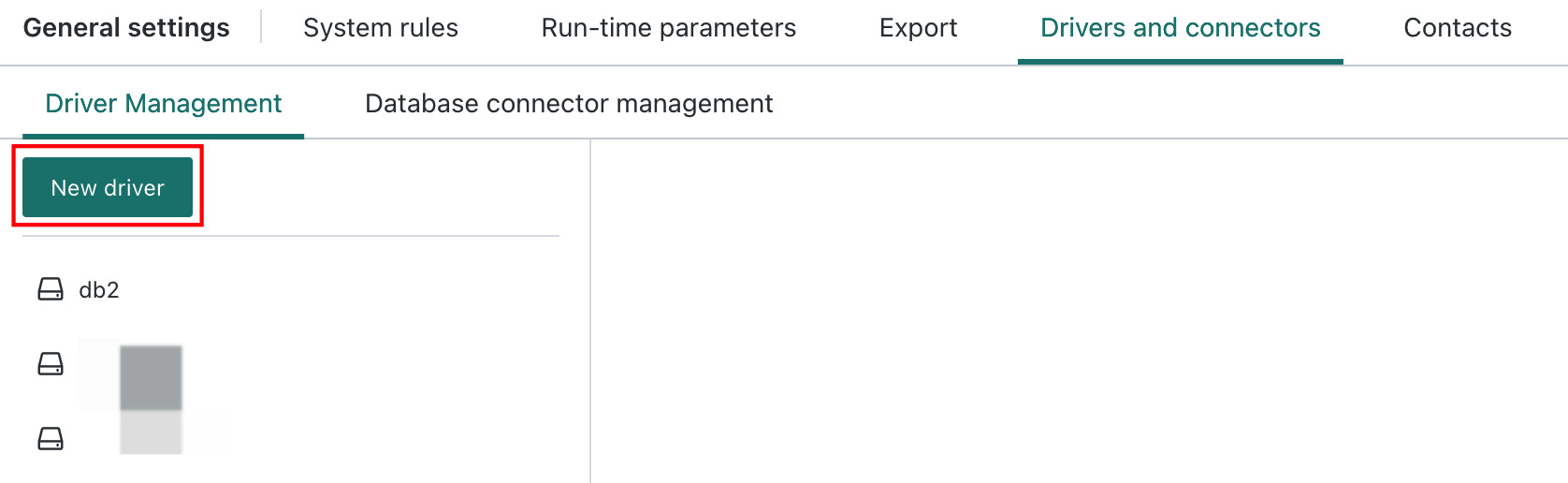
Click Driver Management > Create Driver, edit the driver name, and click Save.
-
Click the newly created driver, upload a Guandata-certified driver JAR package and an available Driver Class, then click Apply to complete the driver configuration.
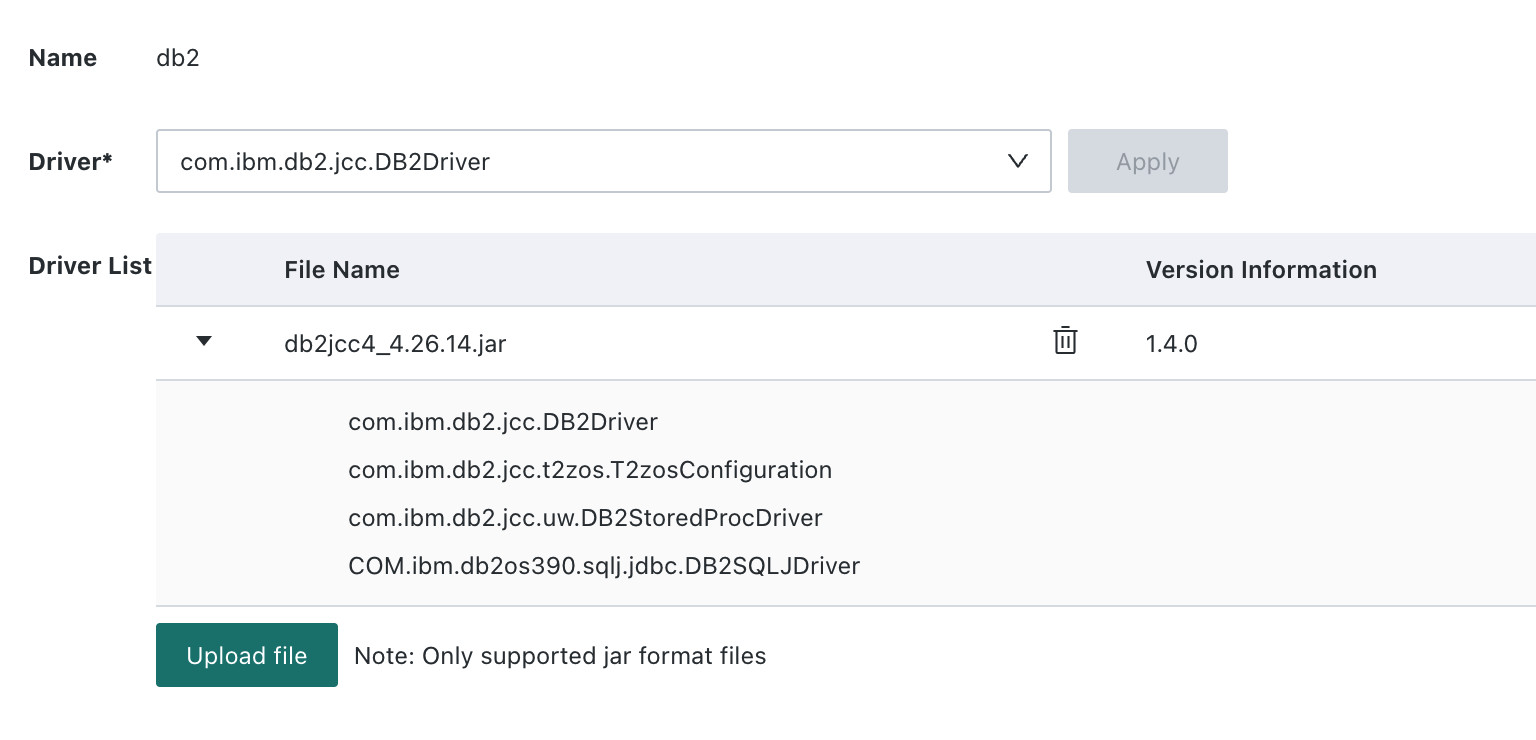 NoteThe system automatically checks whether the uploaded driver is Guandata-certified. If an uncertified driver is uploaded, the system prompts: `The custom driver jar package is invalid. Please use a signed driver package.` In that case, obtain the certified version from the official signed-driver release package or contact Guandata technical support.
Create and Configure a Database Connection
Click Database Connector Management > Create Database Connector to create a new data connector.
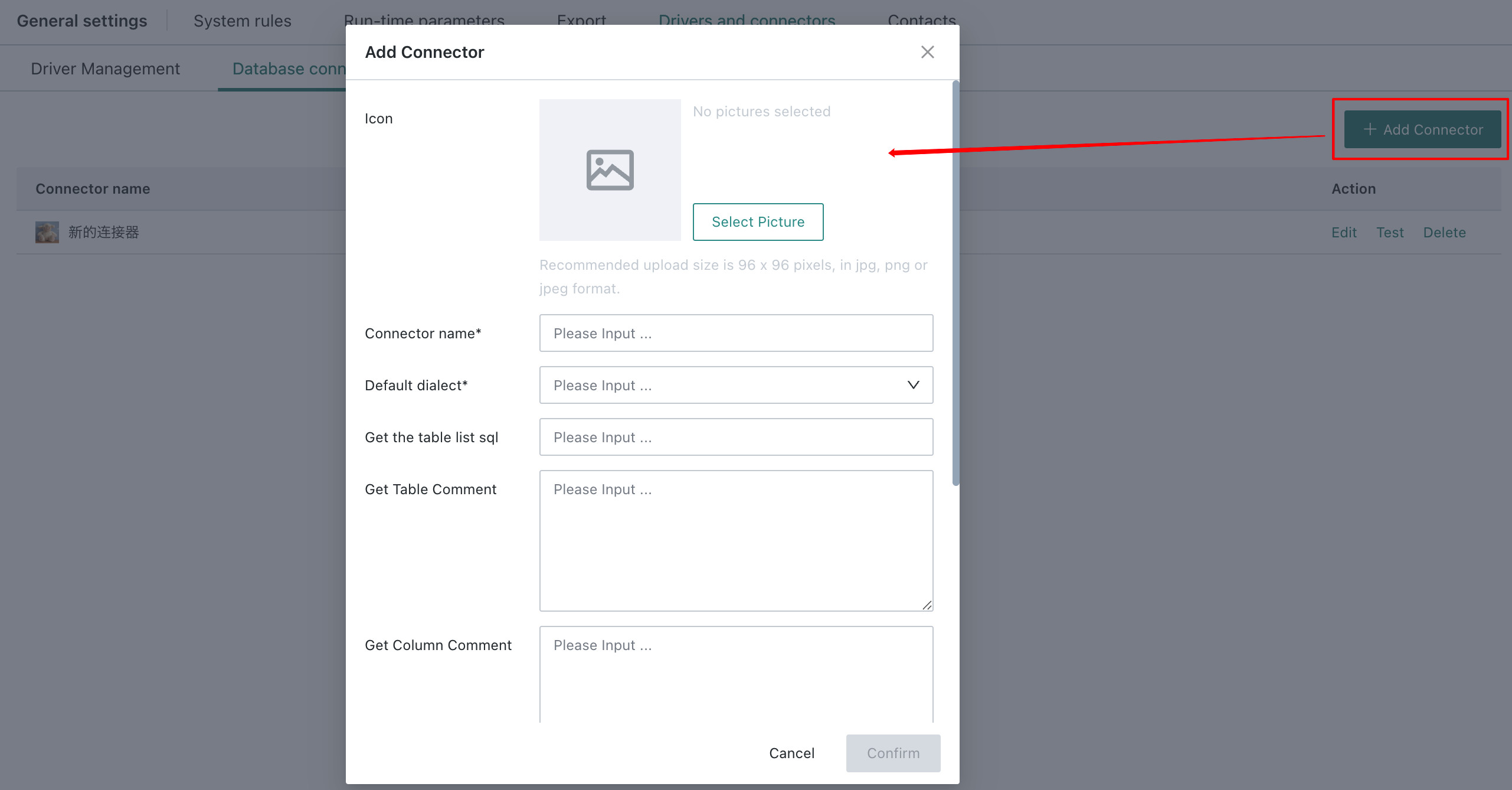
- Parameter 1 - Display Icon: sets the custom image icon for the data connector. It is displayed when creating Data Accounts and database Datasets.
- Parameter 2 - Connector Name: define the name according to user habits. Special characters are not supported.
- Parameter 3 - Default Dialect Support: currently supported dialects include
MySQL,Oracle, andPOSTGRES. The following databases have been verified:
| Dialect | Verified Supported Databases |
|---|---|
| MySQL | OceanBase (MySQL), Azure DataBricks, Yunqi LakeHouse, ByteHouse |
| Oracle | Kingbase KES, OceanBase (Oracle), Aloudata Air Engine |
| POSTGRES | GaussDB (DWS), Aws Athena, CnosDB |
- Parameter 4 - SQL for retrieving the table list: because table-list retrieval logic may differ across databases and dialects, this feature allows users to define their own SQL logic for retrieving the table list and specify the index of the column containing the table name in the returned result set.
If the table-list SQL specifies the |schema| parameter, a schema option is dynamically displayed when creating the Data Account, and the user must enter the schema value.
- Parameter 5 - Username / password display switch: for example, some authentication methods, such as Azure DataBricks, embed the username and password in the URL rather than passing them in traditional fields, so this switch controls whether those fields are displayed.
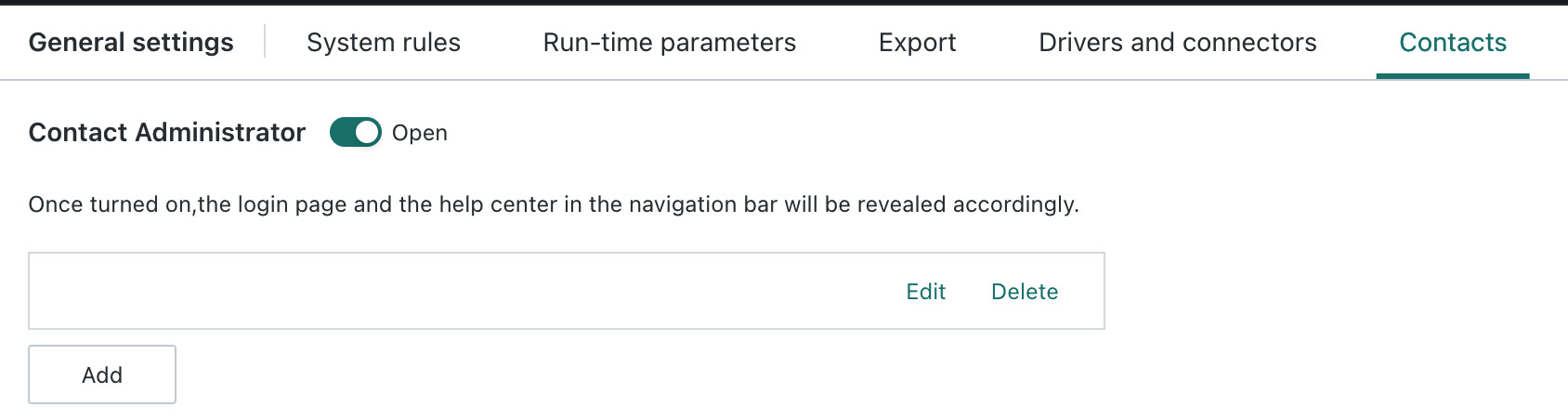
Administrator Contact Settings
After this feature is enabled, the Help entry on both the login page and the navigation bar after login will display the configured administrator contact information. You can add, edit, or delete entries here.