Feishu Aily Integration Guide
Overview
This article explains how to connect a deployed GuanMCP service to Feishu Aily. After configuration, Aily can call Guandata BI query capabilities through MCP.
Employees continue asking questions in Aily. Aily calls Guandata BI data query, metric query, page/card information, and ChatBI-style capabilities through GuanMCP, and results are returned according to each employee's BI permissions.
Key Authentication Information
Prepare two types of authentication information before production integration:
| Authentication | Provider | Purpose |
|---|---|---|
| Account synchronization token | BI administrator | Used for MCP Server deployment as BI_APP_TOKEN. It is key for the MCP Server to identify and map GuanBI users. |
MCP_ENTRYPOINT_TOKEN | O&M engineer | Generated according to GuanMCP Deployment Guide. Configure it in Aily request headers as Authorization: Bearer {MCP_ENTRYPOINT_TOKEN} to protect the MCP service entry. |
Production multi-user integration should use enterprise identity mapping. The Aily client should not store or ask users to enter BI Tokens. For GuanMCP deployment, BI_APP_TOKEN, MCP_ENTRYPOINT_TOKEN, and enterprise identity mapping, see GuanMCP Deployment Guide.
Recommended Integration Method
For production, use enterprise identity mapping. Aily passes the current user identifier, and the GuanMCP server maps the external account to a unique GuanBI user. Queries then run under that user's BI permissions.
Aily passes user identity in request Headers:
| Header | Meaning | Recommendation |
|---|---|---|
x-aily-user | The user's Feishu_user_id in the enterprise. It is a numeric string. | This is not the employee ID. It is not intuitive and is hard to obtain manually, so it is not recommended as the first mapping choice. |
x-aily-email | Current user's email. | Recommended for mapping because it can match the GuanBI user email and is easier to troubleshoot. |
For email-based mapping, configure the GuanMCP server:
BI_USER_PROPERTY_HEADER=x-aily-email
BI_USER_PROPERTY_KEY=email
Do not let all Aily users share one fixed uIdToken in production. A fixed Token is suitable for demos and temporary validation, but it makes everyone share the same BI account permissions and cannot reflect real user permission isolation.
Aily Integration Flow
Step 1: Prepare Account Synchronization Token
Prepare the account synchronization token. If it is missing, ask a BI administrator to provide it.
It corresponds to MCP Server startup configuration:
BI_APP_TOKEN=<account_synchronization_token>
Step 2: Deploy MCP Server
O&M engineers deploy MCP Server. Generate MCP_ENTRYPOINT_TOKEN according toGuanMCP Deployment Guide.After deployment, O&M should provide:
- Full MCP Server URL, such as
https://<mcp-domain>/mcp. MCP_ENTRYPOINT_TOKEN.
Recommended startup parameters:
BI_APP_TOKEN=<account_synchronization_token>
MCP_ENTRYPOINT_TOKEN=<entry_token_generated_by_o&m>
BI_USER_PROPERTY_HEADER=x-aily-email
BI_USER_PROPERTY_KEY=email
The recommended MCP Server relative path is /mcp. After deployment, O&M should provide the complete URL, such as https://<mcp-domain>/mcp, for Aily request configuration.
Aily automatically passes user identity, commonly x-aily-user and x-aily-email. The server should usually use x-aily-email to match GuanBI user email. GuanMCP identifies the unique GuanBI user through server-side identity mapping and returns data according to that user's BI permissions. Do not configure uIdToken, loginId, or BI_APP_TOKEN on the client side.
Step 3: Register an Internal MCP Service in Aily MCP Marketplace
Open Aily MCP Marketplace and create an enterprise internal MCP service. You can refer to Feishu Aily MCP configuration documentation.
After entering name and description, configure:
| Configuration | Value |
|---|---|
| Request URL | Full MCP Server URL from Step 2, such as https://<mcp-domain>/mcp. |
| Endpoint type | Streamable HTTP. |
| Request header | Add a fixed-value header. Name: Authorization; value: Bearer {MCP_ENTRYPOINT_TOKEN}. |
Step 4: Add MCP to an Aily Agent
Open the Aily Agent editing page, find MCP configuration, and add MCP. Choose Add from MCP Library, then select the MCP created in Step 3.
After these steps, the Agent can use BI MCP.
Every time MCP Server is upgraded or configuration is changed, open the target MCP edit page in Aily MCP Marketplace and save once to refresh MCP configuration.
Temporary Test Methods
Fixed Value Mode
Fixed value mode is suitable for test environments or scenarios where all users access data as the same BI account.
All users share one uIdToken, so they also share the data permissions of that token. See How to Obtain a Test uIdToken.
| Parameter Type | Key | Value Type | Value | Description |
|---|---|---|---|---|
| Request header | Authorization | Fixed value | Bearer <your_mcp_service_token> | Corresponds to server MCP_ENTRYPOINT_TOKEN. |
| Request header | X-GuanBI-Uid-Token | Fixed value | <uIdToken obtained from browser> | All users share this Token's data permissions. |
Fixed value mode makes all Aily users share the same BI account permissions. It is suitable for testing, demos, or controlled validation, not production multi-user isolation.
User Input Mode
User input mode is better for temporary validation that needs to distinguish user data permissions. Aily configures the uIdToken header format, and each user enters their own GuanBI uIdToken.
| Parameter Type | Key | Value Type | Display Name | Suggested Description |
|---|---|---|---|---|
| Request header | Authorization | Fixed value | No display name needed | Value: Bearer <your_mcp_service_token>. |
| Request header | X-GuanBI-Uid-Token | User input | GuanBI User Credential (uIdToken) | Enter your personal uIdToken from GuanBI. This credential protects your personal data permissions and prevents unauthorized access. |
This mode is only for temporary validation and is not a production multi-user solution.
How to Obtain a Test uIdToken
Both temporary test modes use the same method. Administrators can obtain a shared account Token, and regular users can obtain their own personal Token.
This method is for testing, demos, or temporary validation. Production integration should not require every business user to manually copy Cookie Tokens. Prefer enterprise identity mapping or gateway-injected identity. See GuanMCP Deployment Guide.
A uIdToken obtained from Cookie usually has an expiration period. If Aily later reports authentication failure or 401, the Token has likely expired. Obtain and update it again.
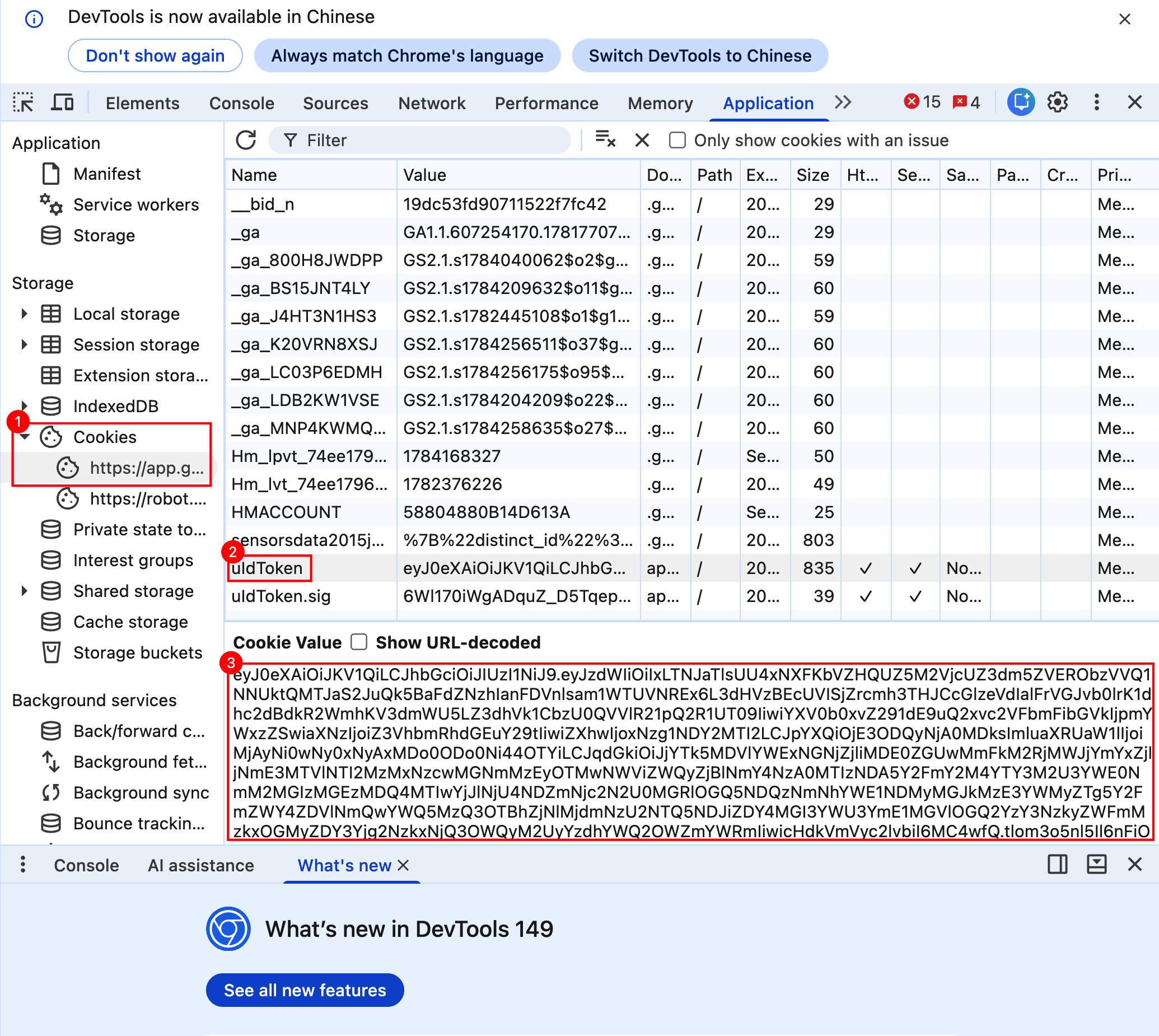
- Log in to Guandata BI.
- Right-click an empty area on the BI page and choose Inspect to open browser developer tools. You can also use
F12orCtrl + Shift + Ion Windows/Linux, orCmd + Option + Ion macOS. - In developer tools, open Application, expand Storage > Cookies, select the current BI domain, and click
uIdToken. Copy the Cookie Value.
Validate After Configuration
Verify in this order:
- Confirm GuanMCP tools are enabled in Aily and entry authentication does not fail.
- Ask a simple question as a normal-permission user, such as "Which sales dashboards can I see?"
- Ask the same question as a high-permission user and compare returned resource scope.
- Ask a metric definition question, such as "What does the Sales Amount metric mean?"
- Ask a data question, such as "What was sales amount in East China yesterday?"
- Ask about a resource the user has no permission to access and confirm unauthorized data is not returned.
If validation fails, determine whether the issue is Aily configuration, MCP entry authentication, user identity mapping, or BI resource permissions.
Context and Return Data Limits
Aily MCP has limits on model context and tool return size. Keep MCP tool returns around 20,000 Chinese characters or less to avoid responses that are too long for the Agent to consume, summarize, or continue with subsequent calls.
Suggestions:
- Prefer summary results, key metrics, Top N details, and necessary trace information.
- Set reasonable row limits for detail data.
- Split deep analysis into multiple rounds, such as overall trend first, then drill down by store, region, product, or time.
- For large detail exports, use BI pages, dataset export, or a dedicated data export method instead of Aily conversation.
See Feishu Aily MCP configuration documentation for more limits.
FAQ
What is the difference between production integration and temporary testing?
Production integration lets Aily automatically pass user identity, and the server maps it to a unique GuanBI user. The client only stores the MCP entry credential, so BI user permissions are inherited.
Fixed value mode makes all users share one BI account. User input mode requires each user to provide a personal uIdToken. Both are for testing, demos, or temporary validation only.
Authentication failure or 401
A Cookie-based uIdToken usually expires. If Aily reports authentication failure or 401, log in to GuanBI again, copy a new test uIdToken, and update it in Aily.