Request Forwarding
Overview
Feature Overview
Request Forwarding lets you configure controlled HTTP forwarding entries in Guandata BI. After an administrator registers an external service as an API, a Super App only needs to call the fixed URL generated by Guandata BI. Guandata BI then handles permission checks, parameter rendering, pre-request execution, sensitive credential injection, target API calls, response forwarding, and audit logging.
Starting September 1, 2026, creating or editing request forwarding configurations requires a Super App commercial license. Without this license, existing configurations remain available for viewing and continue to run, but cannot be created or edited. Request forwarding is not subject to the Super App quantity quota.
Use Cases
- Provide a unified backend entry for Super Apps.
- Hide the real target service URL so frontend code does not expose third-party APIs directly.
- Store tokens, passwords, AK/SK, and other sensitive information as server-side sensitive data, then reference them in requests as needed.
- Run pre-requests before calling the target API, such as login, token exchange, or temporary ticket retrieval.
- Centrally manage callers, allowed origins, log masking, and runtime calls.
Capability Boundaries
- Gateway request methods support
GETandPOST. - Target request methods support
GET,POST,PUT,DELETE, andPATCH. - Pre-request methods support
GETandPOST. - The target URL must be a valid
httporhttpsURL. - If a pre-request needs to extract dynamic parameters, the response body must be JSON and fields are read through JSONPath.
- Target API responses are forwarded to the caller by default. The system filters some response headers that should not be returned.
Request forwarding currently supports only JSON and regular form request bodies without files. File and other binary uploads, including multipart/form-data, are not supported. APIs that an SDK invokes through file uploads therefore cannot be called through request forwarding.
Core Concepts
API
An API is one request forwarding configuration. It includes basic information, permission policies, the target service, request parameters, pre-requests, sensitive data references, and security settings.
Identifier
The identifier is the unique access path of an API, also called the route code. For example, if the identifier is crm-query-user, the call URL is https://{bi-host}/api/gateway/routes/crm-query-user.
Configuration suggestions:
- Use a business prefix, such as
crm-query-useroroa-ticket-create. - Avoid changing the identifier after creation, because callers may already depend on it.
- Keep it short and clear so logs are easier to troubleshoot.
Sensitive Data
Sensitive data stores credentials such as third-party tokens, passwords, AK/SK, and client secrets. After configuration, reference it in Headers, Query, Body, or pre-requests with placeholders:
${SECRET.crm_client_secret}
Sensitive data is decrypted and used only on the server side. Plaintext values are not returned in frontend displays, audit logs, or API details.
Pre-request
A pre-request runs before the main request. It is commonly used for login, token retrieval, or temporary credential exchange. After a pre-request succeeds, dynamic parameter extractors can read fields from the JSON response and make them available to the main request.
For example, if the pre-request returns:
{
  "accessToken": "token-value"
}
Configure the dynamic parameter as follows:
| Parameter | JSONPath |
|---|---|
accessToken | $.accessToken |
Then reference it in the main request:
${PRE_REQ.accessToken}
Access URL
A request forwarding API URL consists of the BI environment domain, the fixed path, the identifier, and optional appended path segments.
https://{bi-host}/api/gateway/routes/{identifier}
https://{bi-host}/api/gateway/routes/{identifier}/{extra-path-1}/{extra-path-2}
| Part | Description | Example |
|---|---|---|
{bi-host} | Current Guandata BI environment domain, without a trailing /. | https://demo.guandata.com |
/api/gateway/routes/ | Fixed request forwarding path. | /api/gateway/routes/ |
{identifier} | Unique identifier configured when creating the API. | crm-query-user |
{extra-path} | Optional path segment appended after the identifier. | 123/profile |
When the identifier is crm-query-user, the call URL is:
https://{bi-host}/api/gateway/routes/crm-query-user
To pass a user ID and resource type through the path, call:
https://{bi-host}/api/gateway/routes/user-resource/123/profile
The system generates path placeholders in order:
| Placeholder | Value |
|---|---|
${REQUEST.path.1} | 123 |
${REQUEST.path.2} | profile |
Placeholder Variables
Request Forwarding supports placeholders that inject caller requests, current-user information, pre-request results, and sensitive data into the target request.
| Variable | Meaning | Example |
|---|---|---|
${REQUEST.path.n} | Reads the nth appended path segment after the identifier. | ${REQUEST.path.2} reads profile from /api/gateway/routes/user-resource/123/profile. |
${REQUEST.query.xxx} | Reads a caller Query parameter. | ${REQUEST.query.keyword} |
${REQUEST.header.xxx} | Reads a normal caller request header. | ${REQUEST.header.x-request-id} |
${REQUEST.body.xxx} | Reads a field from the caller JSON Body. | ${REQUEST.body.userId} |
${CURRENT_USER.xxx} | Reads the current logged-in user ID. | ${CURRENT_USER.userId} |
${PRE_REQ.xxx} | Reads a dynamic parameter extracted from a pre-request. | ${PRE_REQ.accessToken} |
${SECRET.xxx} | Reads a value saved in Sensitive Data. | ${SECRET.crm_client_secret} |
${SYSTEM.xxx} | Reads a built-in system variable. | ${SYSTEM.current_date} |
Notes:
- Do not use
${CURRENT_USER.xxx}for anonymous calls. - A pre-request should not depend on
${PRE_REQ.xxx}, because those values have not been produced yet. - Only Headers and Query parameters explicitly defined in the request forwarding configuration are sent to the target service.
Call Flow
A complete call contains these stages:
- Request validation: The gateway validates the identifier, API status, request method, caller Host, and login permission.
- Pre-request execution: The gateway loads sensitive data, executes pre-requests in order, and extracts dynamic parameters.
- Parameter rendering: The gateway renders placeholders in the target URL, Headers, Query, and Body.
- Target call: The gateway sends configured Headers, Query, and Body to the target service.
- Response return: The gateway forwards the target response, filters sensitive response headers, and records audit logs.
If the target service returns a 4xx or 5xx response, the gateway returns that response to the caller. Gateway-owned errors are returned only for issues such as missing routes, insufficient permissions, pre-request failure, invalid target URL, or timeout.
Create a Request Forwarding API
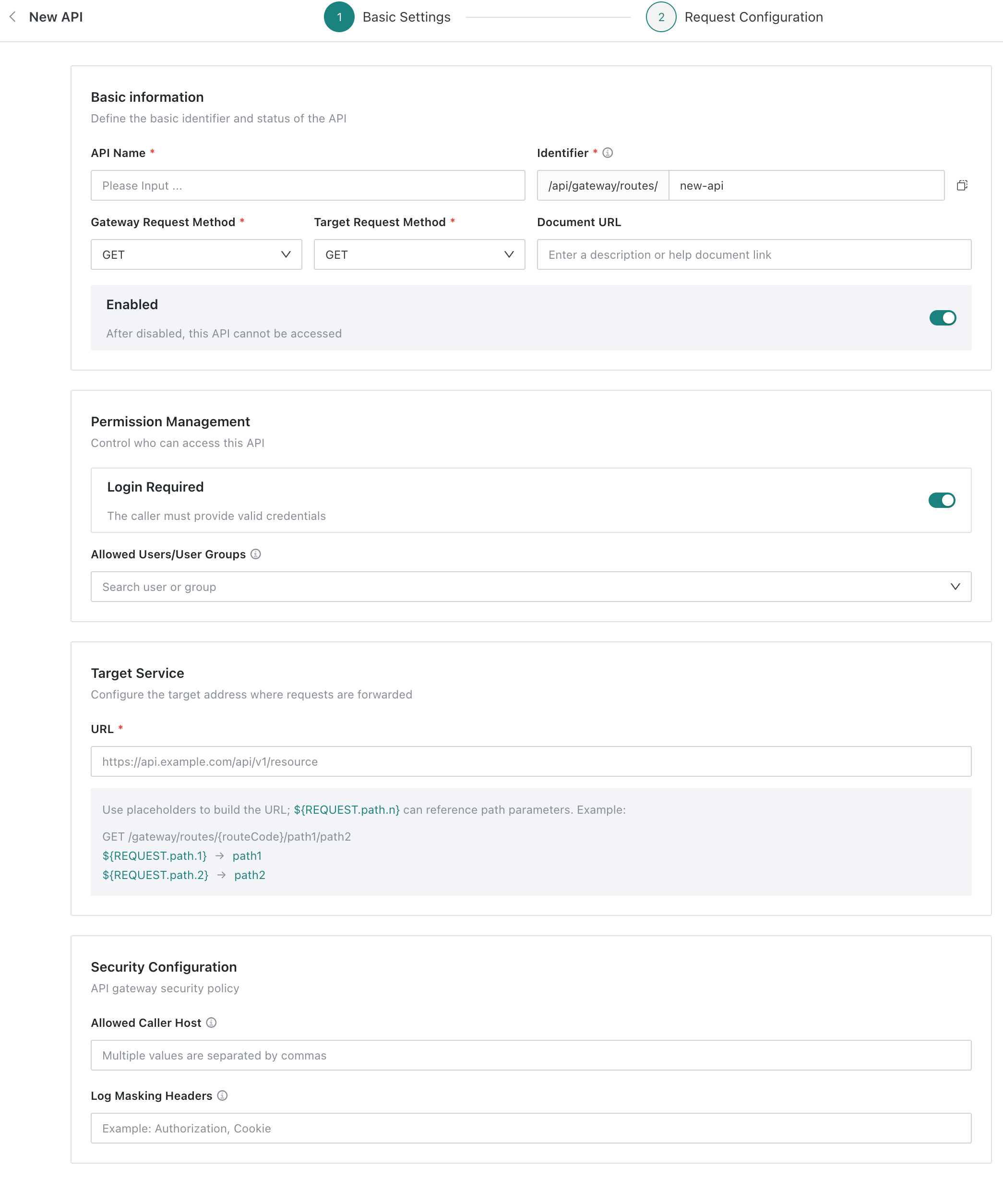
Go to Data Application > Super App > Request Forward, click Create API, and complete Basic Settings and Request Configuration.
Configuration Flow
Before configuration, confirm:
- Target API URL, request method, and timeout.
- Headers, Query parameters, and Body required by the target API.
- Whether the target API requires login, authentication, or token retrieval before the call.
- Whether callers should use
GETorPOSTto access the Guandata gateway. - Whether callers must be logged in, and which users or user groups can access the API.
- Whether calls should be limited to specific pages, systems, domains, or IP addresses.
- Which request headers should be masked in audit logs, such as Authorization and Cookie.
Recommended order:
- Fill in basic information, including API name, identifier, request method, and enabled status.
- Configure permission and security policies.
- Configure the target service URL.
- Optional: add pre-requests if the target API needs a token or temporary credential.
- Configure Headers, Query, Body, and timeout for the main request.
- Test the API and enable it after the full flow works.
Basic Settings
Basic Information
Define the API identifier and status in Basic Information.

| Configuration | Description |
|---|---|
| API Name | Human-readable API name, such as CRM Query User. |
| Identifier | Part of the gateway path. The page shows the fixed /api/gateway/routes/ prefix, so you only need to enter the suffix, such as crm-query-user. |
| Gateway Request Method | Method used by callers to access the Guandata gateway. Supports GET and POST. |
| Target Request Method | Method used by the gateway to call the target service. Supports GET, POST, PUT, DELETE, and PATCH. |
| Documentation URL | Optional. Link to target API or business documentation. |
| Enabled | When enabled, the API can be called. When disabled, callers cannot access it. |
- Gateway Request Method and Target Request Method are different concepts. A caller may use
POSTto access the Guandata gateway, while the gateway usesPUTto call the target service. - Avoid changing the identifier after creation to prevent breaking existing callers.
- Use business prefixes for identifiers, such as
crm-query-useroroa-ticket-create.
Permission Management
Use Permission Management to control who can access this API.

| Configuration | Description |
|---|---|
| Login Required | When enabled, callers must provide a valid login state or identity credential. |
| Allowed Users/User Groups | Available after login is enabled. If empty, all logged-in users can access the API. If not empty, only selected users or groups can access it. |
For production, enable Login Required by default and narrow access by user group. If the API is exposed to an external system or anonymous page, also configure allowed caller Hosts, log masking Headers, and target service authentication.
Anonymous APIs should not use ${CURRENT_USER.xxx}. Anonymous calls do not have stable current-user context, so this variable may be empty or produce unexpected permission behavior.
Target Service
Configure the final target URL in Target Service. The target URL can use path placeholders.
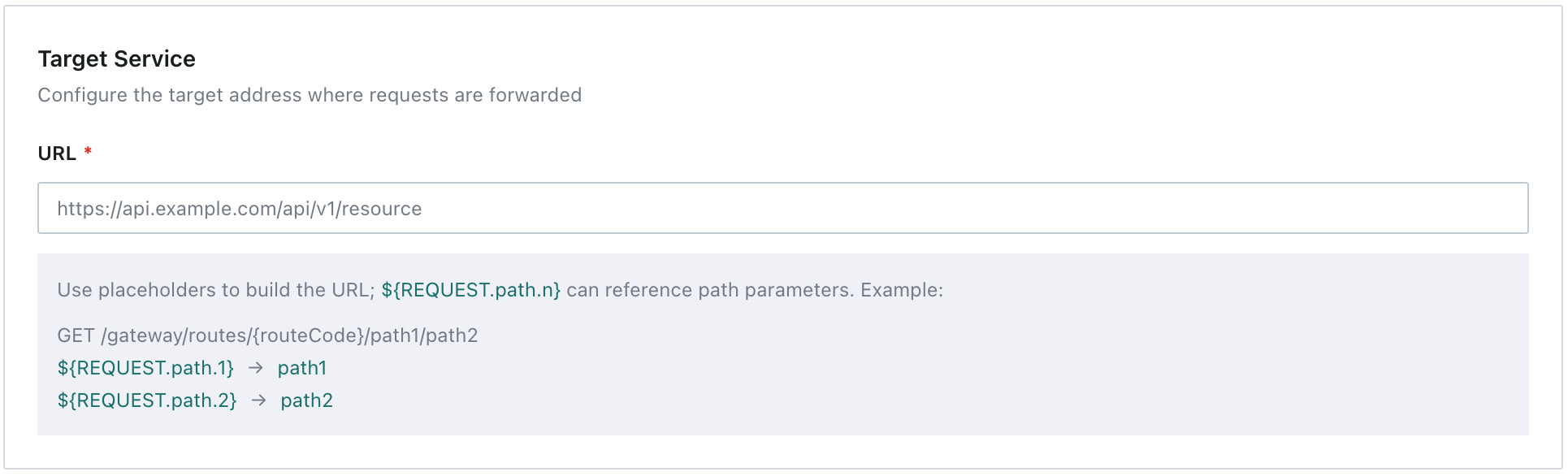
If the caller accesses:
https://{bi-host}/api/gateway/routes/user-resource/123/profile
The mapping is:
| Extra Path Segment | Placeholder | Value |
|---|---|---|
| 1st segment | ${REQUEST.path.1} | 123 |
| 2nd segment | ${REQUEST.path.2} | profile |
If the target URL is:
https://api.example.com/users/${REQUEST.path.1}/resources/${REQUEST.path.2}
The target service receives:
https://api.example.com/users/123/resources/profile
Path parameters come from the appended path after the identifier in the access URL. Appended paths are not automatically added to the target URL. They participate in the target request only after being referenced with ${REQUEST.path.n}.
Security Configuration
Configure origin restrictions and log masking rules in Security Configuration.
| Configuration | Description |
|---|---|
| Allowed Caller Host | Separate multiple values with commas. Empty means no origin restriction. You can enter domains or IP addresses, such as example.com,10.0.0.1. |
| Log Masking Headers | Separate multiple values with commas. Matched Headers are shown as *** in audit logs. |
Common masking configuration:
Authorization,Cookie,X-Auth-Token
Actual values after sensitive data replacement are also masked in audit logs.
Request Configuration
After completing basic settings, click Next to open Request Configuration.

Request Configuration includes Pre-request and Main Request Configuration. Pre-requests retrieve tokens or temporary credentials before the main request. Main Request Configuration declares how caller requests are mapped to the target service.
If Headers, Query, Body, or pre-requests need sensitive credentials, configure Sensitive Data first and reference it with ${SECRET.yourKey}. See Configure Sensitive Data.
(Optional:)Pre-request
If the target API requires login, token exchange, or temporary credentials before the call, click Add Pre-request.
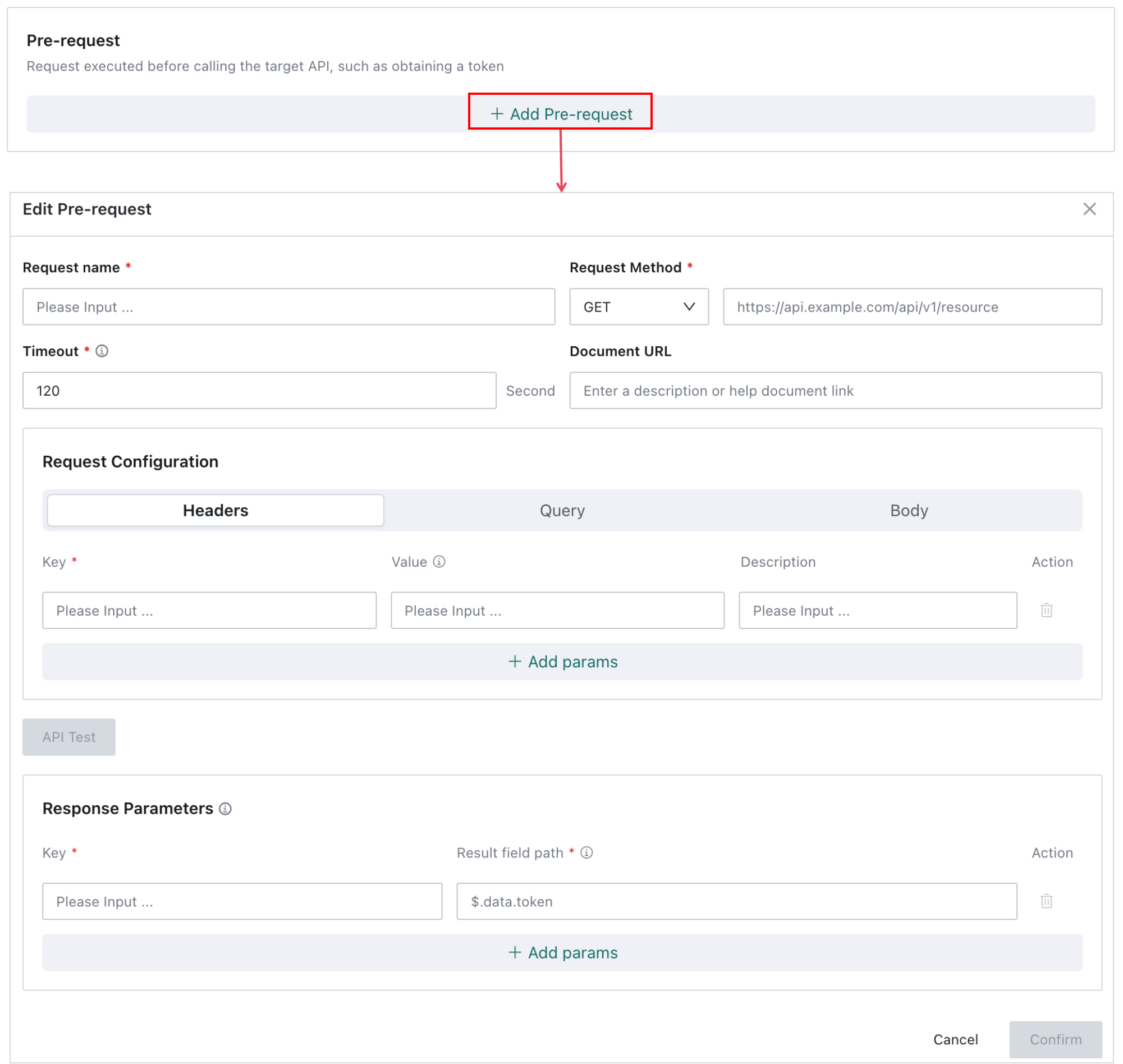
Basic Fields

| Field | Description |
|---|---|
| Request Name | Pre-request name, such as Get CRM Token. |
| Request Method | Supports GET and POST. |
| URL | Target URL of the pre-request. |
| Timeout | Maximum wait time of the pre-request, in seconds. |
| Documentation URL | Optional. Link to pre-request API documentation. |
Request Configuration
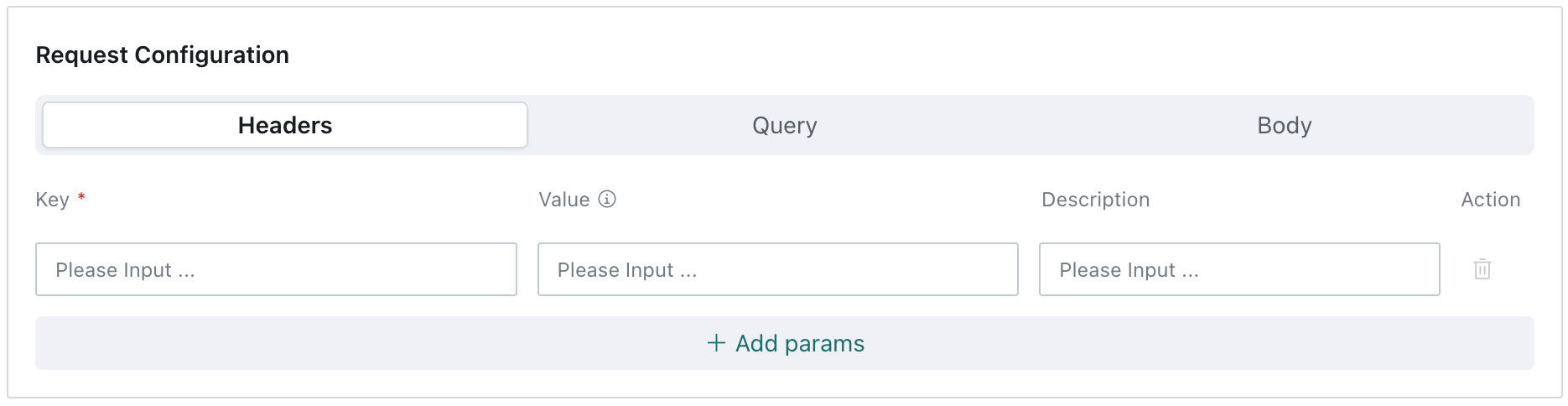
Pre-requests support Headers, Query, and Body. If credentials are needed, configure Sensitive Data first and reference it with ${SECRET.yourKey}.
A common case is calling a login API and injecting a client id and client secret into the Body.
{
  "clientId": "${SECRET.crm_client_id}",
  "clientSecret": "${SECRET.crm_client_secret}"
}
Common variables in pre-requests:
| Variable | Description |
|---|---|
${SECRET.xxx} | Reads sensitive data. |
${CURRENT_USER.xxx} | Reads current logged-in user information. |
Pre-request API Test
You can send a test request in the pre-request edit dialog. Headers, Query, and Body can be temporarily changed for the test.

Check:
- Whether the pre-request returns normally.
- Whether the response body is JSON.
- Whether JSONPath extracts the expected fields.
- Whether referenced sensitive data exists.
If the pre-request fails, the main request will not continue.
Response Parameters
Response Parameters extract fields from the pre-request response. After the pre-request succeeds, the gateway reads fields from the response JSON according to configured JSONPath and binds them to custom parameter names. The main request can then reference these dynamic parameters with ${PRE_REQ.parameterName}.
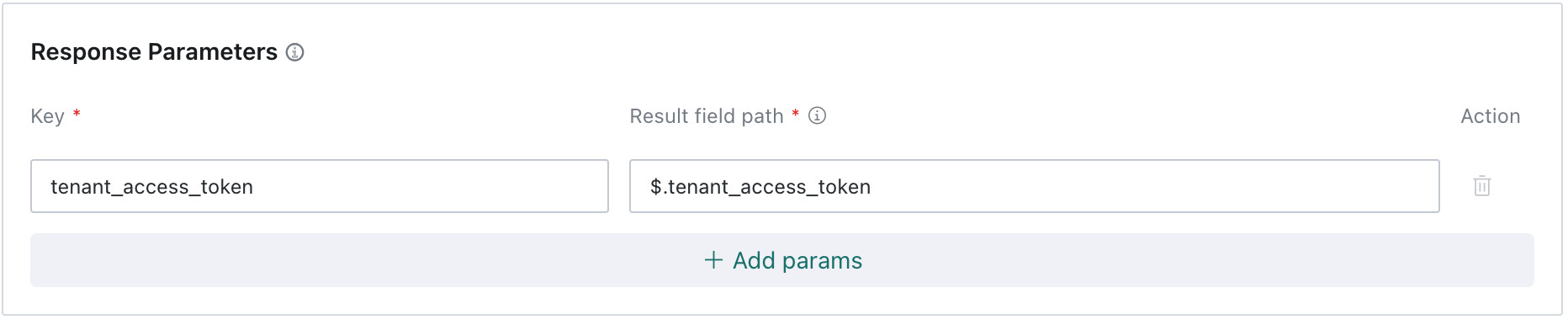
Pre-request response example:
{
  "code": 0,
  "data": {
    "token": "token-value",
    "expiresIn": 7200
  }
}
Dynamic parameter configuration example:
| Parameter | Result Field Path |
|---|---|
accessToken | $.data.token |
expiresIn | $.data.expiresIn |
Reference in the main request:
${PRE_REQ.accessToken}
If you configure multiple pre-requests, use clear and unique parameter names, such as crmAccessToken and tenantToken.
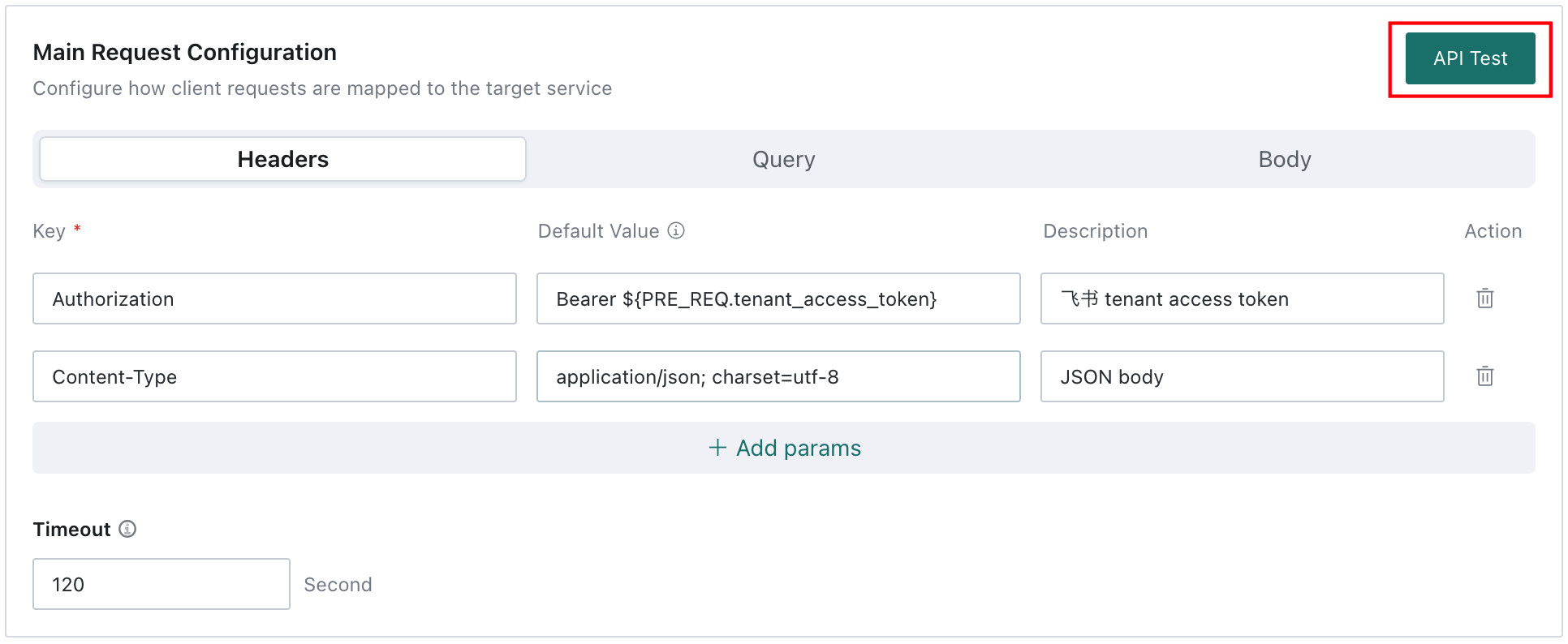
Main Request Configuration
Define how the gateway assembles and sends the target request, including Headers, Query, Body, and timeout. Only parameters configured here are sent to the target service. Caller-provided content that is not defined here is not automatically forwarded.

Parameter Settings
Headers
Configure request headers required by the target service. Only Headers configured here are sent to the target service. Extra caller headers are not forwarded automatically.
| Parameter | Default Value | Description |
|---|---|---|
| Authorization | Bearer ${PRE_REQ.accessToken} | Uses the token returned by the pre-request. |
| X-User-Id | ${CURRENT_USER.userId} | Passes the current logged-in user ID. |
| X-Request-Id | ${REQUEST.header.x-request-id} | Reads the caller-provided x-request-id. |
If the target service needs a caller-provided Header, explicitly define it here and read it through ${REQUEST.header.xxx}.
Query
Configure query parameters required by the target service. Only Query parameters configured here are sent to the target service. Extra caller Query parameters are not forwarded automatically.
| Parameter | Default Value | Description |
|---|---|---|
keyword | ${REQUEST.query.keyword} | Reads the search keyword from the caller. |
tenantId | ${CURRENT_USER.tenantId} | Passes the current tenant or domain information. |
If the caller accesses:
https://{bi-host}/api/gateway/routes/crm-query-user?keyword=John&page=1
but only keyword is defined in request forwarding, the target service receives only keyword, not page.
Body
Configure the main request Body. By default, the caller Body is forwarded to the target service as a whole, with placeholder replacement performed before forwarding.
For example, if the caller sends:
{
  "clientId": "${SECRET.crm_client_id}",
  "keyword": "John"
}
The system replaces ${SECRET.crm_client_id} with the actual sensitive value before sending the full Body to the target service.
Suggestions:
- If the target API only needs the caller Body to be forwarded, no additional Body configuration is required.
- If sensitive data, current-user information, or pre-request results need to be injected, use placeholders in the Body.
- Avoid letting untrusted callers send arbitrary
${...}text to prevent unexpected variable replacement.
Timeout
Timeout controls the maximum wait time for the target service request, in seconds. The default value is 120 seconds. Set a reasonable timeout based on target service performance.
Main Request API Test
After configuration, click API Test to validate the complete flow. Headers, Query, and Body can be temporarily changed during testing. Test parameters are not saved to the API configuration.
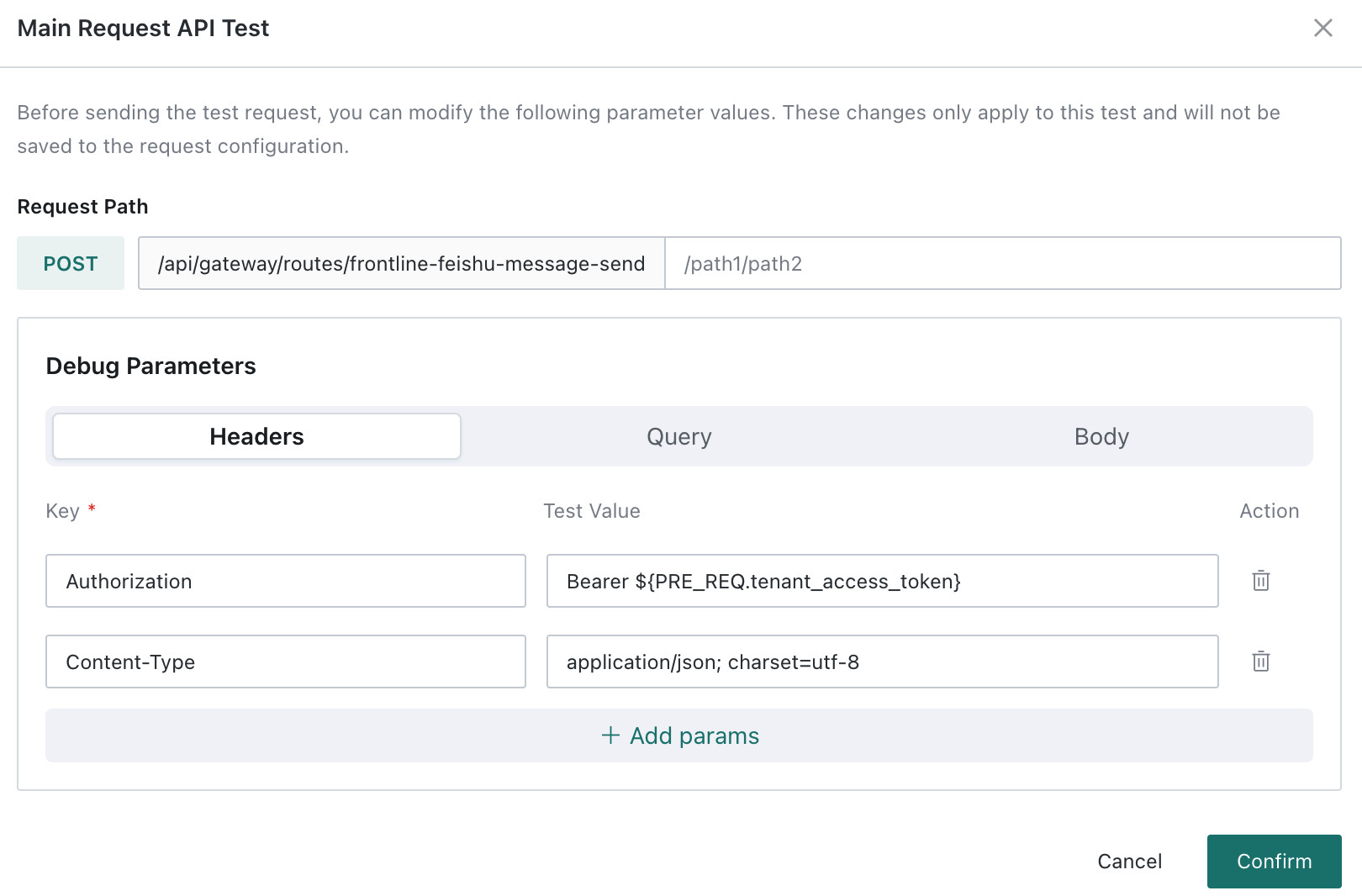
Before going online, verify:
- Test pre-requests separately and confirm token or dynamic parameters can be obtained.
- Check whether dynamic parameter JSONPath extracts the correct values.
- Test the main request and confirm status code, response body, and response headers are as expected.
- Check audit logs and confirm sensitive Headers and sensitive data are masked.
- Enable the API.
- Call the real access URL once from the external caller.
Optional: Configure Sensitive Data
If the target API or pre-request needs credentials such as third-party tokens, passwords, AK/SK, or client secrets, manage them in Sensitive Data. Then reference them in Headers, Query, Body, or pre-requests with ${SECRET.yourKey}.
Steps
-
On the Request Forwarding list page, click Sensitive Data in the upper-right corner.

-
Click New Sensitive Data, enter
secretKeyand the secret value, and click OK.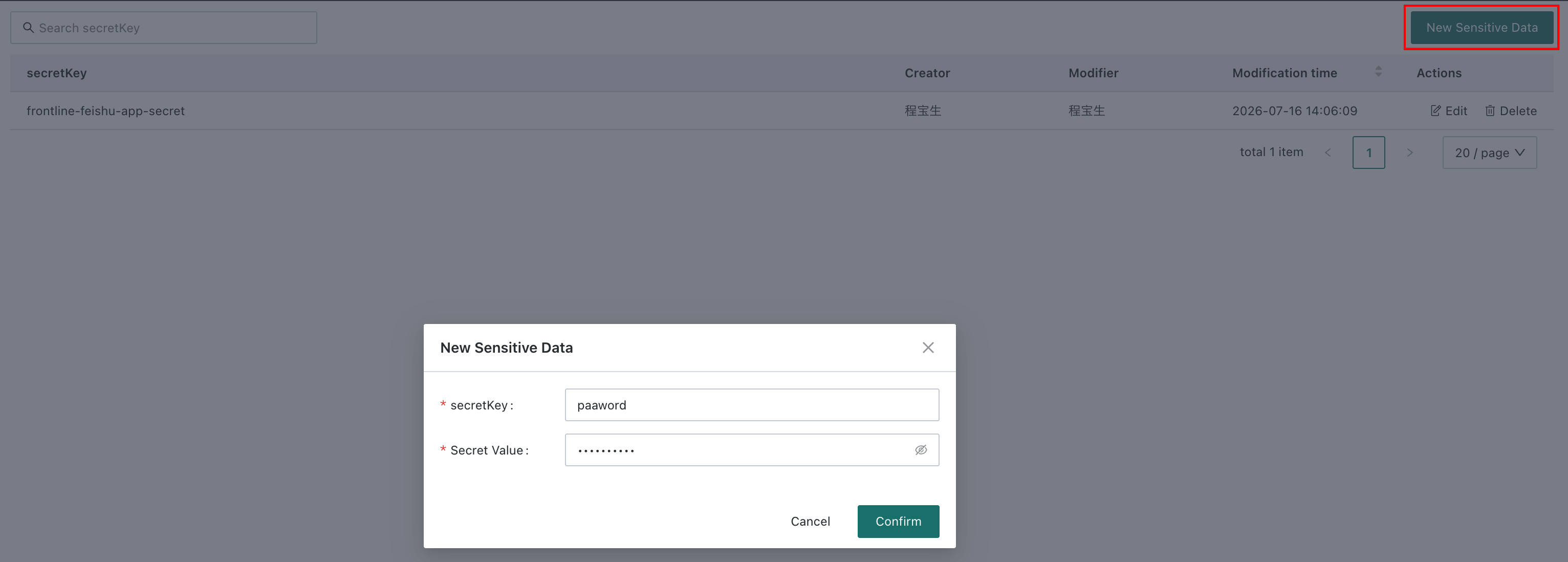
Example sensitive data:
| Key | Example Value |
|---|---|
crm_client_id | mock_client_id_123 |
crm_client_secret | mock_client_secret_456 |
Security Rules
- Sensitive data is stored encrypted.
- The frontend does not return saved sensitive data in plaintext.
- Actual values produced by sensitive data references are automatically masked in audit logs.
- Before deleting or modifying sensitive data, confirm which APIs depend on it.
Configuration Examples
Example 1: Simple Query Forwarding Without Pre-request
Goal
A Super App queries CRM users through the Guandata gateway.
Basic Settings
| Field | Value |
|---|---|
| Identifier | crm-query-user |
| API Name | CRM Query User |
| Gateway Request Method | GET |
| Target Request Method | GET |
| Target URL | https://crm.example.com/api/users |
Main Request Query Configuration
| Parameter | Default Value | Description |
|---|---|---|
keyword | ${REQUEST.query.keyword} | Reads the query keyword passed by the Super App. |
Frontend Call
const response = await fetch(
  `/api/gateway/routes/crm-query-user?keyword=${encodeURIComponent("John")}`,
  {
    method: "GET",
    credentials: "include"
  }
);

const result = await response.json();
Target Service Receives
GET https://crm.example.com/api/users?keyword=John
If the frontend also passes page=1 but page is not defined in request forwarding, the target service does not receive page.
Example 2: Retrieve a Token Before Calling the Target API
Goal
A Super App creates a ticket. The target system requires a token first.
Sensitive Data
| Key | Description |
|---|---|
crm_client_id | CRM client id. |
crm_client_secret | CRM client secret. |
Basic Settings
| Field | Value |
|---|---|
| Identifier | crm-create-ticket |
| API Name | CRM Create Ticket |
| Gateway Request Method | POST |
| Target Request Method | POST |
| Target URL | https://crm.example.com/api/tickets |
Pre-request
| Field | Value |
|---|---|
| Request Name | Get CRM Token |
| Request Method | POST |
| URL | https://crm.example.com/oauth/token |
| Body | Inject credentials with ${SECRET.crm_client_id} and ${SECRET.crm_client_secret}. |
Pre-request Body
{
  "clientId": "${SECRET.crm_client_id}",
  "clientSecret": "${SECRET.crm_client_secret}"
}
Pre-request Response
{
  "accessToken": "token-value"
}
Response Parameters
| Parameter | JSONPath |
|---|---|
accessToken | $.accessToken |
Main Request Headers
| Parameter | Default Value | Description |
|---|---|---|
| Authorization | Bearer ${PRE_REQ.accessToken} | Injects the token returned by the pre-request into the target request Header. |
| Content-Type | application/json | Declares the request body format. |
Frontend Call
const response = await fetch("/api/gateway/routes/crm-create-ticket", {
  method: "POST",
  credentials: "include",
  headers: {
    "Content-Type": "application/json"
  },
  body: JSON.stringify({
    title: "Customer feedback",
    priority: "high"
  })
});

const result = await response.json();
Execution Result
- The gateway first calls the token API.
- The system extracts
accessTokenfrom the response. - The system injects the token into the main request Authorization Header.
- The gateway forwards the caller Body to the CRM ticket creation API.
- The gateway forwards the CRM response to the caller.
Example 3: Forwarding Appended Paths
Goal
A Super App passes a user ID and resource type through the path.
Basic Settings
| Field | Value |
|---|---|
| Identifier | user-resource |
| Gateway Request Method | GET |
| Target Request Method | GET |
| Target URL | https://api.example.com/users/${REQUEST.path.1}/resources/${REQUEST.path.2} |
Frontend Call
const userId = "123";
const resourceType = "profile";

const response = await fetch(
  `/api/gateway/routes/user-resource/${userId}/${resourceType}`,
  {
    method: "GET",
    credentials: "include"
  }
);
Path Parameter Mapping
| Appended Path | Placeholder | Value |
|---|---|---|
| 1st segment | ${REQUEST.path.1} | 123 |
| 2nd segment | ${REQUEST.path.2} | profile |
Target Service Receives
GET https://api.example.com/users/123/resources/profile
Operations and Audit
Responses and Errors
Normal Response
When the target service returns normally, the gateway forwards by default:
- HTTP status code.
- Response body.
- Response headers after security filtering.
The following response headers are not forwarded:
- Authentication and session headers:
authorization,proxy-authorization,set-cookie,x-auth-token. - Connection and transfer headers:
connection,content-length,transfer-encoding. - Security policy headers:
content-security-policy,x-frame-options,strict-transport-security. - CORS headers: headers starting with
access-control-orcross-origin-.
Gateway Error Format
Gateway-owned errors return a unified structure:
{
  "success": false,
  "code": "GATEWAY_ROUTE_NOT_FOUND",
  "message": "gateway route not found",
  "data": null
}
Common Troubleshooting
| Issue | What to Check |
|---|---|
| Route not found | Check whether the identifier is correct and whether the API was deleted. |
| API disabled | Check whether the API is enabled. |
| Request method mismatch | Check whether the caller method matches the gateway request method. |
| No permission | Check whether the user is logged in and belongs to the allowed users or groups. |
| Origin not allowed | Check whether the caller Host matches Allowed Caller Host. |
| Pre-request failed | Test the pre-request separately and check URL, Headers, Body, Secrets, and response format. |
| Dynamic parameter is empty | Check whether the pre-request response is JSON and whether JSONPath is correct. |
| Target API timeout | Check target service availability and timeout settings. |
| Sensitive value not injected | Check whether the Sensitive Data key exists and whether the reference format is correct. |
| Target service did not receive Header or Query | Check whether that Header or Query has been explicitly defined in request forwarding. |
Audit Logs
Request Forwarding records three types of logs for security audit and troubleshooting:
- Management operation logs cover API and sensitive data creation, editing, deletion, enabling, and disabling.
- Test operation logs record request summaries, response status, and results during API testing.
- Runtime call logs record each request forwarding call, pre-request execution, target service call, and masked request summaries.
View audit logs in Management Center > Operation & Maintenance Management > Audit Log.
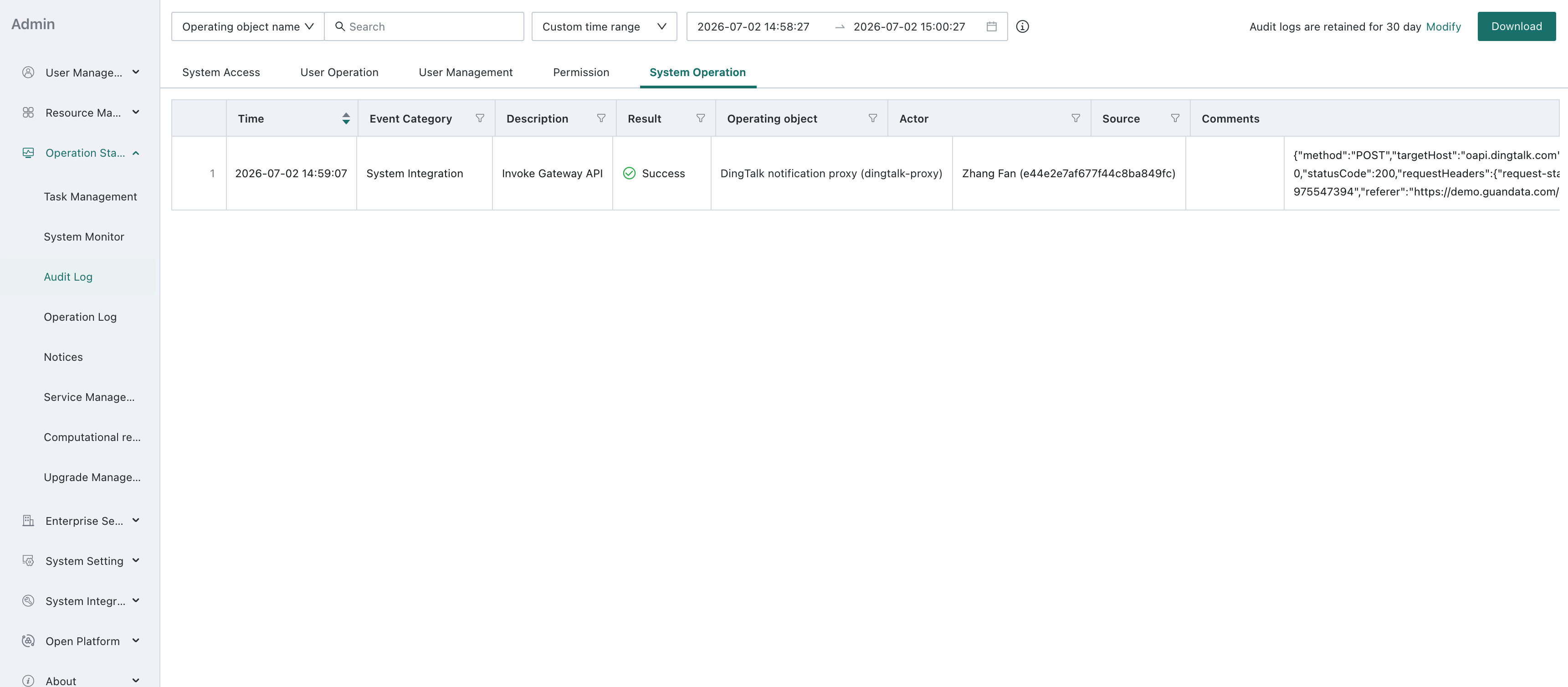
Sensitive content in logs is masked according to masking rules to prevent plaintext leakage.
| Masked Object | Handling | Example |
|---|---|---|
| Request headers that match Log Masking Headers | Value is replaced with ***. | Authorization: *** |
| Actual values after sensitive data replacement | Replaced with *** before logs are written. | The actual value of ${SECRET.crm_client_secret} is not written to logs. |
| Common sensitive fields | Fields containing password, token, secret, authorization, etc. should be masked. | accessToken: *** |
| Cookie or session credentials | Plaintext is not recorded. | Cookie: *** |
Example:
| Original Headers | Written to Audit Log |
|---|---|
Authorization: Bearer eyJhbGciOi... | Authorization: *** |
Cookie: session_id=abc123 | Cookie: *** |
Content-Type: application/json | Content-Type: application/json |
Configuration Suggestions
- Use business prefixes for identifiers to avoid conflicts across teams.
- Enable login verification by default in production.
- Configure Allowed Caller Host when exposing APIs to external systems.
- Do not write sensitive data as plaintext normal parameters. Manage it through Sensitive Data.
- Configure Log Masking Headers, at least including Authorization, Cookie, and X-Auth-Token.
- Headers and Query parameters required by the target service must be explicitly defined in request forwarding.
- Keep pre-requests stable and fast to avoid slowing down the main request.
- Use clear dynamic parameter names, such as
accessTokenandtenantToken. - Test pre-requests first, then test the complete main request before going online.
- Before modifying or deleting sensitive data, confirm which APIs depend on it.
- Regularly review audit logs and call origins for high-risk APIs.