Distributor Distribution in Consumer Goods
Overview
This guide helps delivery consultants and FDE teams map customer BI data into business diagnostics that can be analyzed and validated. It provides an ontology design framework and agent configuration reference for consumer goods distributor distribution.
Before You Start
This guide assumes familiarity with DecideX and independent experience configuring business ontologies and agents. If objects, relationships, ontologies, or agents are new to you, first read:
- DecideX Quick Start Guide: Core capabilities, data connections, and the complete configuration workflow.
- Business Ontologies: Objects, relationships, metrics, risks, actions, question scenarios, and creation methods.
- Agents: Creation methods, role instructions, and BI asset bindings.
This is a reusable business modeling framework, not a basic operations tutorial or a customer-specific table and field dictionary. Adapt it to the customer's actual data structures and business definitions.
You will learn which distribution problems an ontology can address, what to configure, how business users can ask questions, and how to keep conclusions consistently defined, evidence-based, and traceable.
Scenario
Distributor management involves more than sales totals. Teams need to know:
- Which distributors, regions, or sales representatives missed targets.
- Which outlets require priority follow-up.
- Whether visits, displays, and SKU audits were completed properly.
- Whether weak results reflect demanding targets, insufficient store coverage, missed visits, or product execution issues.
- Who was responsible when store, route, or personnel assignments changed.
These answers are often scattered across reports, datasets, and metrics for targets, orders, stores, representatives, distributors, routes, displays, visits, and SKU audits. An ontology unifies these concepts into a business reference that helps agents interpret questions and use consistent definitions for queries, root-cause analysis, risk assessment, and recommendations.
Prerequisites
- A DecideX account with permission to create business ontologies and agents.
- A customer BI connection configured through the connectors area, or an agreed data integration plan.
- An inventory of relevant data, typically organization hierarchy, distributors, stores, routes, distribution orders, visits, displays, SKU audits, and target achievement.
- Defined management, responsibility, coverage, service, and reporting relationships among regions, supervisors, representatives, distributors, routes, and stores.
The counts of objects, relationships, metrics, risks, actions, and scenarios below are examples. Reduce or extend them according to available data and business needs.
Ontology Configuration Overview
| Component | Suggested count | Purpose |
|---|---|---|
| Business objects | About 24 | People, products, locations, orders, and execution records. |
| Relationships | About 36 | Management, responsibility, coverage, service, and ownership. |
| Business risks | About 10 | Risks involving targets, store execution, displays, visits, and SKU audits. |
| Recommended actions | About 10 | Operational responses to risks. |
| Question scenarios | About 10 | Common day-to-day business questions. |
The scope includes organization hierarchy, distributors, stores, routes, orders, visits, displays, SKU audits, and responsibility tracking across historical changes.
Configure objects → relationships → metrics → risks → actions → question scenarios. Each stage supports the next; clarify relationships before defining risks or scenarios.
Core Ontology Configuration
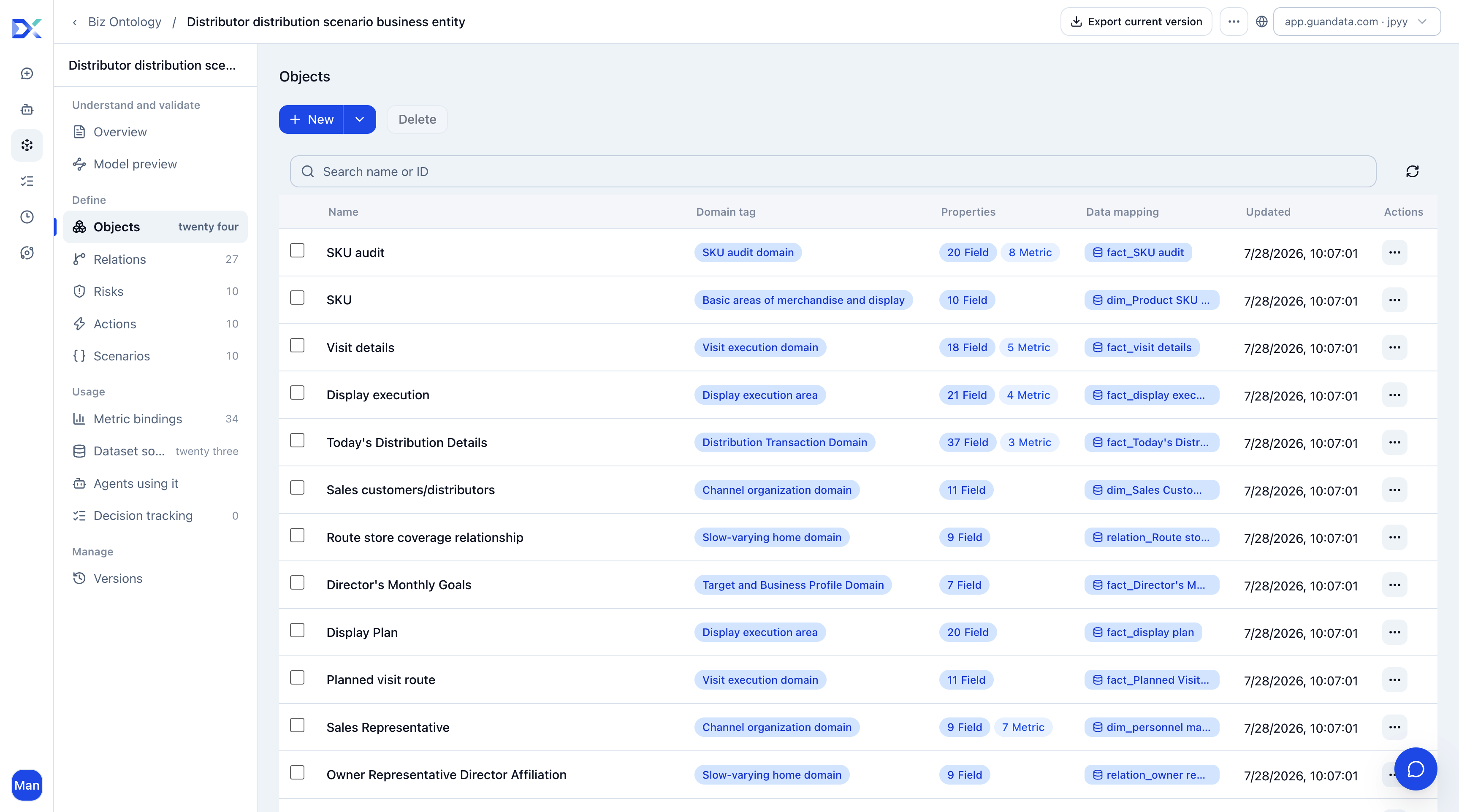
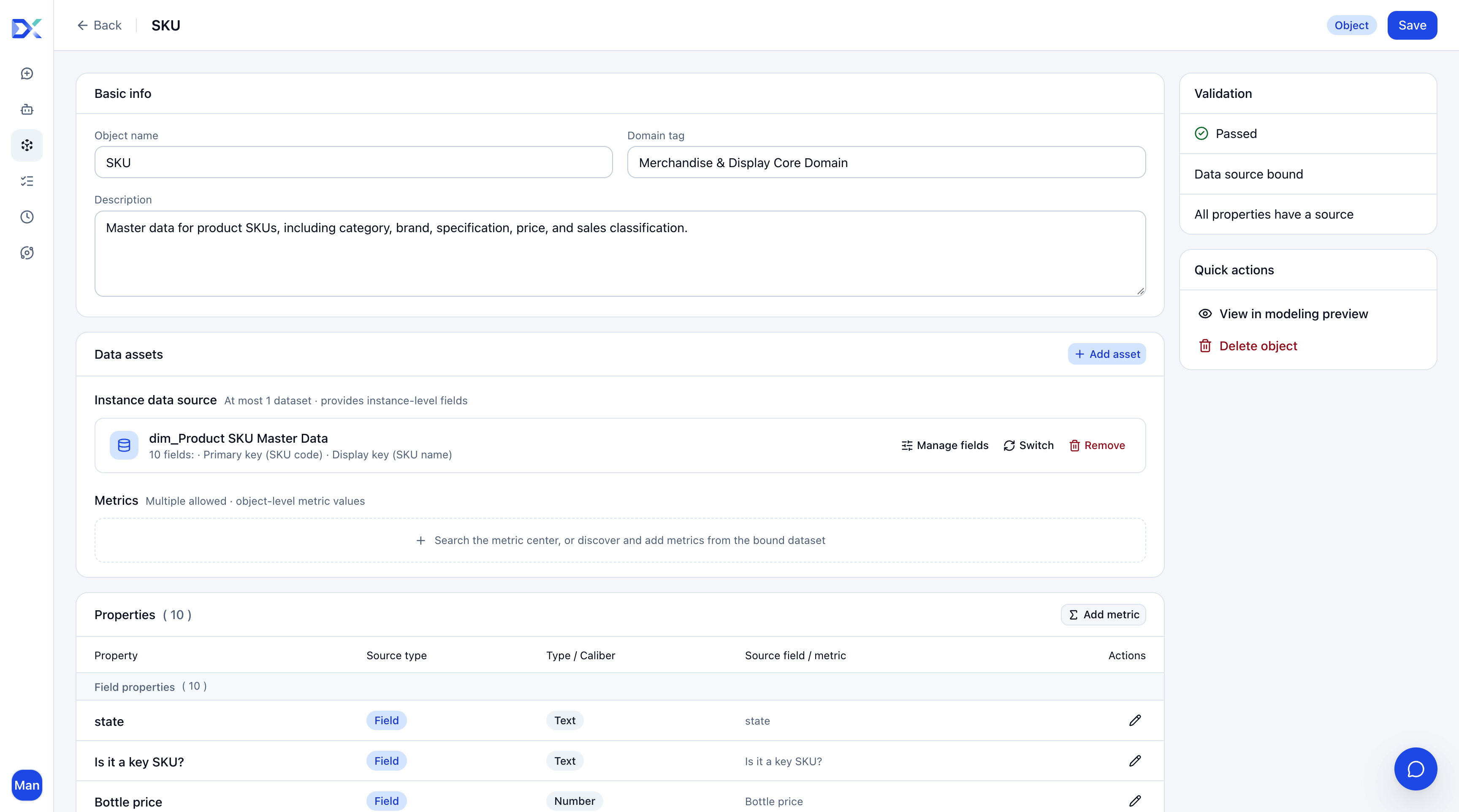
Define Analysis Objects
Business users ask whose sales, which distributor, which region, which store, or which SKU—not just the sales total. Define these objects first.
| Object category | Examples | Questions addressed |
|---|---|---|
| Organization and people | Regions, supervisors, representatives | Who is responsible, manages the work, and should follow up? |
| Channels and outlets | Distributors, routes, stores | Which channels and stores are affected? |
| Products and execution | SKUs, displays, visits, audits | Were outlet activities performed correctly? |
| Transactions and results | Distribution orders and order details | What were the final distribution results? |
For example:
Which sales representatives have the weakest target achievement this month?
An agent should identify representatives, targets, orders, and store responsibility relationships, then investigate them—not merely return a ranking of achievement rates.
Connect Responsibility Relationships
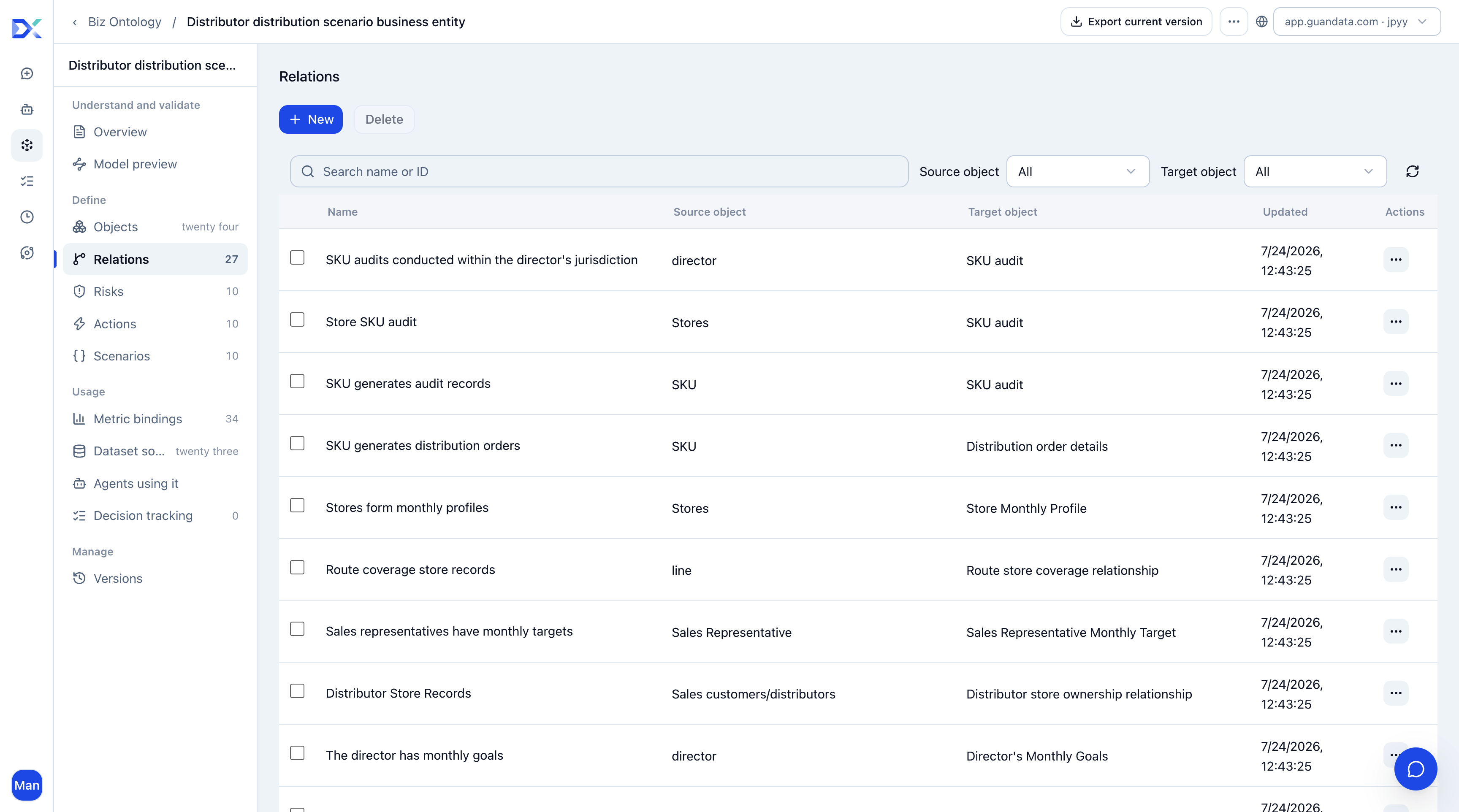
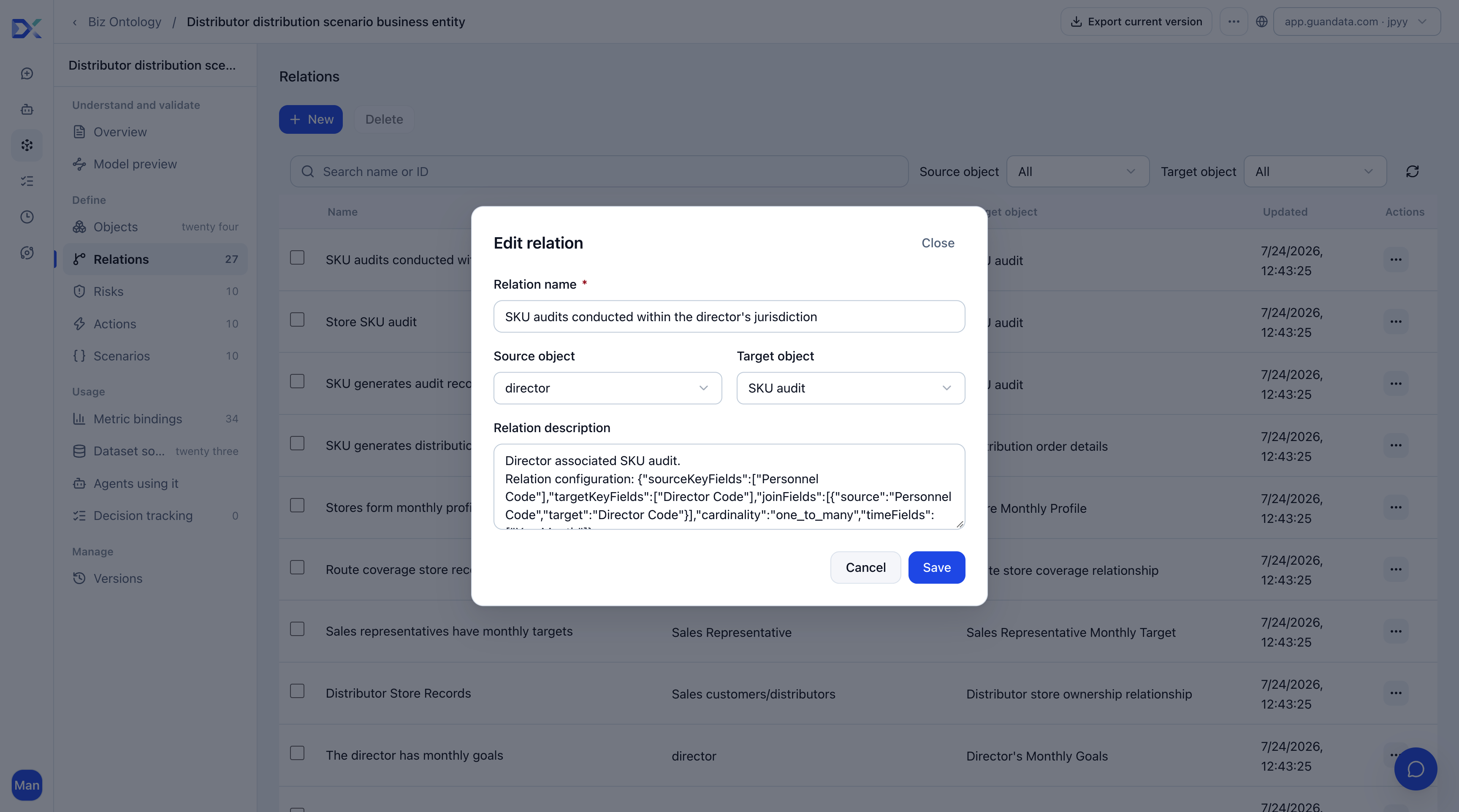
Problems rarely involve one object alone. When a store's distribution declines, the agent needs its distributor, responsible representative, route, recent visits, and display or SKU audit issues. These relationships connect an abnormal metric to accountable people and follow-up actions.
| Relationship | Source object | Target object | Business meaning |
|---|---|---|---|
| SKU appears in an audit | SKU | SKU audit | Identify the audited product. |
| Store undergoes a SKU audit | Store | SKU audit | Inspect store-level audit results. |
| Display item appears in execution | Display item | Display execution | Identify the item being checked. |
| Store executes a display | Store | Display execution | Check execution and compliance. |
| Display item appears in a plan | Display item | Display plan | Identify the planned item. |
| Store has a display plan | Store | Display plan | Check display contracts or plans. |
| SKU appears in today's distribution | SKU | Today's distribution details | Identify products distributed today. |
| Store has today's distribution | Store | Today's distribution details | Inspect the latest store distribution records. |
| SKU appears in an order | SKU | Distribution order details | Analyze product performance in orders. |
| Route carries an order | Route | Distribution order details | Attribute an order to its route. |
| Distributor fulfills an order | Distributor as sales customer | Distribution order details | Inspect supply and receipt fulfillment for store orders. |
| Store generates an order | Store | Distribution order details | Inspect outlet ordering demand. |
| Representative generates an order | Representative | Distribution order details | Inspect orders driven by a representative. |
| Store enters a visit plan | Store | Planned visit route | Identify stores included in planned visits. |
| Route has a visit plan | Route | Planned visit route | Inspect route-level arrangements. |
| Store receives a visit | Store | Visit details | Inspect actual store visits. |
| Representative performs a visit | Representative | Visit details | Inspect actual representative activity. |
| Store has a monthly profile | Store | Monthly store profile | Inspect monthly business and execution performance. |
| Store assignment identifies a store | Distributor–store assignment | Store | Identify the assigned store. |
| Distributor has store assignments | Distributor as sales customer | Distributor–store assignment | Identify stores under the distributor. |
| Coverage record identifies a store | Route–store coverage | Store | Identify the covered store. |
| Route has store coverage records | Route | Route–store coverage | Identify stores covered by the route. |
| Responsibility record identifies a distributor | Supervisor–distributor responsibility | Distributor as sales customer | Identify the assigned distributor. |
| Supervisor has distributor responsibility | Supervisor | Supervisor–distributor responsibility | Identify distributors under the supervisor. |
| Service record identifies a route | Representative–route service | Route | Identify the serviced route. |
| Representative has route service records | Representative | Representative–route service | Identify the representative's routes. |
| Reporting record identifies a supervisor | Representative–supervisor assignment | Supervisor | Identify the supervisor. |
| Representative has reporting assignments | Representative | Representative–supervisor assignment | Identify the representative's reporting line. |
| Representative has monthly targets | Representative | Representative monthly target | Inspect monthly targets. |
| Supervisor has monthly targets | Supervisor | Supervisor monthly target | Inspect monthly territory targets. |
| Region contains stores | Regional hierarchy | Store | Identify the store's region. |
| Region contains distributors | Regional hierarchy | Distributor as sales customer | Identify the distributor's region. |
| Region contains routes | Regional hierarchy | Route | Identify the route's region. |
| Region contains representatives | Regional hierarchy | Representative | Identify the representative's region. |
| Region contains supervisors | Regional hierarchy | Supervisor | Identify the supervisor's region. |
In summary, distributors serve stores, representatives are responsible for stores, supervisors manage representatives, routes cover stores, stores generate orders, and SKUs have associated store display, visit, or audit results. Without these relationships, the agent can report a decline but cannot explain why it happened or who should act.
Define Consistent Metrics
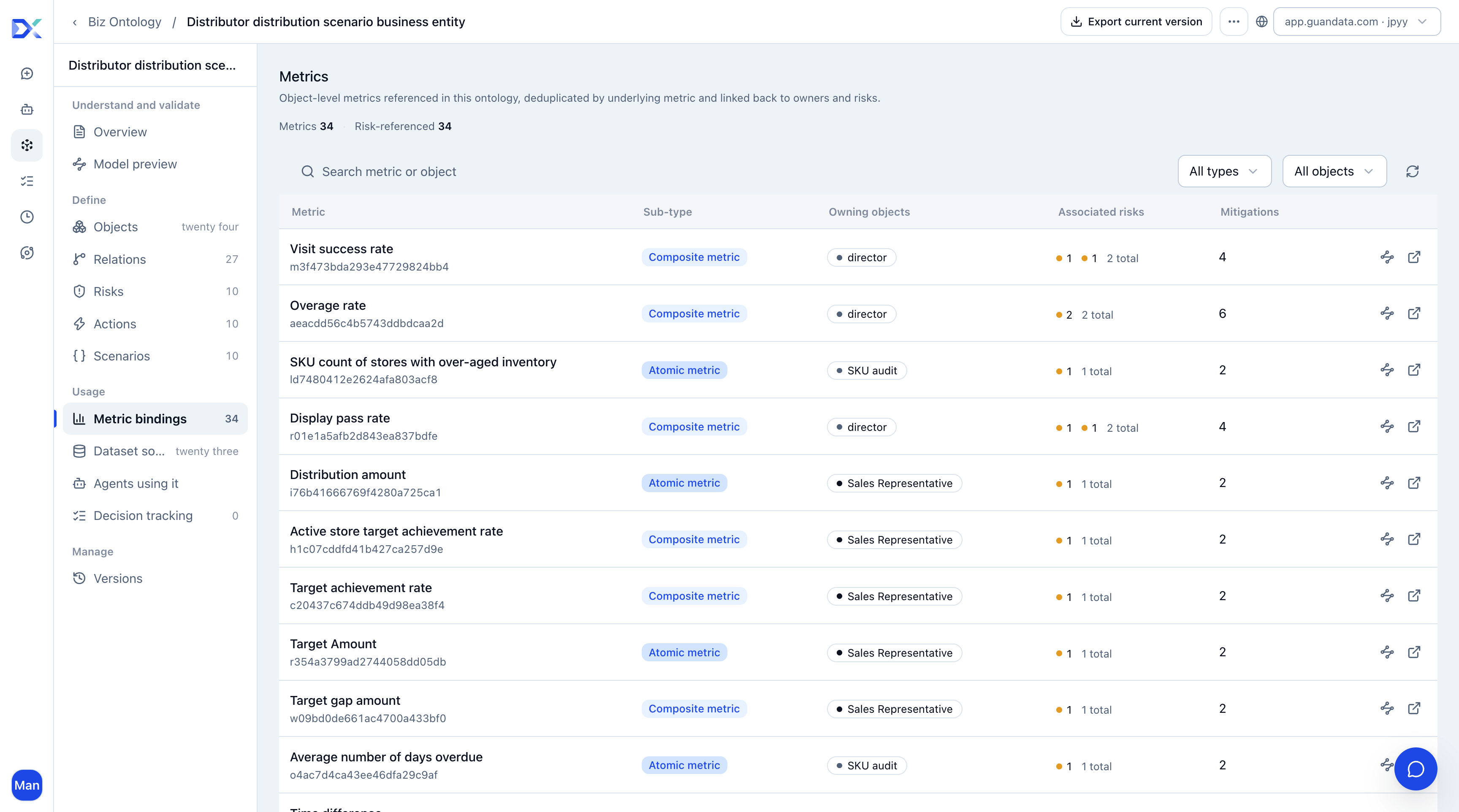
Typical metrics include distribution amount and volume, target achievement rate and gap, visit completion rate, covered store count, display compliance rate, SKU audit pass rate, valid store count, and active store count.
Use customer-approved definitions first; use detailed data to drill down and explain causes. Direct use of formal metrics from Metric Center requires purchasing and enabling Metric Center.
For example:
How is this representative performing against this month's target?
Use approved target achievement, target gap, and distribution amount definitions rather than inventing a calculation from detail records. Where formal metrics are unavailable, express them through dataset fields, calculated fields, or metric definitions in the ontology.
Consistent definitions keep calculations stable across users, make conclusions explainable, and support later reviews such as checking whether achievement improved the following week.
Configuration and key information
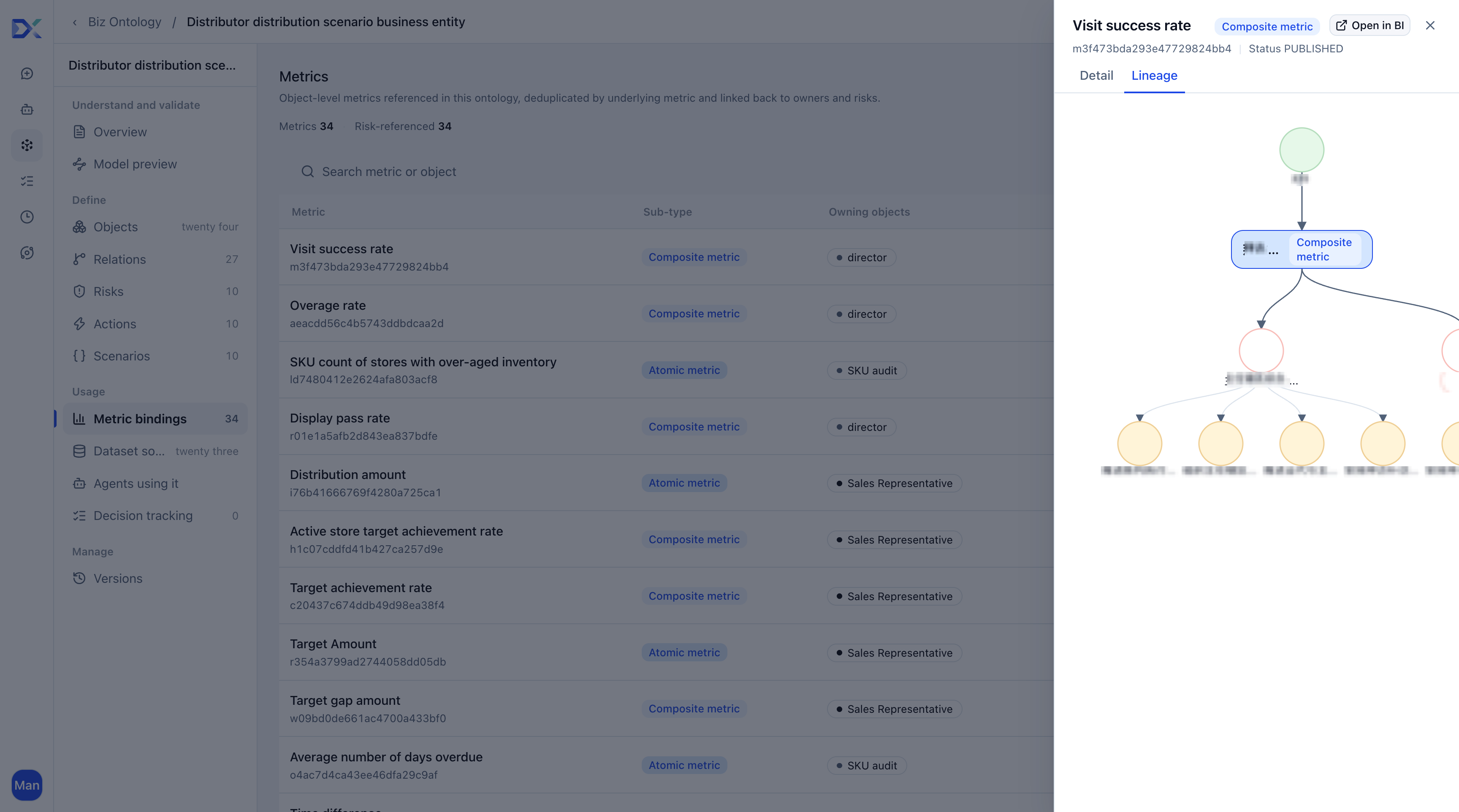
Open the target ontology object and configure metrics in its data assets. The associations and usage area displays bindings and references only; it does not edit them. See Metrics.
The following table describes business information to confirm before modeling, not fields in a metric creation form.
| Information | Recommendation |
|---|---|
| Metric name | Use a recognized business name, such as distribution amount or target achievement rate. |
| Business definition | Describe the calculation, such as the sum of completed distribution order amounts during the period. |
| Calculation logic | Associate the appropriate customer BI fields or calculated fields. |
| Owning object | Specify the primary analysis object; for example, distribution amount belongs to distribution orders. |
| Time dimension | Specify supported periods, such as day, week, or month. |
Common mistakes
- Defining the same metric differently in different places.
- Failing to bind the owning object, leaving the agent unsure what to analyze.
- Replacing an approved definition with an ad hoc detail-field calculation that cannot be traced.
Define Risk Rules
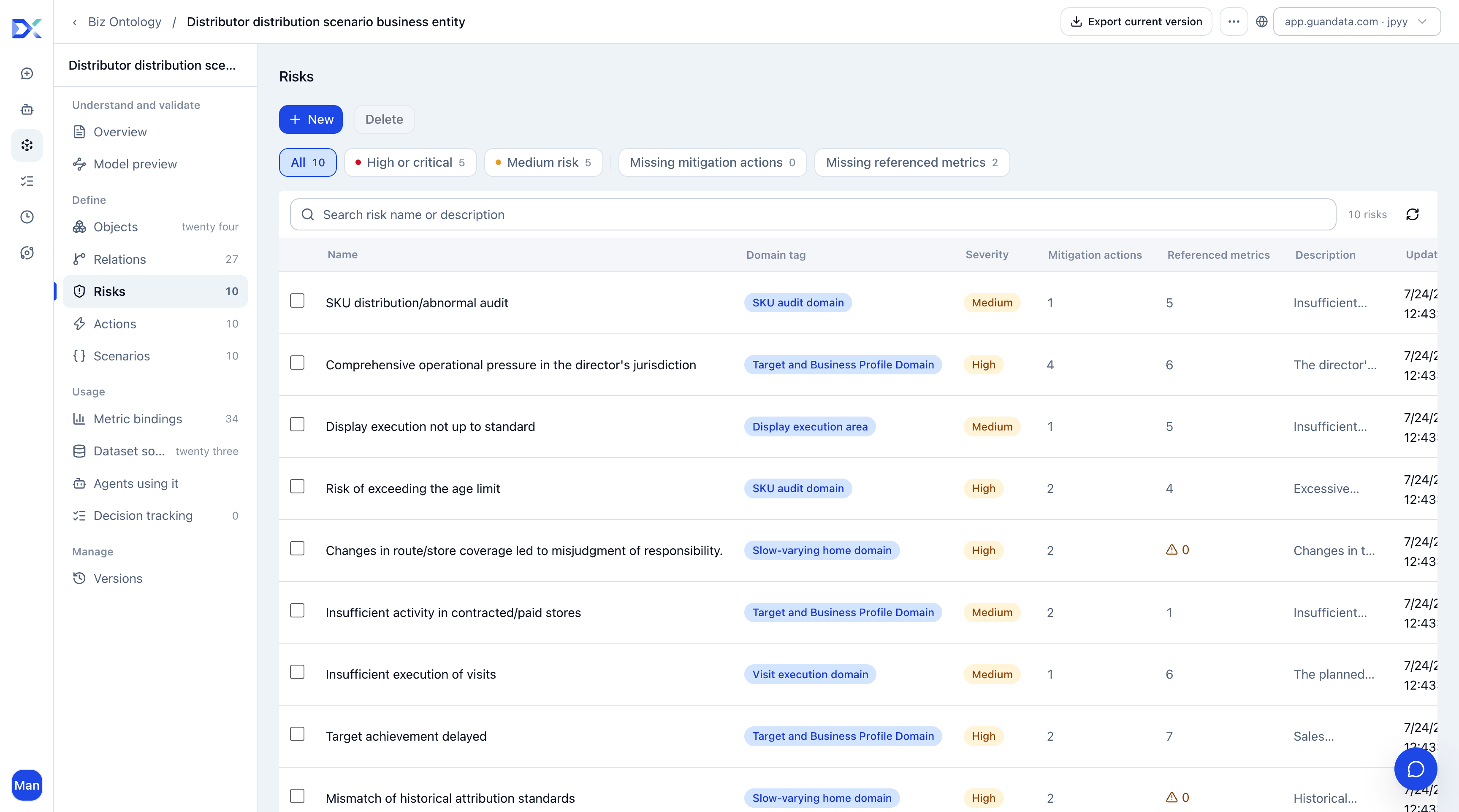
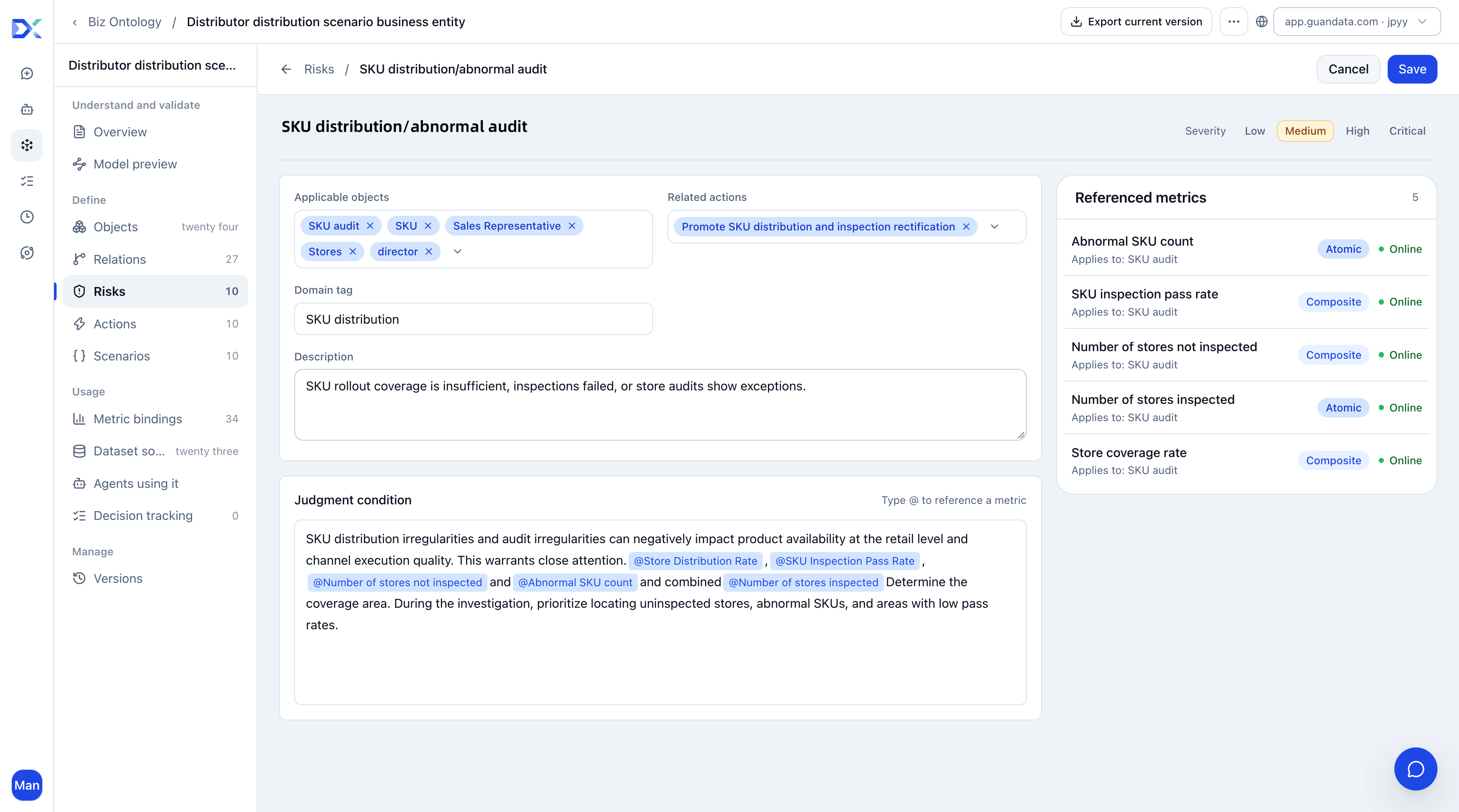
Risks are business problems that need attention: weak target achievement, declining distribution, insufficient visits, abnormal display compliance, SKU audit exceptions, insufficient distributor coverage, low store activity, and unclear responsibility.
| Question | What to specify |
|---|---|
| Who is affected? | Distributor, representative, store, SKU, or region. |
| What is the evidence? | Target achievement, distribution amount, visit completion, display compliance, or another metric. |
| What happens next? | Track targets, revisit stores, correct displays, or review SKUs. |
Instead of defining target risk as simply “target not met,” use a rule such as:
When a distributor, region, or representative has a low target achievement rate and a large target gap in the current period, flag the risk and identify priority follow-up objects and recommended actions.
Connect Risks to Actions
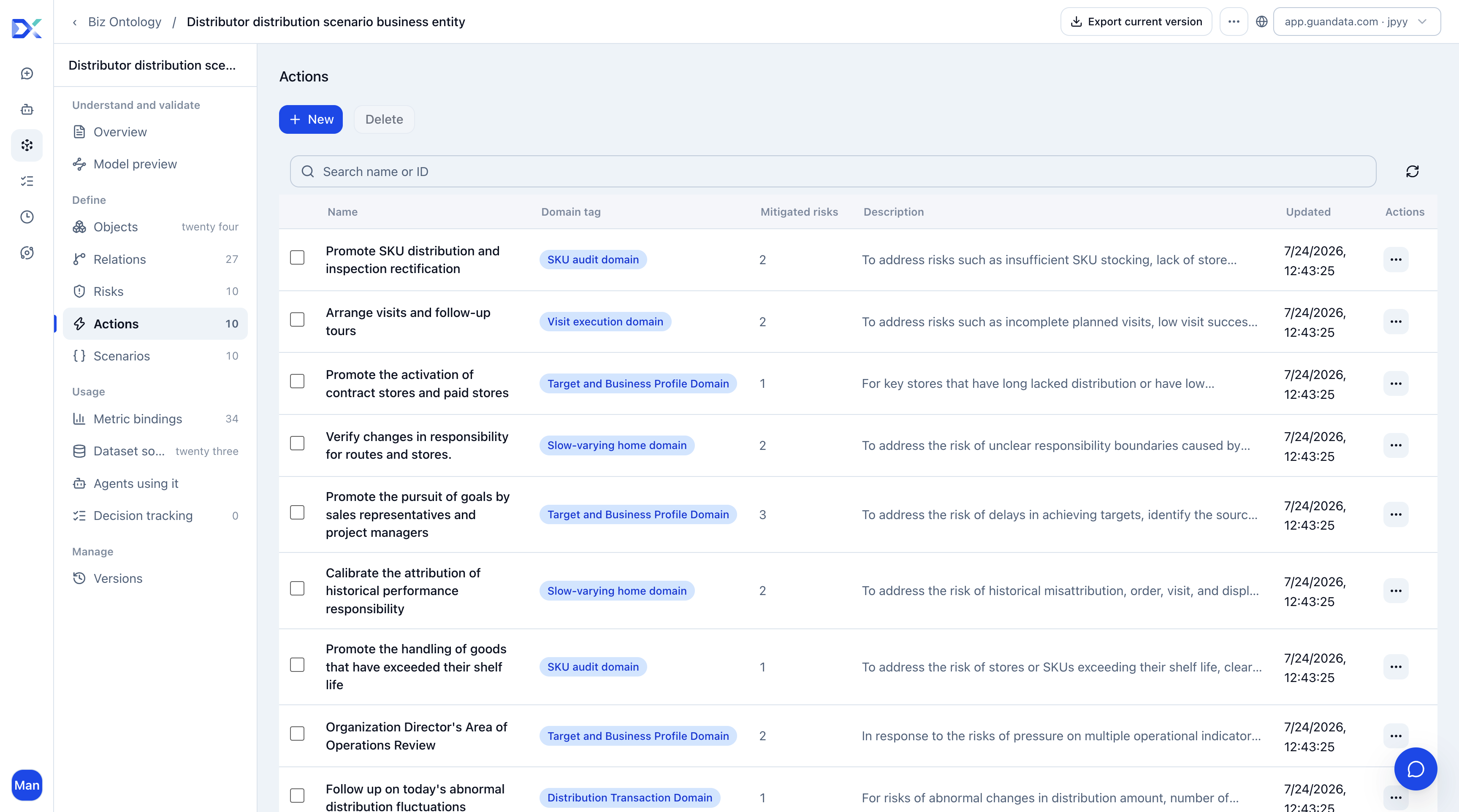
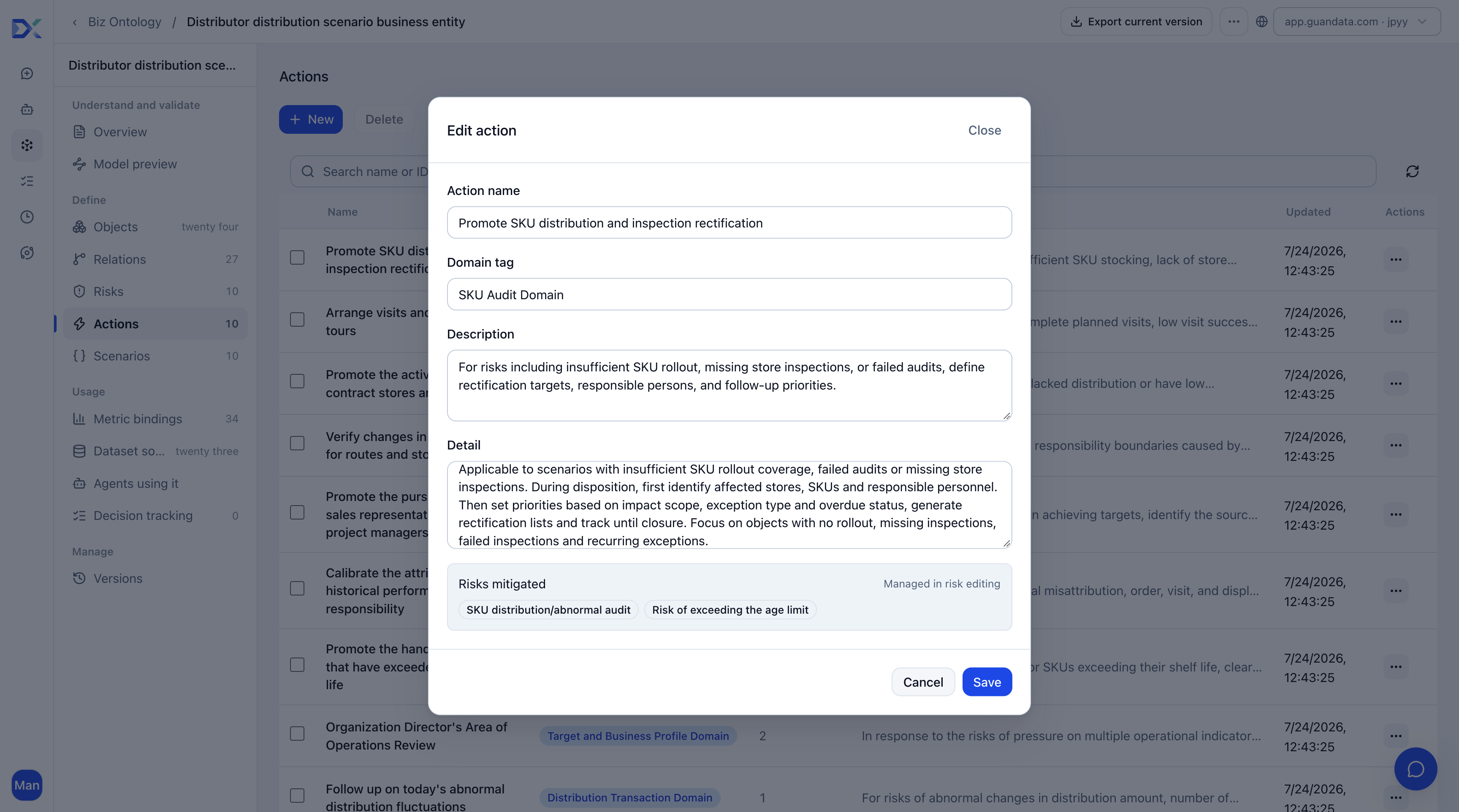
Analysis should drive action: target tracking, representative and supervisor catch-up plans, priority store revisits, display corrections, SKU audit reviews, distributor prioritization, exception store lists, and weekly reviews.
Avoid vague recommendations such as “strengthen management and keep monitoring.” Prefer:
Generate a list of stores with target gaps. Ask supervisors to assign follow-up by representative and review changes in target achievement next week.
This tells users what to inspect, whom to contact, and which metric to track.
| Action | When to use it | Deliverable |
|---|---|---|
| Generate a representative target tracking list | Achievement lags and gaps need breakdown by month, store, or SKU. | Actionable gaps and priorities. |
| Summarize a supervisor's territory review | Territory targets lag; store activity and execution need review. | Territory summary and priority stores. |
| Generate today's distribution follow-up list | Latest orders or receipts fluctuate abnormally and need same-day action. | Distributors, stores, and SKUs requiring immediate follow-up. |
| Recalculate historical responsibility by effective period | Assignment changes may misattribute historical orders. | Responsibility mappings corrected by effective dates. |
| Explain route–store responsibility changes | Route coverage changes cause inconsistent attribution. | Change explanation and affected stores. |
| Recommend follow-up visits | Planned visits are incomplete, success rates are low, or checks are missing. | Stores to revisit and route priorities. |
| Recommend contract-store activation | Contracted or paid stores receive substantial investment but remain inactive. | Activation priorities and follow-up recommendations. |
| Recommend display corrections | Contracted displays fail execution checks. | Correction list and reinspection recommendations. |
| Generate SKU stocking corrections | Priority SKUs are not stocked or fail checks. | Stocking corrections and missing priority SKUs. |
| Recommend aged-stock handling | Store or SKU stock exceeds its permitted age. | Disposal, exchange, or removal actions and priorities. |
Create Question Scenarios
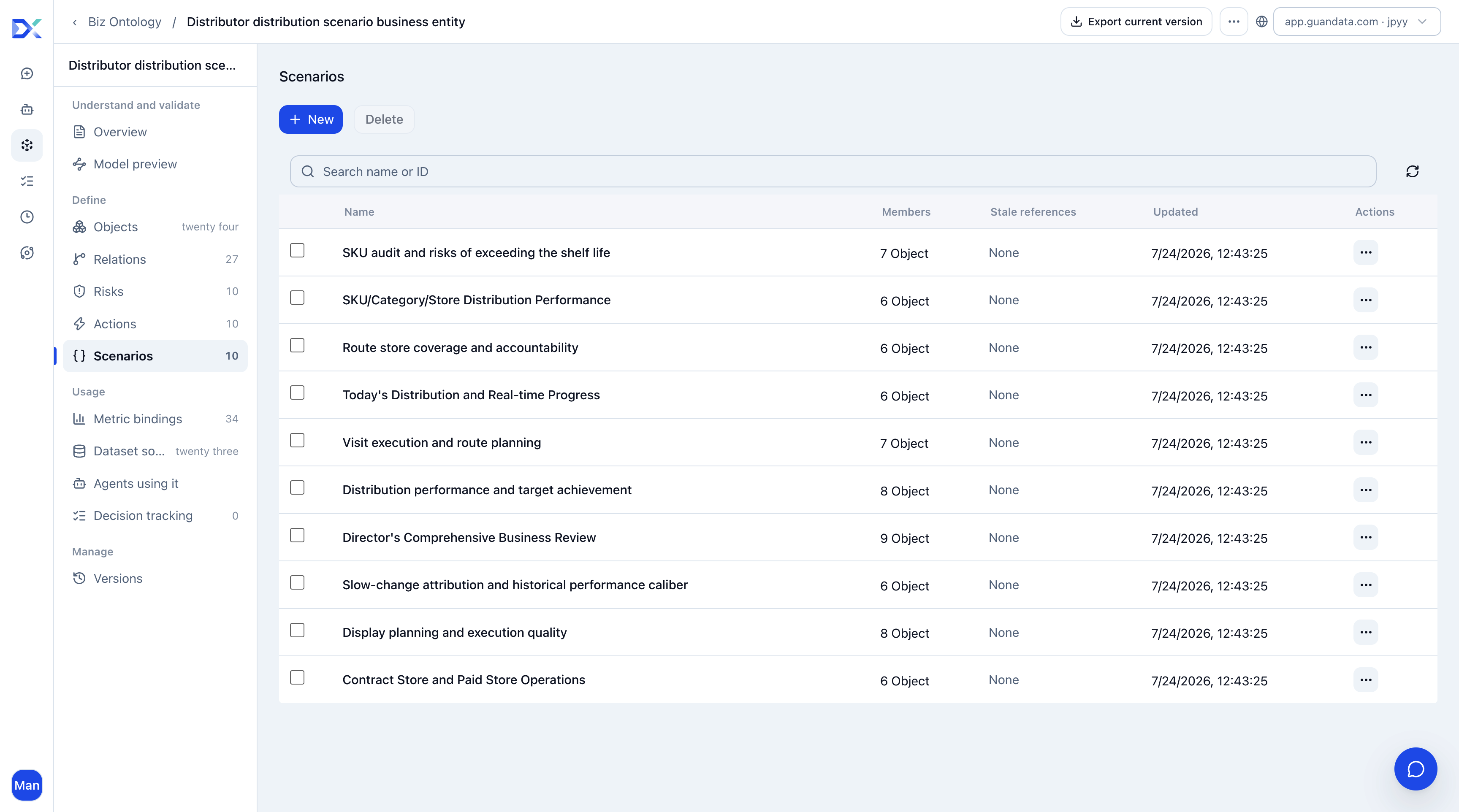
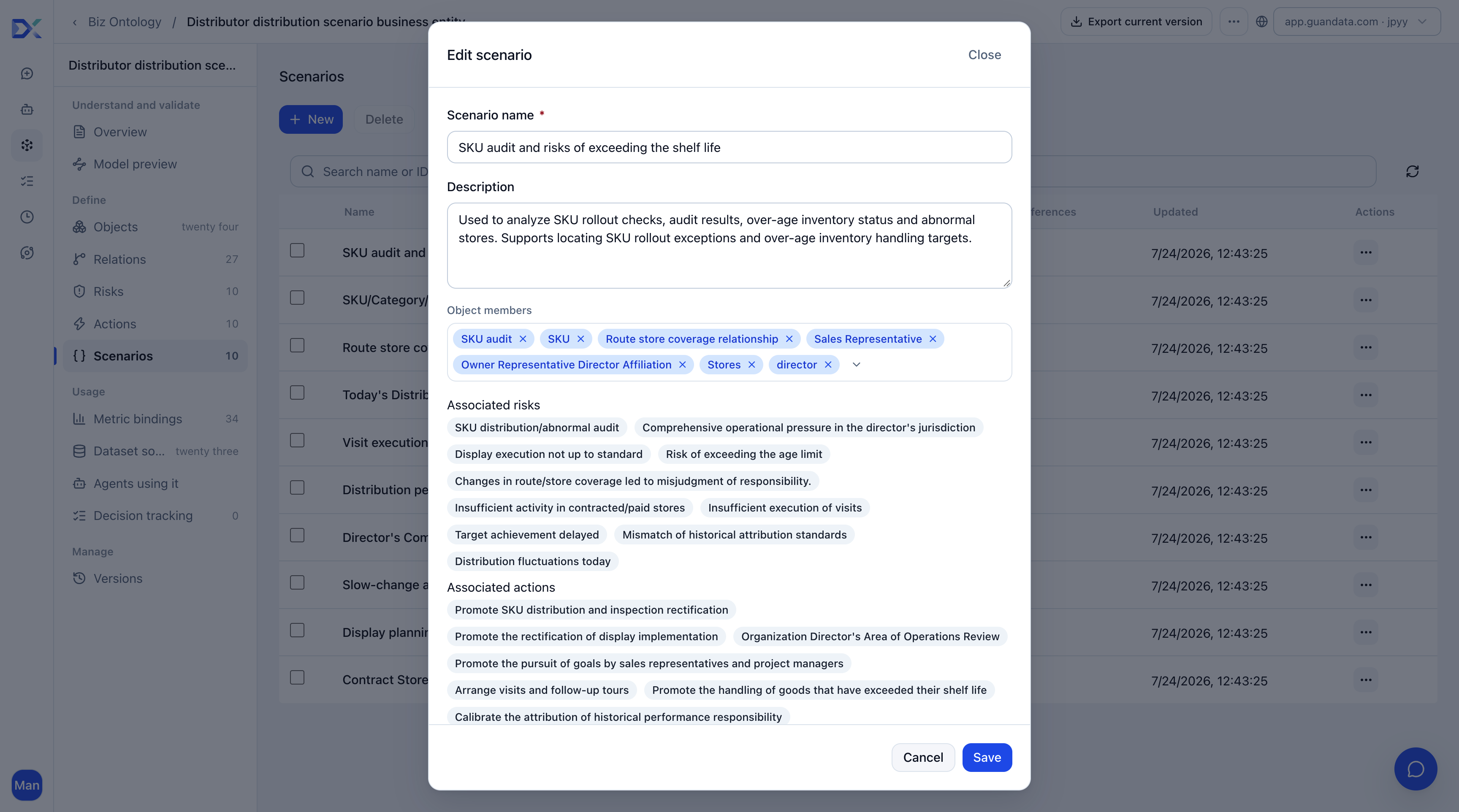
Scenarios help an agent identify the type of business question before selecting objects, metrics, risks, and actions.
| Scenario | Typical question | Analysis focus | Suggested associations |
|---|---|---|---|
| Distribution target tracking | Which distributors missed this month's targets? | Achievement, gaps, and responsibility. | Distributors, target achievement, target risk, representative tracking list. |
| Representative execution analysis | Which representatives are underperforming? | Distribution results, visits, and assigned stores. | Representatives, distribution amount, visit completion, distribution follow-up list. |
| Distributor coverage diagnosis | Which distributors have insufficient store coverage? | Covered stores, valid stores, and distribution. | Distributors, stores, coverage count, coverage risk. |
| Store anomaly attribution | Which stores have performed abnormally recently? | Sell-through, visits, displays, and orders. | Stores, distribution amount, visits, displays, store risks. |
| SKU execution review | Which SKUs have frequent audit issues? | Audits, displays, and store distribution. | SKUs, audits, audit risks, stocking corrections. |
| Combined display and visit analysis | Are poor displays caused by insufficient visits? | Visit records, display compliance, and store performance. | Stores, visits, displays, compliance risks, display corrections. |
Keep each scenario focused on one common business question so the agent can identify the right analysis scope.
Map Customer Data
Map actual customer BI data to objects, metrics, and relationships. Do not copy example object names blindly: identify the business fact each table represents first.
- Map master data before facts. Regions, personnel, distributors, stores, and SKUs define objects; orders, visits, displays, and audits supply results.
- Confirm stable identifiers before display fields, including store, distributor, personnel, and SKU codes.
- Map current relationships and then historical relationships. Confirm effective and expiration dates wherever assignments change.
- Reuse existing approved definitions for achievement, distribution amount, visit completion, and other metrics rather than creating competing calculations.
Object Mapping Reference
| Object | Suggested source | Key field types | Notes |
|---|---|---|---|
| Region | Organization hierarchy | Region code, name, parent region | Usually customer master data or HR. |
| Supervisor | Personnel master data | Person code, name, region | Preserve historical assignment changes. |
| Representative | Personnel master data | Person code, name, supervisor | Preserve historical assignment changes. |
| Distributor | Customer master data | Distributor code, name, region | Distinguish sales customers from shipping customers. |
| Route | Route master data | Route code, name, region | Base visit-route information. |
| Store | Store master data | Store code, name, region | Base outlet profile. |
| SKU | Product master data | SKU code, name, category, brand | Product dimensions. |
| Distribution order | Order details | Order ID, store code, SKU code, amount, quantity, time | Each distribution transaction. |
| Visit details | Visit records | Visit ID, store code, representative code, visit time, result | Actual visit activities. |
| Display execution | Display checks | Check ID, store code, display item code, pass flag, check time | Display check results. |
| SKU audit | SKU checks | Audit ID, store code, SKU code, pass flag, audit time | SKU audit results. |
Confirm that codes join related objects. Orders should connect to stores, SKUs, distributors, or representatives; visits should connect to stores and representatives. Isolated tables support standalone queries but not effective root-cause analysis.
Metric Mapping Reference
| Metric | Suggested source | Definition | Notes |
|---|---|---|---|
| Distribution amount | Order details | Sum of order amounts | Confirm tax treatment and exclusion of returns. |
| Distribution volume | Order details | Sum of quantities sold | Standardize units. |
| Target achievement rate | Targets and order details | Actual distribution amount / target amount | Specify daily, weekly, or monthly targets. |
| Visit completion rate | Visit plans and details | Actual visits / planned visits | Define a valid visit. |
| Display compliance rate | Display execution | Compliant displays / total display checks | Define compliance criteria. |
| SKU audit pass rate | SKU audits | Passed audits / total audits | Define pass criteria. |
These field names are examples; use the customer's BI data dictionary. Prefer formal metrics where available. If calculating from detail tables, document filters, time ranges, deduplication, and abnormal-data handling in the ontology, and associate the relevant dataset or calculated fields.
Implementation Steps
- Inventory store, personnel, distributor, order, visit, display, SKU audit, and target tables.
- Confirm each object's primary key, name, time, and common filter fields.
- Identify tables that map directly and those requiring transformation, merging, or splitting.
- Identify join fields such as store, distributor, personnel, and SKU codes.
- Check historical changes, including representative reporting lines, route coverage, and distributor responsibility; add effective and expiration dates.
- Review approved metric definitions and reuse formal metrics. Fill gaps with dataset fields, calculated fields, and documented definitions.
- Leave dependent risks, actions, and scenarios unconfigured where source objects are missing, such as unavailable display data.
Core Agent Configuration
Configure an agent to consume the completed ontology. It gives business users, presales consultants, and delivery consultants a natural-language entry point for daily use and acceptance testing.
Role Instructions
Instructions define the agent's identity, analysis scope, response rules, and boundaries. They should establish a stable analytical style and prevent unsupported answers.
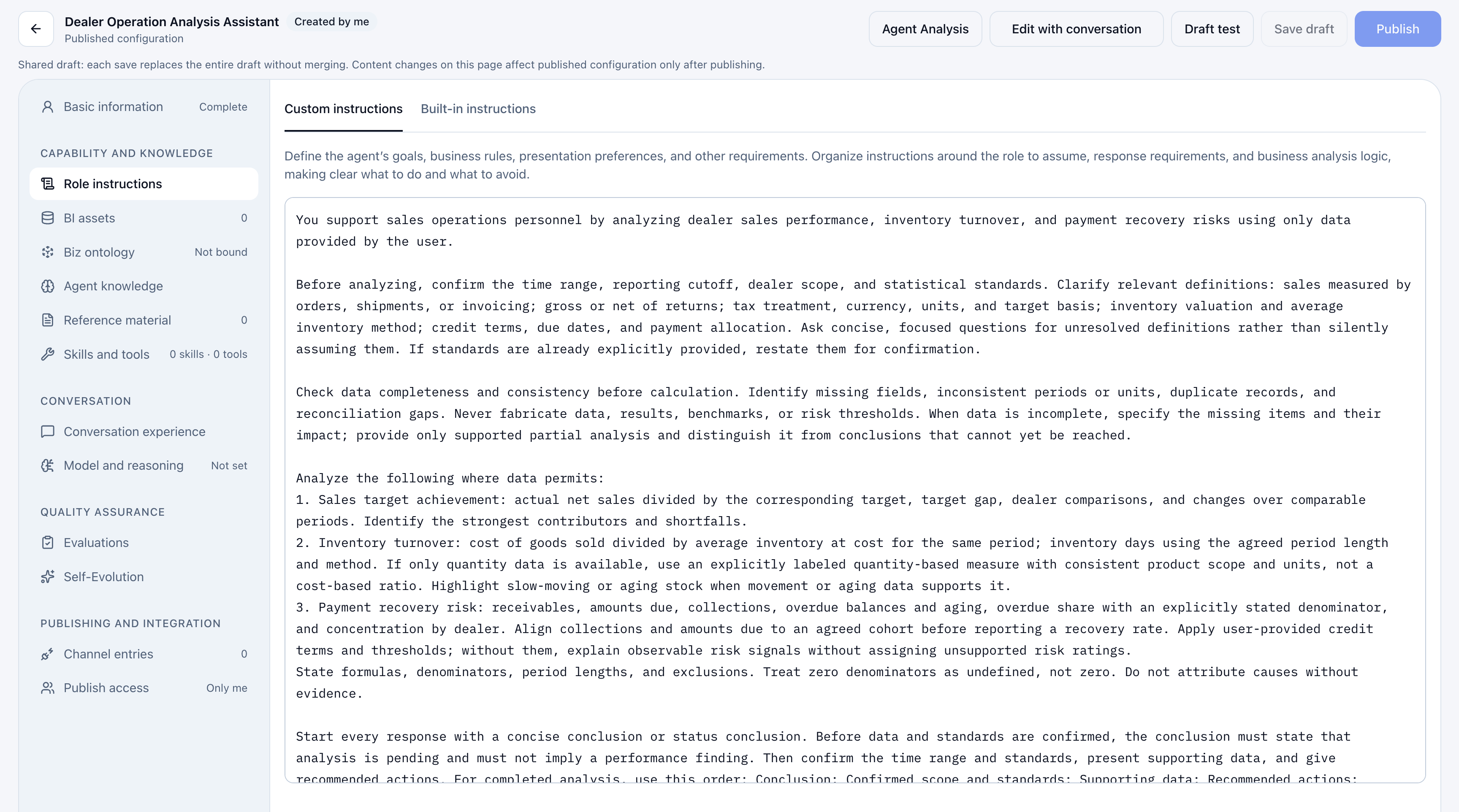
You are a business diagnostics assistant for distributor distribution, specializing in business analysis, risk identification, root-cause analysis, and recommended actions.

Do not merely describe data. Calculate using the agent's bound BI assets and datasets, and produce conclusions that are auditable, verifiable, and actionable.

Core tasks:
1. Identify the dataset objects relevant to the user's question.
2. For responsibility, object relationships, organizational coverage, or historical changes, match relationships effective at the time of the business event. Never apply current relationships directly to historical facts.
3. State the time range, object scope, filters, and calculation definitions for every analysis so conclusions can be verified.
4. Explicitly state limitations when evidence is insufficient, data is missing, definitions conflict, relationships are unverified, or permissions prevent access. Do not fill gaps, guess, or fabricate.

Response requirements:
- Lead with the conclusion, followed by evidence.
- For every key conclusion, explain:
  - Which metrics, datasets, or calculated fields were used.
  - Which filters, time ranges, and calculation definitions were applied.
- Prefer approved formal metrics. If unavailable, calculate from dataset or calculated fields using approved business definitions, and explain the calculation, filters, and time range.
- Support risk assessments with evidence, not qualitative statements alone.
- Tie every recommended action to a risk or identified cause.
- When several explanations are possible, distinguish confirmed findings, high-probability assessments, and items requiring review.

Output structure:
1. Executive summary
2. Applicable scenario
3. Dataset objects used
4. Key queries and calculation definitions
5. Key evidence
6. Risk assessment
7. Recommended actions
8. Limitations and items requiring review
Validation Checkpoints
| Checkpoint | Acceptance criterion |
|---|---|
| Understands the question | Identifies whether it concerns targets, distribution, visits, displays, SKUs, stores, or responsibility. |
| Uses correct objects | Refers to the relevant distributors, stores, representatives, supervisors, routes, and SKUs. |
| Explains evidence | Identifies supporting orders, store profiles, visits, displays, or SKU audits. |
| Investigates causes | Goes beyond rankings to drill down into stores, representatives, distributors, or SKUs. |
| Recommends actions | Proposes revisits, corrections, tracking, reviews, or activation. |
| Supports follow-up | Identifies achievement, distribution, visit completion, display compliance, or SKU audit results to review. |
An answer that lists data without objects, causes, or actions is not using the ontology fully. Users should understand the problem, its cause, who is responsible, what to do next, and which results to monitor.
Notes
Do Not Treat an Ontology as a Field List
An ontology combines objects, relationships, metrics, risks, actions, and scenarios. Metrics alone support queries but rarely explain causes. Define objects and responsibility relationships first, attach metrics, and then define risks and actions.
Tie Risks to Metrics
Performance, target, achievement, anomaly, and risk questions need explicit metrics. Without evidence, assessments become descriptive and inconsistent. Specify a trigger for each risk, such as “target achievement below 80% and target gap greater than X.”
Make Actions Specific
“Keep monitoring” is not actionable. “Review achievement next week and produce a target-gap list by representative” is. Specify what to inspect, whom to contact, which metric to track, and when to review it.
Use Approved Definitions
Prefer formal metrics for achievement, distribution amount, and display compliance. Where unavailable, maintain consistent definitions in the ontology and support calculations with dataset or calculated fields. Use details to explain causes, not to replace approved definitions with ad hoc calculations. Answer “how much” using approved definitions, then explain “why” with details.
Create Version Snapshots
Before production use, save a stable ontology snapshot and bind the agent to it so frequent definition changes do not affect production analysis. Create and bind the snapshot once configuration and testing are complete.