Configure API Access
Overview
API access lets external applications, such as Super Apps and BI backends, call the current agent. Applications can start and continue conversations, read history and deliverables, query execution traces, stop runs, and submit response feedback.
Open Publishing and Integration > Channels on the agent configuration page. This guide covers setup and a minimal call workflow. Use the integration documentation link in the API access area for complete parameters, responses, and file uploads.
Prerequisites and Execution Identity
- The target agent exists and you can edit it.
- The account creating API access has the required BI credentials and connectors and can use the agent in DecideX.
- The external application can store credentials securely and provide stable user identifiers.
API conversations run with the identity, BI credentials, and memory of the account that created the access configuration. Use a dedicated account with the necessary connectors and data permissions.
External user authentication associates external identities with conversation records. It does not switch execution to the external user's permissions. The external application must control who can call the API and who can see returned data.
Create API Access
-
Open the agent's channel settings and click the add action in the API access area.
-
Enter a name identifying the application and environment, such as Distributor Portal > Production.
-
Configure the following settings and create the access configuration.
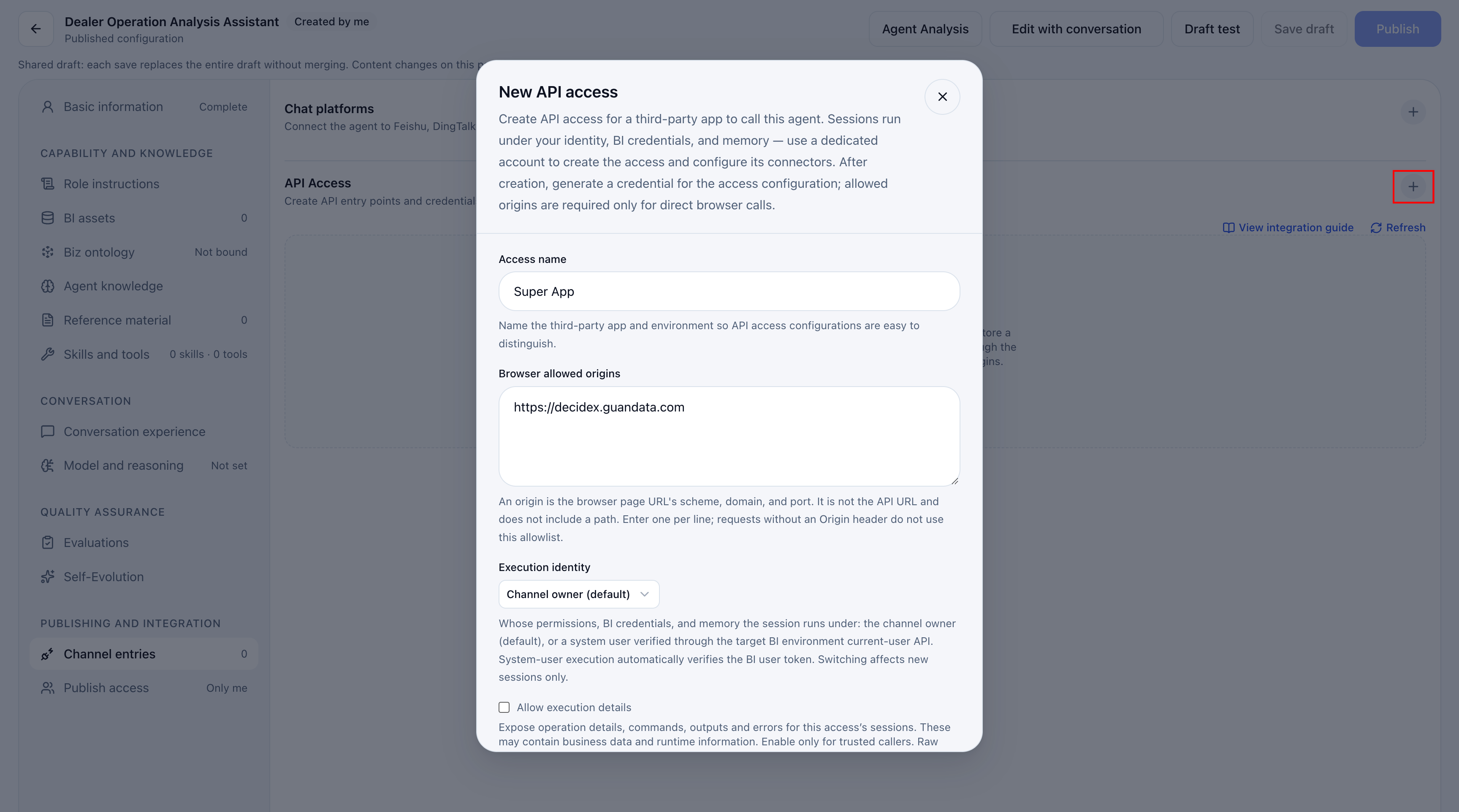
| Setting | Purpose |
|---|---|
| Access name | Distinguish applications and environments. |
| Allowed browser origins | For direct browser calls, enter one requesting-page origin per line. Include scheme, domain, and port, but no path, for example https://portal.example.com or http://localhost:3000. Enter the external page's origin, not the API URL. |
| External user authentication | Disabled by default, using only the calling credential. With Galaxy Token verification, conversation creation also requires a verifiable Galaxy user token. |
| Allow execution details | Disabled by default. Enabling exposes operation descriptions, commands, output, and errors for the caller's conversations. These may contain business data and environment information. Raw protocol packets and internal reasoning are not returned. |
| Add to allowlist | Add the displayed current DecideX page origin. For another site, enter its actual origin separately. |
Prefer storing credentials and calling DecideX from the external application's backend, with the browser calling only that backend. Backend requests without an Origin header do not use the browser allowlist. Direct browser requests must match it.
Generate and Store Credentials
- Generate a credential under the access configuration.
- Copy it immediately into the application's secure backend configuration. Its full plaintext cannot be viewed again after closing the display.
- Send it in
Authorization: Bearer <credential>.
An access configuration can have multiple credentials. If the plaintext was not saved, generate a replacement and update the caller. Revoke unused credentials.
Calling credentials authorize API access. Do not put long-lived credentials in public documents, screenshots, frontend code, URLs, or logs. Direct browser access is suitable only for controlled internal scenarios. An origin allowlist does not replace user authentication or application access controls.
External User Identity
The application must provide a stable external user ID. DecideX isolates conversations by access configuration and external user ID. Keep the ID consistent for follow-ups and history requests.
| Header | Purpose |
|---|---|
| Authorization | Bearer <credential> identifies and authorizes API access. |
| Decidex-External-User-Id | Stable application-side user ID, such as portal-user-10086, not a DecideX user ID. |
| Decidex-External-User-Token | With Galaxy Token verification, provide the current user's Galaxy-issued JWT when creating a conversation. Not required for follow-ups in an existing conversation. |
For Galaxy Token verification, sub must equal Decidex-External-User-Id. Verification creates a local identity and associates records, but execution still uses the access creator's identity and permissions.
A trusted backend should determine the external ID. Do not let users substitute someone else's ID. Model-list queries need only the calling credential, not an external user ID.
Verify API Calls
Open the integration documentation in the current environment. The examples below use synchronous chat to verify creation and follow-up.
Create a Conversation and Send the First Message
Set DECIDEX_BASE_URL to the deployment address and SERVICE_AGENT_TOKEN to the securely stored credential. This example assumes external user authentication is disabled. Otherwise, also provide Decidex-External-User-Token.
curl -sS "$DECIDEX_BASE_URL/api/service-agent/chat" \
  -H "Authorization: Bearer $SERVICE_AGENT_TOKEN" \
  -H "Decidex-External-User-Id: portal-user-10086" \
  -H "Content-Type: application/json" \
  -d '{
    "message": "What business analysis can you help me with?",
    "newSession": { "title": "Business analysis" }
  }'
After completing the turn, the API returns sessionId, runId, user and agent messages, and deliverables. Check assistantMessage.content and retain sessionId for follow-ups.
Without a specified model, the valid agent default takes priority, otherwise the platform default is used. Query GET /api/service-agent/models before specifying a model and reasoning level.
Continue a Conversation
Use the same access configuration and external user ID, and include the returned sessionId.
curl -sS "$DECIDEX_BASE_URL/api/service-agent/chat" \
  -H "Authorization: Bearer $SERVICE_AGENT_TOKEN" \
  -H "Decidex-External-User-Id: portal-user-10086" \
  -H "Content-Type: application/json" \
  -d '{
    "sessionId": "REPLACE_WITH_PREVIOUS_SESSION_ID",
    "message": "Explain what data the analysis requires."
  }'
Provide exactly one of newSession or sessionId. The system does not automatically reuse the latest conversation. Do not automatically retry creation after an uncertain result, as it may create duplicates. Retain any sessionId returned in an error response for further handling.
Additional Capabilities
| Capability | Usage |
|---|---|
| Asynchronous chat | POST /api/service-agent/chat/async returns conversation and run IDs immediately. Poll the trace, then read messages and deliverables after completion. |
| Conversation history | Query the current external user's conversations and a conversation's messages. |
| Work trace | Query stages, steps, and status by conversation and run IDs. Enabling execution details exposes additional operation details. |
| Stop a run | Stop an unfinished run in a specified conversation. Use asynchronous chat when in-progress stopping is needed. |
| Response feedback | Submit, change, or revoke positive/negative feedback for successfully completed responses. |
| Deliverables | Read or download returned file URLs using the same authentication. |
Consult the in-product integration documentation for exact paths, parameters, and responses.
Manage Access and Credentials
| Action | Effect |
|---|---|
| Edit and save | Change the name, origins, authentication, or detail visibility, then save. |
| Generate credential | Create a credential. During rotation, update and verify the caller before revoking the old one. |
| Revoke | Permanently invalidate the selected credential for subsequent requests. |
| Disable/enable | Block subsequent calls, or restore access. |
| Delete | Permanently delete the configuration, all credentials, and external conversation-list mappings. External apps cannot continue the original conversations. Underlying audit records remain. Deletion cannot be undone. |
| Refresh | Reload current state and recent usage. |
Disabling access or revoking credentials does not stop an active run. Use the stop endpoint for that.
FAQ
| Issue | Check |
|---|---|
| Invalid credential or rejected call | Headers, enabled status, revoked/expired credentials, and whether the creator account remains available. |
| Browser fails but backend works | Exact scheme, domain, and port of Origin against the allowlist. Do not enter a URL with a path. |
| Creation fails with authentication | Valid Galaxy token and matching sub and external user ID. |
| Cannot read or continue a conversation | Original access configuration, consistent external ID, and correct conversation ID. |
| Responses work but business data is unavailable | Creator account's BI credentials, connectors, data permissions, and agent configuration. External authentication does not change execution identity. |
| Commands, output, or errors unavailable | Execution-detail setting. Disabled returns a reduced trace. Enabled still excludes internal reasoning and raw protocol packets. |