PostgreSQL Database Environment Preparation
Overview
This article describes the steps required to prepare a PostgreSQL database environment.
Steps
Confirm the Current Database Version
Use PostgreSQL 10 or later.
Notes
- The following field types are not currently supported for synchronization:
time with time zonetimestamp with time zone
Modify REPLICA IDENTITY
This property determines which fields are recorded in the log when data is UPDATEd or DELETEd.
DEFAULT- Updates and deletes include the previous values of the primary key columns.NOTHING- Updates and deletes do not include any previous values.FULL- Updates and deletes include the previous values of all columns.INDEX index_name- Update and delete events include the previous values of the columns defined by the index namedindex_name.
Use the following statement:
Note: All tables that need to participate in
Real-time Syncshould be configured this way.
alter table schema.tablename REPLICA IDENTITY FULL;
- Use the default
postgresaccount to log in to the database nameddatabasename. Here,-Uspecifies the user,-dspecifies the database,-hspecifies the server, and-pspecifies the port.
psql -U postgres -d databasename -h localhost -p 5432
After entering the password, you will log in to the database.

- For example, to update a table named
orders_tablein thepublicschema, run the following statement:
alter table public.orders_table REPLICA IDENTITY FULL
Confirm User Permissions
The steps above use the default postgres user. If you use a different user for configuration, that user must have the PostgreSQL replication role, the PostgreSQL login role, and SELECT permission on the tables that need to be synchronized.
-
Create a user with the PostgreSQL
replicationrole and PostgreSQLloginrole. -
Grant the user
SELECTpermission on all tables in the specified schema:
Note: Replace
schemanamewith the schema name andusernamewith the actual user name.
GRANT SELECT ON ALL TABLES IN SCHEMA schemaname TO username;
- Grant the
replicationandloginpermissions to the user.
Go to the data directory under the PostgreSQL installation path, locate postgresql.conf and pg_hba.conf, and modify both files.
- Modify the PostgreSQL replication slot settings.
In this example, postgresql.conf is located in /var/lib/pgsql/12/data. Use vi /var/lib/pgsql/12/data/postgresql.conf to edit the file, or replace the path with the actual location in your environment. Append the following configuration at the end of the file:
Note: Alternatively, locate the following settings in the file, uncomment them, and update their values.
wal_level = logical
max_wal_senders = 10
max_replication_slots = 10
- Configure the user's
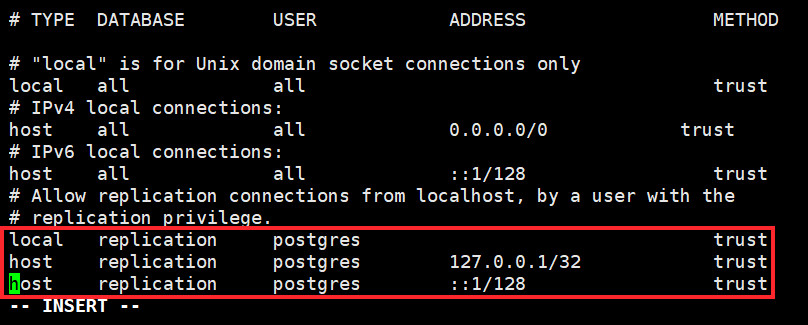
replicationpermission.
In this example, pg_hba.conf is located in /var/lib/pgsql/12/data. Use vi /var/lib/pgsql/12/data/pg_hba.conf to edit the file, or replace the path with the actual location in your environment. Remove the # in front of the two lines highlighted in the figure below: