Configure a Real-Time Sync Task
Overview
After preparing the Data Account, database environment, and Real-time Sync environment, you can create a Real-time Sync task and configure source and target data settings to complete task creation.
Prerequisites
Before creating a task, deploy the Real-time Sync environment, configure the Data Account, and complete the database environment preparation.
Create a Real-Time Sync Task
Configure a Connection Parameter Template in Advance
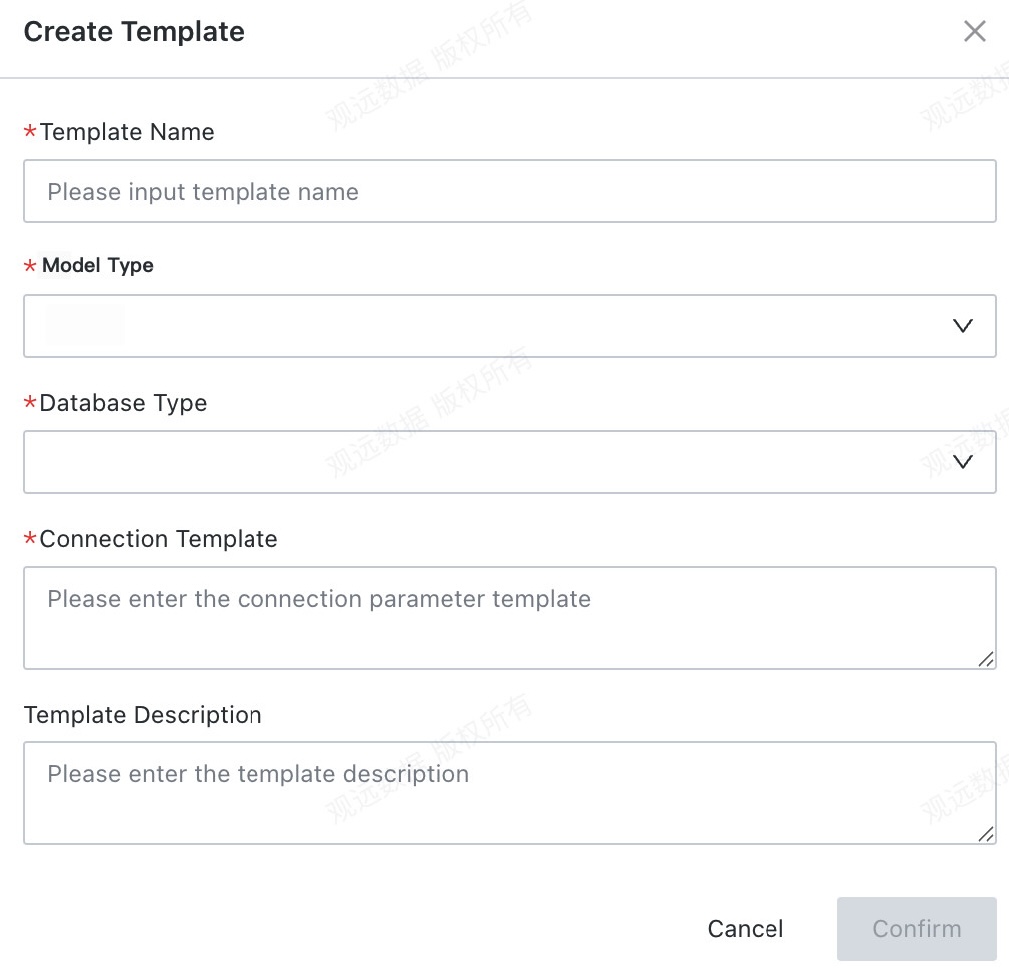
To ensure that the Real-time Sync task runs properly, you need to configure additional parameters for the target database through a connection parameter template.

-
Enter the template name.
-
Select the database type. StarRocks and GaussDB are currently supported.
-
Configure the parameter template.
- When the target database is StarRocks, the parameters generally include the parallelism, the IP address and port of the FE node, and the number of replicas. Use the following example:
{"parallelism":2,"loadUrl":"172.20.0.77:8030","replicationNum":1}- When the target database is GaussDB, no parameters are currently required. Enter
{}. - When the target database is Doris, configure the parallelism, FE node parameters, and the number of replicas. Use the following example:
{"parallelism":4,"feNodes":["doriscluster-sample-fe-service:8030"],"replicationNum":1}- When the source database is Oracle, configure the parallelism and the adapter used to read Oracle redo logs. Use the following example:
{"parallelism":1,"database.connection.adapter":"logminer"} -
Enter the template description.
Select the Data Source
Go to the Real-time Sync module and click Create Real-time Sync.
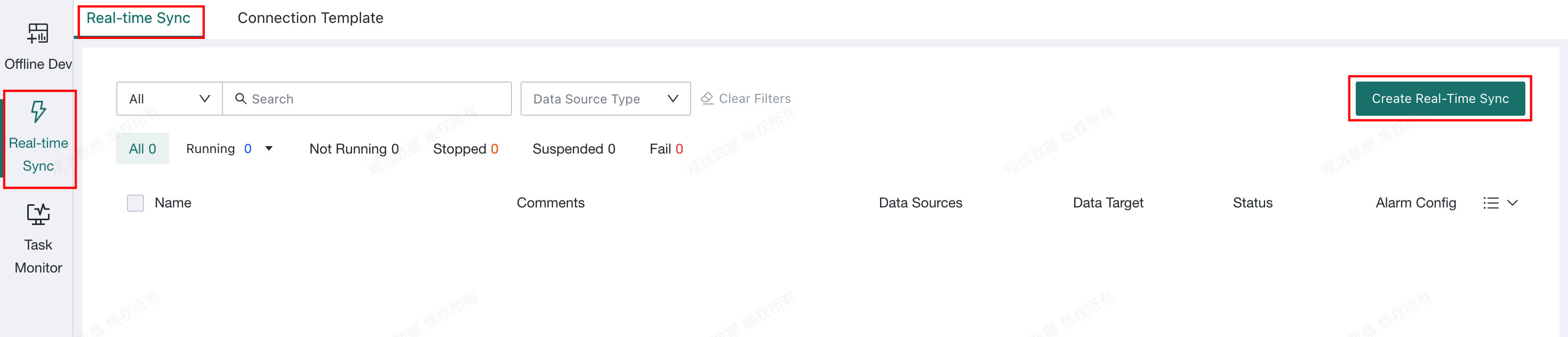
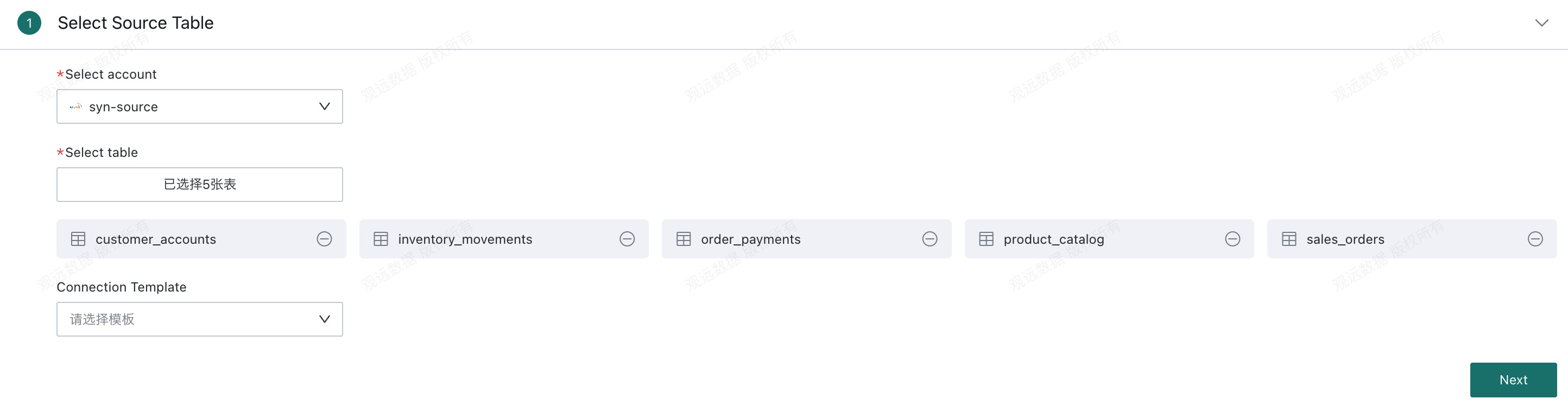
Select the Data Account for the source table, which must be created in advance, and then select the table name.
Select the Target Table
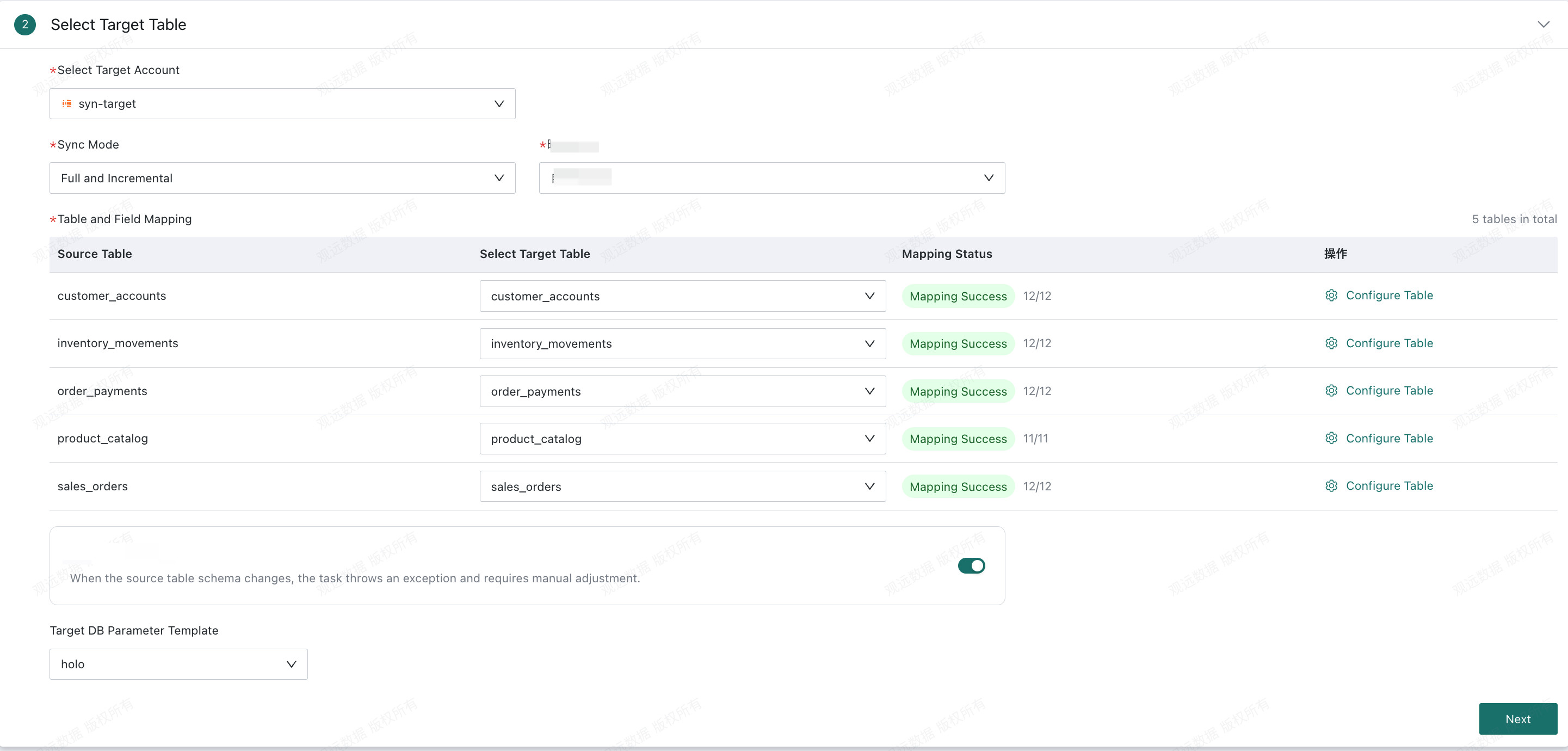
Sync Method
Full Sync + Incremental Sync
First synchronize all existing data, and then continuously synchronize new changes. When the task runs for the first time, it performs a complete full sync followed by incremental sync.
Incremental Sync Only
The task contains only the incremental phase. When the task runs for the first time, incremental synchronization begins from the time the user starts the task.
Mapping Method
Custom Mapping
Manually configure the field mappings between the source and target tables. You can synchronize only selected fields from the source table to the target table.
All-Field Mapping
No mappings need to be configured. All fields in the source table are matched to fields with the same names in the target table. If a source field does not exist in the target table, all-field synchronization is unavailable and you must use custom mapping.
Configure Tables
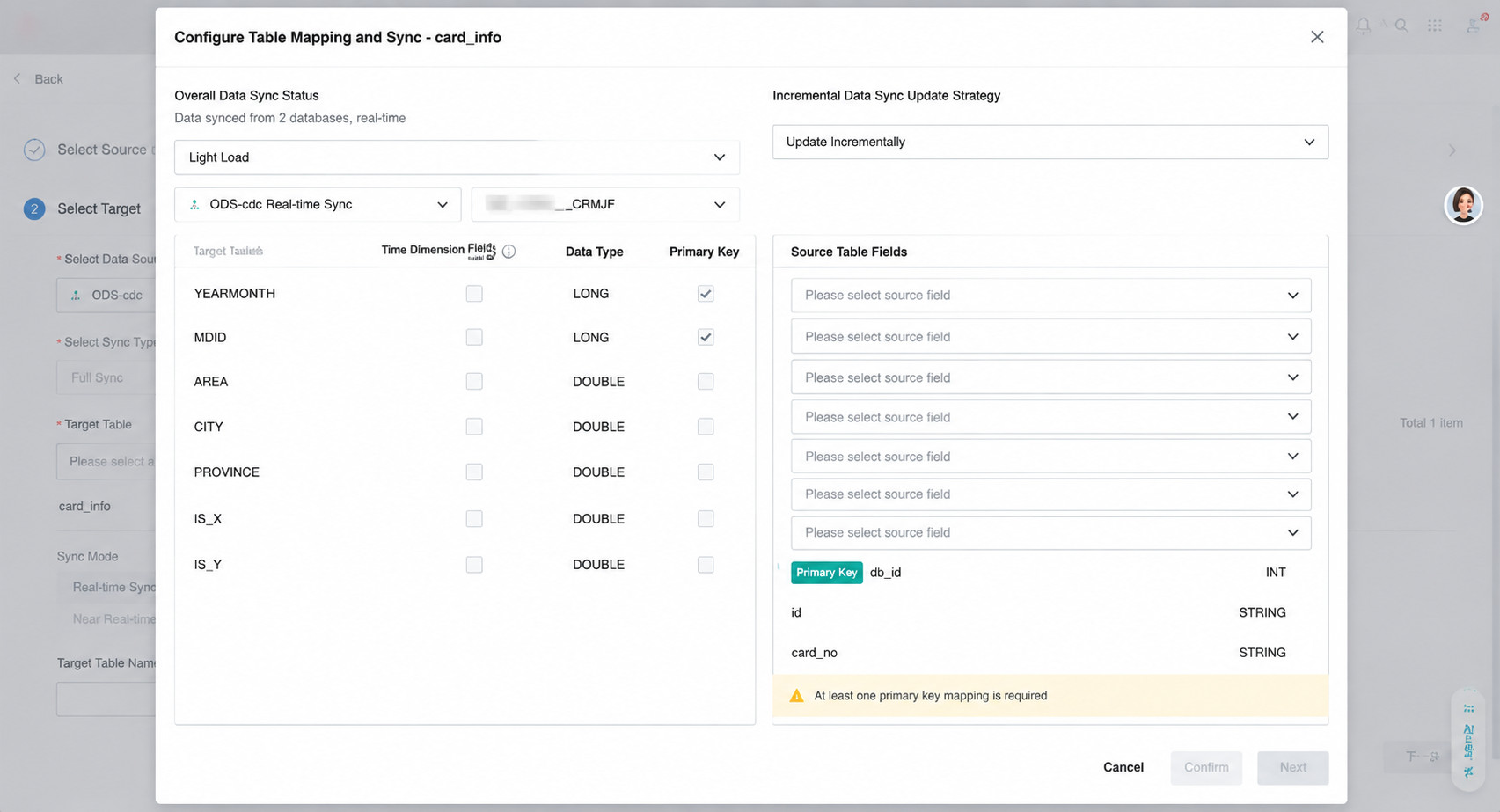
- Configure the full-data and incremental-data profiles. Based on the data volume, the system sets the parallelism and buffer for each synchronization task to use resources efficiently and prevent data accumulation.
- Full data: Select
LightweightorHeavyweight. Ten million rows is generally the threshold. SelectHeavyweightwhen the historical data volume exceeds ten million rows. - Incremental data: Select
Infrequent UpdatesorFrequent Updates. Five million rows is generally the threshold. SelectFrequent Updateswhen the total incremental data volume of all tables in a task reaches five million rows or more.
- Full data: Select
- Configure the target tables and mappings.
- Configure the time marker field. A target field of the
datetimetype can be used as the time marker field. This field records the actual time when data is inserted or updated in the database as a millisecond timestamp.
Synchronize Source Table Schema Changes
This switch controls whether the target table automatically synchronizes DDL events when the source table schema changes.
- When enabled, changes to source field types and names, as well as newly added source fields, are synchronized to the target table.
- When disabled, changing source field types or names or adding source fields causes the task to fail and generate an alert.
DDL support for each source and target database combination is shown below:
| DDL Support | MySQL | PostgreSQL | SQL Server | Oracle | DB2 |
|---|---|---|---|---|---|
| StarRocks | Supported | Supported | Not supported | Supported | Not supported |
| GaussDB | Supported | Supported | Not supported | Supported | Not supported |
| Doris | Supported | Supported | Not supported | Supported | Not supported |
| Hologres | Supported | Supported | Not supported | Supported | Not supported |
When a DDL change occurs in the source table, real-time synchronization tasks behave differently depending on the mapping method.
Custom Mapping
| Source Table Change | DDL Enabled | DDL Disabled | Editing the Real-Time Sync Task | Target Table Schema Change | Target Table Data Change |
|---|---|---|---|---|---|
| Delete a table | The table deletion event cannot be detected, and the task continues running. | The table deletion event cannot be detected, and the task continues running. | The source table is marked as invalid and must be selected again before you can proceed. | No change. | No new data is written for the deleted table during subsequent synchronization. |
| Rename a table | The table rename event cannot be detected, and the task continues running. | The table rename event cannot be detected, and the task continues running. | The source table is marked as invalid and must be selected again before you can proceed. | No change. | No new data is written to the table under its original name during subsequent synchronization. |
| Delete a field | If the deleted field is included in the mapping, the other fields continue to synchronize and NULL is passed for the deleted field during subsequent synchronization.If the deleted field is not included in the mapping, there is no impact. | The task fails and data must be synchronized again from the beginning. | If the field is included in the field mapping: - Yes: The deleted field is marked as invalid and must be selected again before you can proceed. - No: There is no impact. | No change. | NULL is passed for the deleted field during subsequent synchronization. |
| Add a field | A field that is not included in the mapping is not synchronized automatically. | The task fails and data must be synchronized again from the beginning. | No change. | No field is added, and the task continues normally. | No change. |
| Rename a field | If the renamed field is included in the mapping, the field with the original name is deleted and a field with the new name is added. NULL is passed for the field with the original name during subsequent synchronization. The field with the new name is not added.If the renamed field is not included in the mapping, there is no impact. | The task fails and data must be synchronized again from the beginning. | If the field is included in the field mapping: - Yes: The deleted field is marked as invalid and must be selected again before you can proceed. - No: There is no impact. | No field is added. | NULL is passed for the field with the original name during subsequent synchronization.The field with the new name is not added. |
| Change a field type or length | If the field is included in the mapping, the field type change is synchronized automatically. If the target field cannot be changed, the system records a log and reports a task error. If the field is not included in the mapping, there is no impact. | The task fails and data must be synchronized again from the beginning. | If the change succeeds, the field type is updated automatically in both the source and target table configurations. If the change fails, the source table field type is updated automatically, while the target table remains unchanged. | The field type change is synchronized. | Historical data and subsequently added data are converted to the corresponding type. |
| Add, delete, or modify a source field comment | Field comments cannot be synchronized. | Field comments cannot be synchronized. | Field comments cannot be synchronized. | Field comments cannot be synchronized. | Field comments cannot be synchronized. |
All-Field Mapping
| Source Table Change | DDL Enabled | DDL Disabled | Editing the Real-Time Sync Task | Target Table Schema Change | Target Table Data Change |
|---|---|---|---|---|---|
| Delete a table | The table deletion event cannot be detected, and the task continues running. | The table deletion event cannot be detected, and the task continues running. | The source table is marked as invalid and must be selected again before you can proceed. | No change. | No new data is written for the deleted table during subsequent synchronization. |
| Rename a table | The table rename event cannot be detected, and the task continues running. | The table rename event cannot be detected, and the task continues running. | The source table is marked as invalid and must be selected again before you can proceed. | No change. | No new data is written to the table under its original name during subsequent synchronization. |
| Delete a field | If the deleted field is included in the mapping, the other fields continue to synchronize and NULL is passed for the deleted field during subsequent synchronization.If the deleted field is not included in the mapping, there is no impact. | The task fails and data must be synchronized again. | If the field is included in the field mapping: - Yes: The deleted field is marked as invalid and must be selected again before you can proceed. - No: There is no impact. | No change. | NULL is passed for the deleted field during subsequent synchronization. |
| Add a field | The field is added to the target table automatically. - If it is added successfully, synchronization continues. - If it cannot be added, an exception notification is sent and the task continues running. | The task fails and data must be synchronized again from the beginning. | No change. | A field is added. | Subsequent data for the new field is synchronized. |
| Rename a field | If the renamed field is included in the mapping, the field with the original name is deleted and a field with the new name is added. NULL is passed for the original field during subsequent synchronization, and the new field is added.- If the field is added successfully, synchronization continues. - If it cannot be added, an exception notification is sent and the task continues running. | The task fails and data must be synchronized again from the beginning. | If the field is included in the field mapping: - Yes: The deleted field is marked as invalid and must be selected again before you can proceed. - No: There is no impact. | A field is added. | NULL is passed for the field with the original name during subsequent synchronization.The field with the new name is added automatically, and its data is synchronized. |
| Change a field type or length | If the field is included in the mapping, the field type change is synchronized automatically. If the target field cannot be changed, the system records a log and reports a task error. If the field is not included in the mapping, there is no impact. | The task fails and data must be synchronized again from the beginning. | If the change succeeds, the field type is updated automatically in both the source and target table configurations. If the change fails, the source table field type is updated automatically, while the target table remains unchanged. | The field type change is synchronized. | Historical data and subsequently added data are converted to the corresponding type. |
| Add, delete, or modify a source field comment | Field comments cannot be synchronized. | Field comments cannot be synchronized. | Field comments cannot be synchronized. | Field comments cannot be synchronized. | Field comments cannot be synchronized. |
Configure Task Information
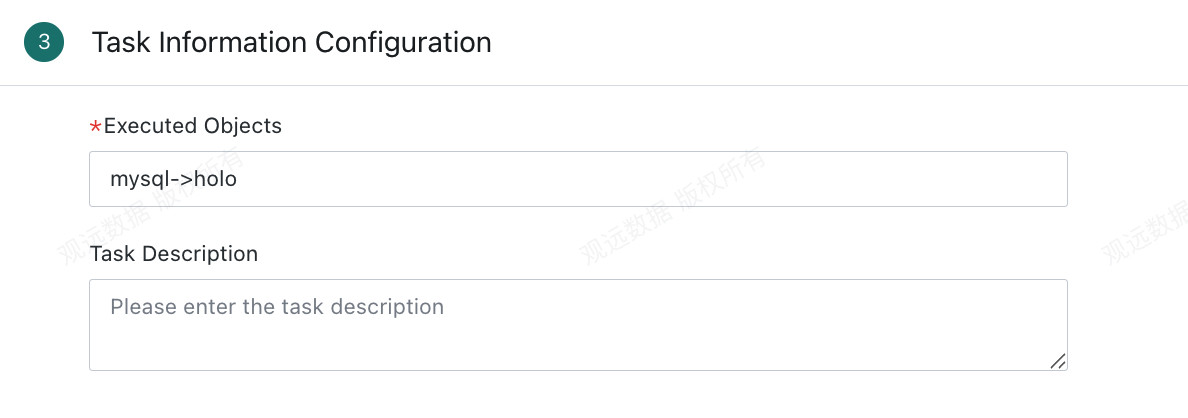
Enter the task name and task description, then click Confirm to create the task.
Run Real-Time Sync
- A newly created real-time synchronization task is not running. Click
Runto start it. A running task can be paused or terminated. - If you pause a task during full synchronization, the full synchronization restarts from the beginning when you run the task again.
- If you pause a task during incremental synchronization, synchronization resumes from the pause point when you run the task again.
- If you stop a task during incremental synchronization or the task fails, troubleshoot the issue and then edit the task manually. To avoid data loss, set the incremental synchronization start time to one hour before the task stopped or failed.