How to Build a High-Quality Dataset Agent
Dataset Agent Goals and Scope
Core Purpose
The core purpose of building a Dataset Agent is to provide business users with a space where they can ask questions in natural language, let the system combine those questions with business knowledge and industry terminology in a specific business domain, query business data, and obtain accurate data answers.
Because enterprise business domains are often complex and intertwined, different business types should be separated from the business perspective. Build different Dataset Agents for different business domains to avoid interference and conflicts among data, knowledge, and terminology.
Target Users
Dataset Agent Admin
The Dataset Agent admin is usually a business team lead, data analyst, or business expert.
The admin needs to understand the data related to the Dataset Agent and the insights that can be obtained from it. In retail, for example, business data may include product information, inventory management, customer purchase behavior, total sales, average transaction value, return rate, and many other dimensions and metrics. We recommend that users familiar with retail business processes and SQL-based analysis define the core structure of the ChatBI Dataset Agent.
The admin's primary responsibility is to translate business context, metric calculation logic, and internal terminology into business knowledge that ChatBI can understand, so that ChatBI can accurately answer questions about sales, inventory, customer behavior, and other business topics.
Business User
Business users have flexible and ad hoc analysis needs within a focused business domain.
Applicable Business Scope
Focus, focus, and focus again. When launching the first ChatBI Dataset Agent, clearly define its purpose and target audience.
For example, if a retail company decides to focus a Dataset Agent on sales performance and the target users are sales managers, the agent should focus on sales trends and inventory changes. Avoid mixing in cross-domain topics such as financial reporting analysis or broad inventory analysis.
Configuration Requirements
When creating a ChatBI Dataset Agent, start with basic data and questions, then expand gradually based on user needs.
For example, a retail company can start with core sales questions such as total sales in a time range or sales volume by category. If you are an experienced Guandata BI user, organize common business questions based on BI dashboards related to this agent. These queries are simple and direct, making it easier to test ChatBI quickly and expand the question set based on feedback.
The following table lists the core configuration rules for a Dataset Agent.
| Category | Configuration Item | Rule |
|---|---|---|
| Basic Configuration | Dataset Agent name | Within 30 characters. |
| Dataset Agent description | No strict limit. | |
| Associated datasets |
1. Data should be processed into ADS-layer wide tables suitable for business self-service queries. 2. Avoid data warehouse layer expressions as field names, such as ods_sales. Use business-meaningful names, such as Sales Amount.3. If field names are abbreviations or business-specific terms, maintain their business meanings in field comments. 4. Avoid ambiguity or near-synonyms across fields. For example, multiple tables may all contain a field named Date, but one means order date and another means inbound date. 5. In a single Dataset Agent, keep the total number of fields across all data tables under 300; otherwise accuracy may decrease. There is no strict table count limit, but no more than five tables is recommended. 6. For the first Dataset Agent, start with a single table when possible. After single-table Q&A accuracy reaches 80%, expand to additional tables. |
|
| Permission Management | Permission configuration | No strict limit. Permission management does not apply to admins. Users can configure ChatBI permissions through roles: - View permission: controls whether the ChatBI Q&A entry is visible. - Edit permission: controls whether the Data Agent management entry is visible. - Authorize permission: controls whether the Permission Management module is visible in the ChatBI Dataset Agent. |
| Q&A Sample | Q&A sample entries | No strict limit. Add business question and query SQL pairs. Existing data request tickets or query templates can be added as samples for the model to learn from. If SQL returned by a question is incorrect later, add the question and corrected SQL to the sample set. For dynamic time expressions such as yesterday, last 7 days, or previous natural week, use time functions instead of hard-coded dates. For complex or error-prone metrics, add both business knowledge and Q&A samples to improve stability. |
| Knowledge Base | General Knowledge | No strict limit. Knowledge that should apply to every conversation. |
| Business Knowledge | No strict limit. Configure industry terminology, common business wording, metric definitions, and other text-based knowledge for the model to learn. | |
| Q&A Testing | Accuracy requirement | Recommended accuracy is 90% or above before production use. |
| Other | Dataset Agent planning | Configure one Dataset Agent for one query scenario. Putting multiple cross-domain scenarios into one agent can lead to too many datasets, redundant business knowledge, and poor query results. |
| Question guidelines | Avoid multiple intents in one question. Otherwise intent recognition and analysis quality may suffer. Bad example: Which TOP 10 products had the highest profit in 2024? Which one had the largest year-over-year growth? What were the profit and sales amounts of these products? |
Dataset Requirements and Configuration
Why Datasets Are Needed
ChatBI provides data Q&A services for business users, so data sources must be added before the system can query data.
How to Add Datasets
Steps and Timing
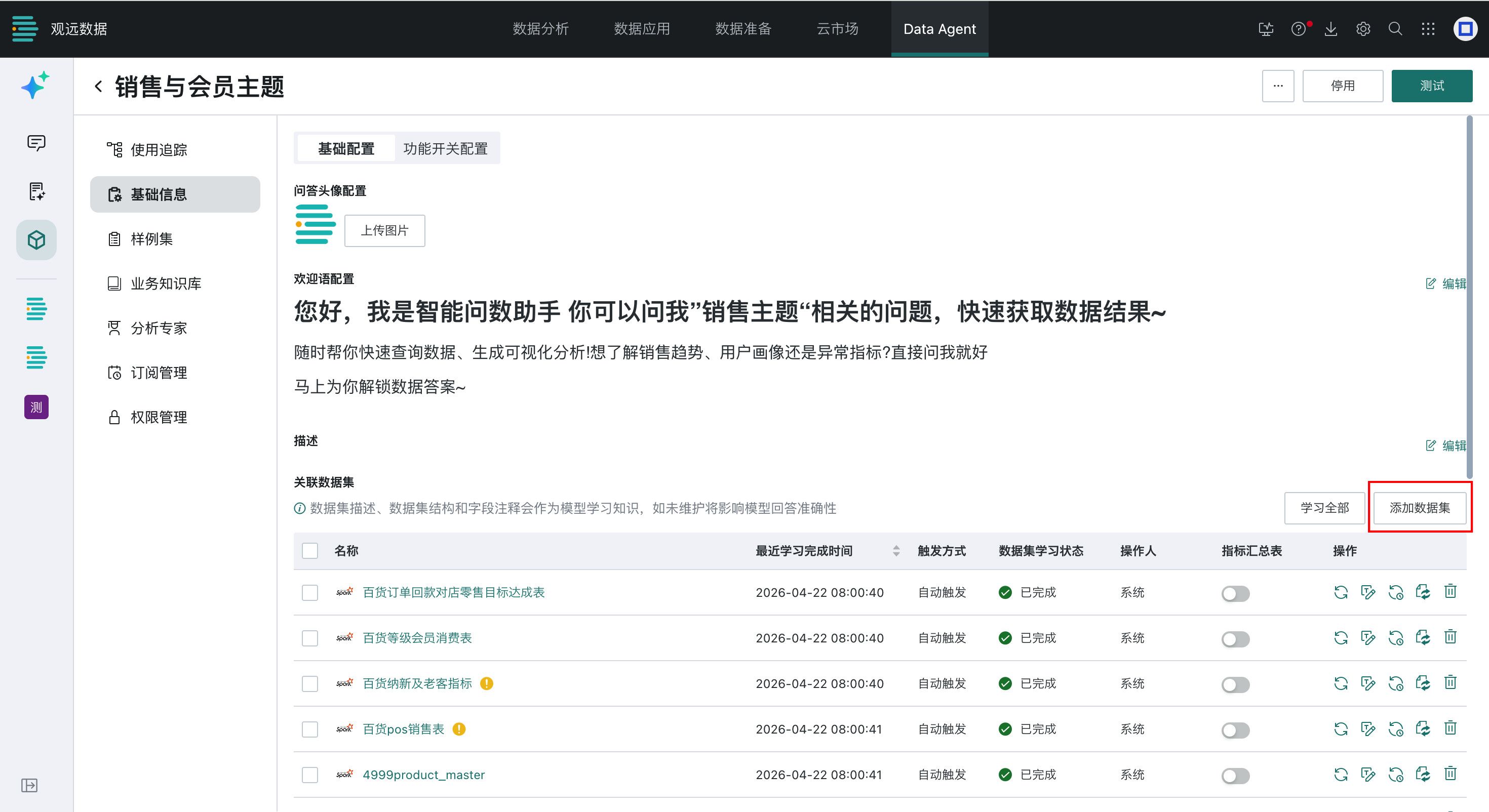
- After creating the Dataset Agent, go to Agent Management > Agent Detail Settings > Basic Information > Basic Configuration and click Add Dataset.
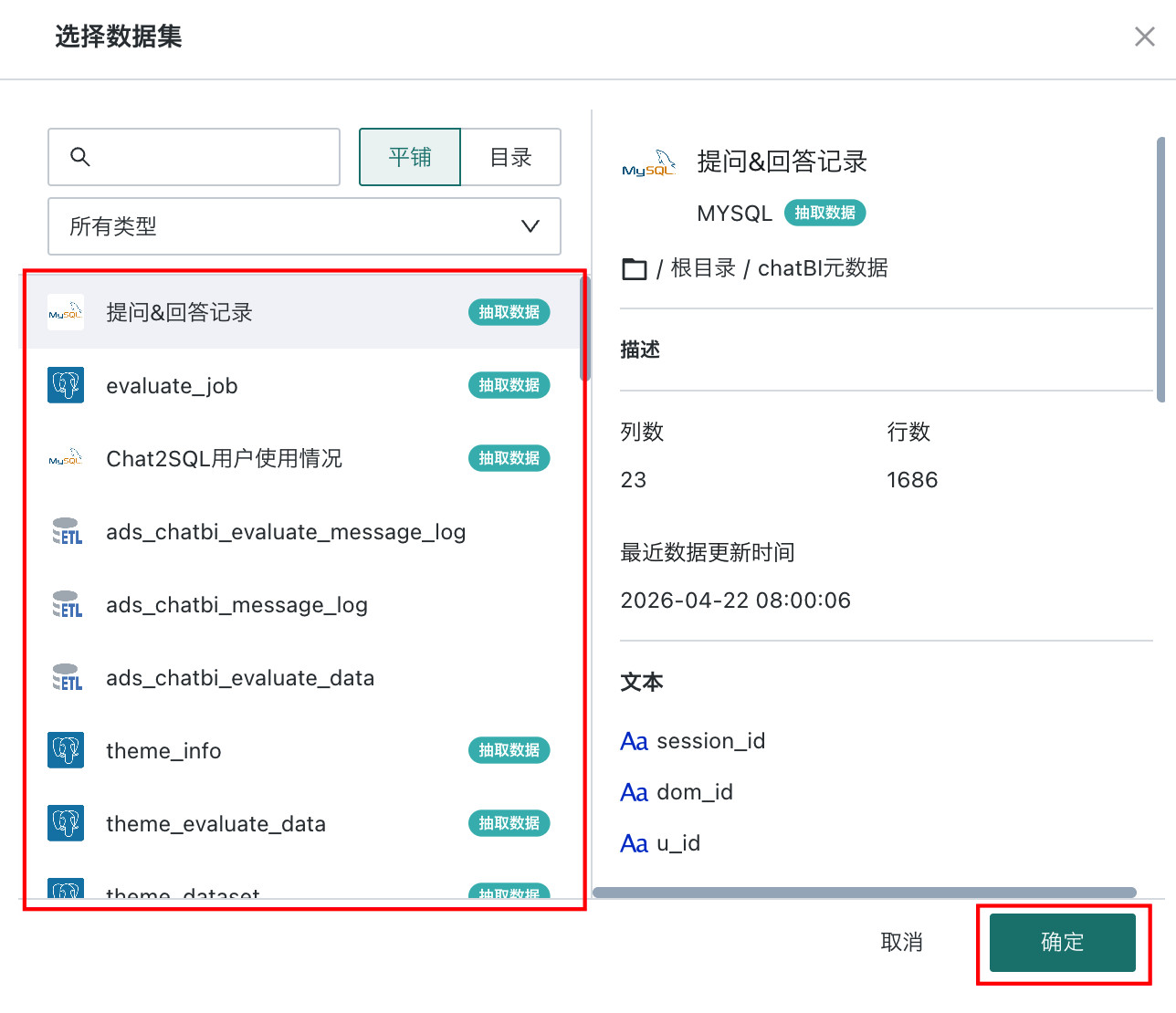
- In the dataset selection window, select the datasets to associate and click OK.
Page
Dataset Quality Requirements
Dataset Structure
- Data should be processed into ADS-layer wide tables suitable for business self-service queries.
- Dataset descriptions should explain the data background, table type (dimension table, fact table, slowly changing table, mapping table), grain, primary key and unique index, refresh logic, covered business time range, and common query scenarios.
- Detail tables should include business keys, business time fields, warehouse load time fields, required dimension fields, and core metric fields.
- Field type requirements: ID and code fields should be strings; date/time fields should define format and time zone; amount fields should use decimal where possible and describe currency and tax/refund logic; ratio fields should define whether the range is 0 to 1 or 0 to 100%; numeric enum fields should document their mapping.
- Aggregated metric tables should describe source tables, aggregation grain, refresh method, and metric logic version. Metric names should be unambiguous.
- Avoid mixed granularity in one table. If unavoidable, add a grain type field such as
DETAIL,DAILY_SUM, orMONTH_SUM, and document fixed filter rules in the knowledge base.
Table and Field Naming
- Avoid data warehouse layer expressions as field names, such as
ods_sales. Use business-meaningful field names. - If field names are abbreviations or business terms, maintain their meanings in field comments.
- Avoid ambiguous or similar field names, such as multiple fields named Date with different meanings.
Enum Value Learning
- Use comments and enum value learning for a small number of values, usually fewer than 10.
- For fixed enum fields such as order status or gender, document enum values in field comments.
- Do not enable enum value learning for fields that are not used in questions.
Other Notes
- Keep the total number of fields across all tables in a Dataset Agent under 300; no more than five tables is recommended.
- Start with a single table for the first Dataset Agent. After single-table accuracy reaches 80%, expand to more tables.
Common Dataset Examples
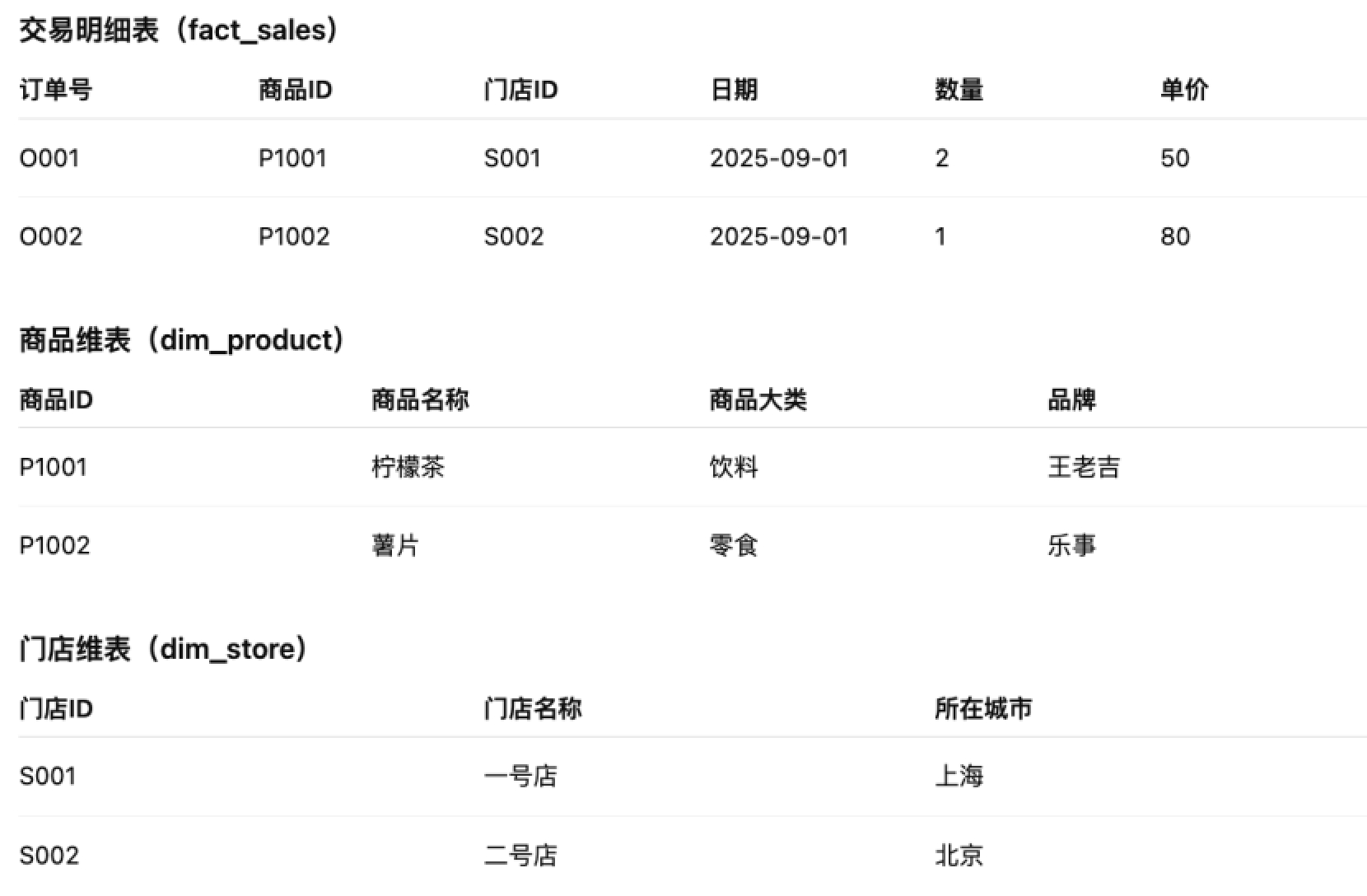
Multiple Tables: Detail Table + Dimension Tables
Typical scenario: transaction detail table + product dimension table + store dimension table.
Challenge: cross-table joins and distributed field sources.
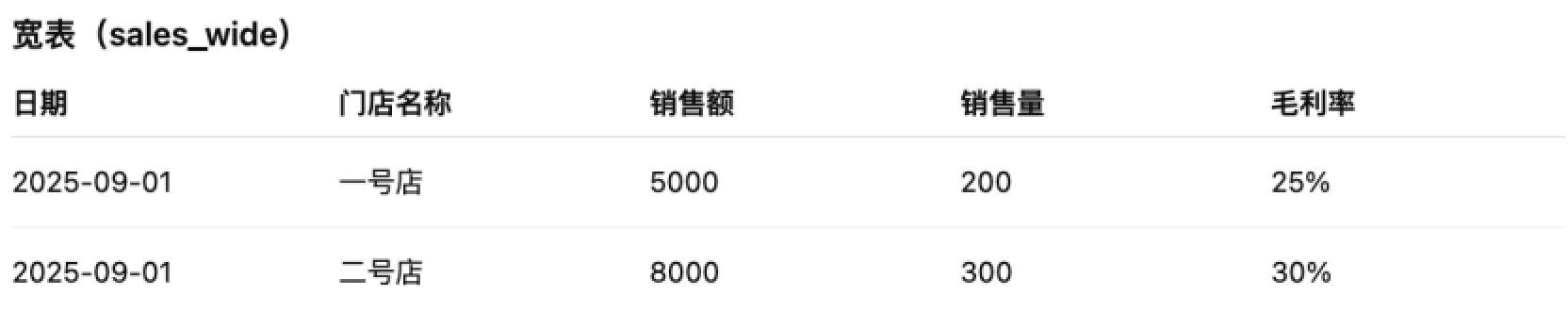
Single Wide Table: Dimensions + Date + Metric Columns
Typical scenario: a wide table where each metric is a separate column, such as sales amount, sales volume, and gross margin rate.
Challenge: many metrics with similar names can be confused.
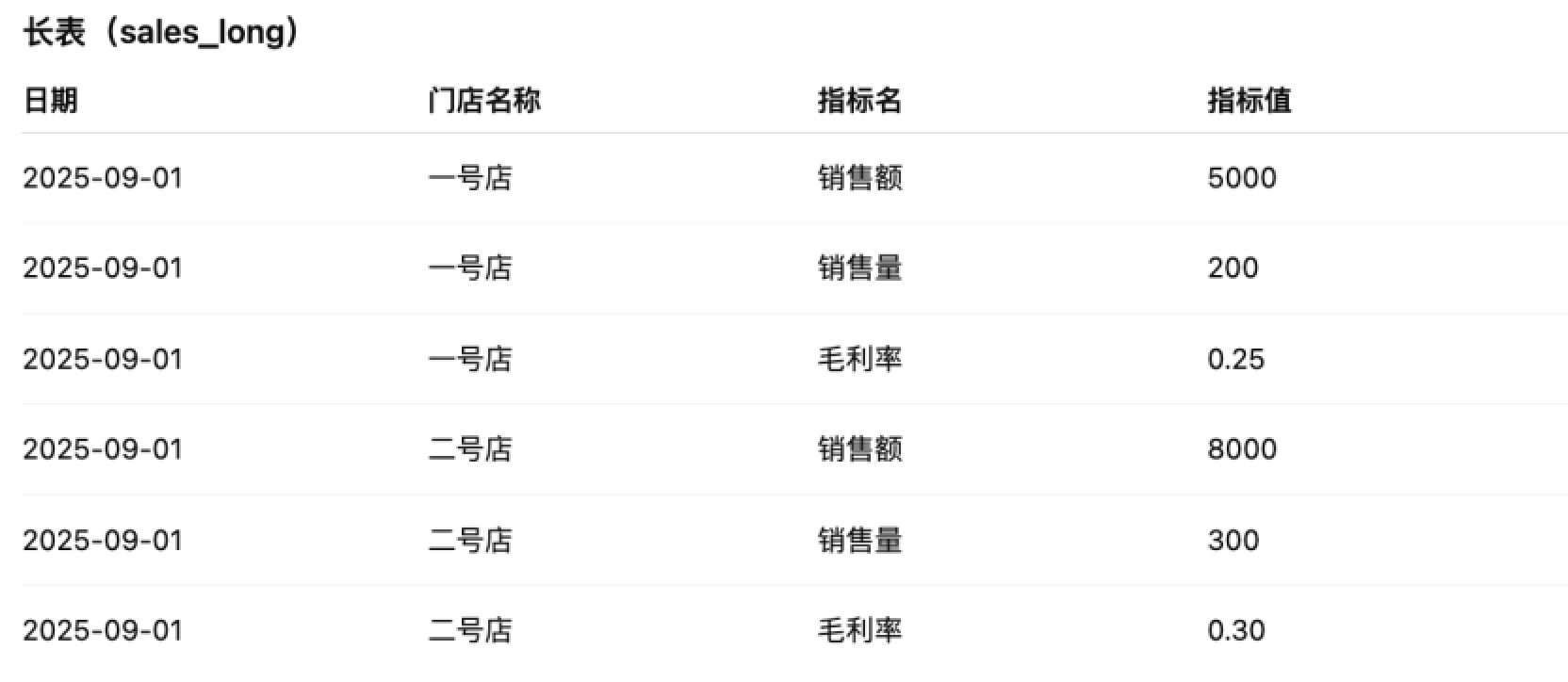
Single Long Table: Dimensions + Date + Metric Name + Metric Value
Typical scenario: metrics are stored by row, with fields such as dimension, date, metric name, and metric value.
Challenge: the system must understand that metric name is a field value, not a column.
Dataset Configuration Recommendations
Dataset-Level Recommendations
- The dataset name should clearly express the dataset meaning and align with the field information. Avoid meaningless timestamps, version numbers, or symbols.
- The dataset description should state the table type, primary key, unique index, refresh logic, query scenarios, time range, and target users.
- Example format: fact table, primary key is order ID, refreshed incrementally every day, covering all store sales orders from January 2020 to today.
Field Configuration Recommendations
- Set code fields to string type.
- Set date/time fields to date or datetime type. If this cannot be set, document sample values or format in comments.
- In multi-table scenarios, reduce duplicate fields across tables, especially duplicate metrics.
- Check whether enum values have business meanings. If not, document their meanings in comments or replace values in advance.
Field Alias Recommendations
- If the original field is English or abbreviated, set the alias directly to the common business name.
- Field names should have actual business meaning, except for common fields such as Date or ID.
- Avoid similar field names. For example, use Weekly Sales Amount and Monthly Sales Amount instead of Sales Amount _ Week and Sales Amount _ Month.
Field Comment Recommendations
- Clearly describe the field meaning, scenarios, synonyms, common filters, and rules.
- If a text or numeric field is actually used as a date, state the date usage and provide an example format, such as
YYYYMMDD. - If a numeric field is used for aggregation, provide the default aggregation method, such as
SUM(Sales Amount). - For code fields, document the fixed format and meaning.
- If enum values such as 0, 1, or 2 have no visible business meaning, document their meanings in field comments.
Knowledge Base Management and Configuration
Why Knowledge Is Needed
With only limited dataset information, the model cannot know the broader business context or implicit requirements behind questions.
In real business scenarios, even experienced analysts need to learn business context. When business logic or rules change, analysts also need updated knowledge to answer data questions accurately. Therefore, after data is prepared, adding knowledge is essential for improving accuracy.
How to Add Knowledge
Steps and Timing
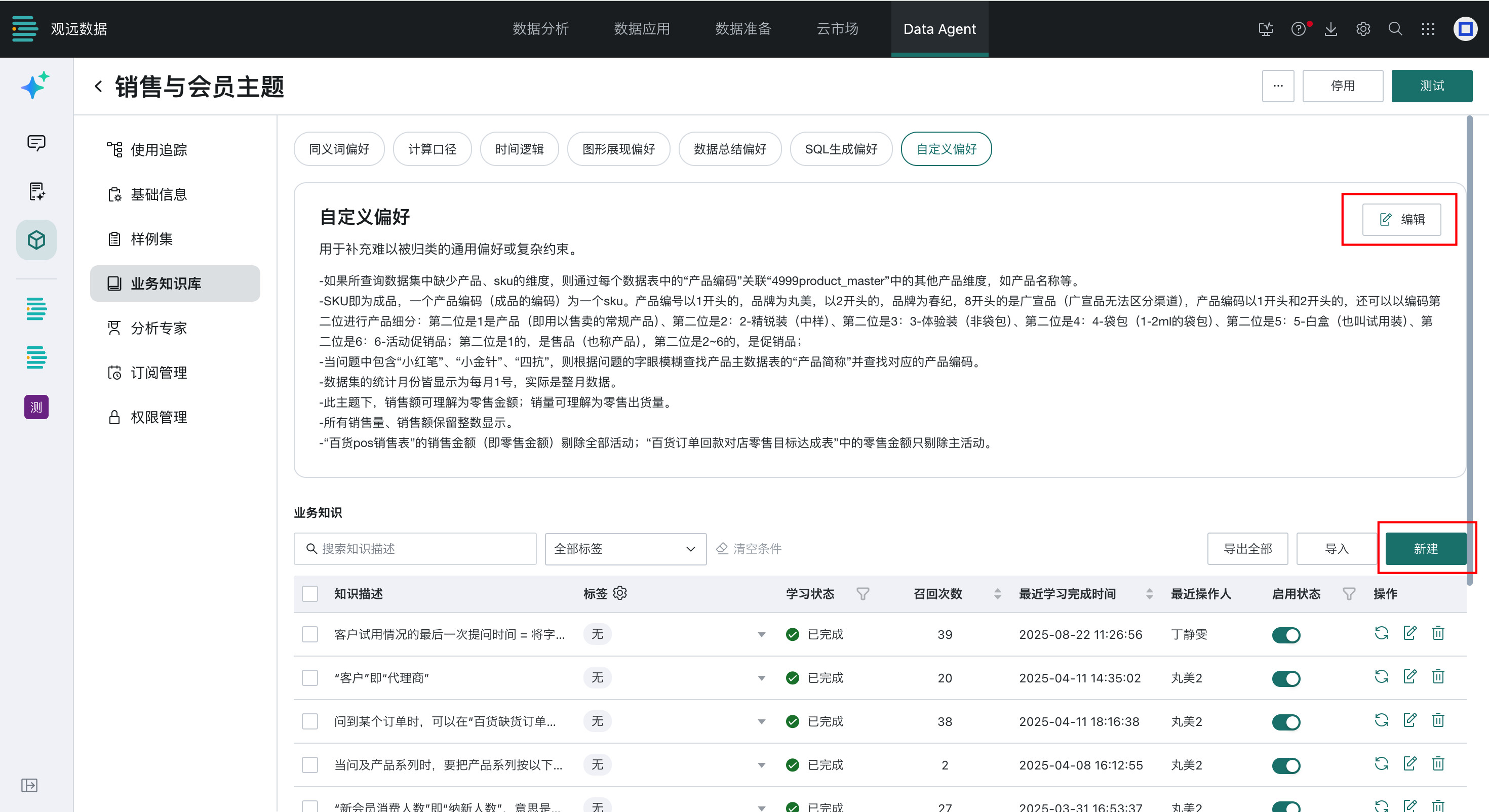
- After creating the Dataset Agent and adding datasets, go to Agent Management > Agent Detail Settings > Business Knowledge Library and click Create.
- In the knowledge editor, add internal knowledge entries such as business logic definitions and metric calculation logic.
- If no ready-made knowledge exists, start with initial Q&A and gradually improve the knowledge base when answers are incorrect or errors occur.
Basic Rules
- Be clear: describe business logic and processing rules in natural language.
- Progress gradually: make sure complex terms have already been explained earlier.
- Manage consistently: keep related concepts together so they are easier to troubleshoot and maintain.
- Avoid conflicts: check for contradictions or ambiguity across knowledge entries.
Page
How to Classify and Write Knowledge
By Usage Type
- Dataset descriptions: Explain field meanings and business knowledge in datasets.
- Primary key example: the primary key of an asset detail table is
月份and客户编号. - Field meaning example:
商品状态in the product dimension table indicates whether a product is on sale. - Relationship example: order detail table joins product dimension table by
货号, and joins store dimension table by店铺编码. - Business scenario example: an asset detail table contains customer profile information and monthly asset and revenue data.
- Table selection priority example: when questions involve products, query the store-product daily sales table; otherwise query the store daily sales table.
- Primary key example: the primary key of an asset detail table is
- Calculation logic: Explain derived metrics and complex metric logic.
- Conversion rate = converted users / followed-up users.
- Purchase quantity =
SUM(销售数量), purchasers =COUNT(DISTINCT 消费者唯一标识). - Gross margin rate =
SUM(销售毛利) / SUM(销售金额).
- Visualization rules: Specify which fields should be shown or hidden for certain questions.
- Business logic: Explain filters, mapping relationships, and conditions.
- Metric calculation logic: Define formulas and calculation scope.
- SQL syntax rules: Explain special syntax that should be used in specific cases.
By Usage Frequency
| General Knowledge | Business Knowledge | |
|---|---|---|
| Advantage | Referenced in every question. | Referenced only when the question is similar to or matches the knowledge. |
| Disadvantage | Consumes prompt length every time and may be truncated if too long. | Matching may be inaccurate, causing missed knowledge. |
Knowledge Application Example
For store sales data, suppose the target is to analyze four key retail levers: number of receipts, discount, joint rate, and average transaction value. Because user questions may combine dimensions and metrics in many ways, a layered dimension and metric system is needed. Generally, build business knowledge from metrics to dimensions and from simple logic to complex logic.
Common metric categories include:
- Basic metrics: sales amount, operating days, tag price, sales quantity, receipt count, return receipt count, average basket quantity.
- Composite metrics: unit price per item, average tag price, discount, average transaction value, percentage of single-item receipts.
- Derived metrics: XX sales amount, XX tag amount, XX receipt count, XX product quantity, and metrics excluding gifts.
Case 1: Basic Metric Query
For basic metric questions, define how metrics such as sales amount are calculated. Amount-related columns may exist in multiple places, so analysts should maintain the relationship between common business wording and actual table columns, such as using RMB结算金额 and SUM(RMB结算金额) for sales amount.
Case 2: Dimension-Related Metric Query
For questions involving dimensions and metrics, define the relationship between dimensions and valid data. For example, maintain in General Knowledge that all queries should filter 是否有效商品标识 = 1, even if the user says not to add other restrictions.
Q&A Sample Management and Configuration
Why Q&A Samples Are Needed
For narrow scenarios with complex logic and many conditions, business knowledge may not be enough. Add Q&A samples to improve answer stability.
How to Add Q&A Samples
Steps and Timing
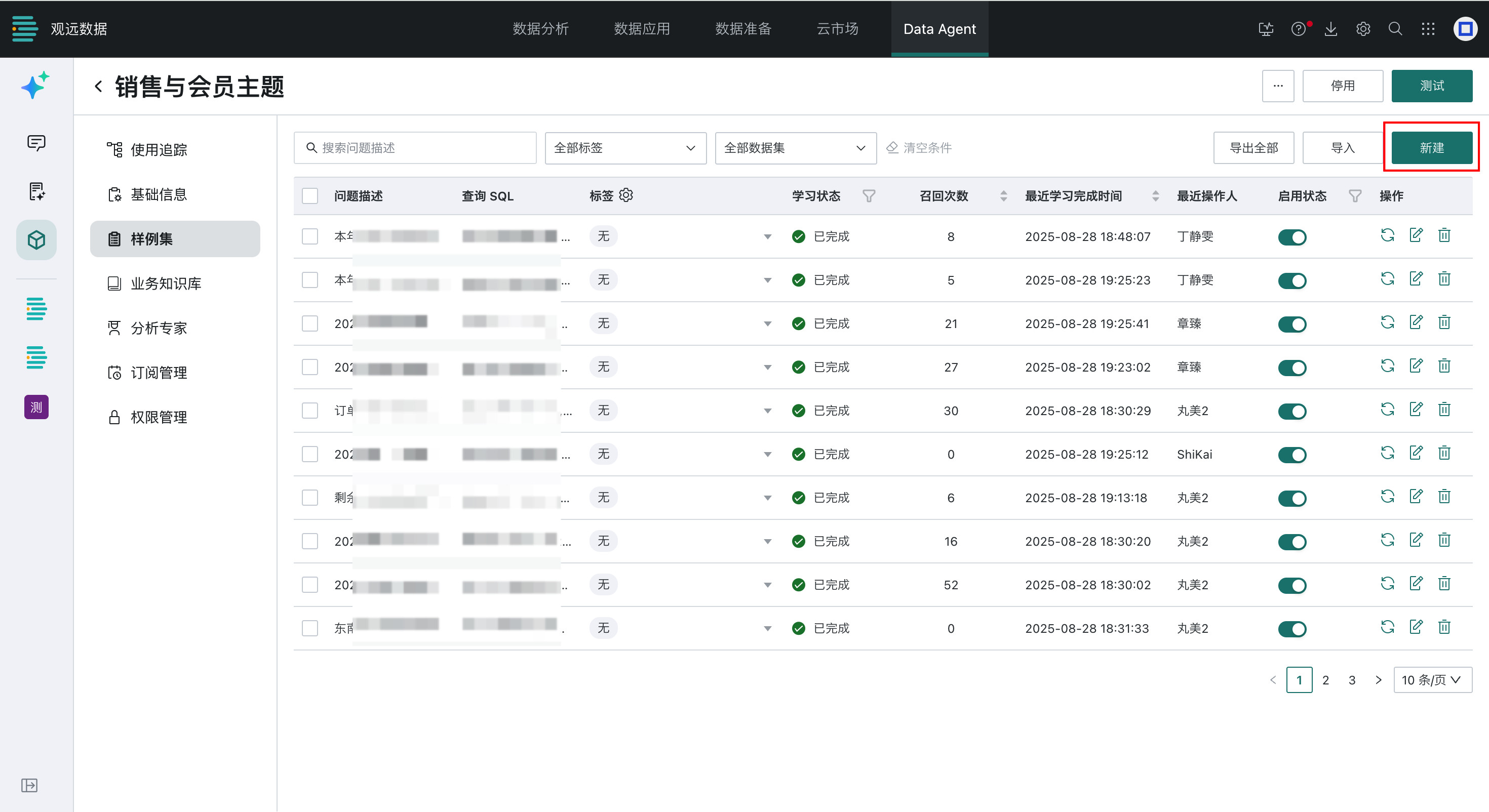
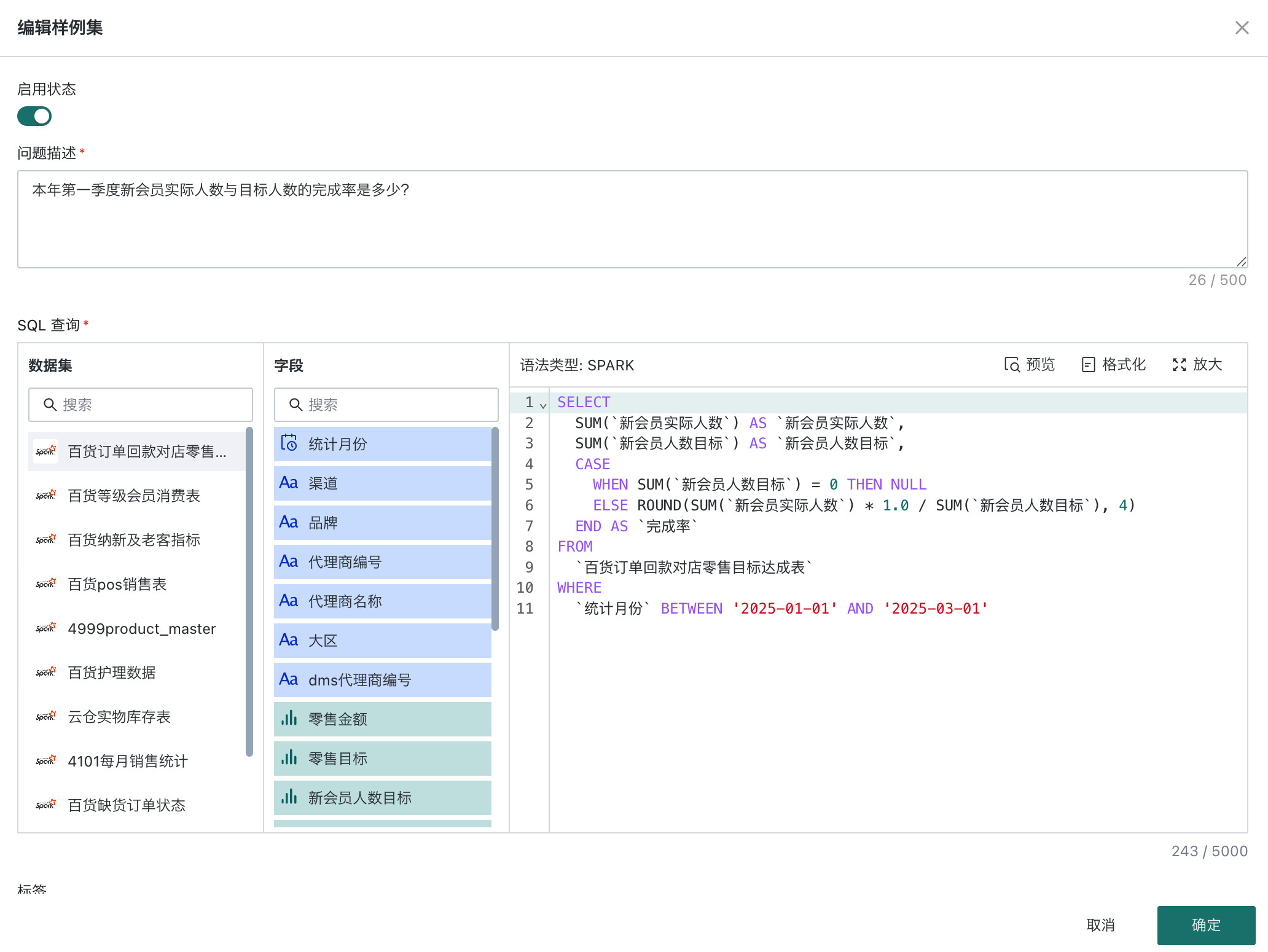
- After datasets meet the requirements and business/general knowledge has been maintained, if the effect is still unstable, go to Agent Management > Agent Detail Settings > Q&A Sample and click Create.
- In the sample editor, enter the question text, correct SQL, and other content, then set the status to enabled.
Basic Rules
- Avoid adding content that is too simple or not valid long term.
- Simple content can usually be maintained efficiently in the business knowledge base.
- Avoid relative-date questions with hard-coded absolute dates in SQL.
- Use time functions for dynamic time expressions such as yesterday, last 7 days, and previous natural week.
Page
Q&A Sample Application Examples
- For long-tail product queries involving window functions and complex logic, add Q&A samples.
WITH `store_goods` AS (
  SELECT `商品编码`, `商品名称`, SUM(`销售金额`) AS `销售额`
  FROM `@CHatBI_全国门店商品销售数据_按天`
  WHERE `业务日期` >= '2025-04-01'
   AND `业务日期` <= '2025-04-30'
   AND `门店名称` LIKE '%德昌%'
   AND `门店名称` LIKE '%育才%'
   AND `门店名称` LIKE '%路%'
   AND NOT `销售金额` IS NULL
  GROUP BY `商品编码`, `商品名称`
 ),
 `total_sales` AS (
  SELECT SUM(`销售额`) AS `总销售额`
  FROM `store_goods`
 ),
 `ranked_goods` AS (
  SELECT `商品编码`, `商品名称`, `销售额`
   , SUM(`销售额`) OVER (ORDER BY `销售额` ASC ROWS BETWEEN UNBOUNDED PRECEDING AND CURRENT ROW) AS `累计销售额`
  FROM `store_goods`
 )
SELECT `商品编码`, `商品名称`, `销售额`
 , ROUND(`累计销售额` / `总销售额`, 4) AS `累计占比`
FROM `ranked_goods`, `total_sales`
WHERE `累计销售额` / `总销售额` <= 0.2
ORDER BY `销售额` ASC
- For week-over-week comparisons where the current week must be compared with the same number of days in the previous week, add Q&A samples.
WITH `date_ref` AS (
SELECT DATE_SUB(CURRENT_DATE, INTERVAL (DAYOFWEEK(CURRENT_DATE) + 5) % 7 DAY) AS `本周起始`
   , DATE_SUB(DATE_SUB(CURRENT_DATE, INTERVAL (DAYOFWEEK(CURRENT_DATE) + 5) % 7 DAY), INTERVAL '7' DAY) AS `上周起始`
 ),
 `cur` AS (
  SELECT SUM(`销售金额`) AS `本周销售额`
  FROM `@CHatBI_全国门店销售数据_按天`, `date_ref`
  WHERE `大战区` LIKE '% 川东南%'
   AND `业务日期` >= `date_ref`.`本周起始`
   AND `业务日期` <= DATE_SUB(CURRENT_DATE, INTERVAL '1' DAY)
   AND NOT `销售金额` IS NULL
 ),
 `pre` AS (
  SELECT SUM(`销售金额`) AS `上周销售额`
  FROM `@CHatBI_全国门店销售数据_按天`, `date_ref`
  WHERE `大战区` LIKE '% 川东南%'
   AND `业务日期` >= `date_ref`.`上周起始`
   AND `业务日期` < DATE_ADD(`date_ref`.`上周起始`, INTERVAL DATE_DIFF('DAY', DATE_SUB(CURRENT_DATE, INTERVAL '1' DAY), `date_ref`.`本周起始`) DAY)
   AND NOT `销售金额` IS NULL
 )
SELECT `cur`.`本周销售额`, `pre`.`上周销售额`, `cur`.`本周销售额` - `pre`.`上周销售额` AS `环比变化`
 , CASE
  WHEN `pre`.`上周销售额` = 0
   OR `pre`.`上周销售额` IS NULL
  THEN NULL
  ELSE ROUND((`cur`.`本周销售额` - `pre`.`上周销售额`) / `pre`.`上周销售额`, 4)
 END AS `环比变化率`
FROM `cur`, `pre`
- For MTD month-over-month and year-over-year comparisons, restrict last month and last year to the same number of days.
WITH `cur_month` AS (
  SELECT SUM(`销售金额`) AS `本月销售额`
  FROM `@CHatBI_全国门店销售数据_按天`
  WHERE `城市` LIKE '% 成都%'
  AND `业务日期` >= DATE_FORMAT(CURRENT_DATE, '%Y-%m-01')
  AND `业务日期` <= DATE_SUB(CURRENT_DATE, INTERVAL '1' DAY)
  AND NOT `销售金额` IS NULL
),
 `last_month` AS (
    SELECT SUM(`销售金额`) AS `上月同期销售额`
    FROM `@CHatBI_全国门店销售数据_按天`
    WHERE `城市` LIKE '% 成都%'
    AND `业务日期` >= DATE_SUB(DATE_FORMAT(CURRENT_DATE, '%Y-%m-01'), INTERVAL '1' MONTH)
    AND `业务日期` <= DATE_SUB(DATE_SUB(CURRENT_DATE, INTERVAL '1' DAY), INTERVAL '1' MONTH)
    AND NOT `销售金额` IS NULL
  ),
 `last_year` AS (
    SELECT SUM(`销售金额`) AS `去年同期销售额`
    FROM `@CHatBI_全国门店销售数据_按天`
    WHERE `城市` LIKE '% 成都%'
    AND `业务日期` >= DATE_SUB(DATE_FORMAT(CURRENT_DATE, '%Y-%m-01'), INTERVAL '1' YEAR)
    AND `业务日期` <= DATE_SUB(DATE_SUB(CURRENT_DATE, INTERVAL '1' DAY), INTERVAL '1' YEAR)
    AND NOT `销售金额` IS NULL
  )
SELECT `c`.`本月销售额`, `l`.`上月同期销售额`, `y`.`去年同期销售额`, `c`.`本月销售额` - `l`.`上月同期销售额` AS `环比变化`
 , CASE
  WHEN `l`.`上月同期销售额` = 0
   OR `l`.`上月同期销售额` IS NULL
  THEN NULL
  ELSE ROUND((`c`.`本月销售额` - `l`.`上月同期销售额`) / `l`.`上月同期销售额`, 4)
 END AS `环比变化率`, `c`.`本月销售额` - `y`.`去年同期销售额` AS `同比变化`
 , CASE
  WHEN `y`.`去年同期销售额` = 0
   OR `y`.`去年同期销售额` IS NULL
  THEN NULL
  ELSE ROUND((`c`.`本月销售额` - `y`.`去年同期销售额`) / `y`.`去年同期销售额`, 4)
 END AS `同比变化率`
FROM `cur_month` `c`, `last_month` `l`, `last_year` `y`
Accuracy Testing
Why Accuracy Testing Is Needed
As the Dataset Agent admin, you are usually the first user of the agent. Carefully verify whether datasets, business knowledge, and Q&A samples take effect, and whether the Dataset Agent can accurately answer business users' questions.
If ChatBI misunderstands data, questions, or business terminology, correct the generated SQL and add it to Q&A samples, or update other business knowledge.
How to Test Accuracy
Steps and Timing
After datasets and business knowledge are configured, test accuracy before production release. We recommend reaching 90% accuracy or above before opening the Dataset Agent to business users.
Basic Rules
- Test flow: add questions or batch import questions -> judge whether data results are correct -> judge whether SQL is correct -> add or modify knowledge -> retest.
- Test questions should use a valid question structure, stay within the agent scope, and have clear time, conditions, and metrics.
- If SQL validity frequently fails, select the failed items and retest. Contact Guandata if the issue repeats.
Page
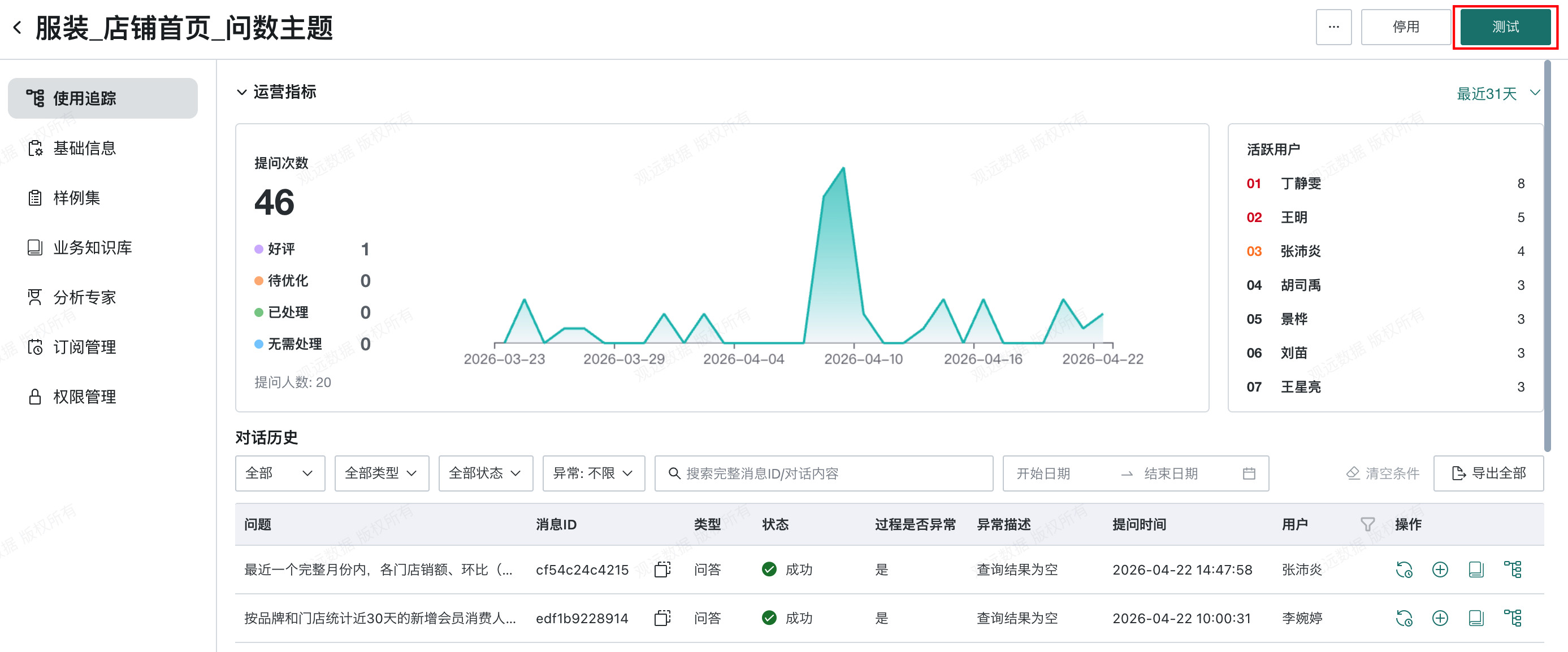
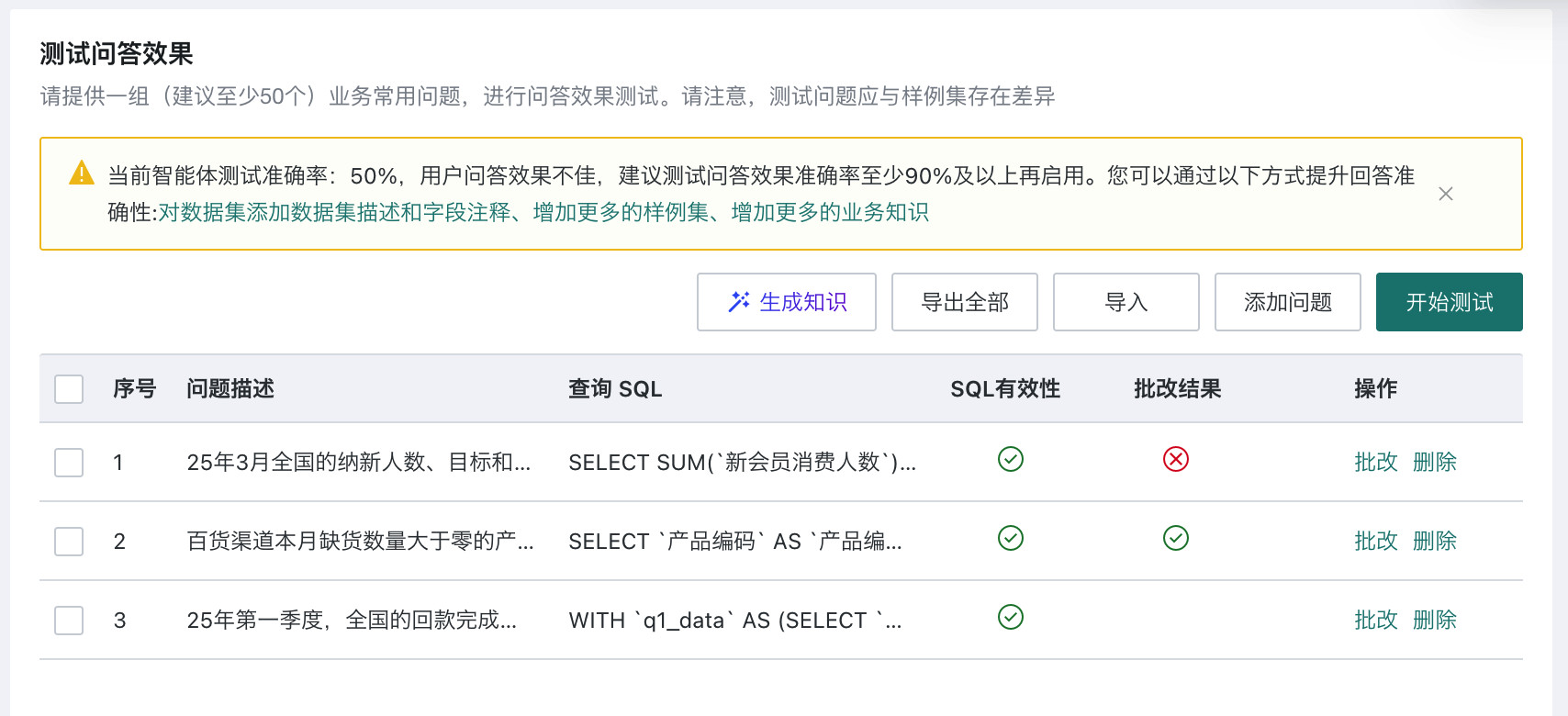
Testing Feature Application Example
Applicable Scenario
Use this process to validate answer accuracy in batch and confirm whether generated results and queried data are correct.
Prerequisites
Prepare a test evaluation set with 50 to 100 recommended questions and answers in SQL form. Save it in Excel and import it into the ChatBI testing feature.
Steps
-
Define the test objective:
- What accuracy target is expected?
- Is the test business POC oriented or product capability oriented?
- For business POC tests, check whether questions follow real business asking habits.
- For product capability tests, provide five sample questions for each capability to validate.
-
Prepare materials:
- Data sources.
- Graded test samples.
- Test answers, if available.
Test questions and answers should be as general as possible and avoid time-sensitive conditions. If time must be included, use absolute time in both the question and SQL, or use relative time in both.
-
Go to Data Agent > Agent Management > Agent Detail Settings > Basic Information, and confirm that data knowledge has finished learning and required enum value fields have been selected for learning.
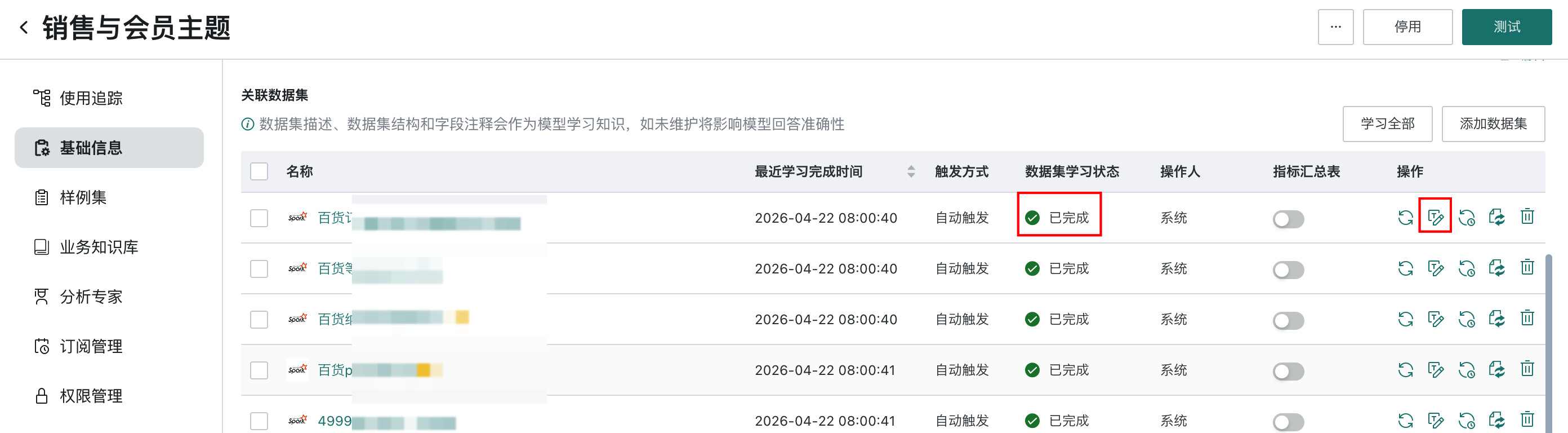
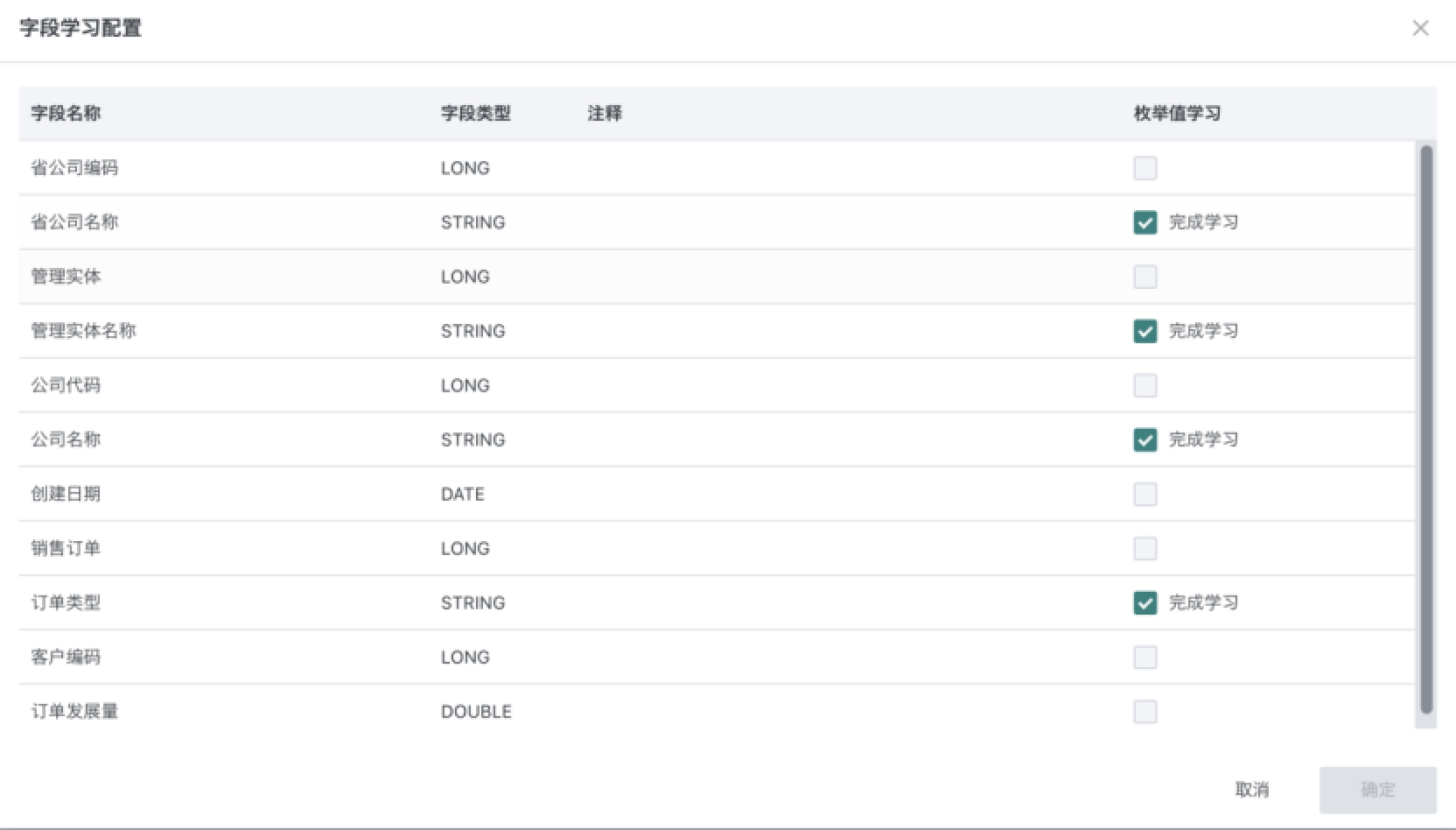
-
After dataset learning is complete, click Test to open the test page.
-
Click Import to import the prepared evaluation set containing questions and SQL. Wait for testing and grading to finish automatically. A single question usually takes about one minute to test.
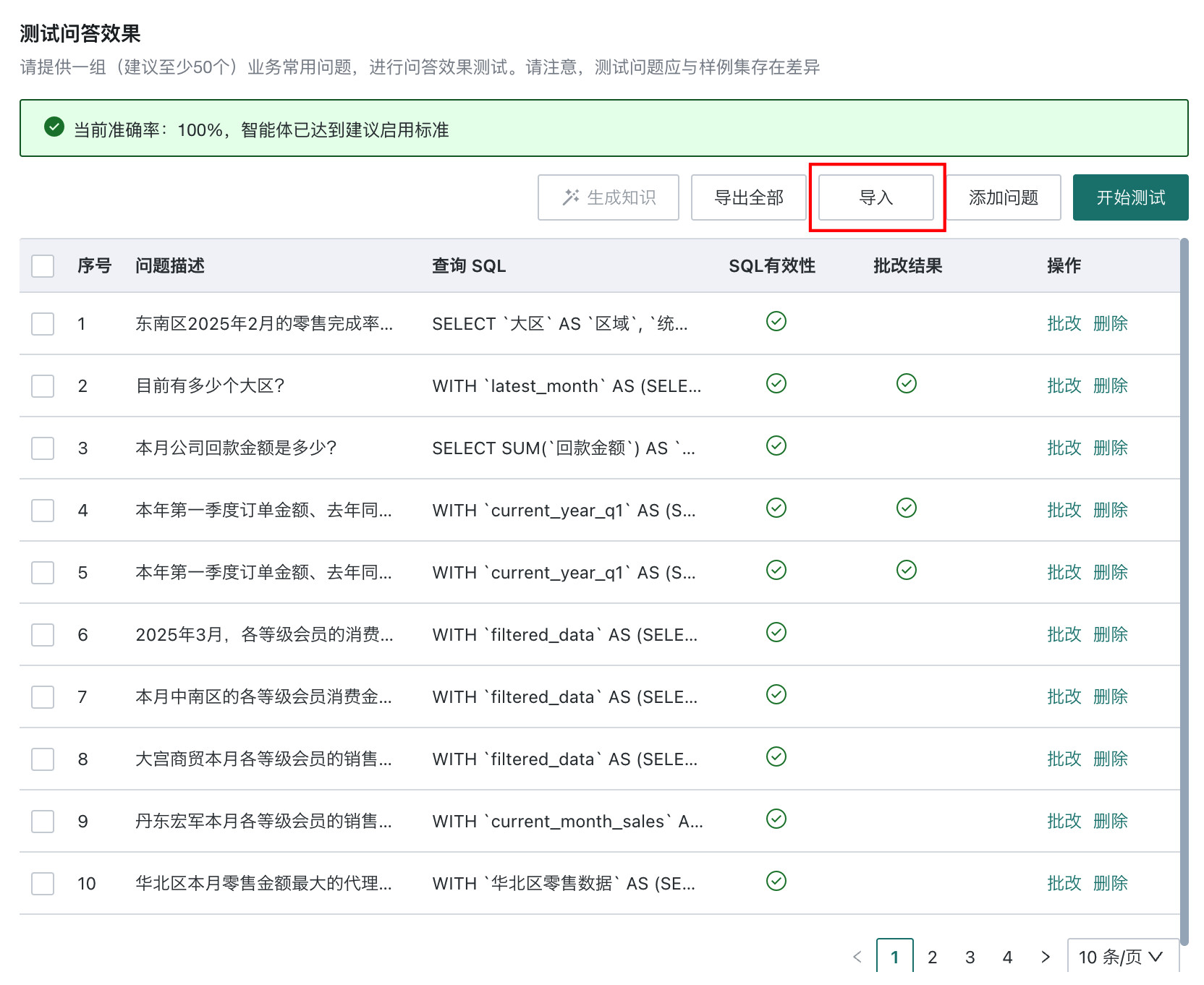
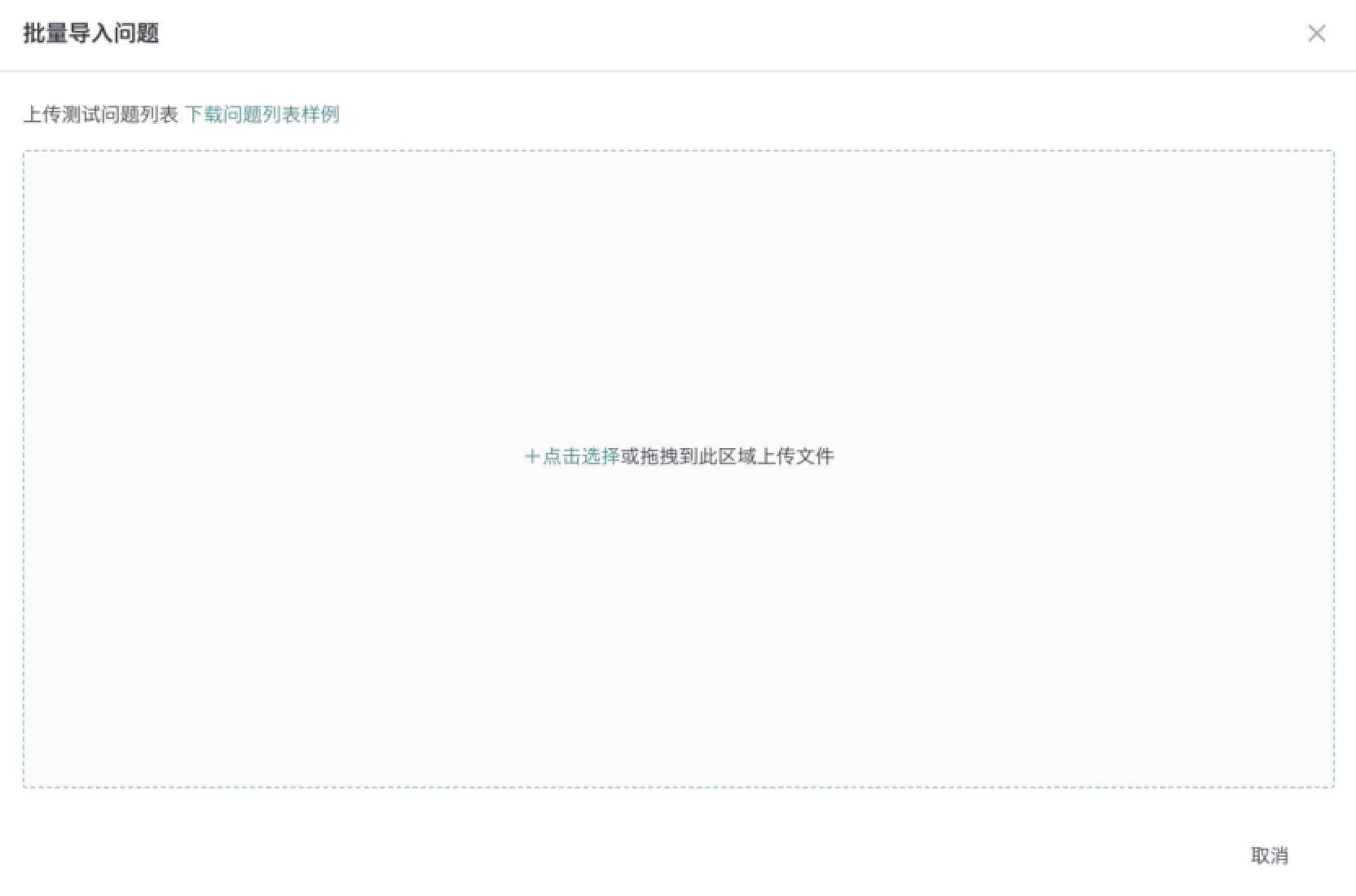
-
After testing is complete, click Generate Knowledge. The system automatically generates knowledge for questions answered incorrectly. A single question usually takes about one minute for knowledge generation.
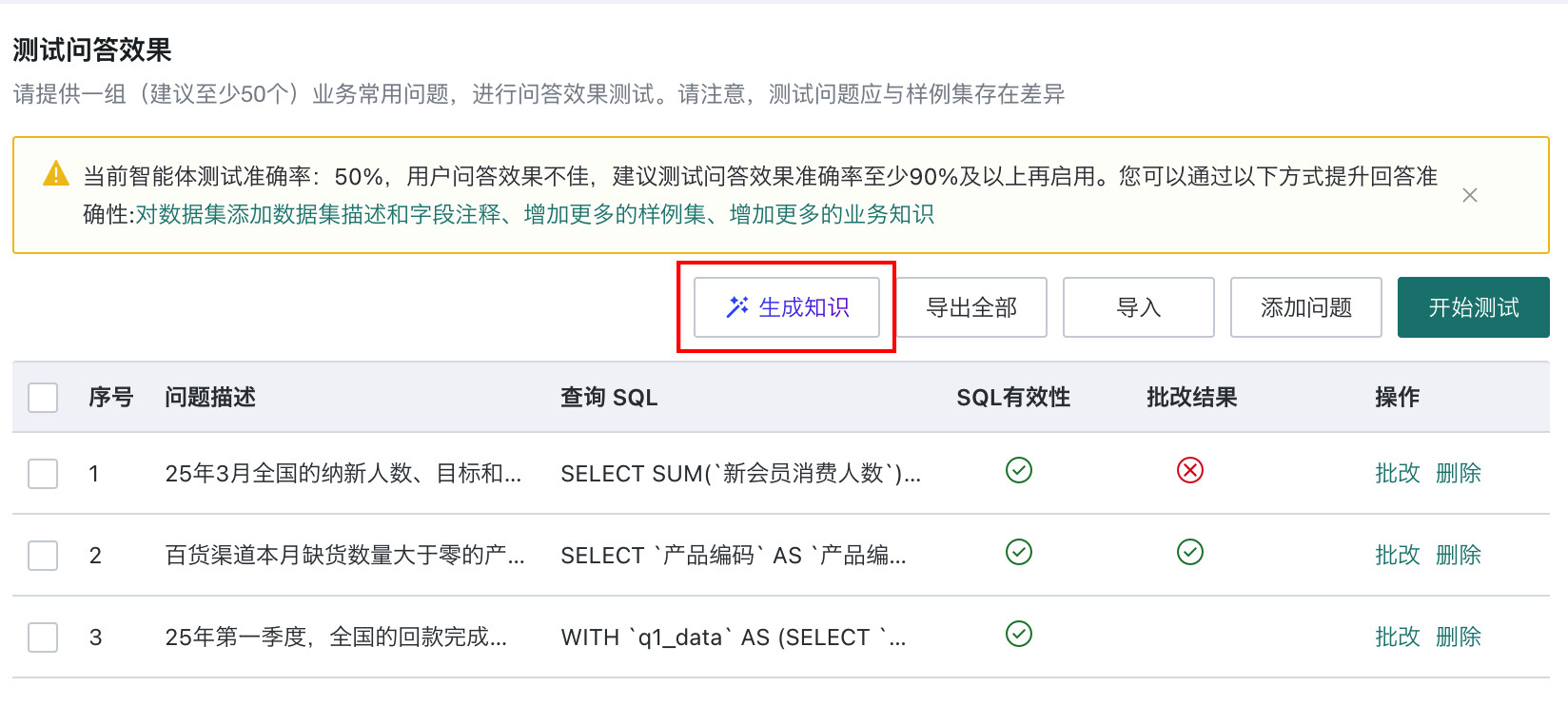
-
After all knowledge is generated, review the generated knowledge in the dialog and click Confirm Changes to keep the generated knowledge. If any generated entry needs adjustment, confirm the changes first, then filter the knowledge base by the System Generated tag and edit the knowledge.
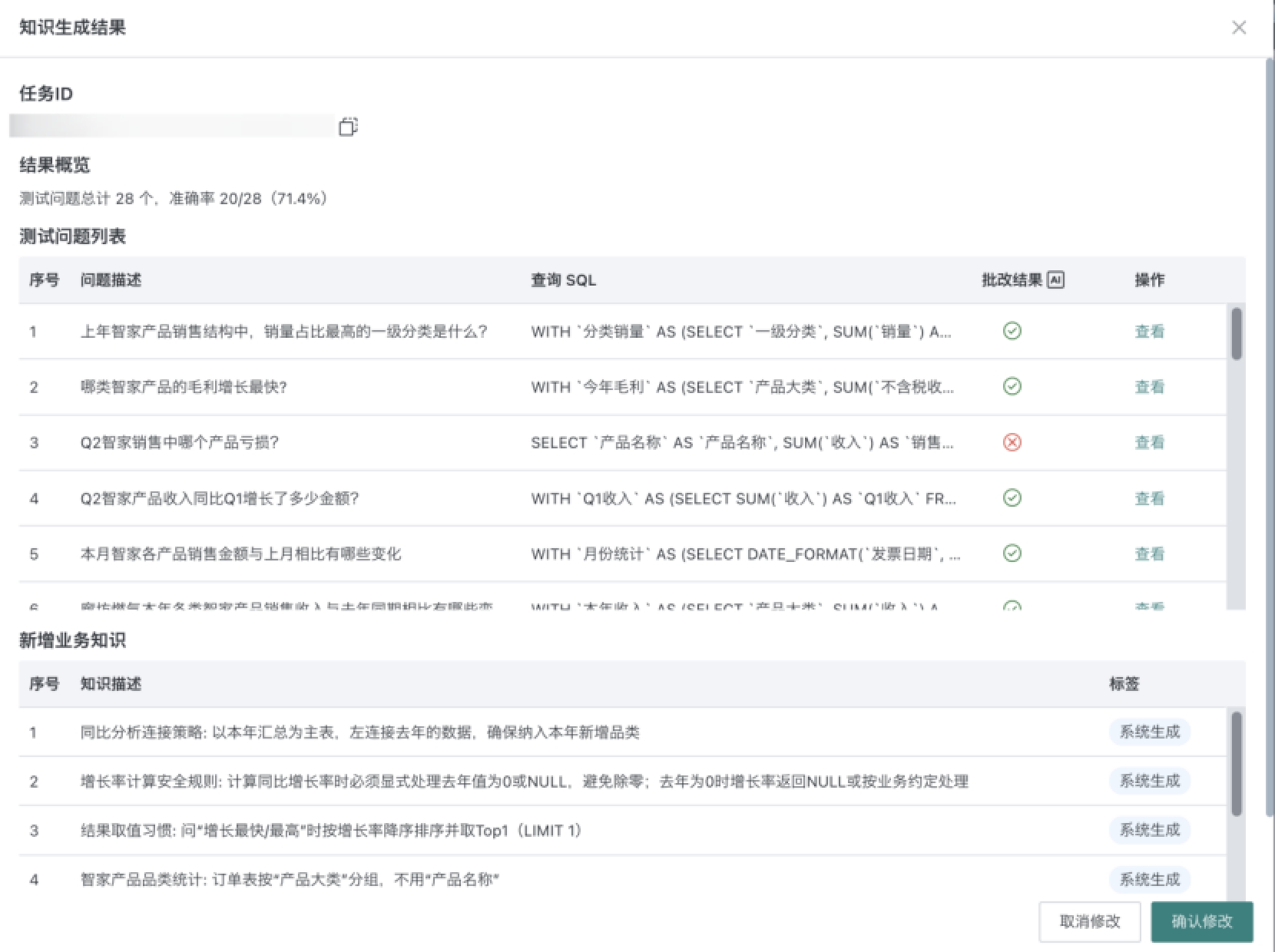
-
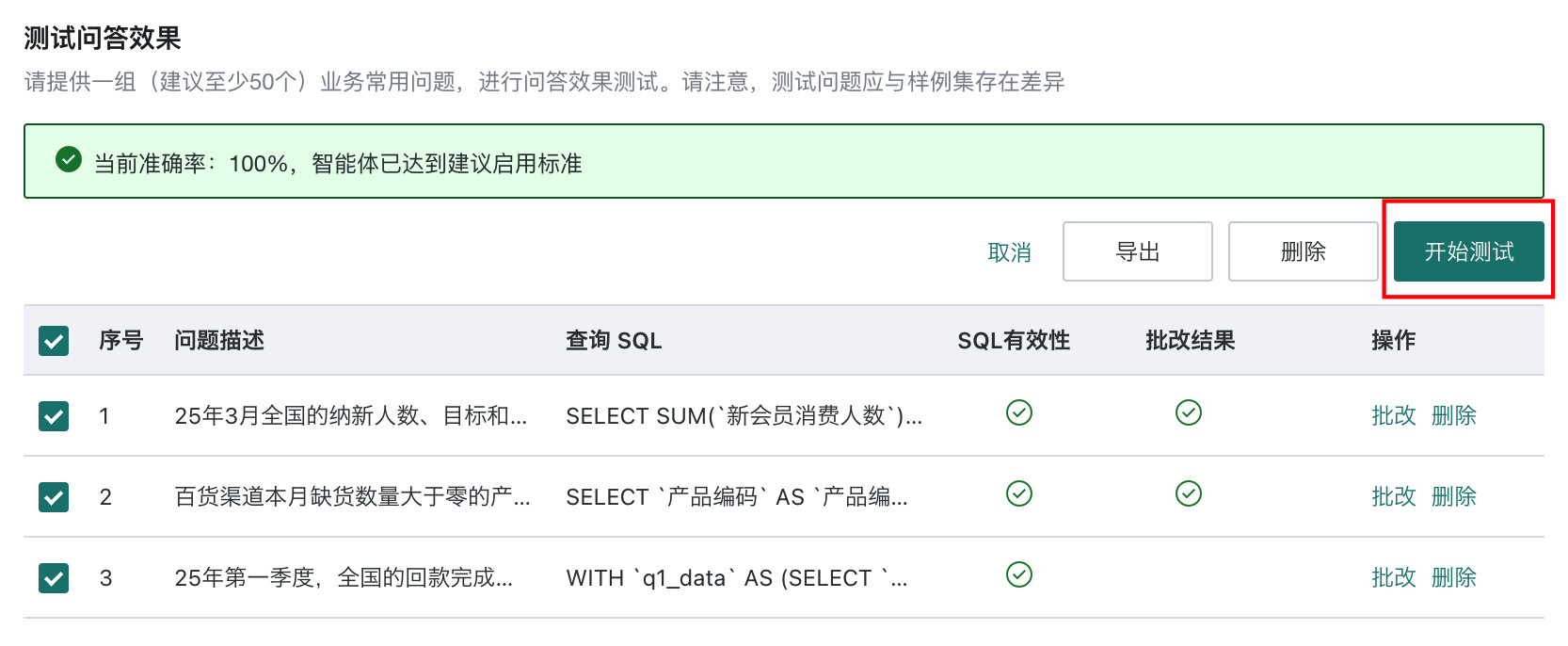
After review, return to the test page, select all current questions, and click Start Test to retest and verify whether generated knowledge is effective.
-
After retesting, check the accuracy statistics:
- If accuracy reaches the expected target, such as 90% or above, the Dataset Agent can be released to production.
- If accuracy does not meet the target, repeat the Generate Knowledge > Batch Retest process until the requirement is met.
- After each test, manually review and correct the test results.
Result Verification
After testing, verify accuracy in the following ways:
- Check the accuracy card on the test page and confirm whether overall accuracy reaches 90% or above.
- Click View Details and inspect incorrect answers one by one to identify error types, such as data error, SQL error, or understanding error.
- For incorrect answers, click View SQL and compare the generated SQL with the expected SQL.