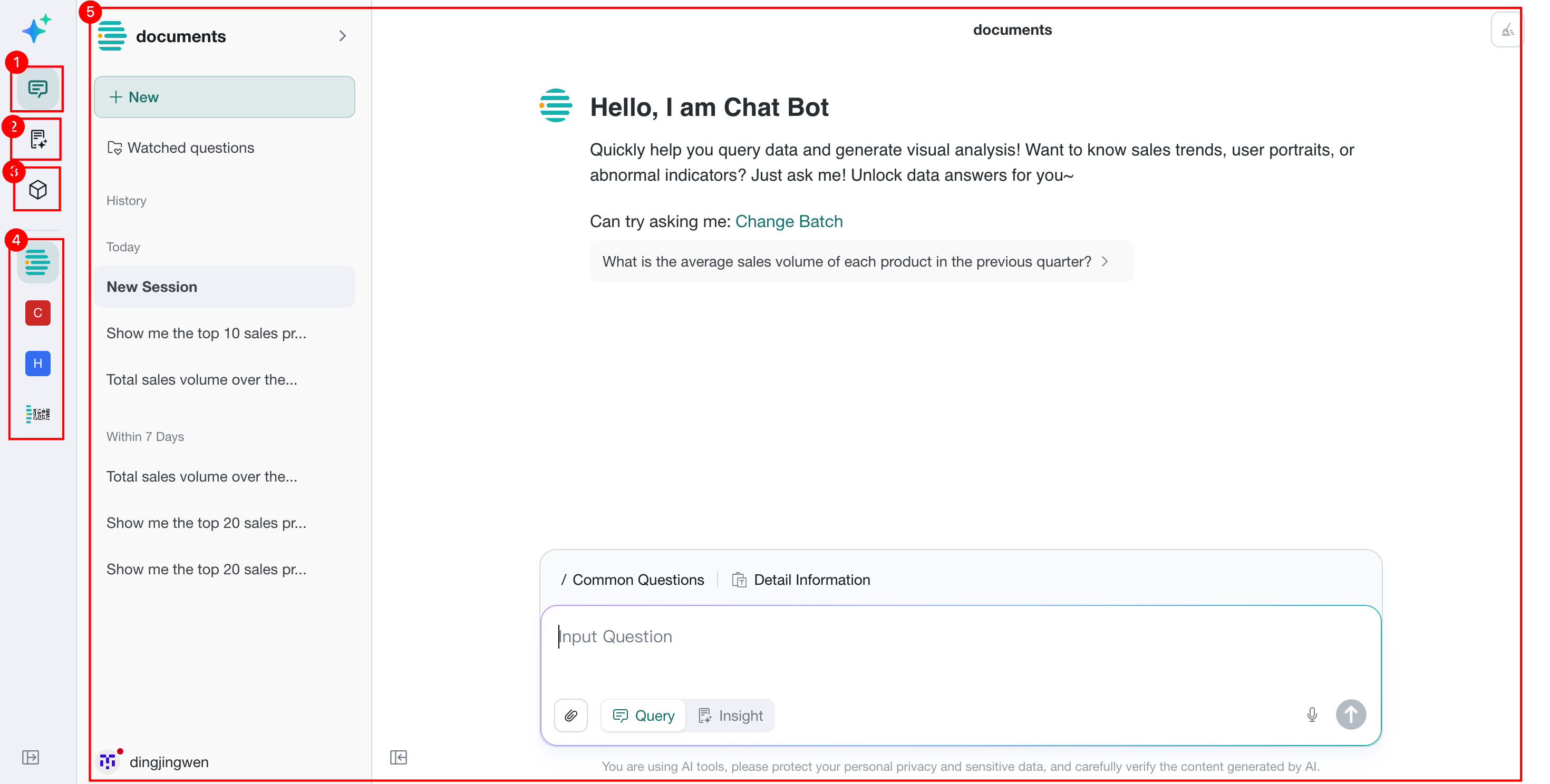
Data Agent Feature Navigation
Overview
Data Agent is an intelligent data analysis and Q&A product for business users. It provides Query, Insight Analysis, and management capabilities through a unified entry point.
Access Entry
In the top navigation bar of the BI system, click the Data Agent tab to enter the product.
The access URL is https://<your domain>/agent. For private deployments, replace <your domain> with your actual environment address.
Layout
Data Agent uses a layout with a left navigation bar and a main operation area on the right.
| No. | Icon Name | Description |
|---|---|---|
| 1 | Query Agent | Opens the query interface, where users can ask questions in natural language and receive visualized results. See Query Agent. |
| 2 | Insight Agent | Opens the in-depth analysis mode, where the LLM automatically plans tasks and generates illustrated analysis reports. See Insight Agent. |
| 3 | Agent Management | Opens the backend configuration area for agent management, knowledge management, memory settings, and more. See Agent Management. |
| 4 | Session Management | Displays recently used topics and helps users quickly return to previous analysis content. |
| 5 | Main Work Area | Displays the detailed interactive area for the currently selected module, such as the Q&A input area or the configuration management area. |