FAQ
Usage-related Issues
Data Query Failed
Troubleshooting approach:
- Check whether
SQL generation is incorrect, including whether the SQL syntax is valid and whether the table names and field names in the SQL match those in the dataset. - Check
Agent Detail Settings > Basic Configurationand confirm whether the dataset table names containspaces or special characters. These are difficult for the model to understand and often cause SQL generation errors. We recommend removing such characters and then checking the generated SQL again. - Check whether
table names and field names have duplicate names. At present, if a table name is identical to a field name, BI-side SQL execution may fail. - Check API errors and rule out SSO configuration issues.
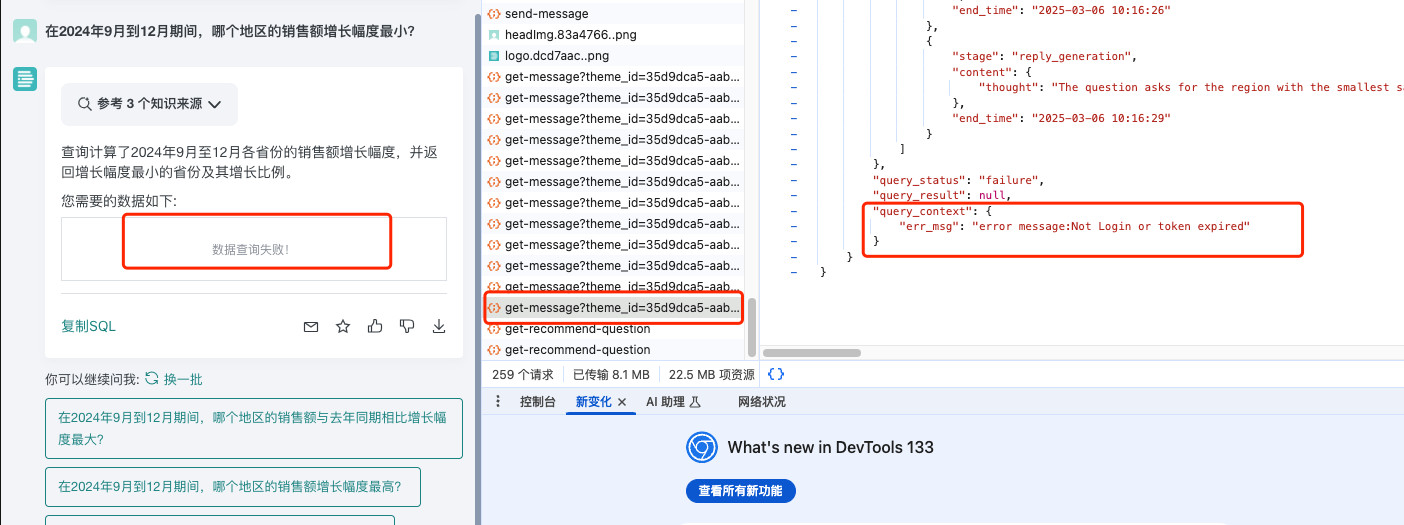
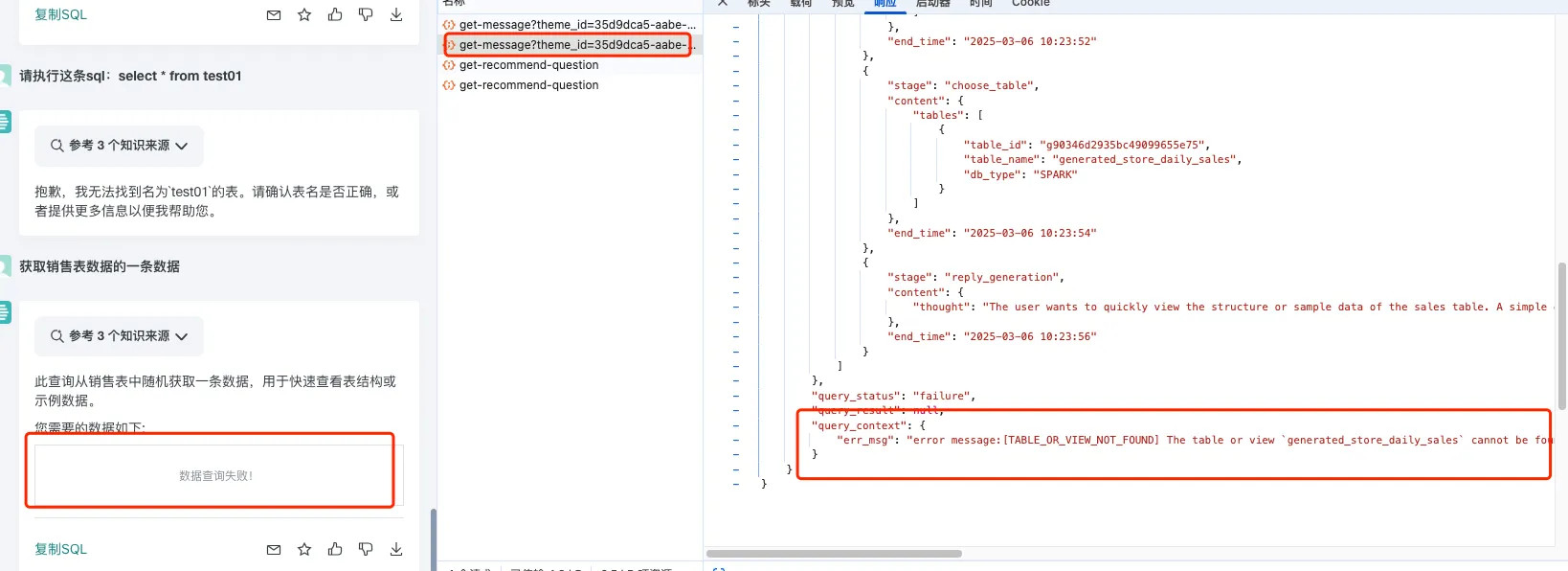
- Cause: Data Agent relies on SSO to obtain user cookies. If the operations team configures incorrect SSO data, cookie retrieval fails, which ultimately appears as SQL execution failure.
- Solutions:
- If
data_synapseis earlier than version2.2.0, and the user does not have permission to the dataset used in the SQL, SQL queries may fail. Upgrade to version>= 2.2.0or grant the user permission to the related datasets. - Confirm that the SSO provided by the user is a
private_key, not apublic_key. If the wrong key was provided, regenerate and reinsert the SSO configuration.
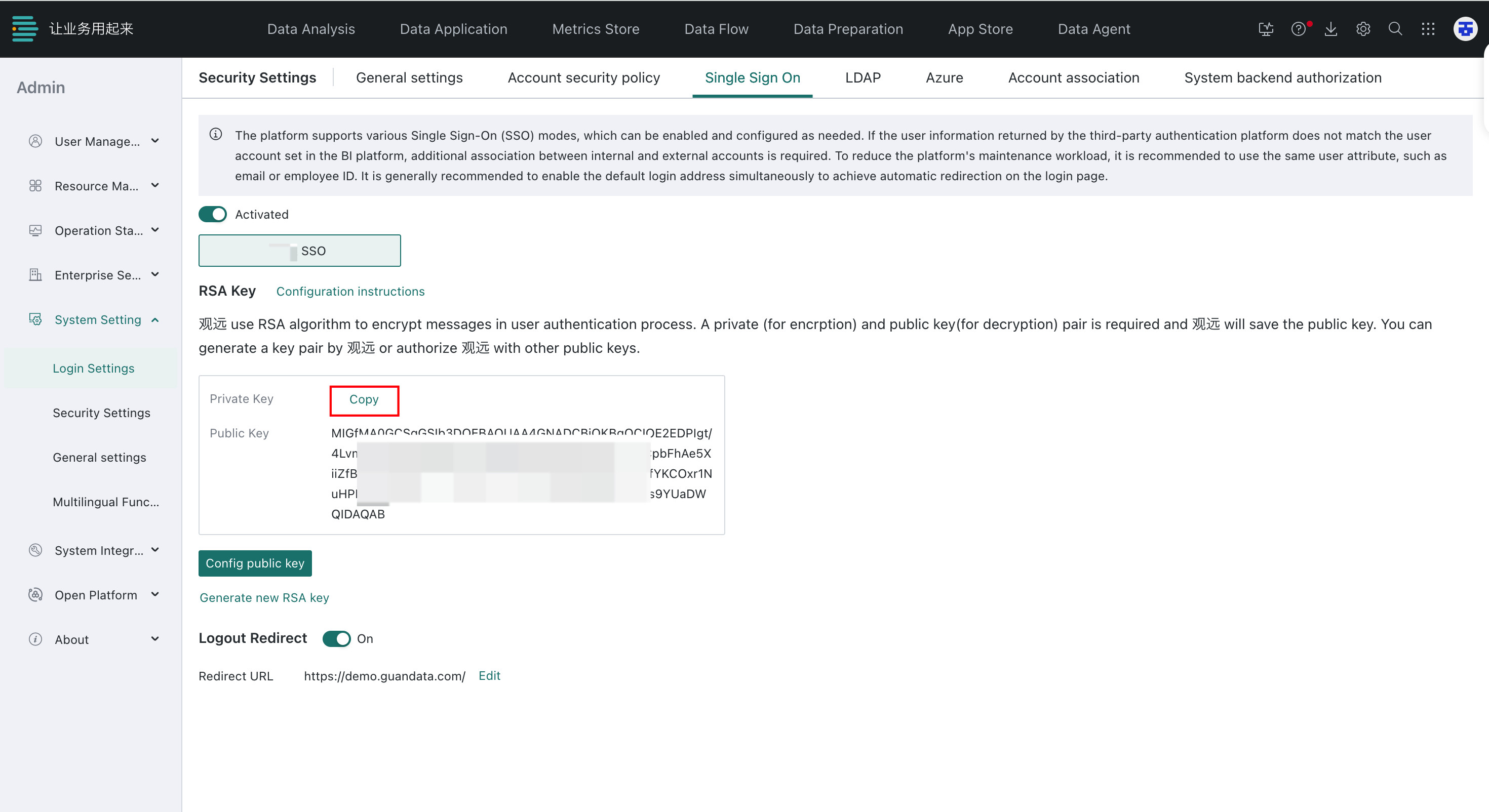
- The operations team should check whether the SSO-encoded data has been inserted into the SSO table in PostgreSQL. If not, insert it again.
- The operations team should also verify whether the generated SSO token is valid and whether
domain_idanduser_idcontain extra spaces or line breaks after Base64 decoding. If issues are found, correct them before reinserting the token.
- If
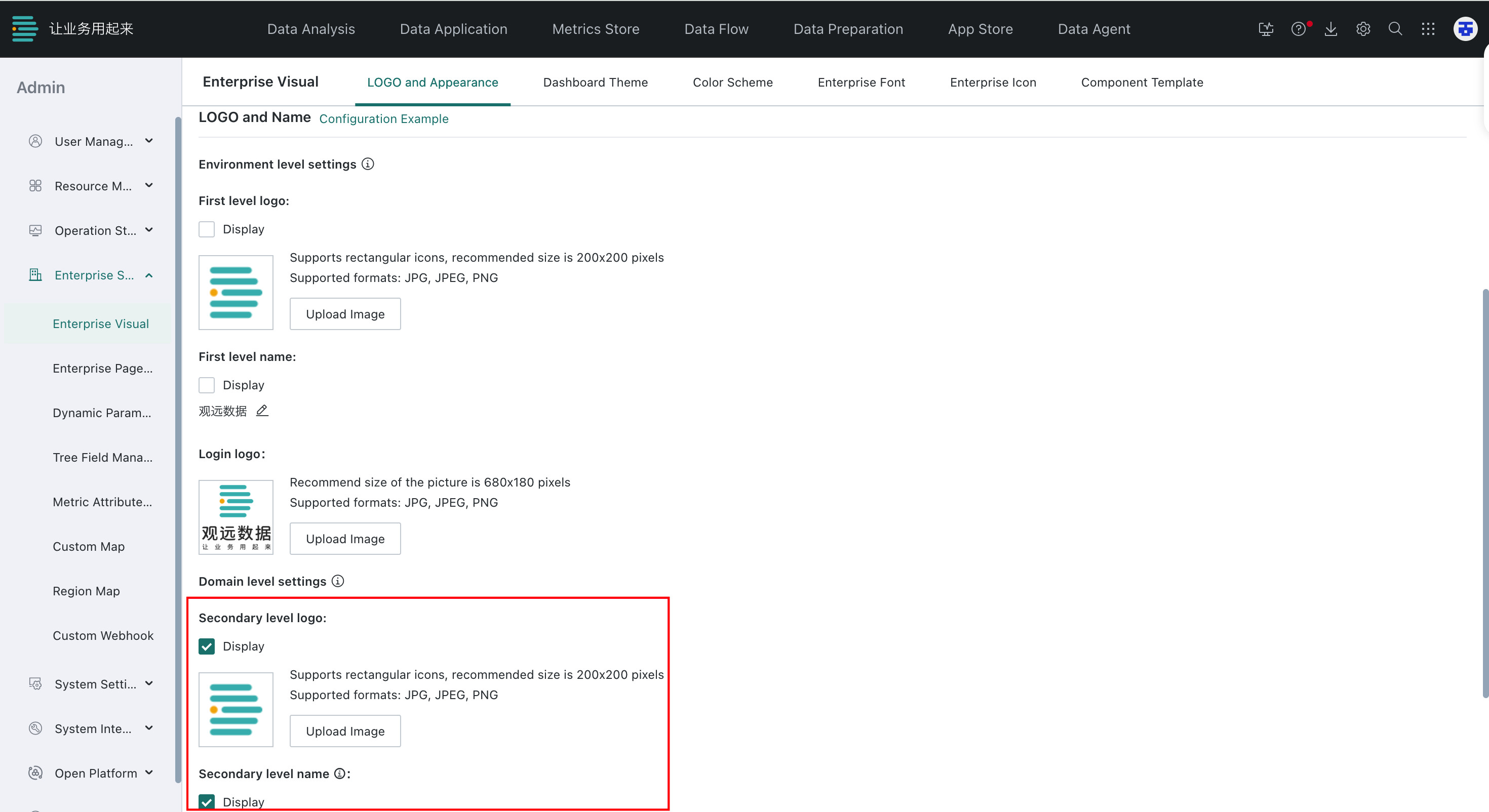
Do Not Want to Expose the Enterprise Logo at the Q&A Entry
Go to Management Center > Enterprise Configuration > Enterprise Visual > LOGO and Appearance > LOGO and Name, then clear the Display checkbox.
Permission-related Issues
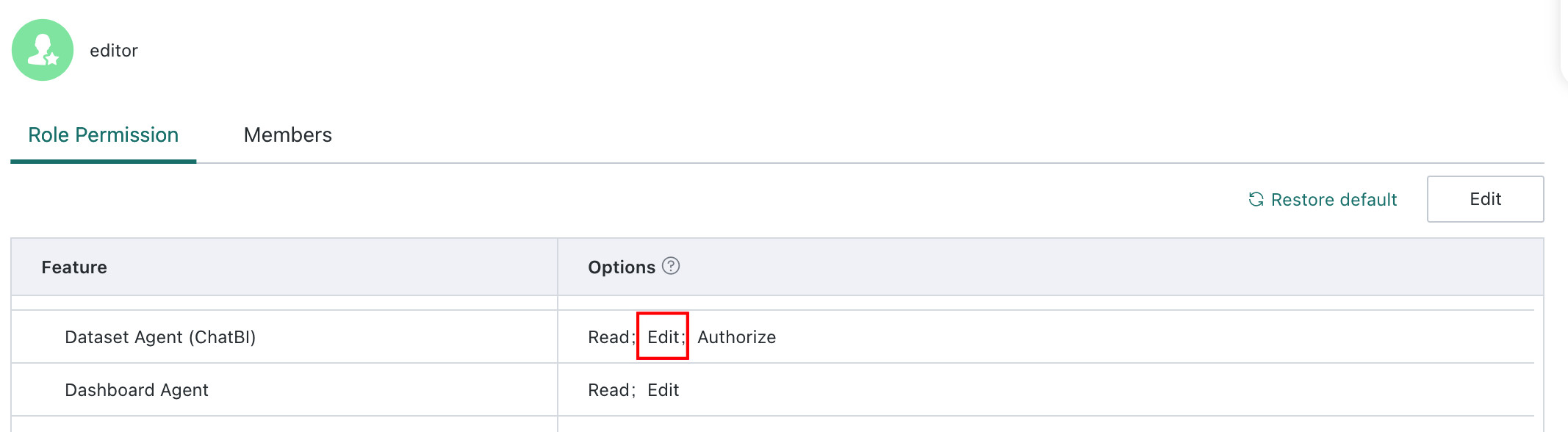
Cannot Enter the Data Agent Backend
Check whether the user has the ChatBI Edit permission in Management Center > User Management > Role.
Cannot See the Query Entry or the Agent
-
If the user cannot see the query entry, check whether the user has the
ChatBI Viewpermission inManagement Center > User Management > Role.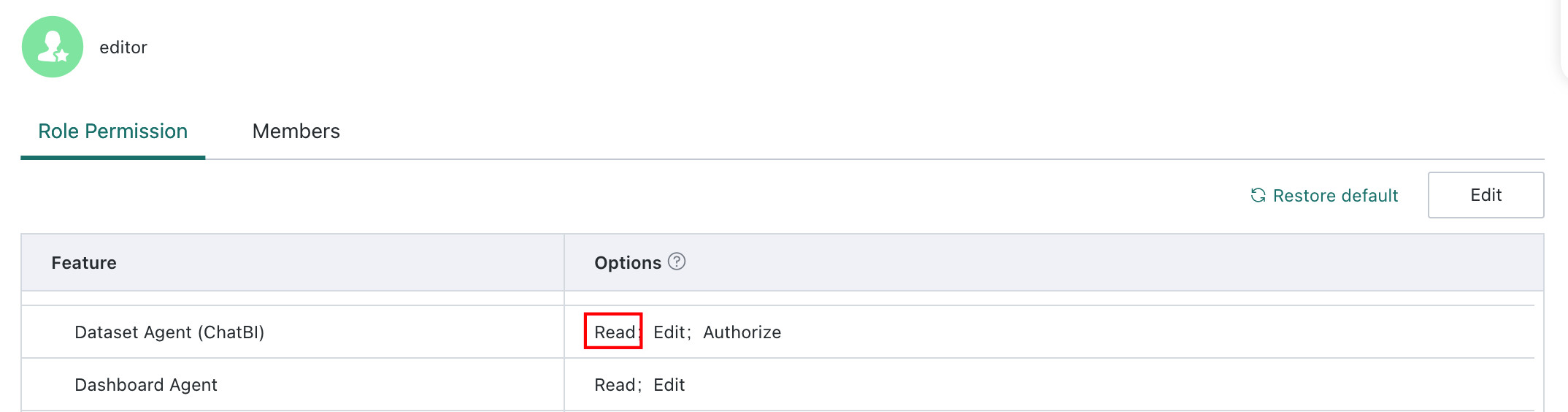
-
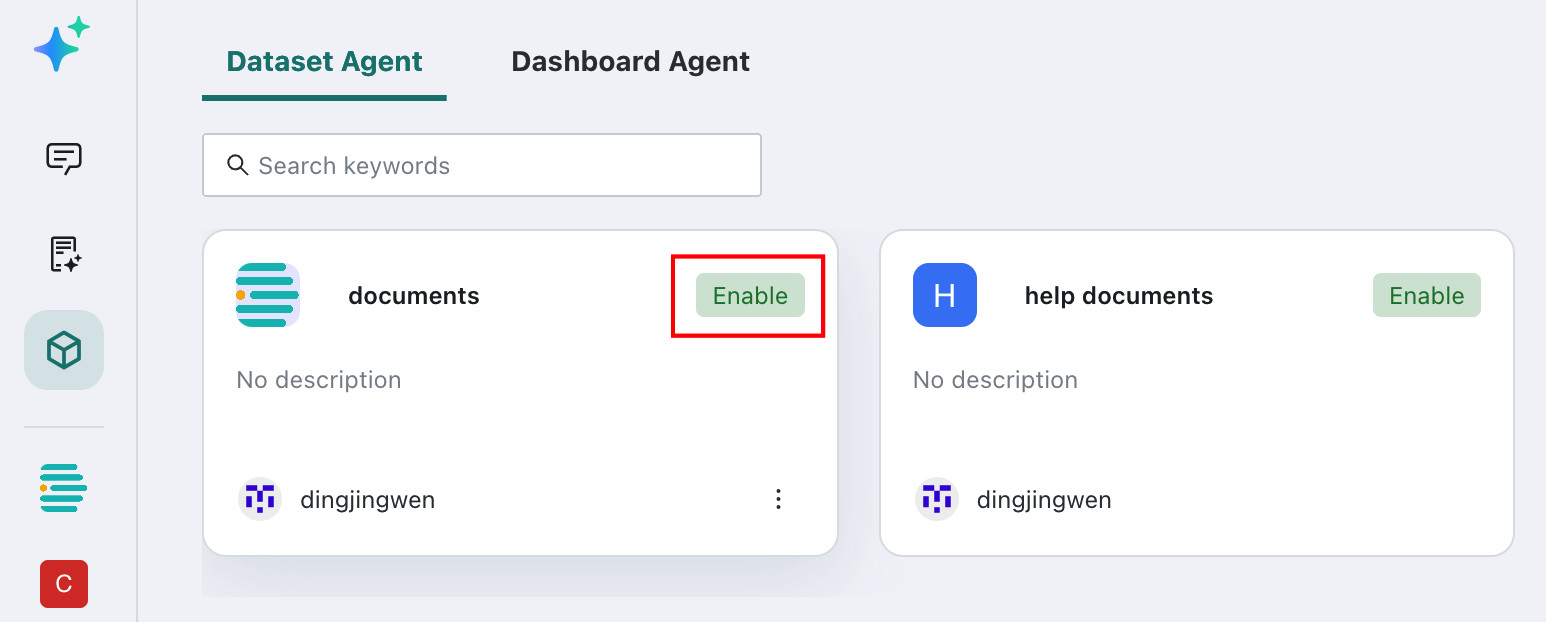
If the user cannot see the target agent, check the following:
- Confirm that the agent has already been enabled.
- Confirm that the user has
Userpermission for the current agent.
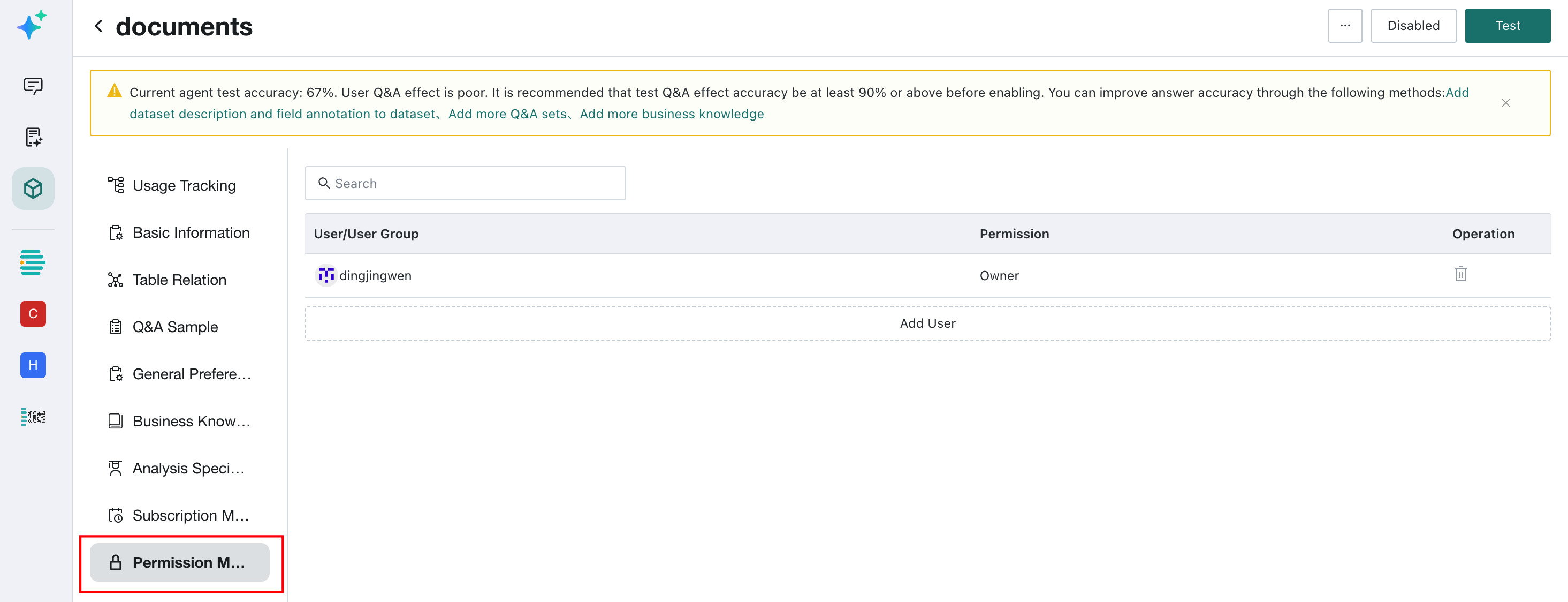
The Data Agent Backend Does Not Show the Permission Management Module
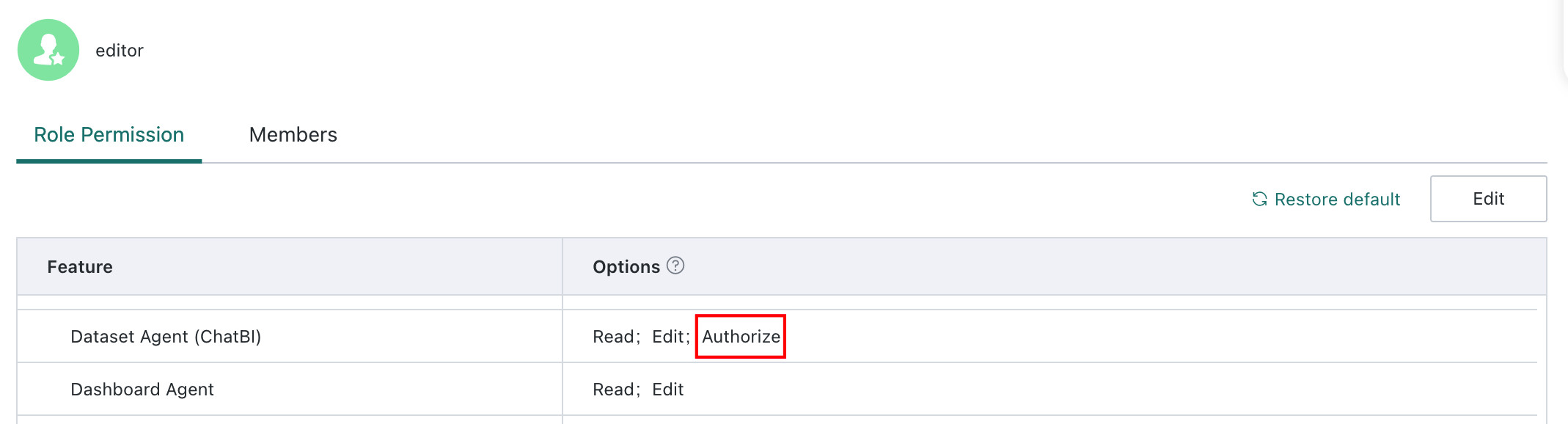
If the Permission Management module is missing, check whether the user has the ChatBI Authorize permission in Management Center > User Management > Role.
Cannot Ask Questions
If the frontend shows the message The current query balance is insufficient. Please contact the administrator, contact your Guandata customer success manager for a quota recharge. All environments have a default quota of 5000 questions, and the quota can be adjusted for partner customers according to agreement.
Accuracy Troubleshooting
In addition to product errors, the following types of problems are commonly reported by users.
Incorrect Data Query Results
The data result returned by Data Agent is not what the user expects.
-
Understand the data structure and metric definitions the user actually wants, and identify what is wrong.
No data returned:first check whether the generated SQL is correct, especially whether the table names and field names match the dataset configuration. If the SQL logic is correct, use the same logic to filter the dataset directly and confirm whether the source data actually exists.Missing time range definition:if the user question uses vague time wording, such asHow are recent sales?, check whether the meaning ofrecenthas already been defined inGeneral Knowledge. If not, add the definition inBusiness Knowledge Library > General Knowledge.Incorrect aggregation dimension or metric selection:if the user question does not clearly specify dimensions such as SKU, region, or store, check whether relevant knowledge exists in theBusiness Knowledge Library, and whetherQ&A Samplealready defines the problem and correct SQL.- Business knowledge example:
When the user asks <...>, use organization code to join the organization dataset and the daily report dataset, aggregate all organizations with hierarchy level 3 including their child organizations, and summarize attendance hours by organization code and organization name. Q&A Sampleexample:
Question:What is the asset distribution of customers in the supermarket channel of a certain brand in March 2023?
Query SQL:SELECT Customer Asset Type AS Customer Asset Type, COUNT(DISTINCT Customer Unique ID) AS User Count FROM Member Table WHERE Channel = 'Offline' AND Brand = '...' AND CAST('2023-03-31' AS DATE) BETWEEN TO_DATE(Start Time) AND TO_DATE(End Time) GROUP BY Customer Asset Type- Incorrect metric generation: check whether the metric in the current answer already has a definition in
Business Knowledge LibraryorQ&A Sample. If not, add the missing definition there first.
- Business knowledge example:
-
Review the operational logs and check whether the relevant knowledge was actually recalled during this Q&A run. If the knowledge has been maintained but was not recalled, contact Guandata for assistance.
NoteGeneral Knowledgeis recalled in every conversation and is not shown in the operational logs.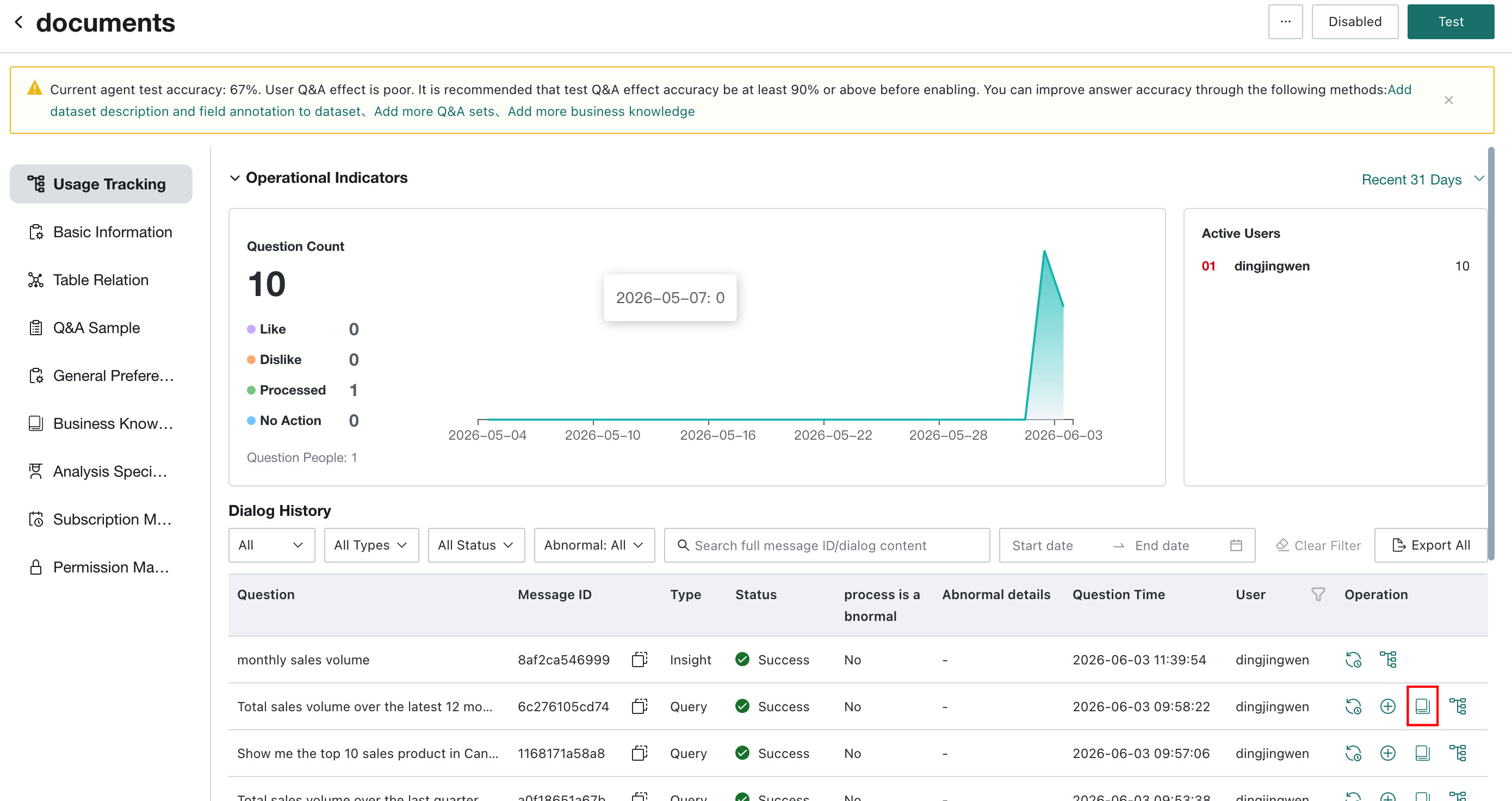
-
If the issue still cannot be resolved through the above steps, contact Guandata for support.
Incorrect Visualization Output
When a specific chart type is requested, the result is returned as a table or no visualization is generated.
- Check whether the current BI version is
7.0or above. In version6.6, thespecified chart typecapability does not take effect. - Check whether the returned table structure can actually be converted into a BI chart. For example, if the returned structure is
Dimension - Time,Dimension - SKU, andMetric - Sales Amount, and this structure cannot be rendered as a column chart in BI, then a table result is expected behavior. - If the issue still cannot be resolved, contact Guandata for support.
Agent Usage Q&A
-
Q: How can I improve Q&A accuracy?- Make sure questions follow a valid question structure, with clear time, conditions, and metrics and as little ambiguity as possible.
- Ensure data quality and avoid messy data that increases knowledge maintenance complexity.
- Add knowledge purposefully according to the target question list, including
General Knowledge,Business Knowledge, andQ&A Sample.
-
Q: Can adding questions in \Test` improve accuracy?`No. The
Testfeature is only used to validate Q&A results in batch and evaluate accuracy. -
Q: For complex but similar knowledge, is it better to maintain it item by item or in one long entry? Sometimes long knowledge can be learned, and sometimes it cannot?We recommend maintaining
Business Knowledgeitem by item and avoiding combining unrelated business knowledge into one entry. -
Q: Knowledge base writing styles vary from person to person. Is there a recommended unified format, such as Markdown?The knowledge base has no strict formatting requirement. It is similar to prompt writing. As long as the logic is clear and the wording is explicit, it is acceptable. For example:
When the question involves xxx, query/display/calculate... by default,When the question involves aaa, bbb, or ccc, they all refer to Field 1, orMetric Name = specific calculation formula. -
Q: After the knowledge base becomes large, how can I quickly find knowledge that needs modification? How can I identify conflicts between new knowledge and historical knowledge?Whether knowledge needs to be added depends on Q&A performance. For add, delete, or update operations, first verify the Q&A result. When a question cannot be answered correctly because knowledge is missing, incorrect, or redundant, the required maintenance action becomes clear.
Business Knowledgesupports search, so you can first search existing knowledge entries by keyword before adding new ones -
Q: How can the system correctly match fields whose names are similar, or fields with similar enumeration values, when the full value set cannot be fully enumerated?- First confirm that enumeration value learning has been completed, for example from
Basic Configuration > Dataset > Expandor by checking whether there is aValue examplein the operational logs. - Then prefer letting the model directly identify the corresponding value from the proper noun in the question. If the wording is exactly the same as the enum value but still returns the wrong result, record it as a bad case. If it is not exactly the same, guide the model through fuzzy mapping in business knowledge.
- First confirm that enumeration value learning has been completed, for example from
-
Q: If there are fields such as major category, subcategory, series, and subseries, does the system have to ask a follow-up question to let the user choose the right field? Are there other options?- If the term in the question has the
sameenumeration value in multiple fields, the system can only disambiguate through a follow-up question. For example, if bothRegionandCitycontain city-level enumeration values, add business knowledge such asWhen the user mentions <city name>, ask whether the city name refers to City or Region. - If the enumeration values are not exactly the same across fields, define explicit query rules, for example
aaa, bbb, ccc all refer to Major Category, while ddd and eee refer to Series.
- If the term in the question has the
How to Obtain Logs for Guandata Troubleshooting
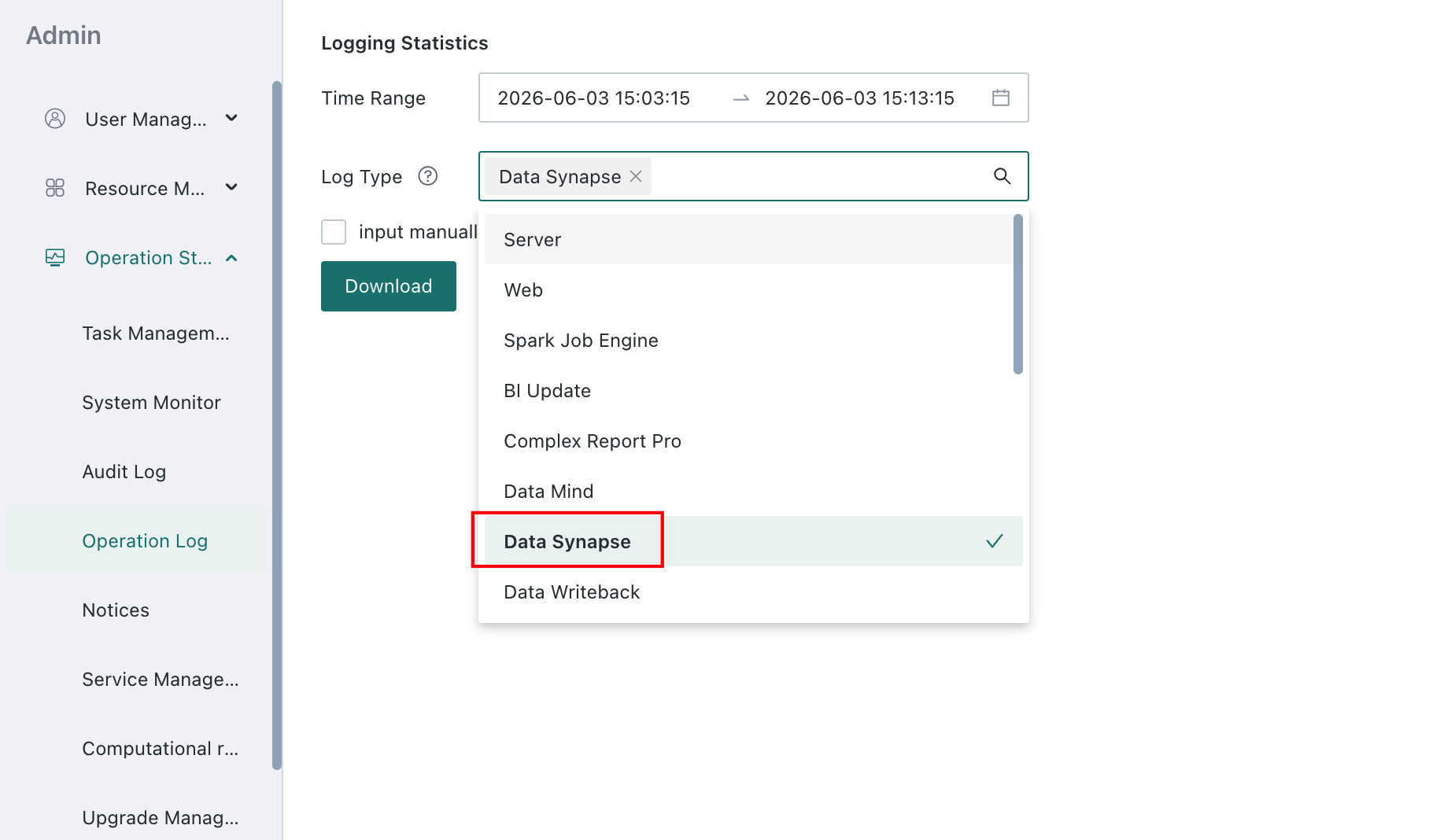
In Management Center > Operations Management > Operation Log, users can download the Data_Synapse service log and provide it to Guandata for troubleshooting. If the user is connected to a privately deployed large model, they should also download the Data_Mind service log and provide it together.
Typical Troubleshooting Cases
Wrong Dataset or Column Used
If ChatBI tries to retrieve data from the wrong dataset or analyze the wrong column, you can adjust the data in the following ways:
- Provide clear and accurate descriptions: check your datasets and related metadata to ensure that the terminology used in the dataset, such as table names and field names, matches the terminology used by end users in their questions. If not, improve the description or add business knowledge that maps the dataset terminology to the user wording.
- Add example queries: provide example SQL that ChatBI can learn from in
Q&A Sample. - Remove datasets or columns from the topic: some datasets may contain overlapping columns or concepts, making it difficult for ChatBI to determine which data to use. If possible, remove unnecessary or overlapping datasets or columns. You may need to create another dataset that contains only the required columns and associate it with the topic.
Wrong Filter Conditions
Generated queries usually include a WHERE clause to filter results by specific values. Because ChatBI cannot see the actual data directly, it may filter on the wrong value. For example, it may try to match China while the dataset stores values in a different form. In this case, try the following strategy:
Add notes to the dataset column comments. If the column value set is relatively small, enumerate each valid string value in the column description. In some cases, general guidance such as Use the three-letter country ISO code is enough.
Wrong Table Joins
The topic may not know how to join different datasets together. You can describe the relationship in General Knowledge, for example: Use Product Code in Sales Ticket Detail Table to join Product Dimension Table.
Wrong Metric Calculation Logic
Metric calculations and aggregation logic can be complex. If ChatBI does not understand the business details, it may generate incorrect SQL. Try one or more of the following:
- If the metric is aggregated from raw datasets, provide example SQL that shows how each aggregated value is calculated.
- If the metric is already precomputed and stored in an aggregated dataset, explain this in the dataset comments and
General Knowledge. If further aggregation is allowed, specify the valid aggregation logic for each metric. - If the target SQL is extremely complex, consider creating a dataset with those metrics pre-aggregated and associate that dataset with the topic.
Ignored Business Knowledge
Even if you have explained the dataset, columns, and business knowledge, the topic may still not use them correctly. Try one or more of the following:
- Provide example queries that demonstrate the correct usage, especially in
Q&A Sample. Example queries are especially effective in teaching the topic how to use data. - Build a simplified dataset with a higher aggregation level based on your existing data.
- Review your
Q&A SampleandBusiness Knowledge, remove irrelevant content, and check for conflicts to keep the topic focused. - Start a new conversation. Previous Q&A in the same session may affect later answers. Opening a new session clears the context and gives the model a clean starting point.
Business Knowledge Consistency Issues
When maintaining a ChatBI topic, you may encounter redundancy, outdated knowledge, or inconsistent business knowledge. This typically happens when multiple pieces of business knowledge conflict with one another and cause ChatBI to generate incorrect SQL. Common causes and recommended actions include:
- Inconsistent data sources: if the topic uses data from multiple systems and some fields are represented differently across them, you need to clarify the mapping rules in business knowledge.
- Business rule changes: if business rules change over time but old knowledge is not updated, contradictions appear. In this case, add new business knowledge and specify the effective date of the new rule.
- Unclear wording: if business knowledge is not explicit enough, ChatBI may interpret it differently in different situations. In that case, define the concept more precisely.
- Complex data models: in complex models, the same business concept may be represented by different tables and fields. Without explicit mappings, SQL generation errors become more likely.
- Semantic ambiguity in business language: the same term may mean different things in different departments. In this case, define those terms separately in ChatBI and specify the time range or context. When needed, ChatBI will ask a follow-up question to clarify the current context before giving the answer.