Quick Start
Overview
This article explains the workflow for using Data Agent and helps you quickly understand and start using it.
Usage Guide
Workflow
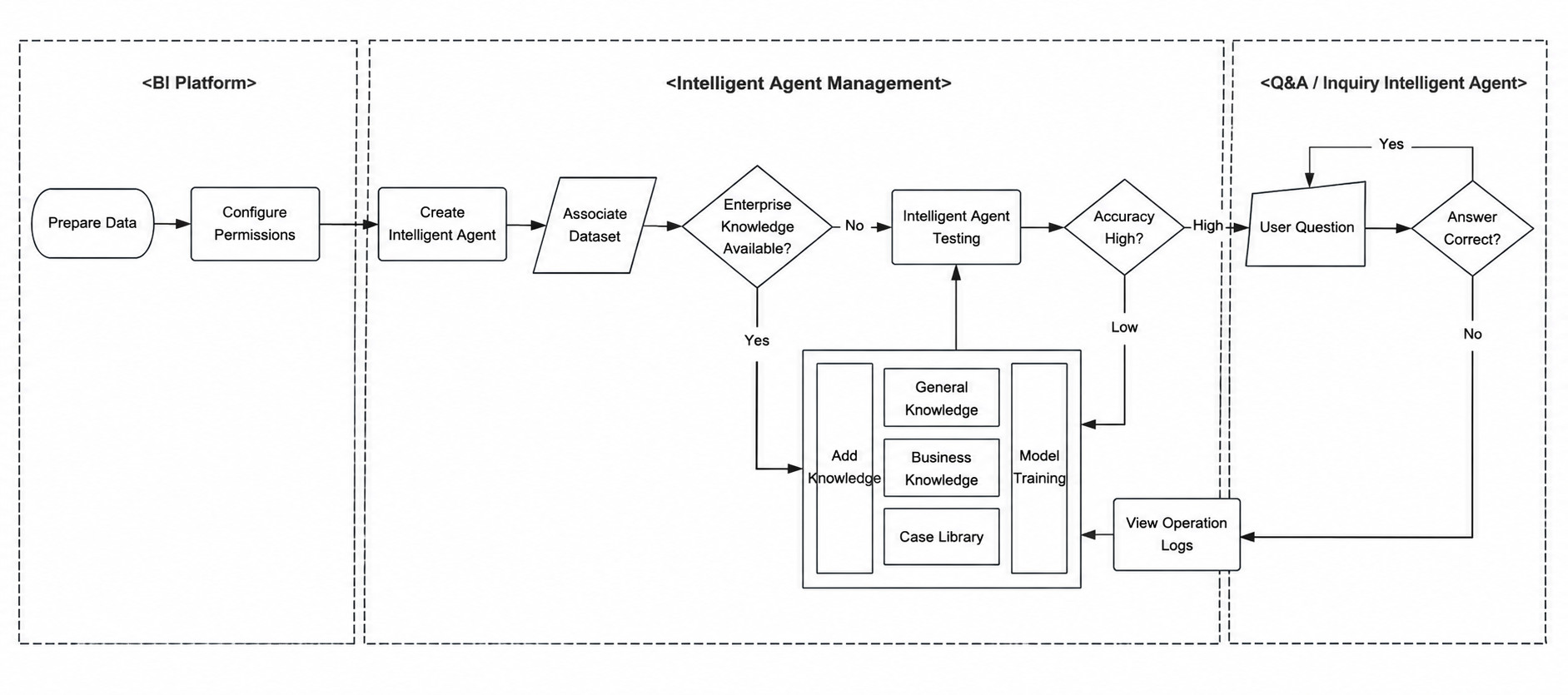
Steps
- Select appropriate datasets as input for the large language model. For details, see Data Preparation.
- Configure Data Agent access permissions in the BI management backend. For details, see Permission Management.
- Build an agent in the Data Agent operations backend, including
Basic Informationsettings, related datasets, and an optional knowledge base. For details, see Create an Agent. - After the agent and knowledge base are ready, test the agent. For details, see Test an Agent.
- When backend test accuracy reaches 90%, click
Enableto publish the agent. Business users will then be able to see all enabled agents they have permission to use in the frontend Q&A interface. - Run frontend Q&A on the published agent. For details, see Query Agent and Insight Agent.
- Track frontend usage after launch. If Q&A quality is not satisfactory, use operational logs to locate the cause, then add or update the knowledge base and test again. For details, see Usage Tracking.