Limit the Number of Subscriptions and Alerts
Overview
To ensure stable system operation and avoid performance issues caused by excessive concurrent tasks, administrators can finely limit the number of enabled subscriptions and alerts from the following two dimensions:
- Limit totals by system and user/user group: Set the upper limit for the total number of enabled subscriptions/alerts in the system, and set the upper limit for enabled subscriptions/alerts allowed for a single user or user group.
- Limit totals by sending time period: If multiple subscriptions/alerts are sent within a specific time period, such as 8:00-9:00 every morning, limit the number of subscriptions and alerts that users can enable.
After the upper limit is reached, you cannot continue enabling subscriptions or alerts.
- This limit applies only to subscription/alert enablement operations, including create and enable, save as enabled after editing, and direct enablement. It does not affect the sending of existing subscriptions/alerts.
- Limit rules apply only to manual operations in the BI product interface. Enable/disable operations performed through API interfaces are not subject to this limit.
Usage Guide
Procedure
- Create the corresponding management plugin for subscription and alert count limits.
- Enter the subscription and alert limits in the corresponding configuration items based on actual management requirements.
- Enable the plugin. The limits take effect immediately.
Limit the Number of Enabled Subscriptions and Alerts by System and User/User Group
Feature Introduction
Take subscriptions as an example:
After an administrator enables this frontend plugin, edit the configuration items in the plugin. Refer to the highlighted area in the figure.
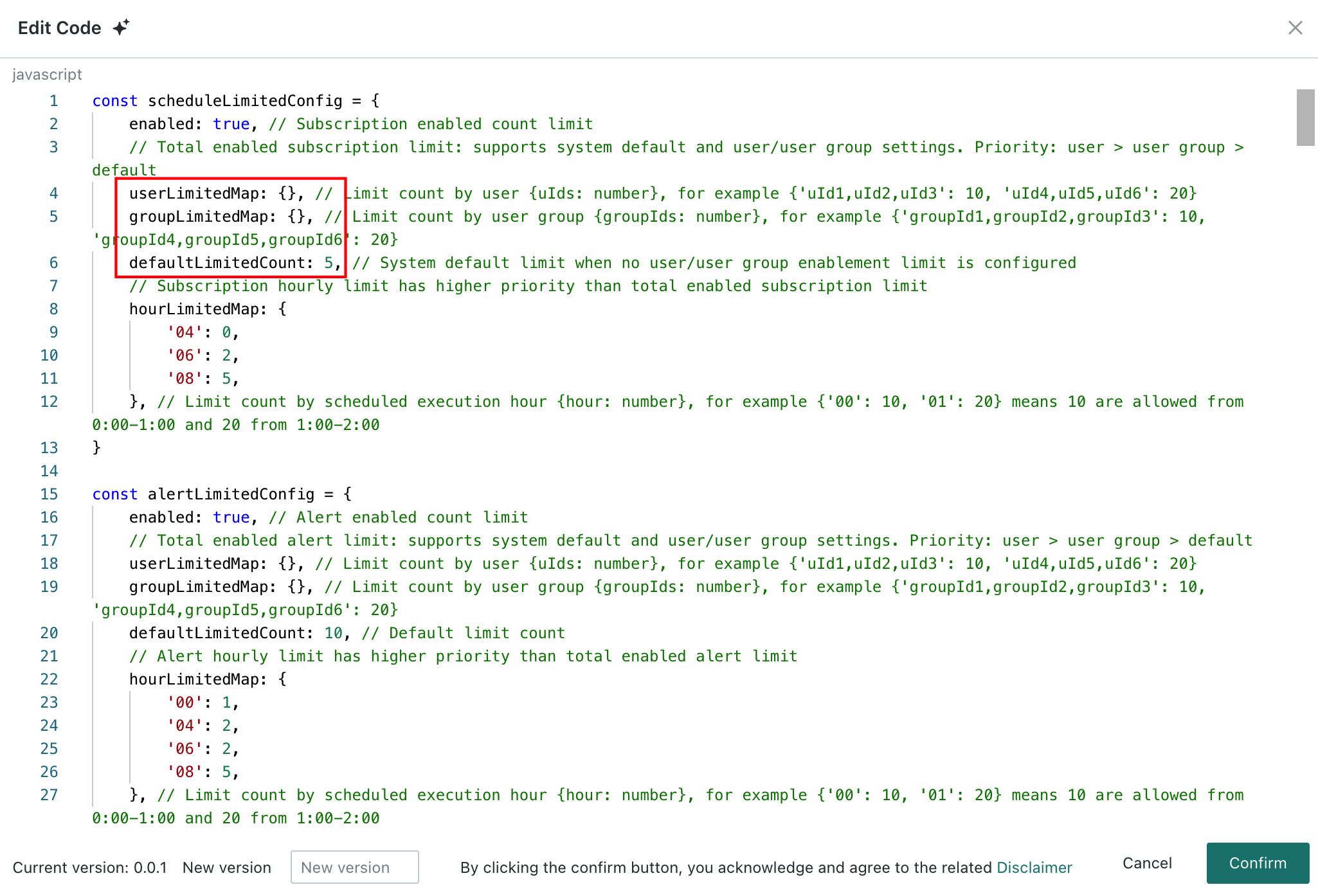
Administrators can set the system-level number of enabled subscriptions, and can also set the number of enabled subscriptions by user/user group. After editing, users are constrained by these configurations when enabling subscriptions, based on comparison with the T-1 count.
- System-level limit: The system default limit when no user/user group enablement limit is configured.
- User-level limit: Limit by user. Format:
{User ID: Count}. - User group-level limit: Limit by user group. Format:
{User Group ID: Count}. - Priority: User setting > user group setting > system setting. If you have a dedicated personal limit, that count applies. Otherwise, you inherit the settings of your user group and then the system in order.
When you perform the following operations, the system checks whether the total count, compared with the T-1 count, has reached the upper limit:
- Creating a new subscription, changing the status to enabled, and clicking
Save. - Editing a subscription, changing the status to enabled, and clicking
Save. - Clicking
Enabledirectly for a disabled subscription in the list.
If your enabled count has reached the upper limit, you cannot successfully enable another one.
Configuration Description
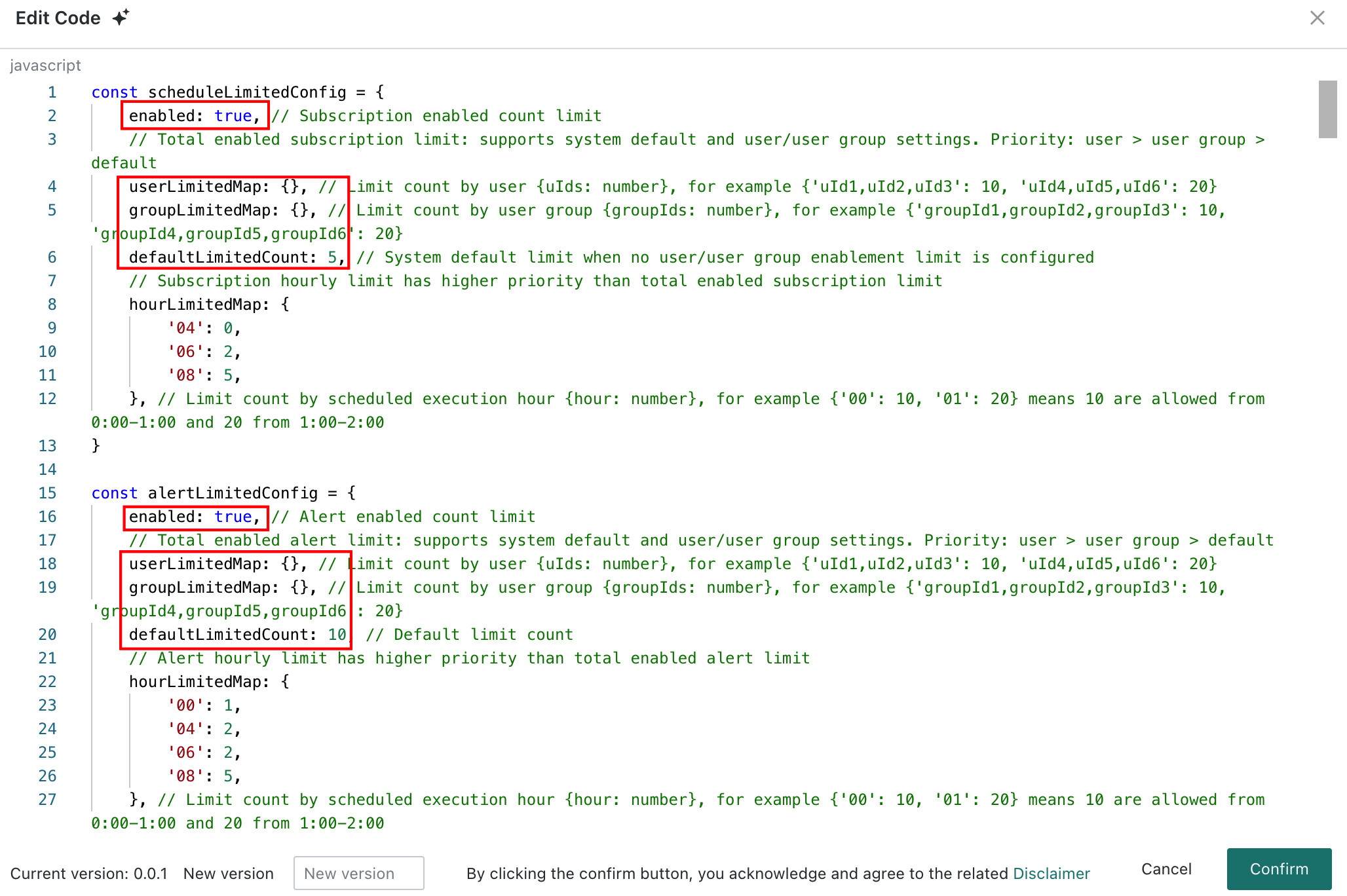
This feature is configured through a plugin and is usually operated by a system administrator. In the plugin code, enable Subscription and Alert Enabled Count Limit and configure Total Subscription and Alert Limit. Refer to the highlighted area in the figure.
For how to create a plugin and view the complete plugin code example, see Plugin Management.
Limit the Total Number of Subscriptions and Alerts by Sending Time Period
Feature Introduction
In addition to total limits, limiting the number of newly enabled subscriptions and alerts within a specific time period, such as a specific hour of the day, is also supported.
Sending time period limit has higher priority than enabled count limit.
- Configuration method:
Set the upper limit for the number allowed to be enabled by hour for each day, week, or month. - Statistics and validation logic:
- The system checks historical stock data as of 00:00 today. In other words, it counts the number already enabled in that time period before today, rather than querying in real time how many the current user newly enabled today.
- During
SaveandEnableoperations, the system checks whether your historically enabled count in the time period containing the current time has reached the upper limit.
- Limit prompt:
If the historical enabled count in that time period has reached the upper limit, the operation fails and the following prompt appears: "The number of enabled subscriptions (alerts) has reached the upper limit in this time period."
Configuration Description
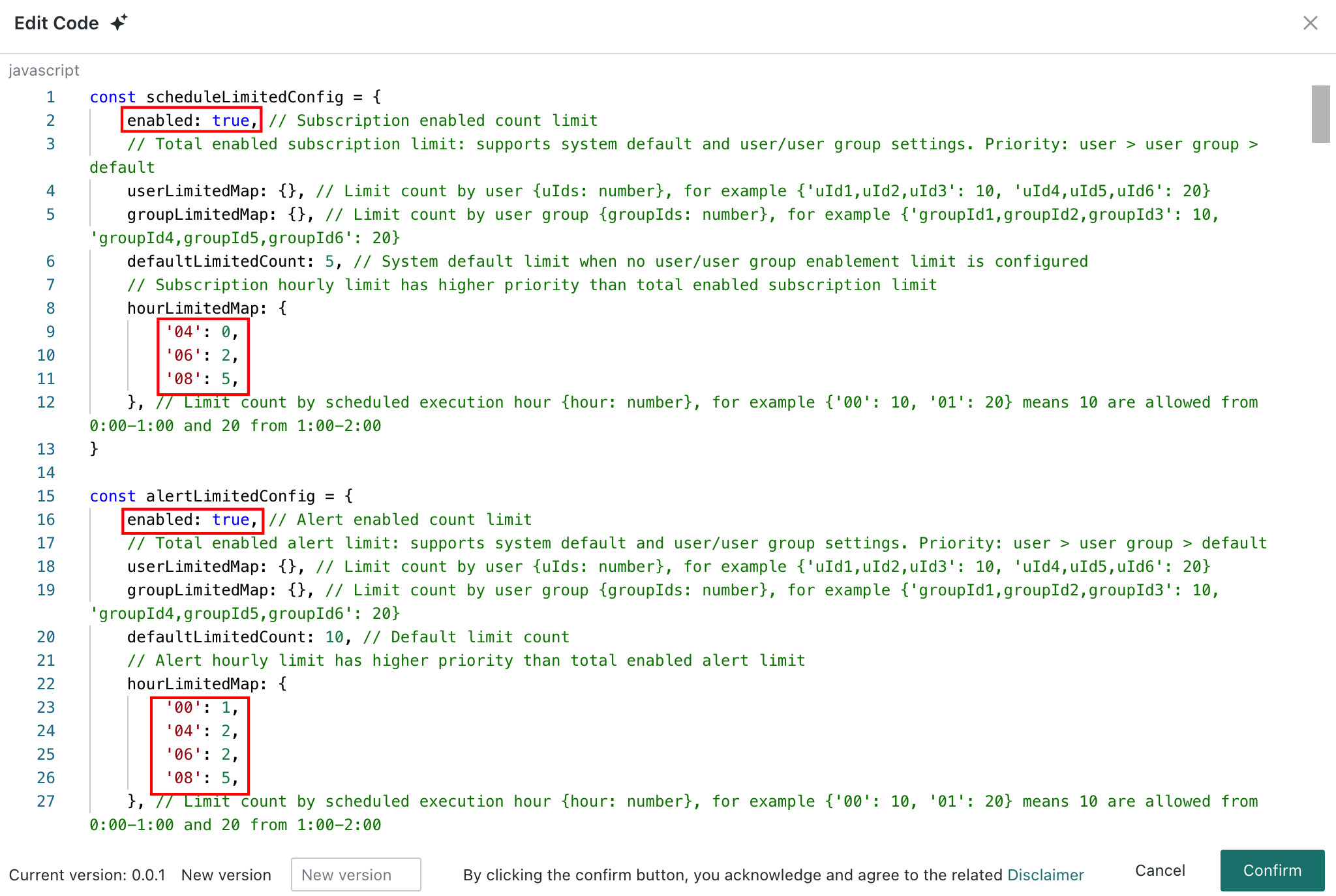
This feature is configured through a plugin and is usually operated by a system administrator. In the plugin code, enable Subscription and Alert Enabled Count Limit and configure the specific count for Subscription and Alert Hourly Limit. Refer to the highlighted area in the figure.
For how to create a plugin and view the complete plugin code example, see Plugin Management.
Plugin Management
Configure a Plugin
Entry: Management Center > Open Platform > Plugin Management
- Click
Create Pluginin the upper-right corner. After configuring basic plugin information, clickOKto create the plugin. - Click
Edit Codeon the right side of the plugin created in the previous step. In the pop-up code editor, enter the plugin code and clickOK. For plugin code, see Plugin Code Example. - Turn on the enable switch to enable the plugin.

For more plugin management operations, see Plugin Management.
Code Example
The following code example shows how to configure limit rules for subscriptions and alerts. You can modify the parameters as needed.
const scheduleLimitedConfig = {
enabled: true, // Subscription enabled count limit
// Total enabled subscription limit: supports system default and user/user group settings. Priority: user > user group > default
userLimitedMap: {}, // Limit count by user {uIds: number}, for example {'uId1,uId2,uId3': 10, 'uId4,uId5,uId6': 20}
groupLimitedMap: {}, // Limit count by user group {groupIds: number}, for example {'groupId1,groupId2,groupId3': 10, 'groupId4,groupId5,groupId6': 20}
defaultLimitedCount: 5, // System default limit when no user/user group enablement limit is configured
// Subscription hourly limit has higher priority than total enabled subscription limit
hourLimitedMap: {
'04': 0,
'06': 2,
'08': 5,
}, // Limit count by scheduled execution hour {hour: number}, for example {'00': 10, '01': 20} means 10 are allowed from 0:00-1:00 and 20 from 1:00-2:00
}
const alertLimitedConfig = {
enabled: true, // Alert enabled count limit
// Total enabled alert limit: supports system default and user/user group settings. Priority: user > user group > default
userLimitedMap: {}, // Limit count by user {uIds: number}, for example {'uId1,uId2,uId3': 10, 'uId4,uId5,uId6': 20}
groupLimitedMap: {}, // Limit count by user group {groupIds: number}, for example {'groupId1,groupId2,groupId3': 10, 'groupId4,groupId5,groupId6': 20}
defaultLimitedCount: 10, // Default limit count
// Alert hourly limit has higher priority than total enabled alert limit
hourLimitedMap: {
'00': 1,
'04': 2,
'06': 2,
'08': 5,
}, // Limit count by scheduled execution hour {hour: number}, for example {'00': 10, '01': 20} means 10 are allowed from 0:00-1:00 and 20 from 1:00-2:00
}
const prefix = '' // Domain prefix. Leave empty if none.
class LimitedBase {
constructor(limitedMap, type) {
this.limitedMap = limitedMap
this.type = type
this.hourCreatedCount = {}
this.userCreatedCount = 0
this.cacheInfo = {}
this.hoursDataFetched = false
this.countType = type === 'schedule' ? 'subscription' : type
}
// Parse scheduled sending configuration
parseCronHours = (cronValue) => {
if (cronValue) {
const cronInfo = JSON.parse(cronValue)
return (cronInfo.hours || '').split(',')
}
return []
}
// Get user groups
getUserGroup = async () => {
if (Object.keys(this.limitedMap.groupLimitedMap).length === 0) return []
const response = await window.GD.fetch(`/api/user/groups`)
const { response: resJson } = await response.json()
return resJson.map(group => group.ugId)
}
// Get created counts for each time period
getCronCreateCount = async () => {
const response = await window.GD.fetch(`/api/${this.type}/statistics-cron`)
const { response: resJson } = await response.json()
this.hourCreatedCount = resJson
}
// Get the user's enabled count
getUserCreateCount = async () => {
const response = await window.GD.fetch(`/api/resource-control/count/${this.countType}?enabledStatus=1`)
const { response: resJson } = await response.json()
this.userCreatedCount = resJson
}
// Determine whether the time-period limit has been reached
hourLimitHasReached = async (hours, count = 1) => {
if (hours?.length) {
if (!this.hoursDataFetched) {
await this.getCronCreateCount()
this.hoursDataFetched = true
}
return hours.some(hour => {
const existedCount = this.hourCreatedCount[ hour ] || 0
const limitedCount = this.limitedMap.hourLimitedMap[ hour ]
return limitedCount && existedCount + count > limitedCount
})
}
return false
}
// Determine whether the user-level limit has been reached
userLimitHasReached = async (count = 1) => {
const userInfo = GD.getUser()
const { userLimitedMap, groupLimitedMap, defaultLimitedCount } = this.limitedMap
await this.getUserCreateCount()
// User-level check
const userLimitedConfigKey = Object.keys(userLimitedMap).find(ids => ids.includes(userInfo.uId))
if (userLimitedConfigKey) {
return {
limited: this.userCreatedCount + count > userLimitedMap[ userLimitedConfigKey ],
type: 'user',
}
}
// User group-level check
const groupIds = await this.getUserGroup()
const groupLimitedConfigKey = Object.keys(groupLimitedMap)
const groupLimitedList = groupIds.map(groupId => groupLimitedConfigKey.find(ids => ids.includes(groupId))).filter(Boolean)
if (groupLimitedList.length) {
return {
limited: groupLimitedList.every(limitedConfigKey => {
const limitedCount = groupLimitedMap[ limitedConfigKey ]
return this.userCreatedCount + count > limitedCount
}),
type: 'user group'
}
}
// Default check
return {
limited: this.userCreatedCount + count > defaultLimitedCount,
type: 'system',
}
}
limitHasReachedHandler = async (hours, count = 1) => {
const ret = await this.hourLimitHasReached(hours, count)
if (ret) {
return {
limited: true,
type: 'trigger time period',
}
}
return await this.userLimitHasReached(count)
}
// Determine whether validation is needed and which time periods need validation
handleIfLimited = async (editedInfo, id, count = 1) => {
const { cron, enabled } = editedInfo
if (!enabled) {
return {
limited: false
}
}
const hours = this.parseCronHours(cron?.value)
const cacheData = this.cacheInfo[ id ]
if (!cacheData) return await this.limitHasReachedHandler(hours, count)
const { cronValue: cacheCronValue, enabled: cacheEnabled, creatorId } = cacheData
if (cacheEnabled !== enabled) {
const userInfo = GD.getUser()
// When enabling a subscription, if the creator is not the current user, check whether the trigger time period limit has been reached
if (creatorId === userInfo.uId) {
return await this.limitHasReachedHandler(hours, count)
}
return {
limited: await this.hourLimitHasReached(hours, count),
type: 'trigger time period',
}
}
const cacheHours = this.parseCronHours(cacheCronValue)
const diffHours = hours.filter(hour => !cacheHours.includes(hour))
return {
limited: await this.hourLimitHasReached(diffHours, count),
type: 'trigger time period',
}
}
}
class ScheduleLimited extends LimitedBase {
constructor(limitedMap, type) {
super(limitedMap, type)
this.initListener()
}
// Update cached subscription data
updateCacheInfo = ({ schedules }) => {
schedules.forEach((item) => {
this.cacheInfo[ item.scId ] = {
cronValue: item.cron?.value,
enabled: item.enabled,
creatorId: item.creator?.relId,
}
})
}
// API listener
initListener = () => {
const getScheduleUrlReg = new RegExp(`^${prefix}/api/schedule/[A-Z_]+$`)
const editScheduleUrlReg = new RegExp(`^${prefix}/api/schedule/update/[a-zA-Z0-9]+$`)
const addScheduleUrl = `${prefix}/api/schedule/add`
const batchEnableScheduleUrl = `${prefix}/api/schedule/batch-update-config`
const batchEnableScheduleBody = []
window.GD.registerFetchMiddleware(
'Subscription count limit API handling',
async ({ url, body, method }) => {
if (
method === 'POST'
&& (editScheduleUrlReg.test(url) || url === addScheduleUrl)
) {
const { limited, type } = await this.handleIfLimited(body, body.scId)
if (limited) {
console.log('Limit reached', type)
return {
errorMessage: type === 'trigger time period' ? 'The number of enabled subscriptions has reached the upper limit in this time period' : 'The number of subscriptions you enabled has reached the upper limit'
}
}
}
if (
method === 'POST' && url === batchEnableScheduleUrl
) {
let limited = false
let type = ''
const { ids, enabled } = body
// Traverse each subscription ID and determine whether the limit has been reached
for (const scId of ids) {
const cacheData = this.cacheInfo[scId]
if (cacheData) {
const editedInfo = {
...cacheData,
enabled,
}
const { limited: _limited, type: _type } = await this.handleIfLimited(editedInfo, scId, ids.length)
if (_limited) {
limited = _limited
type = _type
break
}
}
}
if (limited) {
console.log('Limit reached', type)
return {
errorMessage: type === 'trigger time period' ? 'The number of enabled subscriptions has reached the upper limit in this time period' : 'The number of subscriptions you enabled has reached the upper limit'
}
}
batchEnableScheduleBody.push({
ids,
enabled,
})
}
},
async ({ url, method, response }) => {
if (method === 'POST' && getScheduleUrlReg.test(url)) {
this.updateCacheInfo(response)
} else if (
method === 'POST'
&& (editScheduleUrlReg.test(url) || url === addScheduleUrl)
) {
const { scId, enabled } = response
if (this.cacheInfo[ scId ]) {
this.cacheInfo[ scId ].enabled = enabled
}
} else if (
method === 'POST' && url === batchEnableScheduleUrl
) {
const body = batchEnableScheduleBody.shift()
if (body) {
const { ids, enabled } = body
for (const scId of ids) {
if (this.cacheInfo[scId]) {
this.cacheInfo[scId].enabled = enabled
}
}
}
}
},
200,
)
}
}
class AlertLimited extends LimitedBase {
constructor(limitedMap, type) {
super(limitedMap, type)
this.initListener()
}
// Update cached alert data
updateCacheInfo = ({ alerts }) => {
alerts.forEach((item) => {
this.cacheInfo[ item.alertId ] = {
cronValue: item.cron?.value,
enabled: item.enabled,
creatorId: item.creator?.uId,
}
})
}
initListener = () => {
const getAlertUrl = `${prefix}/api/alert/search`
const batchEditAlertUrl = `${prefix}/api/alert`
const editAlertUrlReg = new RegExp(`^${prefix}/api/oriput/alert/[a-zA-Z0-9]+$`)
const batchEnableAlertUrl = `${prefix}/api/alert/batch-update-config`
const batchEnableAlertBody = []
window.GD.registerFetchMiddleware(
'Alert count limit API handling',
async ({ url, body, method }) => {
if (
method === 'POST'
&& editAlertUrlReg.test(url)
) {
const { limited, type } = await this.handleIfLimited(body, body.alertId)
if (limited) {
console.log('Limit reached', type)
return {
errorMessage: type === 'trigger time period' ? 'The number of enabled alerts has reached the upper limit in this time period' : 'The number of alerts you enabled has reached the upper limit'
}
}
}
if (
method === 'POST'
&& url === batchEditAlertUrl
) {
let limited = false
let type = ''
for (const alert of body) {
const { limited: _limited, type: _type } = await this.handleIfLimited(alert, alert.alertId)
if (_limited) {
limited = _limited
type = _type
break
}
}
if (limited) {
console.log('Limit reached', type)
return {
errorMessage: type === 'trigger time period' ? 'The number of enabled alerts has reached the upper limit in this time period' : 'The number of alerts you enabled has reached the upper limit'
}
}
}
if (
method === 'POST' && url === batchEnableAlertUrl
) {
let limited = false
let type = ''
const { ids, enabled } = body
// Traverse each alert ID and determine whether the limit has been reached
for (const alertId of ids) {
const cacheData = this.cacheInfo[ alertId ]
if (cacheData) {
const editedInfo = {
...cacheData,
enabled,
}
const { limited: _limited, type: _type } = await this.handleIfLimited(editedInfo, alertId, ids.length)
if (_limited) {
limited = _limited
type = _type
break
}
}
}
if (limited) {
console.log('Limit reached', type)
return {
errorMessage: type === 'trigger time period' ? 'The number of enabled alerts has reached the upper limit in this time period' : 'The number of alerts you enabled has reached the upper limit'
}
}
batchEnableAlertBody.push({
ids,
enabled,
})
}
},
async ({ url, method, response }) => {
if (method === 'POST' && url === getAlertUrl) {
this.updateCacheInfo(response)
} else if (
method === 'POST'
&& editAlertUrlReg.test(url)
) {
const { alertId, enabled, cron } = response
if (this.cacheInfo[ alertId ]) {
this.cacheInfo[ alertId ].enabled = enabled
this.cacheInfo[ alertId ].cronValue = cron?.value
}
} else if (
method === 'POST' && url === batchEnableAlertUrl
) {
const body = batchEnableAlertBody.shift()
if (body) {
const { ids, enabled } = body
for (const alertId of ids) {
if (this.cacheInfo[ alertId ]) {
this.cacheInfo[ alertId ].enabled = enabled
}
}
}
}
},
200,
)
}
}
window.GD.on('gd-ready', () => {
if (scheduleLimitedConfig.enabled) {
new ScheduleLimited(scheduleLimitedConfig, 'schedule')
}
if (alertLimitedConfig.enabled) {
new AlertLimited(alertLimitedConfig, 'alert')
}
})
FAQs
Q1: What happens if the number of subscriptions I have already enabled exceeds the newly configured upper limit?
A1: There is no impact. Limit rules apply only to newly enabled operations and do not change or disable subscriptions or alerts that are already enabled.
Q2: Can these limits be temporarily disabled?
A2: Yes. Administrators can set the enabled property in scheduleLimitedConfig or alertLimitedConfig to false in the plugin code, then re-enable the plugin to temporarily disable the corresponding limit.
Q3: Why does the system say the limit has been reached when I have not enabled anything in a certain hour?
A3: Frequency limits check historical stock data. The prompt means that before this hour today, enough subscriptions/alerts under your name had already been enabled for this time period to trigger the upper limit. Contact an administrator to adjust the quota for this time period, or disable some old subscriptions/alerts.
Q4: Do these limits apply to operations through API interfaces?
A4: No. This plugin limit applies only to Save and Enable operations performed in the BI product interface. Enabling or disabling through API interfaces is not restricted.