GuanCLI User Guide
Starting September 1, 2026, GuanCLI requires a commercial license. To obtain a license, contact your Guandata sales representative or Customer Success Manager.
What Is GuanCLI
GuanCLI is the official Guandata BI command-line tool. From a terminal, you can query BI resources, preview data, troubleshoot tasks, operate forms, and call ChatBI. With Skills, users can ask an Agent in natural language to retrieve data and troubleshoot issues, improving analysis and O&M efficiency.
Think of GuanCLI as a BI toolbox for AI and technical users. It does not replace the BI product UI. It lets AI Agents, data analysts, implementation consultants, and IT users read and inspect BI resources faster in a controlled environment.
Typical Use Cases
| Scenario | What You Can Do |
|---|---|
| Find BI resources | Search datasets, pages, cards, ETL, and tasks by name; locate IDs and folders quickly. |
| Analyze data definitions | View dataset fields, card sources, page structure, and upstream ETL logic. |
| Troubleshoot tasks | View failed tasks, ETL status, and error messages to locate causes. |
| Call ChatBI | Let AI ask questions or run insight analysis based on existing ChatBI topics. |
| Assist resource generation | Work with GuanVis and GuanETL to draft dashboards or modify ETL drafts. |
If your goal is to let business users ask data questions directly in an enterprise-built AI assistant, and the assistant cannot install or call GuanCLI, read the GuanMCP Integration and User Guide. If the environment can install and run GuanCLI, prefer GuanCLI.
Prerequisites
Before installing GuanCLI, make sure Node.js V22 or later and npm are installed.
Check the Current Environment
Run:
node -v
npm -v
If Node.js returns v22.x.x or later and npm -v returns a version, the environment is ready.
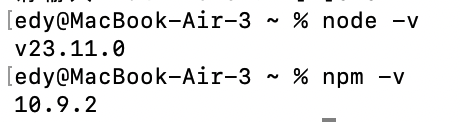
Install Node.js
If the command is not found or the version is earlier than V22, reinstall Node.js.
Option 1: Manual Installation
- Open the Node.js download page.
- Select your operating system, choose the installer, and download the recommended LTS version.
- Run the installer and follow the wizard.
- Reopen the terminal, then run
node -vandnpm -vagain.
Installing Node.js usually installs npm and adds commands to system PATH. If the commands are still not found, check environment variables.
Option 2: Ask an Agent to Install
Send this prompt to an Agent such as Claude Code, Codex, Cursor, or Trae:
Install Node.js V22+ for me.
Install GuanCLI
Option 1: Install Globally with npm
- Install GuanCLI:
# First installation
npm install -g @guandata/guancli

# Update if already installed
npm update -g @guandata/guancli
- Verify installation:
guancli version
If the terminal shows a version number, installation succeeded.

If installation succeeds but guancli version says the command is not found, the npm global command directory is usually not in system PATH. On macOS/Linux, run npm prefix -g and add its bin directory to PATH. On Windows, add %AppData%\npm to PATH. Reopen the terminal afterward.
- Optional: view installation location:
npm list -g @guandata/guancli

- Install the Skill so Agents know when to use GuanCLI:
guancli install-skill
Option 2: Ask an Agent to Install
Send this prompt to an Agent:
Install GuanCLI for me: https://www.guandata.com/guandata-cli-installation-guide.md
If installation is slow, ask the Agent to use the npm mirror:
Use https://registry.npmmirror.com as the npm registry to install GuanCLI.
Install Skill
GuanCLI provides both command-line tools and a Skill. A Skill is a set of BI tool instructions for AI assistants. After installation, AI assistants such as Claude Code, Cursor, and Codex know when to call GuanCLI, which command to use, and how to fill parameters.
For example:
- Without the Skill, if you say "Find the sales dataset", the AI may not know how to operate.
- With the Skill, the AI can recognize the intent and call commands such as
guancli dataset listorguancli dataset search.
If you want AI to operate BI through natural language, install the Skill:
guancli install-skill
Then you can ask in an AI tool:
List the dataset folders in the current BI environment.
Update GuanCLI
Run:
npm update -g @guandata/guancli
guancli install-skill
guancli version
Log In to GuanCLI
Before using guancli, configure the BI system URL and authentication information. CLI and Skill share the same authentication configuration. After guancli auth login succeeds, the Skill automatically reuses the current authentication.
Run:
guancli auth login
Follow the prompts:
- Environment name: default is
default; you can also useprod,test, etc. Different names let you save multiple BI environment profiles locally and switch quickly withguancli auth use <profile>. - BI system URL: for example,
https://demo.guandata.com. - Login method: choose Browser OIDC Login (Recommended), account/password login, direct uIdToken input, or direct Personal Access Token input.
- Domain: required for account/password login in multi-tenant or private deployments. Most users can press Enter to leave it empty; the CLI detects it automatically. If your administrator provides a Domain, enter it.
- Login ID: account name for account/password login.
- Password: password for account/password login.
After login succeeds, the Token is saved locally and later commands do not require repeated login.
Login Methods
Method 1: Login with Account and Password
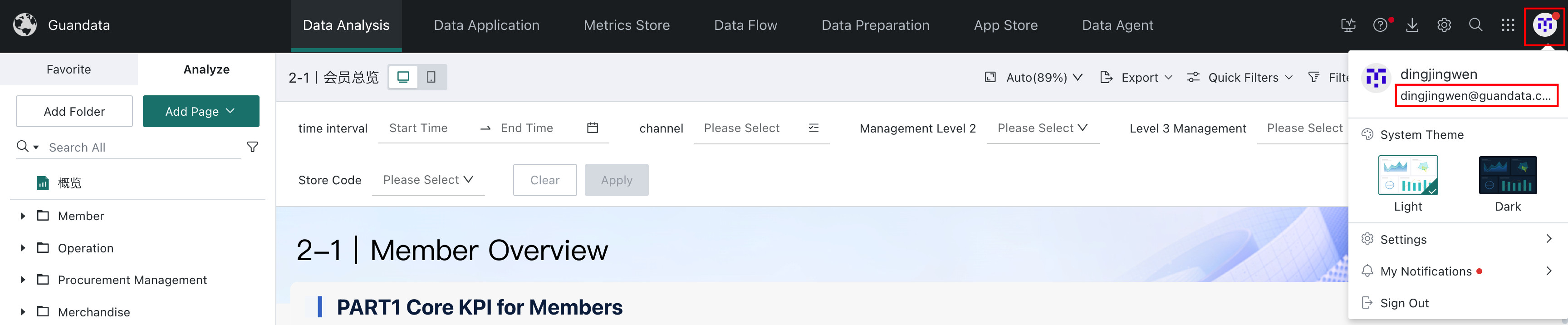
Use the BI account and password. Click the avatar in the upper-right corner of BI to view the login account. If you do not know the password, contact an administrator.
Method 2: Login with uIdToken
Because tokens are usually short-lived, account/password login is recommended.
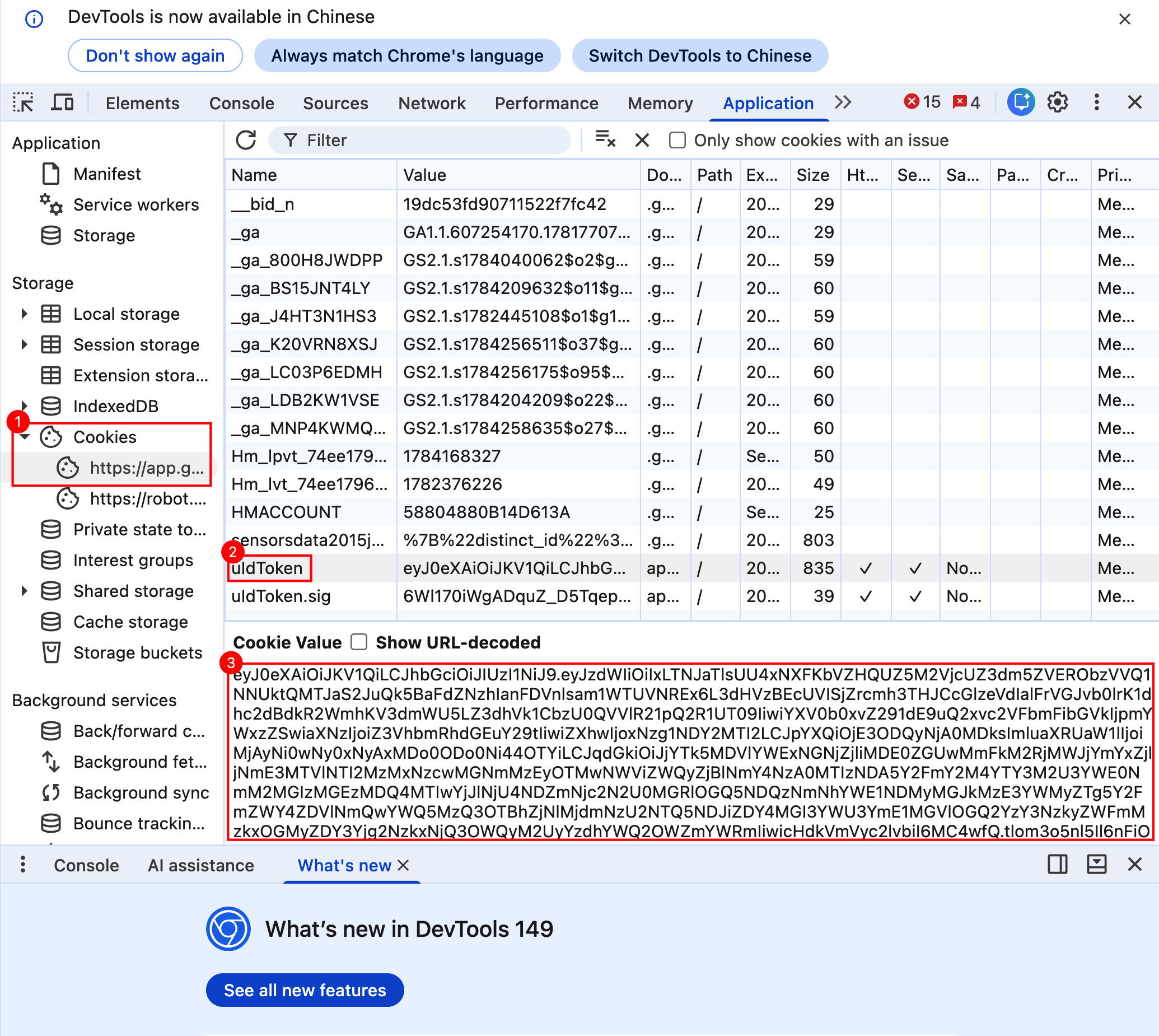
To obtain a token:
- Open and log in to BI in a browser.
- Right-click an empty area on the BI page and click Inspect.
- Open the Application tab.
- In Storage > Cookies, select the current BI domain.
- Find the cookie named
uIdTokenand copy its Value.
Method 3: Login with PAT
A Personal Access Token (PAT) is a secret string that begins with gdpat_. Unlike uIdToken, a PAT has independently configured permissions and an expiration date, making it more suitable for long-term GuanCLI use.
Create a PAT before using this method. For creation, authorization, and security requirements, see Personal Access Token (PAT) Usage Guide.
Run the following command:
guancli auth login
Follow the prompts to enter the profile name and BI URL. Select Enter Personal Access Token directly, then paste the PAT.
For automated environments, use non-interactive configuration:
guancli auth login \
  --profile prod \
  --url https://bi.example.com \
  --pat '<your-token>' \
  --default
--default is optional. It sets this profile as the default profile.
PAT security:
- Do not include a real PAT in Markdown files, Git repositories, tickets, chat messages, screenshots, or CI logs.
- On shared machines, prefer interactive login.
- Non-interactive commands may be saved in shell history and may briefly appear in the local process list. Use them only in trusted environments.
- If you suspect that a PAT has been exposed, revoke it in Guandata BI immediately and create a new one.
After configuration, run the following command to validate the PAT:
guancli auth status
To check a specific profile, run:
guancli --profile prod status
prod is the profile name used when configuring the PAT. Replace it with your profile name. If you omit --profile, the command checks the current default profile.
The status is valid only when the server explicitly confirms that the PAT can be used. If the result is invalid, expired, or unverifiable, check the PAT, BI URL, network connection, and GuanCLI version.
| Status | Meaning | Recommended action |
|---|---|---|
| Valid | The server confirms that the PAT is currently usable. | Run a read-only business command to verify permissions. |
| Invalid | The PAT is incorrect, expired, revoked, or explicitly rejected by the server. | Update the PAT and sign in again. |
| Expired | The local configuration identifies the PAT as expired. | Create and configure a new PAT. |
| Unverifiable | The network, reverse proxy, API version, or response format is abnormal. | Check the BI URL, network connection, BI version, and GuanCLI version. |
After validation succeeds, run the following read-only commands for an additional check:
guancli --profile prod server-version
guancli --profile prod ds tree
- If
server-versionsucceeds, the PAT can access the core API. - If
ds treesucceeds, the PAT also has permission to read datasets. - If
statusshows valid but a business command fails, the PAT is usually valid but lacks the required business permission.
Method 4: Login with OIDC
OIDC login opens the Guandata BI login page in a browser. After the user signs in, GuanCLI obtains a login credential issued by Guandata BI, so the BI password does not need to be entered or stored in the terminal. Access continues to follow the current user's existing Guandata BI permissions.
Before you begin, ask the administrator for the OIDC Client ID and Client Secret for GuanCLI. See Create an OIDC Application.
- Run
guancli auth login. - Enter the environment name and BI system URL.
- Select the browser-based OIDC login option.
- Enter the OIDC Client ID and Client Secret.
- Confirm the callback URL. It must match the registered OIDC callback URL and defaults to
http://127.0.0.1/auth/oidc/callback. - Complete Guandata BI login in the browser, then return to the terminal.
Management Center > Open Platform > OIDC Management only disables or restricts OIDC access for the current domain and specified applications. It does not create OIDC applications. If no relying-party restriction is configured, OIDC applications created in the administration console can sign in normally.
If login fails, ask the administrator to check the OIDC application, callback URL, and current-domain access restrictions.
Switch Login Environments
GuanCLI can save multiple BI profiles on one computer, such as test, production, customer A, and customer B.
guancli auth list
guancli auth use <profile>
View Login Status
guancli auth status
guancli auth whoami
Common GuanCLI Workflows
After installing the Skill, it is recommended to ask natural-language questions directly in AI tools such as Claude Code, Cursor, or Codex. The AI will call GuanCLI and summarize the results.
Recommended Usage Pattern
Use the order: check environment, query resources, then perform risky operations.
- Confirm the current login environment and account to avoid connecting to the wrong customer or production environment.
- Ask AI to search resources, read structures, and preview a small amount of data before making judgments.
- Before writes, updates, publishing, saving, running, or deletion, ask AI to show target IDs, impact scope, and commands.
- In production, ask a business or data owner to confirm key metric definitions before execution.
Start with:
Check the current GuanCLI login environment and confirm BI is accessible.
AI may run:
guancli auth status
guancli auth whoami
guancli bi info
Analyze BI Resources
You can ask AI to:
- Search an ETL, dataset, page, or card.
- View ETL nodes, SQL, inputs, outputs, and lineage.
- View dataset fields, types, dimensions, measures, calculated fields, and lineage.
- View cards, filters, and interactions on a page.
- View card dataset sources, chart configuration, and preview data.
Example:
Show which datasets are used by the Sales Operations Dashboard.
AI may run:
guancli page search Sales Operations Dashboard
guancli page get <page_id>
guancli card get <cd_id>
guancli ds get <ds_id>
Find and Preview a Dataset by Name
In the sales detail dataset, show Shanghai data for January 2026, sorted by sales amount descending, top 20 rows.
AI may run:
guancli ds search sales
guancli ds get <ds_id>
guancli ds preview <ds_id> \
  --filter "date toMonth EQ 2026-01" \
  --filter "city EQ Shanghai" \
  --sort-desc sales_amount \
  --limit 20
Find a Card from a Page and Preview Card Data
Find the core metric card in the Operations Dashboard and preview its data.
guancli page search Operations Dashboard
guancli page get <page_id>
guancli card get <cd_id>
guancli card preview <cd_id> --limit 20
Troubleshoot ETL and Data Definitions
Which ETL generated this sales summary dataset? Check the upstream SQL logic.
guancli ds search sales_summary
guancli ds get <ds_id> --assoc
guancli etl get <etl_id>
For failed tasks:
Check recently failed ETL tasks, explain failure reasons, and suggest next troubleshooting steps.
guancli task history --status Failed --task-types ETL_COMBINED
guancli task get <task_id>
guancli task detail <task_id>
Query and Maintain Form Data
Find records in the customer follow-up form whose status is Pending, and update the first one to Processed.
guancli form list customer_follow_up
guancli form schema <fmId>
guancli form query <fmId> --filter "status EQ Pending" -f json
guancli form update <fmId> <rowId> --set "status=Processed"
Form data operations: Before writing, updating, or deleting form data, ask AI to show the fmId, rowId, and field changes, and execute only after confirmation.
Use ChatBI for Q&A and Insight
Use the Operations ChatBI topic to ask revenue for the last 30 days.
guancli chatbi list-theme
guancli chatbi query --theme-name "Operations" --message "What was revenue in the last 30 days?"
Insight example:
Use the Operations ChatBI topic to analyze why revenue changed in the last 30 days.
guancli chatbi insight \
  --theme-name "Operations" \
  --message "Analyze why revenue changed in the last 30 days"
Query Metrics and Metric Attribution
Find the business definition of the Sales Amount metric and show recent data by channel.
guancli metric search Sales Amount
guancli metric get <metric_id>
guancli metric query <metric_id> --dim channel --limit 20
Metric attribution example:
Find the sales-related metric tree and analyze metric changes by channel.
guancli metric_attribution search sales
guancli metric_attribution get <metric_tree_id>
guancli metric_attribution query <metric_tree_id> --target dim --dim channel
Generate Insights and Create Applications
Dashboard Insights and Insight Agent support GuanCLI. You can use GuanCLI to ask questions based on Dashboard Insights or an Insight Agent, generate insight conclusions, and then create deliverables such as HTML pages, presentations, or SuperApps. This turns analysis results into applications that can be presented, shared, and iterated.
Example:
Use the Offline Retail Performance Analysis Agent to analyze business performance in Zhejiang Province for April.
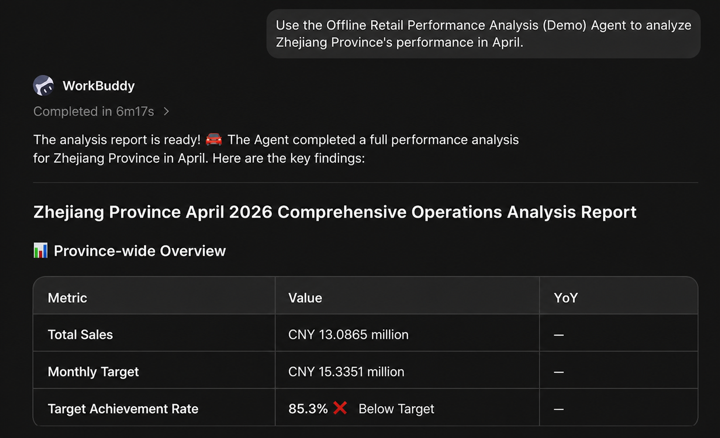
Create an HTML page for an operations review based on the insight conclusions.
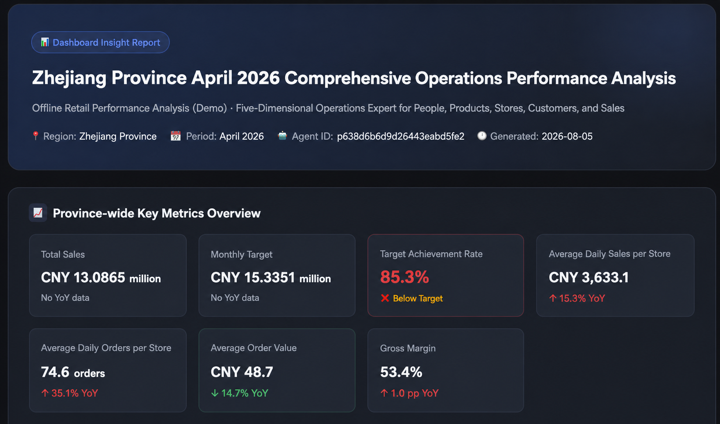
Before generating a deliverable, verify the data scope, reporting period, and metric definitions in the insight conclusions. After generation, review the content, styling, and access scope of the HTML page, presentation, or SuperApp against actual business requirements.
Permissions and Security
GuanCLI calls Guandata BI with the current logged-in user or Token. Visible resources and executable operations depend on that user's BI permissions.
Use it carefully:
- Do not paste accounts, passwords, Tokens, customer private data, or sensitive business data in public chats, tickets, or documents.
- Before Agent automation, confirm the environment and account shown by
guancli auth status. - Read-only queries and data preview are usually lower risk. Form updates, resource saving, page publishing, and ETL save/run/delete are high-risk operations.
- Before high-risk operations, ask AI to list target resource IDs, names, changes, and expected impact.
- Prepare separate test accounts for pilots and demos instead of using high-permission production accounts directly.
Troubleshooting
Command Not Found After Installation
Confirm installation:
npm list -g @guandata/guancli
Check whether the npm global command directory is in PATH:
npm prefix -g
Windows global commands are usually in %AppData%\npm; macOS/Linux usually use $(npm prefix -g)/bin.
Not Logged In or Authentication Failed
guancli auth status
guancli auth login
Token Expired
If account/password login is used and the password is saved, the tool tries to log in again automatically. If Token login is used, or no password was saved, run:
guancli auth login
Does GuanCLI Depend on BI Version
There is generally no hard dependency. Core functions such as card reading, dataset reading, and form operations work in BI 7.x.
A few APIs may require newer versions. For example, Super App initialization currently depends on BI 8.2 and may fail on earlier versions. Upgrade BI to the required version when needed.