Dataset Alert
Overview
Dataset alert is an advanced monitoring feature based on datasets. It detects data anomalies and sends personalized email notifications to recipients matched by user attribute fields. Dynamic content insertion helps enterprises achieve precise data-driven management and efficient collaboration.
Prerequisites
To send alerts by email, complete Email Configuration in Management Center > System Integration.
Create an Alert
-
Click
Alert Centerin the app launcher in the upper-right corner to enter theAlert Centerpage.
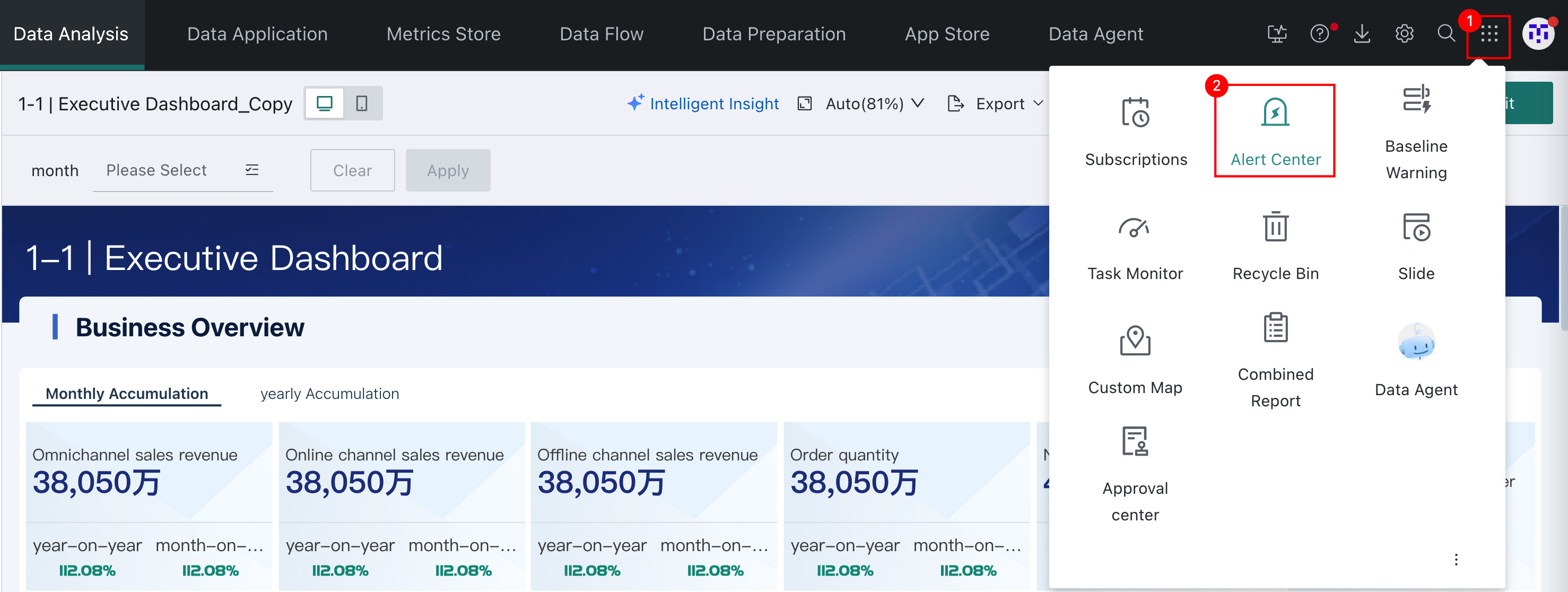
-
Select
Dataset Alertand clickAdd Dataset Alerton the right to enter theDataset Alertconfiguration page.
Configure an Alert
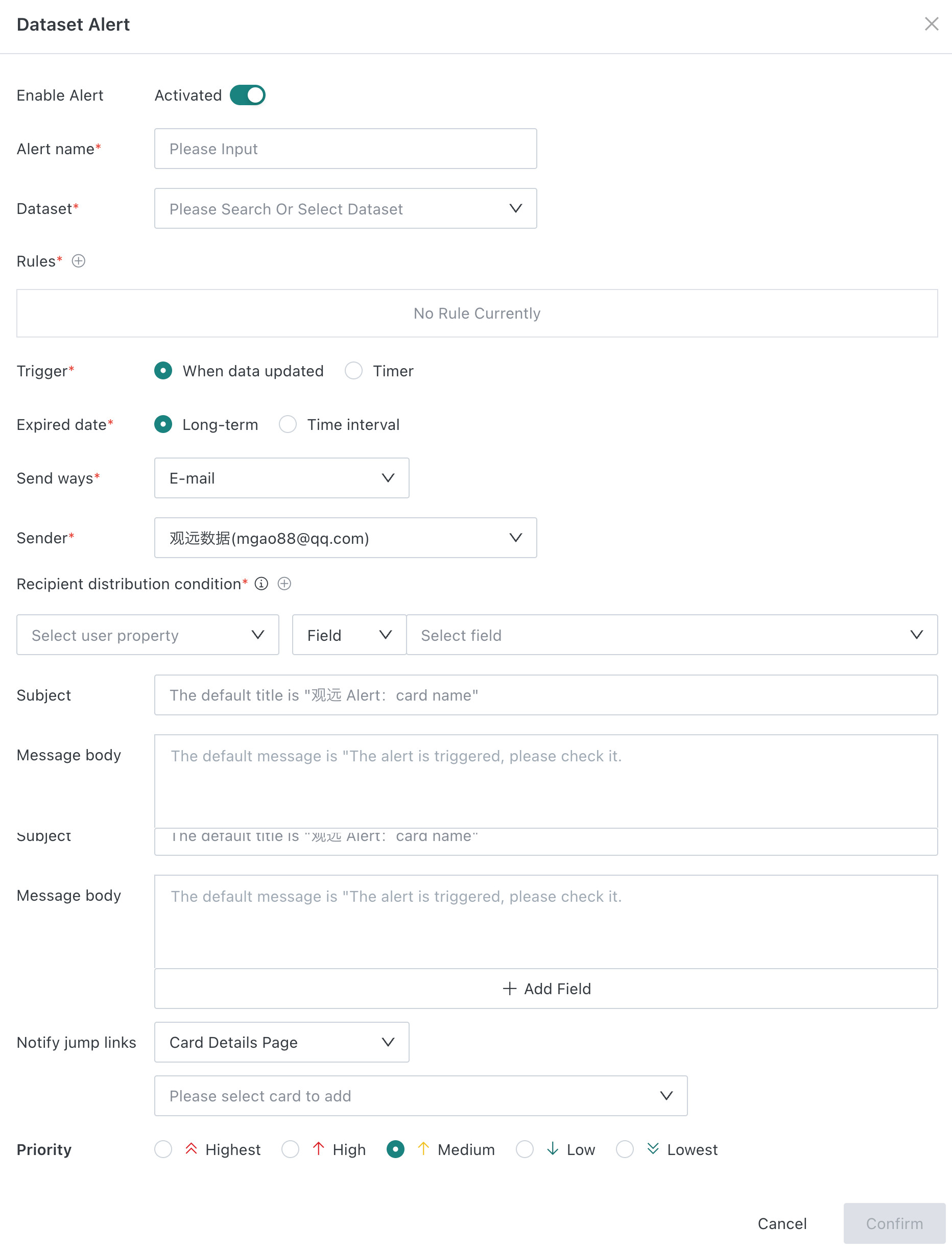
The configuration is roughly the same as Card Alert, with the following differences:
- Dataset alert requires selecting an associated dataset and uses information from the associated dataset for alerts.
- Recipient distribution condition: When data meets alert rules, the system emails corresponding users based on the user attributes associated with the data. For an example, see Alert Example.
Fielddistribution rule: Based on specific fields in the dataset, alert notifications are precisely distributed to recipients matching the corresponding user attributes.Fixed Valuedistribution rule:-
When the attribute value is a single-value attribute and multiple values are selected, for example, if the fixed value for Name (user attribute) selects A and B, the two accounts whose names equal A or B are used as recipients.
-
When the attribute value is a multi-value attribute and multiple values are selected, for example, if the fixed value for Region (user attribute) selects Beijing and Shanghai, accounts whose region contains Beijing or Shanghai are used as recipients.
-
- Email body/notification content: Enter the notification body. If left blank, the default body is used. When editing the body, adding fields is supported, so each recipient can receive dynamically varied information. If a numeric field is inserted, data format settings are also supported to provide a better reading experience, such as displaying completion progress decimals as percentages.
- Notification jump link: You can show or hide the card details page link.
| Notification Channel | Notification Jump Link |
|---|---|
| Jumping is not supported |
Alert Example
To configure Dataset Alert, the dataset data must meet the following requirements: each row must contain the information required by the current alert rule, and the dataset must contain at least one user attribute field for associating recipients.
Take the following data as an example:
If you want to push alerts to regions that have not reached the target sales amount, this dataset cannot be used directly. At minimum, the data needs to be aggregated by region and include sales amount and target sales amount by region, generating the final dataset that can be used for alert pushes.
In Guandata BI, you can process data through Data Preparation > Smart ETL. For detailed steps, see Input Dataset and Output Dataset.
The processed dataset is as follows. At least one user attribute must be associated. For easier explanation, two are associated here.
You can configure a dataset alert for this processed dataset.
For example, if Alert Rule is configured as Trigger when sales amount is less than target sales amount, North China and Central China trigger alerts.
For recipients
- If the field associated with recipients is
Region ID, the information is sent to all users corresponding to that region ID. For example, North China information is sent to all users whose user attribute Region ID is B1002, and Central China works the same way. - If the field associated with recipients is
Region Manager Employee ID, the information is sent to the user corresponding to that employee ID. For example, North China information is sent to the user whose user attribute employee ID is bj0294, and Central China works the same way.
For alert content
- If the content is
The sales amount in your region did not meet the target, all recipients receive the same text message. - If the content is
The sales amount in the region you manage did not meet the target: actual sales amount is Sales Amount; target sales amount is Target Sales Amount, then:- Users in North China receive:
The sales amount in the region you manage did not meet the target: actual sales amount is 78283; target sales amount is 80000. - Users in Central China receive:
The sales amount in the region you manage did not meet the target: actual sales amount is 45832; target sales amount is 50000.
- Users in North China receive:
FAQs
For alert-related FAQs, see FAQs.