Data Security in the AI Era
Intended audience
This article is for BI administrators, enterprise IT and information-security teams, and managers responsible for introducing AI tools. It explains how AI changes the way data is used and how to establish corresponding security controls.
Here, “taking data away” includes copying, screenshots, photographs, file exports, and using AI to extract or organize data from pages or images.
How AI changes data-security risks
Data-security controls normally cover two areas:
- Access management: Control who can view which data through resource permissions, row- and column-level permissions, and data masking.
- Copy, export, and sharing management: Control how visible data can be copied, saved, exported, and shared.
AI does not automatically expand a user's permissions, but it lowers the effort required to extract, organize, and process data the user is already authorized to see.
| Scenario | Change in risk |
|---|---|
| Image recognition | Text, tables, and values can be extracted quickly from screenshots, reducing the deterrent effect of ordinary visible watermarks. |
| Page reading | Visible page content can be understood, organized, and converted into structured text or tables. |
| Desktop agents | With user authorization, an agent can operate a browser and continuously organize data across pages. |
| Programmatic access | Scattered manual page visits can become batch operations. |
The concern is not that AI lets users access data they were never permitted to see. The concern is that AI substantially reduces the cost of extracting, organizing, and removing authorized visible data in bulk.
Extracting data through screenshots or page reading may not trigger the product's formal export process. Copy restrictions and visible watermarks alone therefore cannot cover every new AI-related risk.
A combined control approach
Copy restrictions, dynamic watermarks, export approval, and file encryption remain valuable. They increase the effort required to remove data, control formal exports, and help trace sources. No single measure should be treated as complete data-loss prevention.
Minimize unnecessary visibility
Apply least privilege through resource permissions, row- and column-level permissions, and data masking. Be especially careful with sensitive fields, detail data, and large datasets.
Control formal exports and sharing
Configure copy restrictions, watermarks, export approval, and exported-file encryption according to data sensitivity. See Security Settings and General Settings.
Govern AI tool access
Define which AI tools may process internal data, which systems browser extensions and desktop agents may access, and whether data leaves the enterprise-controlled environment. Combine endpoint management and internal policies for unmanaged tools.
Provide controlled AI access
When AI needs BI data, prefer official access that binds a user identity, inherits existing permissions, limits capabilities, and records the operation source.
Review records and respond to anomalies
Regularly review programmatic-access members, permission scopes, and operation records. Watch for high-frequency access, unusual access times, large queries, or bulk exports. Tighten permissions, revoke credentials, and investigate when an account, token, or endpoint is at risk.
Controlled access through GuanCLI and GuanMCP
GuanCLI and GuanMCP provide official Guandata BI access for AI agents, enterprise AI platforms, and technical users. Each method must bind to a specific BI user and follow that user's permissions.
| Access method | User identity | Permission control |
|---|---|---|
| GuanCLI with PAT | PAT owner | Intersection of user permissions, PAT scope, and global administrator policy |
| GuanCLI with another login method | Signed-in user | That user's Guandata BI permissions |
| Centralized GuanMCP | BI user mapped from the external platform | Mapped BI user's permissions |
| Individual GuanMCP | Owner of the personal credential | User and credential permissions |
For centralized GuanMCP access, ensure the external member identifier uniquely maps to one enabled Guandata BI user. Never substitute one fixed privileged account for all members. See the GuanMCP Integration and User Guide.
Manage CLI users and PATs
Under Management Center > User Management > CLI Users, administrators can:
- Control which users may create PATs.
- Set the global upper limit for PAT permissions.
- Require PAT-only login for CLI.
- Remove CLI members or revoke user PATs.
- Distinguish Web, CLI, and MCP operation sources in audit logs.
Effective PAT permissions are calculated for every call:
Effective PAT permissions = current user permissions ∩ PAT scope ∩ global administrator policy
A PAT cannot expand the user's permissions. Tightening user permissions or global policy immediately reduces its effective permissions. See CLI Users and the PAT Usage Guide.
Pause CLI/MCP access
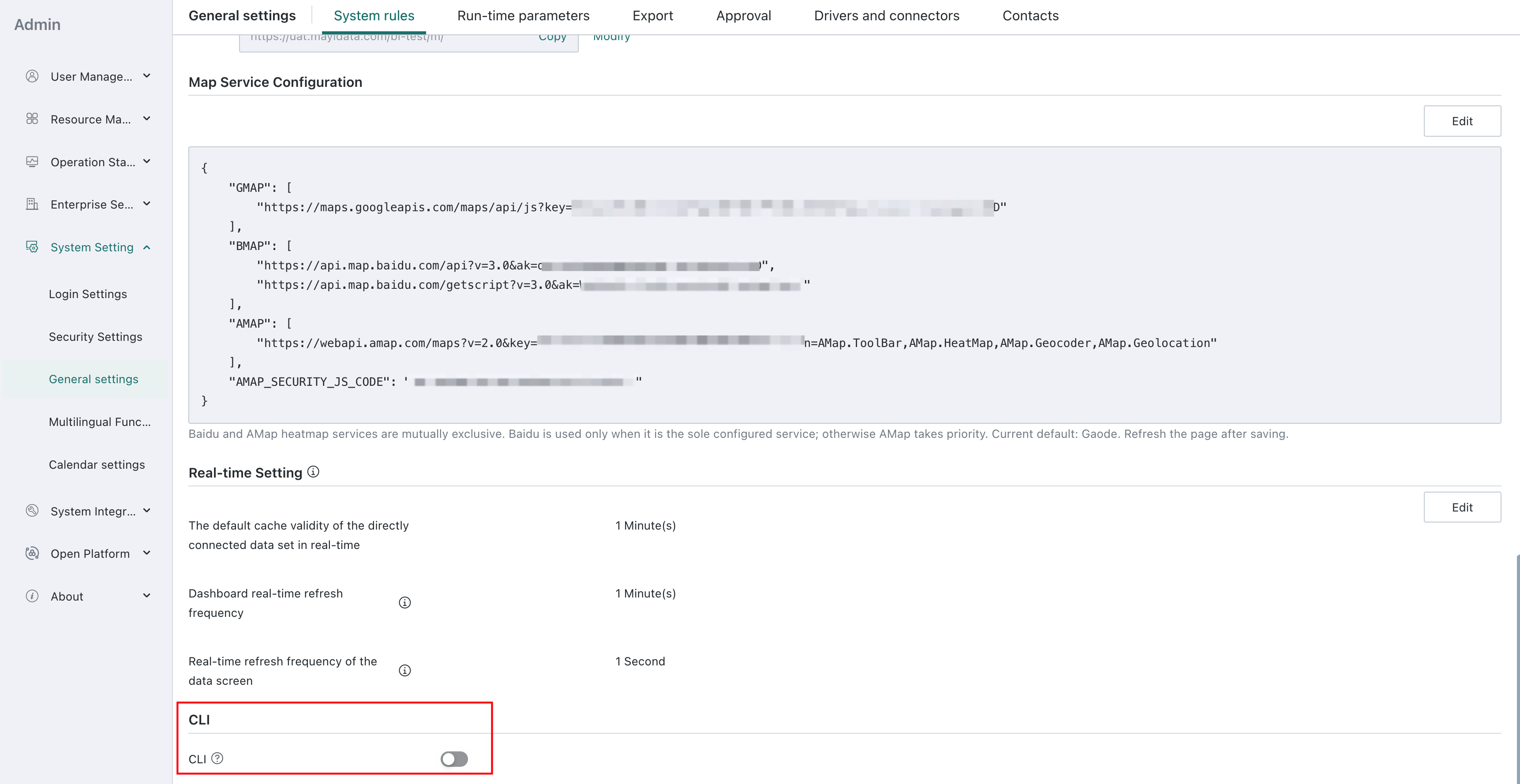
To temporarily disable CLI/MCP access, go to Management Center > System Settings > General Settings > System Rules and turn off the CLI/MCP access switch. Before reopening access, configure CLI users, PAT permissions, or GuanMCP user mapping for the intended scope.
Trace sources through audit logs
The Source field in audit logs distinguishes entry points such as Web, CLI, and MCP. The recorded scope depends on product version and operation type. Identifying a source does not mean the full result of every query is recorded. See Audit Logs.
Administrator checklist
Before introducing AI tools or enabling GuanCLI or GuanMCP:
- Inventory sensitive, detailed, and exportable data.
- Review resource permissions, row- and column-level permissions, and masking rules under least privilege.
- Allow PAT only for users or groups that need it, and limit PAT scope and lifetime.
- Test AI results with accounts that have different permissions.
- Define approved browser extensions, desktop agents, and AI services for enterprise data.
- Regularly review CLI users, active PATs, and CLI/MCP sources in audit logs.
- Establish response procedures for disabled accounts, departing employees, leaked PATs, and abnormal access.