Product Behavior Changes
CLI/MCP Call Quotas
This change applies to all versions from V8.2 onward.
Starting September 1, 2026, CLI/MCP usage moves from the previous trial period to call-based billing. Activation grants 50,000 free CLI/MCP calls. After this quota is exhausted, contact your Guandata sales representative or customer success manager to purchase additional calls.
Impact on Existing Users After Upgrade
For existing CLI/MCP customers, call limits take effect on the first upgrade to V8.2 or later. If the call quota has not been activated, calls are unavailable until you activate the quota.
Calls made before the upgrade do not count toward the 50,000 free calls granted on activation.
Activate the Free Call Quota
Existing users restoring access after an upgrade and new users trying CLI/MCP can activate their quota as follows:
- In Admin, open AI Credits or CLI/MCP Logs under operations management to access the activation page.
- Activate the quota to receive 50,000 free CLI/MCP calls. Purchase additional calls to continue after the free quota is exhausted.
View Call Usage
After activation, open CLI/MCP Logs in Admin to view Remaining Calls and Call Logs. Once the remaining quota is exhausted, calls are unavailable. Contact your Guandata sales representative or customer success manager to purchase additional calls.
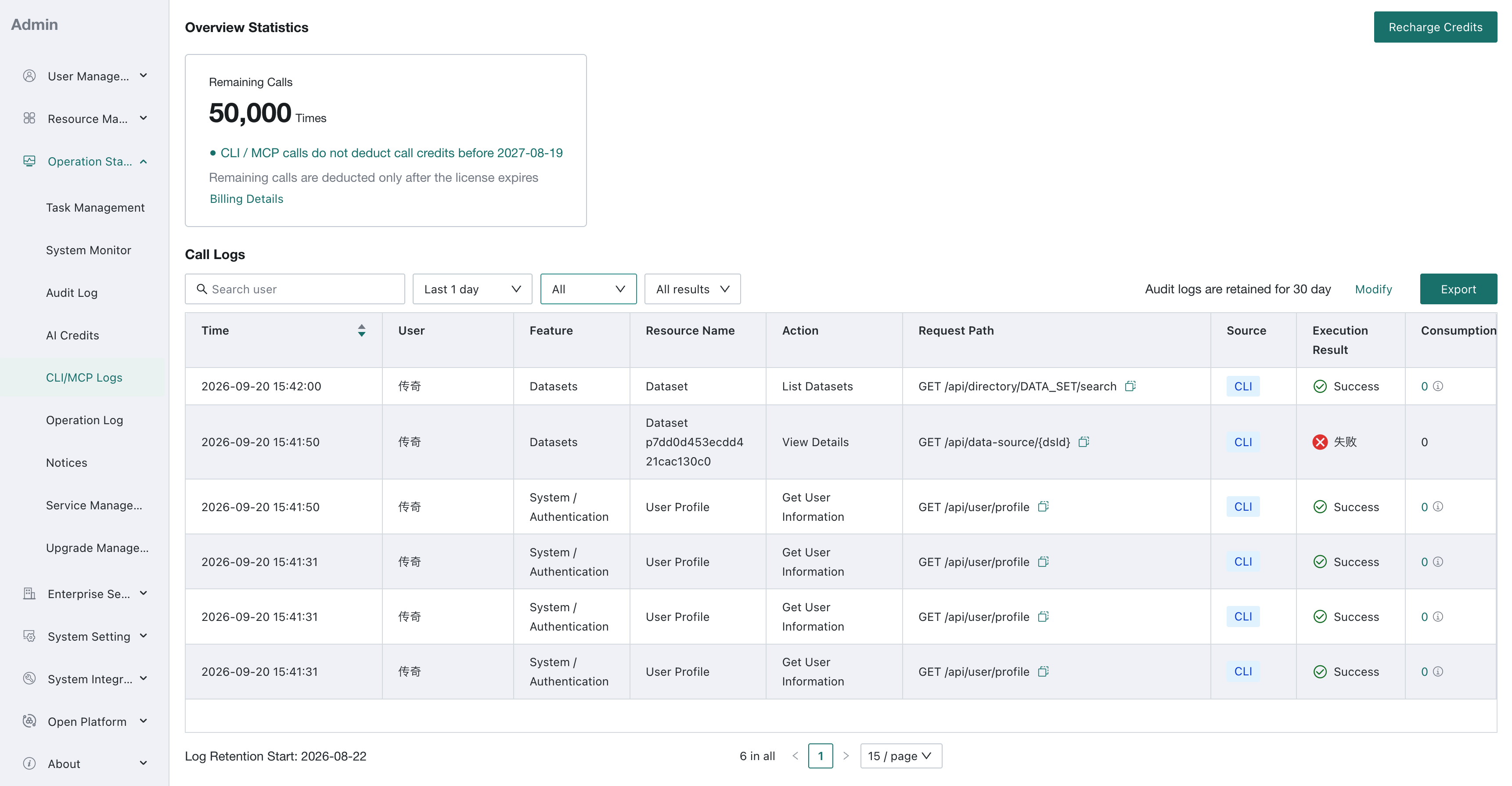
The license date and remaining balance in the screenshot are examples from a test tenant, not a general extension of the trial period. The general rules above still apply.
Guandata LLM Service Activation and Credit Display
This change applies to all versions from V8.2 onward.
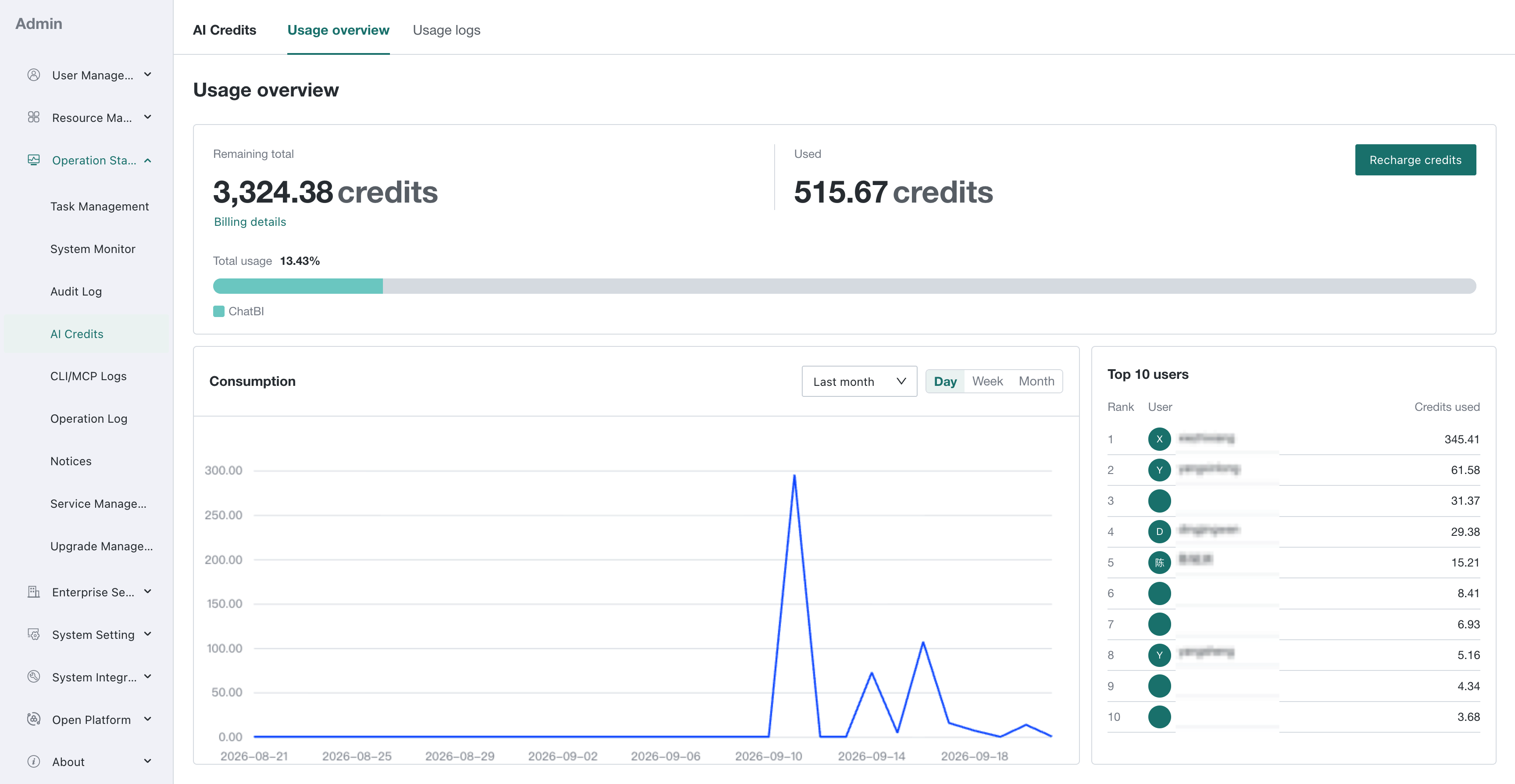
Guandata LLM Service balances are now displayed as AI Credits instead of currency amounts. CNY 1 equals 20 AI credits, so the previous CNY 100 trial balance corresponds to 2,000 AI credits. Activation now takes place on the activation page.
This change affects Guandata LLM Service calls from Dashboard Insights, Insight Agent, and ChatBI.
Before the change: Users enabled Guandata LLM Service from the LLM service configuration page under system integration in Admin to receive a CNY 100 trial balance.
After the change: The activation entry in the LLM service configuration remains available but opens the activation page. Users can also open AI Credits or CLI/MCP Logs in Admin to activate their credits.
Existing users retain their remaining balance after activation. New users receive 2,000 AI credits.
Impact on Existing Users After Upgrade
If Dashboard Insights, Insight Agent, or ChatBI cannot call Guandata LLM Service because credits have not been activated, activate them through either entry above. The AI Credits page then displays the pre-upgrade balance as AI credits:
- Remaining credits greater than 0: The service remains available, and subsequent calls consume AI credits.
- Remaining credits equal to 0: Activation does not restore access. Contact your customer success manager to discuss additional credits.
Activation restores the existing balance; it does not grant existing users another 2,000 AI credits.
Activate Credits as a New User
- In Admin, open AI Credits or CLI/MCP Logs to access the activation page.
- Activate the credits to receive 2,000 AI credits, equivalent to the CNY 100 trial balance, for Guandata LLM Service calls from Dashboard Insights, Insight Agent, and ChatBI.
View AI Credit Usage
After activation, open AI Credits in Admin to view remaining credits and consumption under Usage overview. Contact your Guandata sales representative or customer success manager to purchase additional credits when the balance is exhausted.