Super App Permission Management
Overview
Super App permission management controls whether users can view, edit, or manage Super Apps. A Super App includes two areas: Application List and Request Forwarding. Configure permissions for these areas separately.
Before configuration, understand these two permission types:
- Feature permissions: Control whether a user can see a feature entry and use that feature.
- Resource permissions: Control which specific app a user can access or manage.
In short, feature permissions decide whether a user can use the feature; resource permissions decide which apps the user can use.
The Application List is affected by both feature permissions and resource permissions.
Request Forwarding only requires feature permissions and has no resource permissions.
Super App Feature Permissions
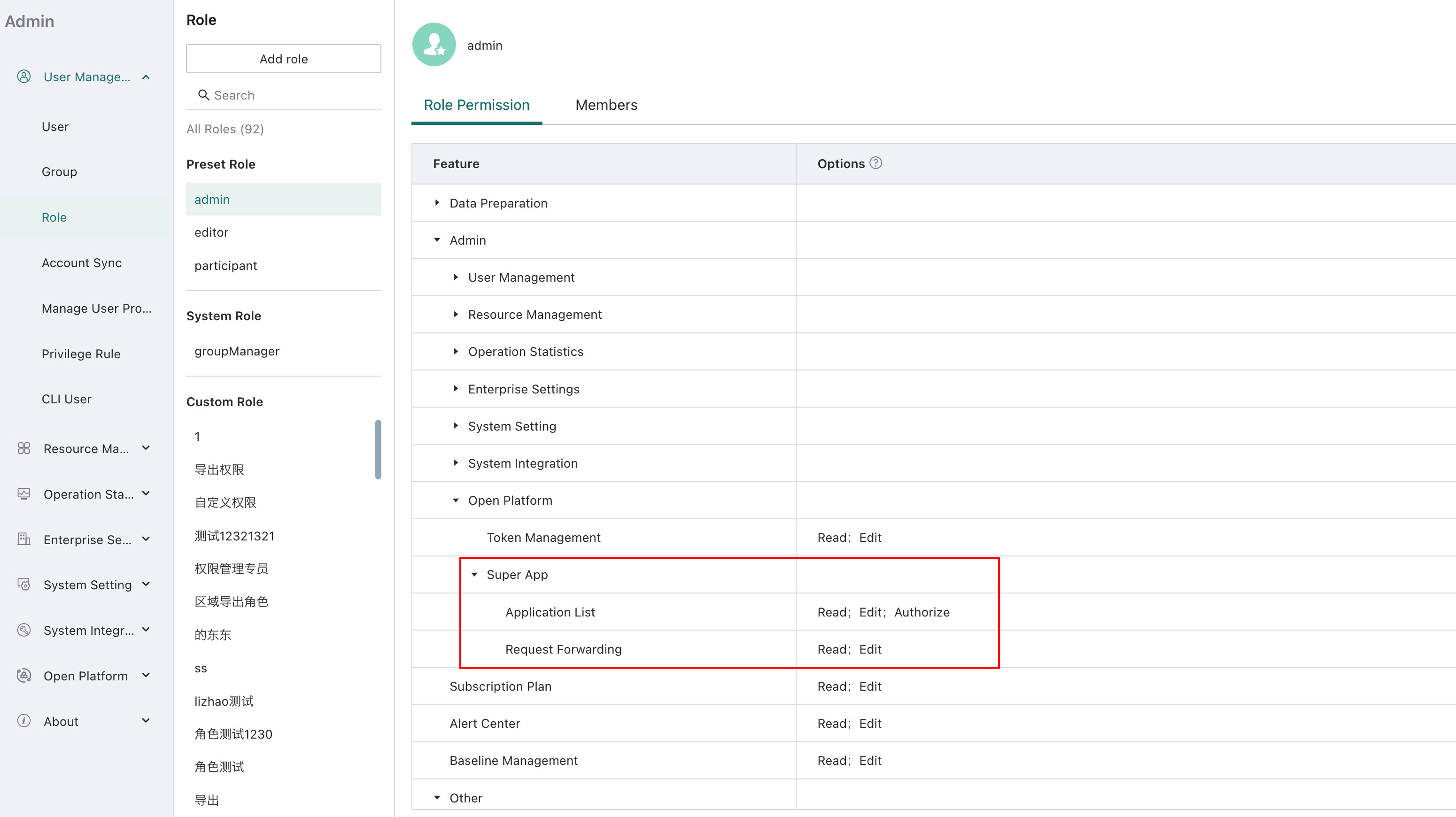
You can assign feature permissions to different roles in Management Center > User Management > Roles.
Super App feature permissions are as follows:
| Feature | View | Edit | Authorize |
|---|---|---|---|
| Application List | Access the Application List page. | Create apps and edit apps that the user has permission to manage. | App owners can manage app permissions. |
| Request Forwarding | Access the Request Forwarding management page. | Create and manage request forwarding configurations. | - |
Application List
The Application List is used to manage Super Apps. Users can access the Application List page only when they have the View permission for Application List. The page shows all apps for which the current user has visitor permission.
Feature Permissions
Application List includes three feature permissions: View, Edit, and Authorize.
| Permission | Capability |
|---|---|
| View | Show the Application List tab under Management Center > Open Platform > Super App, and view apps that the user has permission to access. |
| Edit | Includes View permission. The user can create apps or edit apps that they have permission to edit, such as modifying app information, configuring the app, and updating app files. |
| Authorize | Includes View permission. The user can authorize apps that they have permission to manage, such as adding collaborators, adding visitors, or transferring ownership. |
Having only the View feature permission does not mean the user can see all apps in the Application List. Users can only see apps for which they have Visitor permission.
Having only the Edit feature permission does not mean the user can edit all apps. The user must also be the owner or a collaborator of the app.
Having only the Authorize feature permission does not mean the user can manage permissions for all apps. Regular users can only manage permissions for apps they own.
Resource Permissions
Resource permissions are configured for each specific Super App. Each app can have owners, collaborators, and visitors.
| Resource Permission | Description |
|---|---|
| Owner | With the corresponding feature permissions, can edit the app, manage collaborators and visitors, and transfer ownership to another user. |
| Collaborator | Maintains the app together with the owner. With Edit feature permission, can edit app information, configure the app, and update app files, but cannot manage app permissions. |
| Visitor | Can access the app, but cannot edit the app or manage app permissions. |
You can view and change app resource permissions from the app details page.

Request Forwarding
Request Forwarding is used to create and manage request forwarding APIs. It is controlled only by feature permissions and has no resource permissions.
Request Forwarding includes two feature permissions: View and Edit.
| Permission | Capability |
|---|---|
| View | Show the Request Forwarding tab under Management Center > Open Platform > Super App, and view existing request forwarding configurations. |
| Edit | Includes View permission. The user can create, edit, enable, disable, or delete request forwarding configurations. |
The View and Edit permissions here control whether users can manage request forwarding configurations. To learn how to create and configure request forwarding APIs, see Request Forwarding.