Error Reference
Overview
This article covers errors in Guandata BI modules such as multi-source data access, data preparation, data analysis, and visualization.
Multi-source Data Access
Datasets
/guandata-store/table_cache/guanbi/XXX doesn't exist
Issue:
When creating a dataset from a Hive database, the query and preview succeed, but the following error occurs: /guandata-store/table_cache/guanbi/XXX doesn't exist.
Cause:
The dataset creation task is still queued or running.
Solution:
Wait for the task to finish before previewing the dataset or performing other operations.
Field SKU is not unique in Record
Issue:
The query runs normally in Oracle, but creating the dataset in Guandata BI returns Field SKU is not unique in Record.
Cause:
Guandata BI does not support fields with duplicate names. Oracle clients can query and display duplicate field names, but Guandata BI must store them with distinct names.
Solution:
Rename the duplicate fields.
Prepared statement needs to be re-prepared
Issue:
The dataset overview displays: Database exception. Contact the database administrator. Error details: Prepared statement needs to be re-prepared.
Cause:
This error originates from the source database and is related to its cache configuration.
Solution:
Change the following parameters:
set global table_open_cache=16384;
set global table_definition_cache=16384;
column ambiguously defined
Issue:
The database preview returns column ambiguously defined when you create a dataset.
Cause:
-
A column is not fully qualified. For example, a field selected by
SELECTexists in both tables inFROM, so the database cannot determine its source table. -
The query contains duplicate fields, for example:
SELECT a.name, a.name.
No such file or directory
Issue:
Scenario 1: You update a dataset immediately after canceling its update task, and No such file or directory occurs.
Scenario 2: A scheduled update set for 1:00 AM fails with this error.
Cause:
Scenario 1: After cancellation, the task can continue deleting files even though the interface shows it as finished. A new update may create files that the canceled task then deletes, causing this error.
Scenario 2: The BI system removes empty folders at 1:00 AM. A dataset update can create an empty folder before creating its Avro file, and the scheduled cleanup can remove that folder.
Solution:
Solution for Scenario 1:
- Wait several minutes after canceling a task before updating the dataset.
- If the error occurs, wait and run the update again.
Solution for Scenario 2:
- Schedule automatic updates outside the 1:00 AM cleanup window.
- Enable retry on failure. A retry after 1:00 AM can complete without the folder being deleted.
Cannot call methods on a stopped SparkContext
Issue:
Tasks fail with Cannot call methods on a stopped SparkContext. Dataset updates and ETL runs may fail in large batches.
Cause:
Disk usage is high.
Solution:
Check Resource Monitoring.
Ask the operations team to clean up disk space. If that does not resolve the issue, assess a disk-capacity expansion.
java.io.IOException: org.apache.hadoop.hive.ql.metadata.HiveException: java.lang.ClassCastException
Issue:
The dataset update returns java.io.IOException: org.apache.hadoop.hive.ql.metadata.HiveException: java.lang.ClassCastException.
Cause:
A type-conversion exception occurs because the original and new field types differ.
Solution:
Check whether the dataset preview succeeds and whether any previewed fields have unexpected values.
total length XXX
Issue:
A new TiDB dataset previews successfully, but the update fails with the full SQL statement followed by total length XXX.
Cause:
An SQL comment causes a syntax error because it cannot be ignored. Check the logs for the underlying error: You have an error in your SQL syntax; check the manual that corresponds to your TiDB version for the right syntax to use line XXX.
Solution:
Remove comments from the SQL statement, then update the dataset again.
Data Volume Exceeds the Allowed Threshold
Issue:
A Web Service dataset update returns Data volume exceeds the allowed threshold.
Cause:
To maintain update reliability and BI performance, a Web Service dataset update is limited to 19 MB per run.
Solution:
Adjust the fields to reduce the returned content.
Disk I/O error: Failed to open HDFS file
Issue:
A direct-connection dataset update returns Disk I/O error: Failed to open HDFS file.
Cause:
The source database cannot find the required file.
Solution:
Verify the database connection information. Confirm that the source database configuration has not changed and run the update SQL in the source database. Contact the internal database administrator if needed.
Error getting connection from data source HikariDataSource(HikariPool-10)
Issue:
The dataset update returns Error getting connection from data source HikariDataSource(HikariPool-10).
Cause:
The database connection pool is usually full because connections from earlier tasks were not fully released. If the data account and network are healthy, a manual update usually succeeds. If it also fails but the test connection succeeds, connectivity is normal and the BI connection pool is likely full. Check the logs for the error period.
Solution:
-
If the business requires real-time data with no cache, enable Support Real-time Card Data > No Cache for the dataset.
Each report request then queries the dataset directly and increases database load.
-
If many dataset updates fail because they are scheduled at the same time, stagger their update schedules.
Packet for query is too large
Issue:
A dataset update or extraction returns Packet for query is too large.
Cause:
The parameter values in the built-in MySQL configuration are too low.
Solution:
Ask Guandata Operations to adjust the built-in MySQL configuration.
/guandata-store/table_cache/guanbi/*********` is not a Delta table
Issue:
The SQL preview succeeds when configuring data extraction, but the overview then returns ``/guandata-store/table_cache/guanbi/*********is not a Delta table.
Cause:
The extraction task is still running and has not retrieved all data.
Solution:
Wait for the task to finish, then check the overview again.
java.nio.channels.UnresolvedAddressException
Issue:
The preview succeeds, but dataset extraction returns java.nio.channels.UnresolvedAddressException.
Cause:
An HDFS address cannot be resolved. A preview accesses only one or two nodes, while a full extraction accesses many nodes.
Solution:
Troubleshooting steps:
-
Check whether the source database is Impala or Hive.
-
Check whether extraction or preview returns
java.nio.channels.UnresolvedAddressException. The preview may succeed, but extraction fails.
Ask a developer to check the configuration.
Error retrieving next row
Issue:
The dataset update returns Error retrieving next row.
Cause:
A timeout or network fluctuation prevents retrieval of the next data row.
Solution:
- In Task Management, view task details. No
fetchrecord indicates a timeout; a failure during fetching indicates network fluctuation. - Enable retry on failure for the dataset.
empty.max
Issue:
Uploading a file returns empty.max.
Cause:
The file contains incompatible or non-standard row or column properties.
Solution:
Modify the file. Upload only plain row-and-column data; remove Excel formatting such as merged cells.
Illegal Conversion
Issue:
Updating a dataset after changing a field type returns Illegal Conversion.
Cause:
Directly changing a data type in the data structure is not supported, for example from STRING to TIMESTAMP.
Solution:
Use a database function to convert an expression to another type, such as CAST.
Query exceeded distributed user memory limit of XXX
Issue:
Adding a dataset with a large date range or high data volume returns Query exceeded distributed user memory limit of XXX.
Cause:
The SQL is usually too complex for the available runtime memory.
Solution:
If you cannot reduce the data volume, optimize the SQL to lower runtime memory usage:
- Do not select unused fields.
- For SQL that uses
partition by,group by,order, orjoin, create a table in Berserker or a wide table, then query it in BI.
Exception: Memory limit (total) exceeded: would use xx GiB
Issue:
An occasional dataset error occurs, such as Exception: Memory limit (total) exceeded: would use xx GiB.
Cause:
Available memory or disk space is insufficient.
Solution:
- Optimize the query by reducing unnecessary calculations and data loading.
- Reduce the data volume by narrowing the query scope or processing the data in batches.
- Increase server memory if the configuration permits.
- Contact Guandata Support if the issue remains unresolved.
Incorrect syntax near ";"/missing right parenthesis\n
Issue:
The same SQL runs locally but the BI preview returns Incorrect syntax near ";"/missing right parenthesis\n.
Cause:
The preview stores the input SQL result in a temporary table before retrieving the final result. A trailing semicolon causes a syntax error.
Solution:
Remove the trailing semicolon.
The maximum length of cell contents (text) is 32,767 characters
Issue:
Exporting a dataset returns The maximum length of cell contents (text) is 32,767 characters.
Cause:
Excel limits the text in a cell to 32,767 characters.
Solution:
Process the data to reduce the cell content, then try again. See https://blog.csdn.net/weixin_43957211/article/details/109077959.
null, message from server: "Host 'xxx.xxx.x.xxx'
Issue:
Testing a newly created data account returns null, message from server: "Host 'xxx.xxx.x.xxx'.
Cause:
The IP address has generated too many interrupted database connections in a short period, exceeding MySQL max_connect_errors.
Solution:
Ask the local database administrator to run FLUSH HOSTS to clear the cache.
Domain Name Cannot Be Resolved: Confirm the DNS Configuration
Issue:
Adding an account in Data Center returns Domain name cannot be resolved. Confirm the DNS configuration with the server administrator.
Cause:
The network connection is unavailable.
Solution:
Correct the network configuration.
Related Connector Cannot Be Found
Issue:
The data account list displays an unknown type and reports that the related connector cannot be found.
Some data accounts cannot be edited and their lineage cannot be viewed.
Cause:
The custom connector has a problem.
Solution:
Restart the custom connector switch. If the issue remains, contact Guandata Support.
Account Verification Error: Custom driver path:/guandata-store/jdbcdrivers/XXX does not exist
Issue:
After selecting a custom driver and testing the connection, the data account returns Custom driver path:/guandata-store/jdbcdrivers/XXX does not exist.
Cause:
MinIO is not enabled, so the custom driver path cannot be found.
Solution:
Ask Guandata Operations to enable MinIO, then upload the custom driver again.
Cannot reserve XXX MiB, not enough space
Issue:
A high-performance dataset returns Cannot reserve XXX MiB, not enough space.
Cause:
The data disk used by ClickHouse is full.
Solution:
Expand disk capacity, clean up unnecessary data, or mount a larger disk. Contact Guandata Operations if needed.
Connect to xxx.xx.xxx.xxx:xxxx [/xxx.xx.xxx.xxx] failed: Connection refused
Issue:
Connect to xxx.xx.xxx.xxx:xxxx [/xxx.xx.xxx.xxx] failed: Connection refused.
Cause:
Accelerating a very large dataset can exceed the memory allocated to ClickHouse and restart it. Subsequent acceleration tasks then receive Connection refused.
Solution:
Ask Guandata Operations to increase the ClickHouse memory configuration.
ClickHouse exception, code: 241, host: 10.250.156.78, port: 8123; Code: 241, e.displayText() = DB::Exception: Memory limit (for query) exceeded: would use 9.32 GiB (attempt to allocate chunk of 4718592 bytes), maximum: 9.31 GiB (version 20.4.5.36 (official build))
Issue:
ClickHouse exception, code: 241, host: 10.250.156.78, port: 8123; Code: 241, e.displayText() = DB::Exception: Memory limit (for query) exceeded: would use 9.32 GiB (attempt to allocate chunk of 4718592 bytes), maximum: 9.31 GiB (version 20.4.5.36 (official build))
Cause:
The data volume exceeds the default 9.31 GB memory limit.
Solution:
Ask Guandata Operations to increase the ClickHouse memory configuration.
ClickHouse exception, code: 60, host: 172.16.171.254, port: 8123; Code: 60, e.displayText() = DB::Exception: Table guandata.f957aeedb2dcd4313812bad7_new doesn't exist. (version 20.4.5.36 (official build))
Issue:
ClickHouse exception, code: 60, host: 172.16.171.254, port: 8123; Code: 60, e.displayText() = DB::Exception: Table guandata.f957aeedb2dcd4313812bad7_new doesn't exist. (version 20.4.5.36 (official build))
Cause:
The system deletes the original temporary table, creates a new one, and inserts the new data into it.
When two update tasks for the same resource run concurrently, one task can delete the original temporary table while the other inserts data, causing the table-not-found error.
Solution:
Ensure that only one update task runs for the same resource at a time.
Adjust the dataset or ETL update schedule to avoid overlapping updates.
Can a Dataset with More Than 100 Partitions Be Converted to a High-performance Dataset?
Issue:
Can a dataset with more than 100 partitions be converted to a high-performance dataset? Does omitting the partition parameter affect performance?
Cause:
-
Converting a standard dataset to a high-performance dataset requires a partition, which supports the underlying high-speed query framework.
-
Too many partitions affect query performance. High-performance datasets are limited to 100 partitions and cannot be created above that limit.
Why Do Related ETLs Fail After a Dataset Is Converted to a High-performance Dataset?
Issue:
Why do related ETLs fail after a dataset is converted to a high-performance dataset?
Cause:
After conversion, the dataset behaves as a direct ClickHouse dataset. When used as an ETL input, ClickHouse and Spark functions can conflict, and ETL cannot recognize fields created with ClickHouse functions or row and column permissions. It can participate in ETL only when it has no row or column permissions and no added fields.
Solution:
Convert only large datasets used for final card creation. Do not convert datasets that still need ETL processing. If one dataset serves both cards and ETL, use one ETL to output a standard ETL dataset and another to output a high-performance dataset for cards.

ru.yandex.clickhouse.except.ClickHouseException: ClickHouse exception, code: 210, host: xx, port: 8123; Connect to xx failed
Issue:
Updating, converting, or extracting a high-performance dataset returns ru.yandex.clickhouse.except.ClickHouseException ... connect timed out.
Cause:
The connection timed out or the configuration changed.
Solution:
Check whether prior runs succeeded. If so, verify the configuration and retry; contact Guandata Support if the issue remains.
Dataset Update Fails with unknown error
Issue:
unknown error occurs while writing the task history after a successful update, so the update is incorrectly reported as failed. This is an intermittent issue.
Data Preparation
Smart ETL
Job Cancelled due to shuffle bytes limit, the threshold is XXX
Issue:
An ETL run returns Job Cancelled due to shuffle bytes limit, the threshold is XXX.
Cause:
Joins, aggregations, and window functions cause Spark to shuffle data to disk. Large shuffle volumes create disk pressure. Guandata's engine stops an ETL output task when it writes more than 200 GB of shuffle data by default.
Solution:
- With sufficient disk capacity, ask Guandata to set a higher shuffle limit, up to 60% of total BI disk capacity while keeping peak disk usage below 85%.
- Upgrade to Job Engine private deployment 1.1.0 or later.
- If disk usage is already high, optimize or split the ETL instead of increasing the shuffle limit.
org.apache.spark.SparkException: Could not execute broadcast in 300 secs. You can increase the timeout for broadcasts via spark.sql.broadcastTimeout or disable broadcast join by setting spark.sql.autoBroadcastJoinThreshold to –1
Issue:
The ETL returns org.apache.spark.SparkException: Could not execute broadcast in 300 secs.
Cause:
The joined data frame is large, but the default spark.sql.broadcastTimeout is only 300 seconds.
Solution:
Increase spark.sql.broadcastTimeout, for example: config("spark.sql.broadcastTimeout", "3600").
Found duplicate column(s) ..
Issue:
ETL reports Found duplicate column(s) ... even though no fields appear identical.

Cause:
Spark is case-insensitive for field names, so Field A and Field a are treated as duplicates.
Solution:
Check for similarly named fields, rename them, and run the ETL again.
Job 2632 Cancelled Because SparkContext Was Shut Down, Engine Lost
Issue:
The ETL returns Job 2632 cancelled because SparkContext was shut down, engine lost.
Cause:
Multiple large ETLs running concurrently can exhaust disk or memory and restart Job Engine.
Solution:
Clean up disk space, check resource configuration, and stagger long-running ETLs.
Parquet data source does not support void data type
Issue:
All ETL nodes preview successfully, but the ETL run returns Parquet data source does not support void data type.
Cause:
A field created with a null value has an invalid selected data type.
Solution:
Use a function to specify the type of null, for example, cast(null as int).
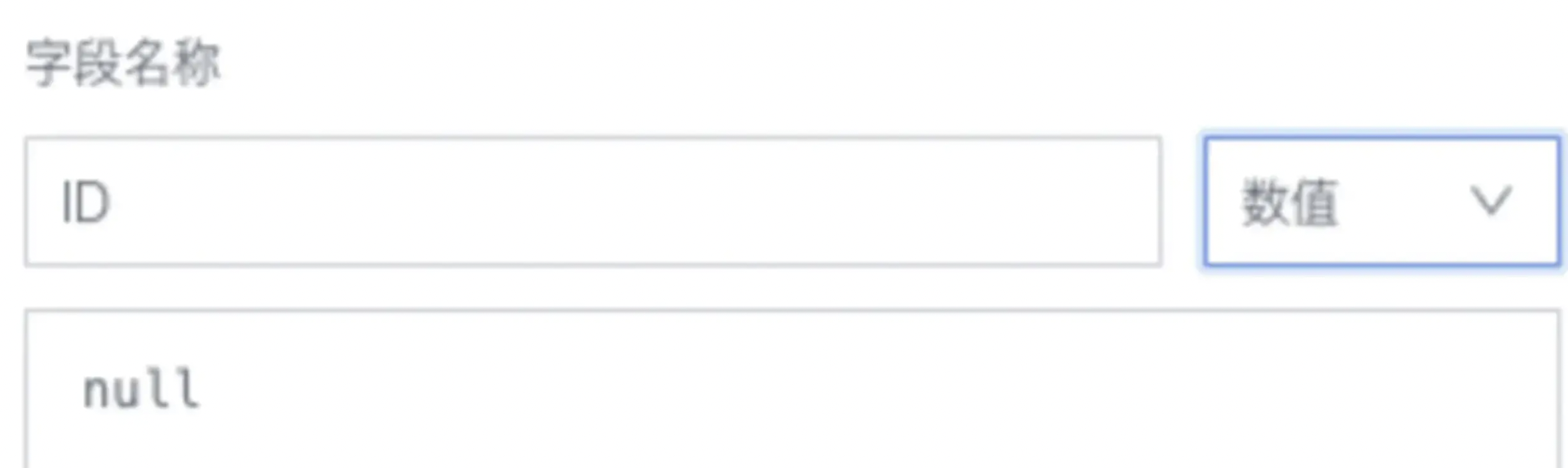
Illegal sequence boundaries: 19662 to 19606 by 1
Issue:
The ETL run fails with Illegal sequence boundaries: 19662 to 19606 by 1.
Cause:
The ETL uses the sequence function to expand the range between two dates by day (or month). The start date must be earlier than or equal to the end date. If the start date is later, both preview and run fail. 19662 and 19606 represent the Unix dates for the start and end dates, respectively.
Solution:
Check the end date and ensure it is always later than or equal to the start date.

Illegal sequence boundaries
Issue:
The ETL run fails with Illegal sequence boundaries: XXX to XXX by 1. Occasionally, the preview succeeds but the run fails.
Cause:
Previews display only the first 200 rows. If invalid data is outside those rows, the error may not be detected during preview. This commonly occurs when an ETL uses the sequence function to expand the range between two dates by day (or month): the start date must be earlier than or equal to the end date. The ETL fails if even one row has a start date later than its end date.
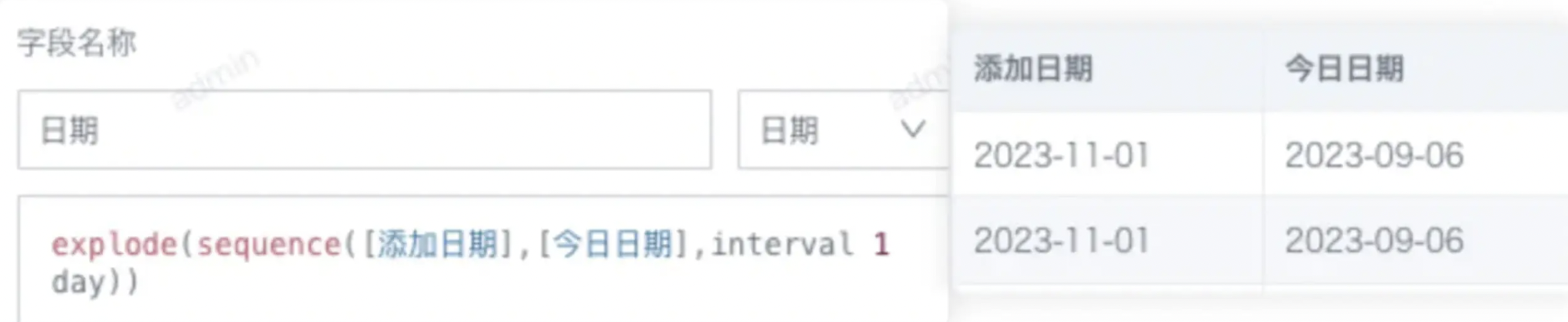
Solution:
Check the end date and ensure it is always later than or equal to the start date.
Job aborted due to stage failure
Issue:
The ETL run returns: Job aborted due to stage failure: Total size of serialized results of 2700 tasks (1024.2 MiB) is bigger than spark.driver.maxResultSize (1024.0 MiB).
Cause:
spark.driver.maxResultSize defaults to 1 GB. It limits the total size of serialized results returned from all partitions for each Spark action (such as collect). The results returned from the executors to the driver exceed that limit.
Solution:
Change spark.driver.maxResultSize from 1 GB to 2 GB. If that remains insufficient, add an output node to the ETL to output datasets that can be merged first; the ETL can then reuse that node's result in subsequent logic.
cancelled because SparkContext was shut down
Issue:
The ETL run returns Job *** cancelled because SparkContext was shut down.
Cause:
This usually occurs when a running task drives disk usage too high, causing Job Engine to restart.
Solution:
Clean up the disk to maintain sufficient free space. If cleanup is not possible, expand disk capacity.
Field Type Mismatch
Issue:
When running or previewing the ETL, the Group Aggregate operator returns Field type mismatch: XXX.

Cause:
This usually means that a field type has changed. In the example above, the Sales Quantity field is mismatched. Originally, this field was of type long in the four upstream SQL inputs and therefore in the Group Aggregate operator. A later change to an SQL input or to the source dataset changed Sales Quantity to double, resulting in a type mismatch.
Solution:
Open the Group Aggregate operator, remove the problematic field, and add it again.
Cannot broadcast the table that is larger than XXX
Issue:
The ETL update returns Cannot broadcast the table that is larger than XXX.
Cause:
The table exceeds Spark's broadcast join limit. A common cause is an invalid join condition that leaves data unmatched, producing a large number of NULL values and greatly expanding the joined data, which can exceed Spark's 8 GB broadcast join limit.
Solution:
Modify the join fields to ensure their types match and the join is valid.
[message] = Reference 'id_1666072244947.truck_id' is ambiguous, could be id_1666072244947.truck_id, id_1666072244947.truck_id.; line 1 pos 0
Issue:
An ETL Join node returns: Reference 'id_1666072244947.truck_id' is ambiguous.
Cause:
There is a cross-table circular join. In the example above, tables A and B have already been joined, so table A must not also join table C when table B joins table C.
Solution:
Designate only one table as the primary table for the join to avoid cross-table circular joins. For complex cases, split the logic into multiple Join nodes.

Issue:
An ETL Join node returns: Reference 'id_1666072244947.truck_id' is ambiguous.
Cause:
There is a cross-table circular join. In the example above, tables A and B have already been joined, so table A must not also join table C when table B joins table C.
Solution:
Designate only one table as the primary table for the join to avoid cross-table circular joins. For complex cases, split the logic into multiple Join nodes.
Error When Replacing Values in ETL
Issue:
What can cause an error when replacing values in an ETL?
Cause:
It may be caused by incompatible field types. For example, replacing a numeric field value with text causes an error.
Solution:
Before replacing values, add a Create Field node to convert the field format.
Group Aggregate Node Reports a Missing Field That Is Still Present
Issue:
The ETL Group Aggregate node reports a missing field, but the field is still present.
Cause:
The field ID or type has likely changed. For example, an input dataset field may have been deleted and recreated, giving it a new field ID. The ETL still retains the original field, and the mismatched IDs produce the missing-field error.
Solution:
Remove and add the field again.
ETL Run Returns Job timed out
Issue:
The ETL run returns Job timed out.
Cause:
The corresponding Spark job has timed out.
Solution:
Administrators can change the ETL Maximum Task Runtime and Spark Single-Job Timeout in Admin Settings > Operations Management > Parameter Settings. Optimize or split ETLs with excessively long runtimes.
Data Analysis and Visualization
Cards
“The Current Task Has Been Cancelled. Card: [xxx] May Have Timed Out. Optimize This Card or Try Again Later.”
Issue:
The current task has been cancelled. Card: [xxx] may have timed out. Optimize this card or try again later.
Cause:
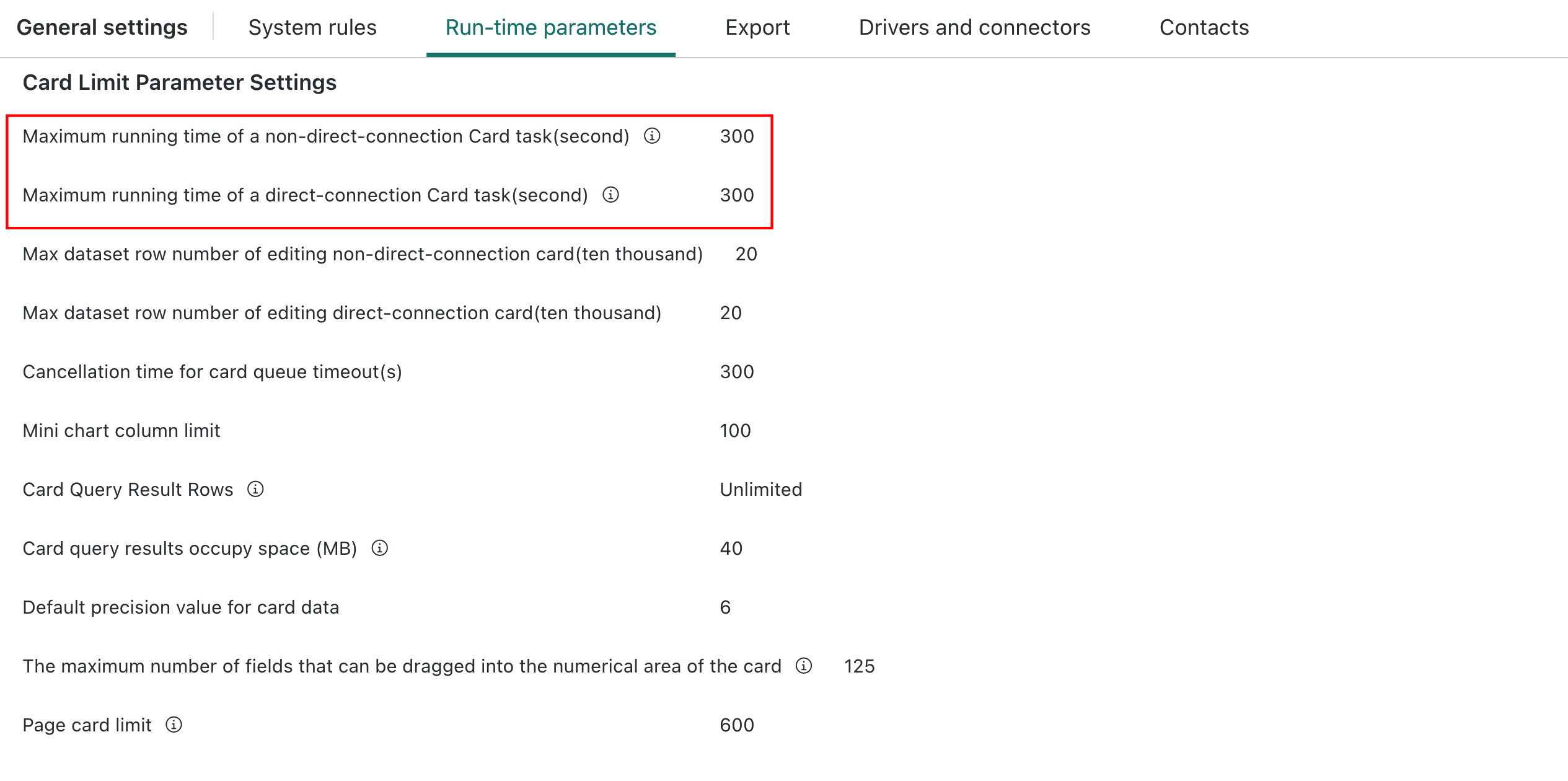
When a card runs longer than the threshold, the system stops it because its design may be inefficient. This prevents a resource-intensive card from exhausting system resources.
Solution:
- Determine whether the issue affects individual cards or many cards.
- If many cards return this error, check for queued tasks in Admin Settings. If all system tasks are slower than before or severely backlogged, contact Guandata Support.
- If the error affects one card, check whether its configuration can be optimized, such as resource-intensive functions or advanced calculations. Also assess the data volume and whether ETL preprocessing can improve performance. If the card cannot be further optimized, consider increasing its timeout setting.
Index xx out of bounds for length xx
Issue:
The card frequently returns Index xx out of bounds for length xx.
Cause:
Header calculations or secondary calculations are running concurrently. This can occur when the card has high concurrent access.
Solution:
Upgrade to version 5.9.0 or later to avoid this issue.
Chinese-style Reports
Index 0 out of bounds for length 0
Issue:
In Chinese-style Report 2.0, LOOKUPEXP interval expansion is enabled but not configured.
Cause:
Interval expansion is selected in a template formula, but its view name and field name are not configured.
Solution:
Configure both the view name and field for interval expansion.
Subscription Distribution and Alerts
Subscriptions
“An Error Occurred”
Issue:
Opening a subscription link on mobile displays An error occurred.
Cause:
The user lacks permission to access the corresponding card or page.
Solution:
Grant the user Viewer or Owner permission for the corresponding resource. [Improved in version 5.6 and later.]
key not found: scanAppld
Issue:
Sending a subscription to DingTalk returns key not found: scanAppld.
Cause:
The application information for QR-code sign-in is not configured.
Solution:
Configure both the QR-code sign-in application and mini-app information. BI sends DingTalk messages primarily using the mini-app configuration, but links in those messages require the QR-code sign-in configuration to enable password-free sign-in.
Subscription Image Width Does Not Match the Page
Issue:
The width of an image sent in a subscription does not match the page width.
Cause:
Subscription page exports use the same logic as manual exports, and the result depends on the export-view settings.
Solution:
Check how the export view is displayed.
Intermittent Export CARD/PAGE FAILED
Issue:
Errors of this type include, but are not limited to, Export CARD FAILED, Export PAGE FAILED, and export failed due to load page 300000ms timeout: Timeout exceeded while waiting for event.
Cause:
The subscription fails because the export fails. Possible causes include a data-retrieval timeout for a card or page, a PDF service timeout, or an issue with a card or page on the dashboard.
Solution:
Adjust the relevant parameters. Contact Guandata Support for an assessment and specific adjustments.