High-Performance Query Table (Advanced Option)
Overview
Feature Description
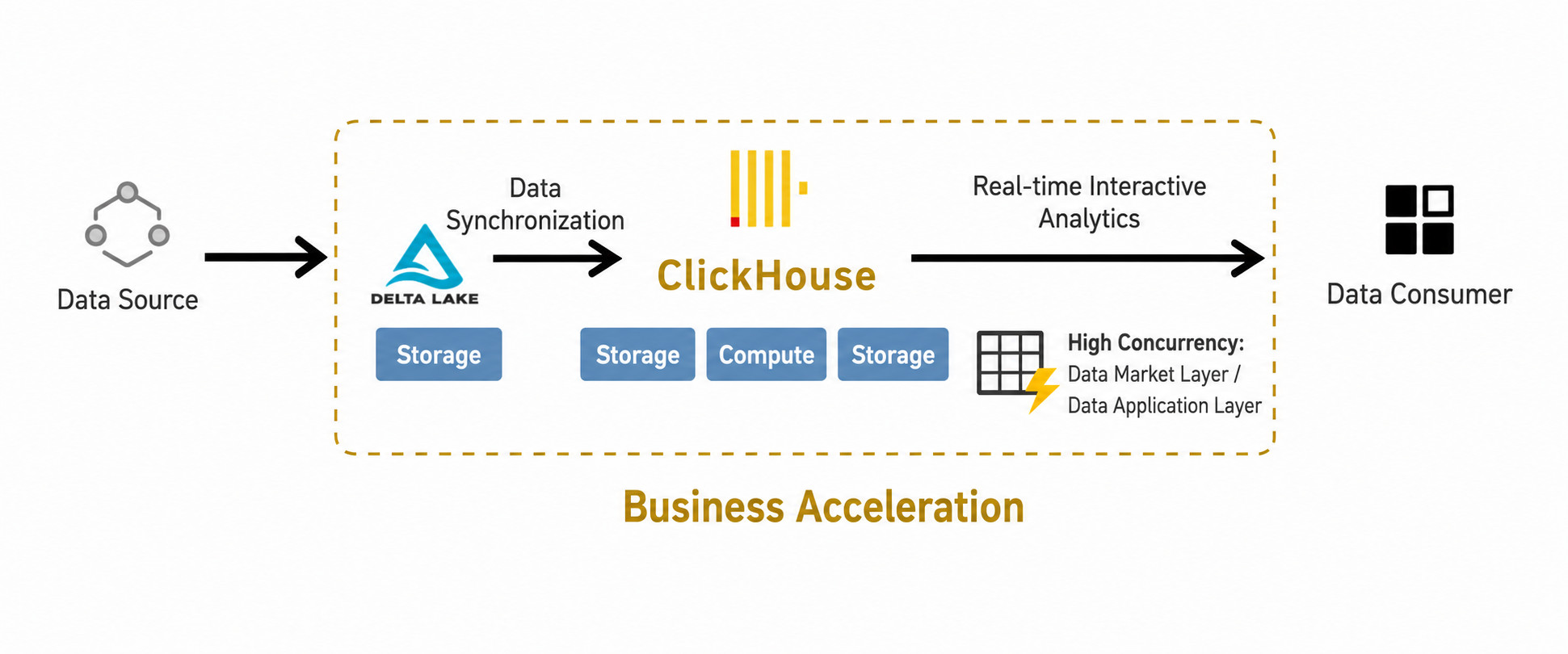
The High-Performance Query Table is an acceleration service provided by Guandata BI for data computing and storage. By converting Guan-Index datasets, file datasets, and ETL output datasets into High-Performance Query Tables, users can accelerate analysis and query performance and achieve second-level computation on datasets with hundreds of millions of rows.
It provides the following advantages:
- Excellent Query Performance: High-Performance Query Tables use distributed computing to achieve strong scalability. They are especially suitable for OLAP queries on massive datasets, arbitrary aggregation and slicing on large wide tables, and detailed data queries. Compared with using Spark directly as the query engine, they provide a much better ad hoc query experience.
- Simple to Use: Configuration is done through the UI. Users can define acceleration fields and switch modes with simple point-and-click operations. The overall workflow is zero-code and low-threshold, and supports complete SQL capabilities with flexible operations.
- Efficient Storage: Efficient data compression technology can achieve roughly a 10x compression ratio, improving single-node storage and compute capacity and supporting high-concurrency and high-throughput analytical workloads.
High-performance datasets are a paid add-on service. For detailed usage information, contact your Guandata consultant.
Use Cases
When Extract or ETL Datasets face scenarios like the following, it is recommended to use the Guandata Acceleration Engine and switch the dataset to a High-Performance Query Table with one click:
- Transaction Reports: Retail order and financial reporting often requires multi-table joins and large amounts of exact calculation. Query performance on large wide tables or joined tables can become a bottleneck, and massive reports may be difficult to generate in real time.
- Promotion Analysis: During major promotions, large-screen dashboards need to calculate and display core metrics in real time. SQL concurrency is high and data availability is under pressure.
- User Analysis: Some analysis scenarios involve complex models such as retention and conversion funnels. Because analysis dimensions are not fixed, precomputation is often not possible, and queries may need to cover long time periods and large amounts of detailed data.
Preparation
Because High-Performance Query Tables rely on the OLAP capabilities of ClickHouse, users need not only the BI main service deployment, but also the Guandata Acceleration Engine module and an independently deployed ClickHouse environment.
Recommended configuration: ClickHouse should generally be deployed independently, with no less than 8 CPU cores, 64 GB of memory, and 300 GB of disk space. The specific deployment and configuration are completed by Guandata staff. Contact your Guandata representative for details.
User Guide
Publish a Dataset as a High-Performance Query Table
Datasets accelerated with ClickHouse are collectively referred to as High-Performance Query Tables. All Guan-Index datasets, file datasets, and ETL output datasets support this acceleration mode.
-
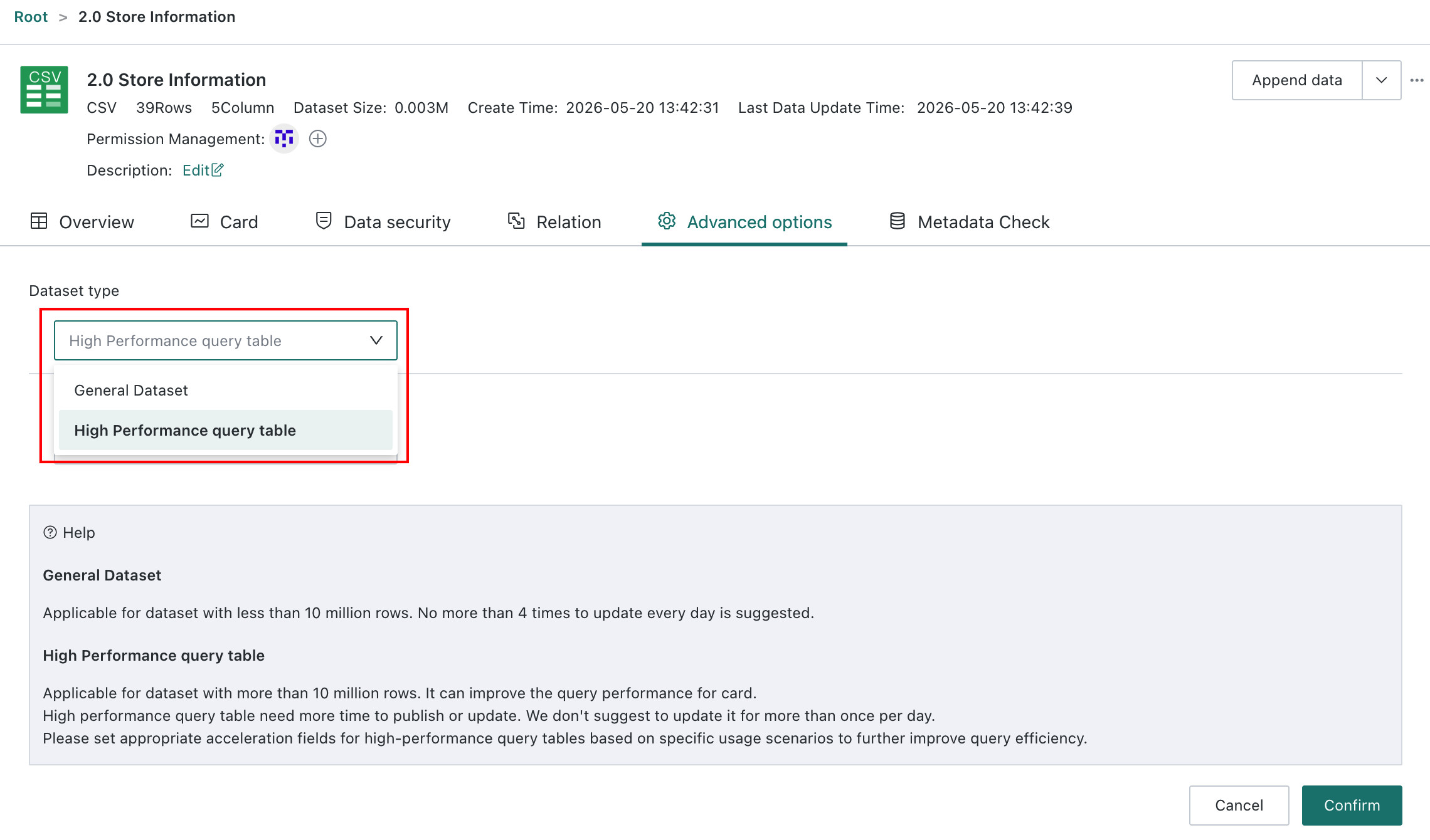
Open the dataset details page, go to
Advanced Options, and clickEditin the upper-right corner to switch a standard dataset into aHigh-Performance Query Table. After the switch, the data is imported into ClickHouse, and Cards query ClickHouse directly for acceleration.- Standard Dataset: Suitable for datasets with fewer than 10 million rows. Recommended update frequency is no more than four times per day.
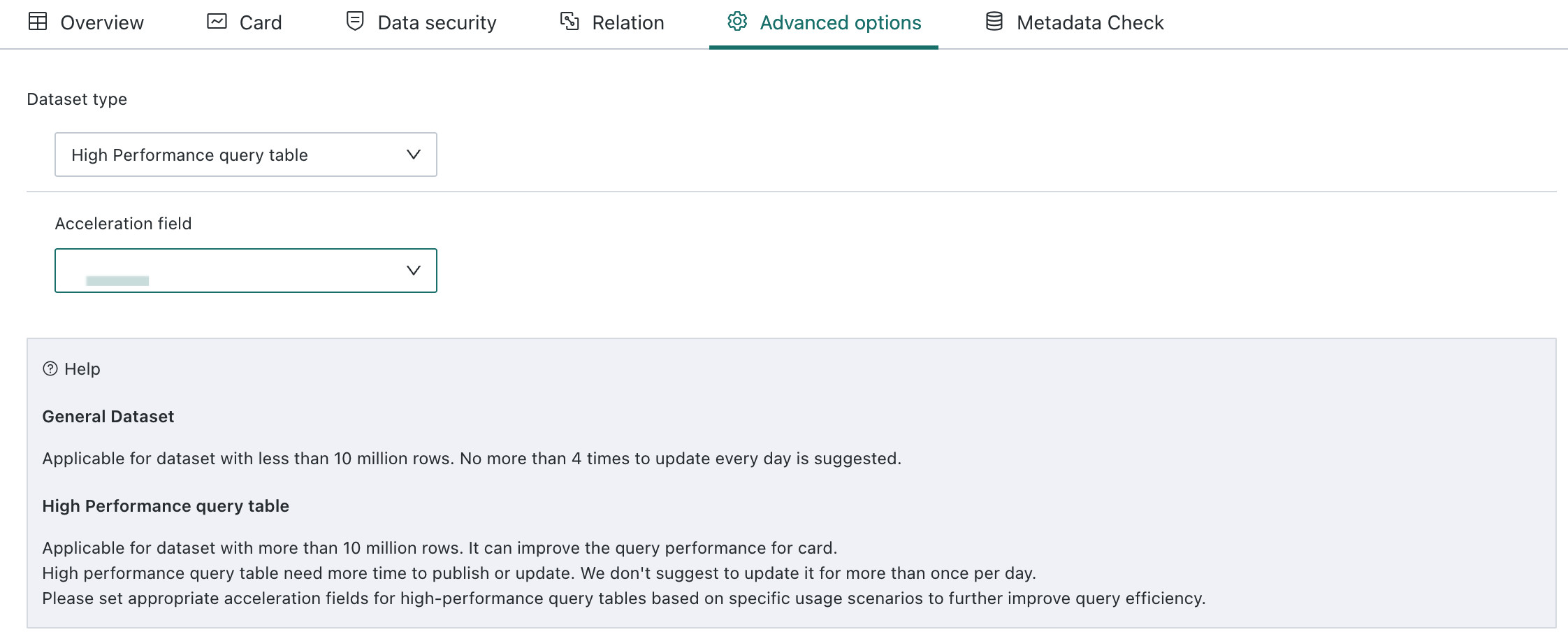
- High-Performance Query Table: Suitable for datasets with 10 million rows or more. It significantly accelerates query efficiency on the Card side, but some functional limitations apply, for example window functions may not always be supported depending on environment configuration. Generating and updating this mode takes more time, so the recommended update frequency is no more than once per day. Appropriate acceleration fields should be configured based on the use case, and date fields are generally recommended.
-
When configuring
High-Performance Query Tablemode, users need to define acceleration fields. These fields help ClickHouse partition the data more effectively, which can significantly reduce full-table scans during queries. Date fields are generally recommended, and the partition granularity is usually best set toMonthorDay. If no date field exists, another field can be selected carefully, but the cardinality of the field must be controlled. Avoid using serial numbers such as order IDs or raw numeric values as acceleration fields.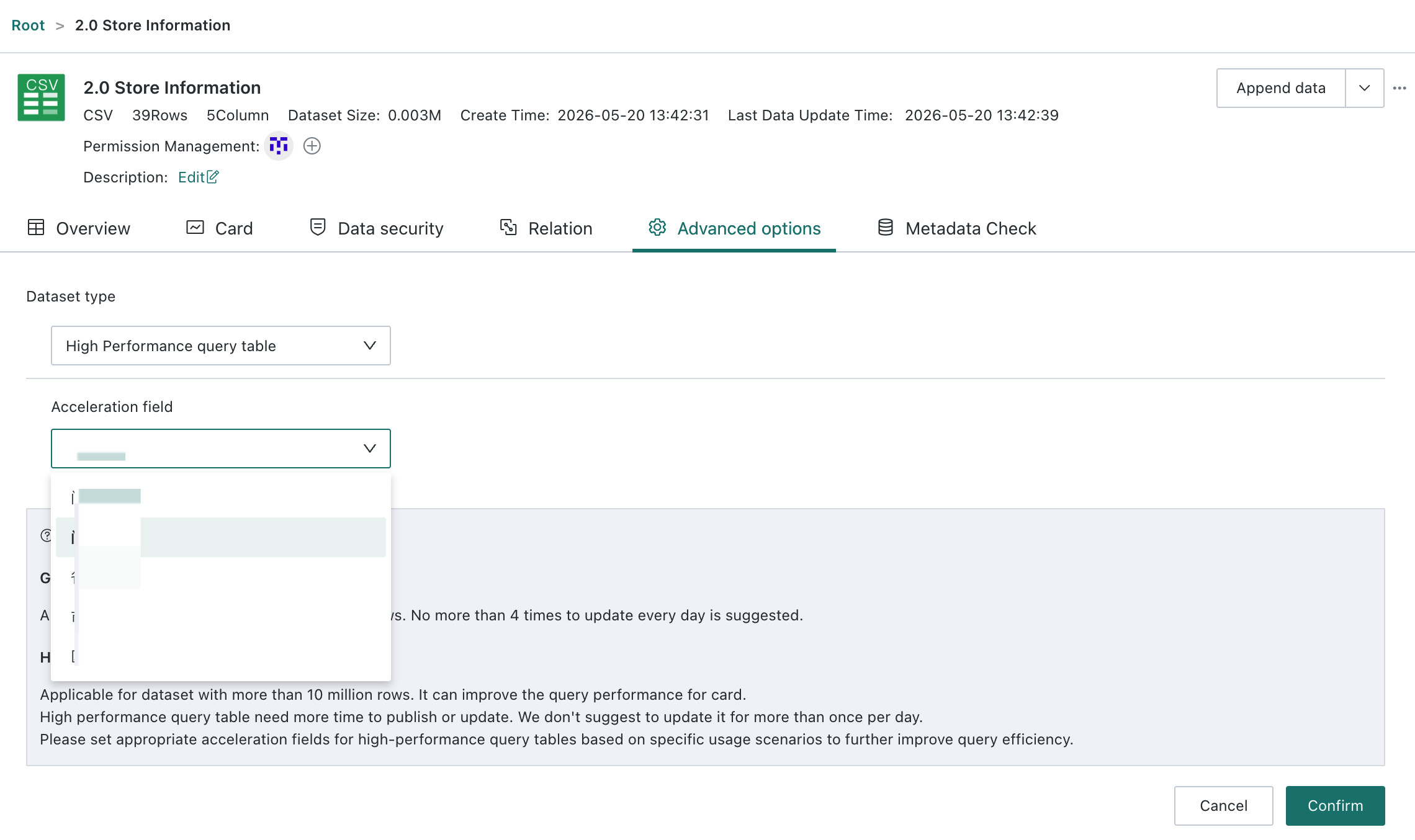
-
After configuring the acceleration fields, click
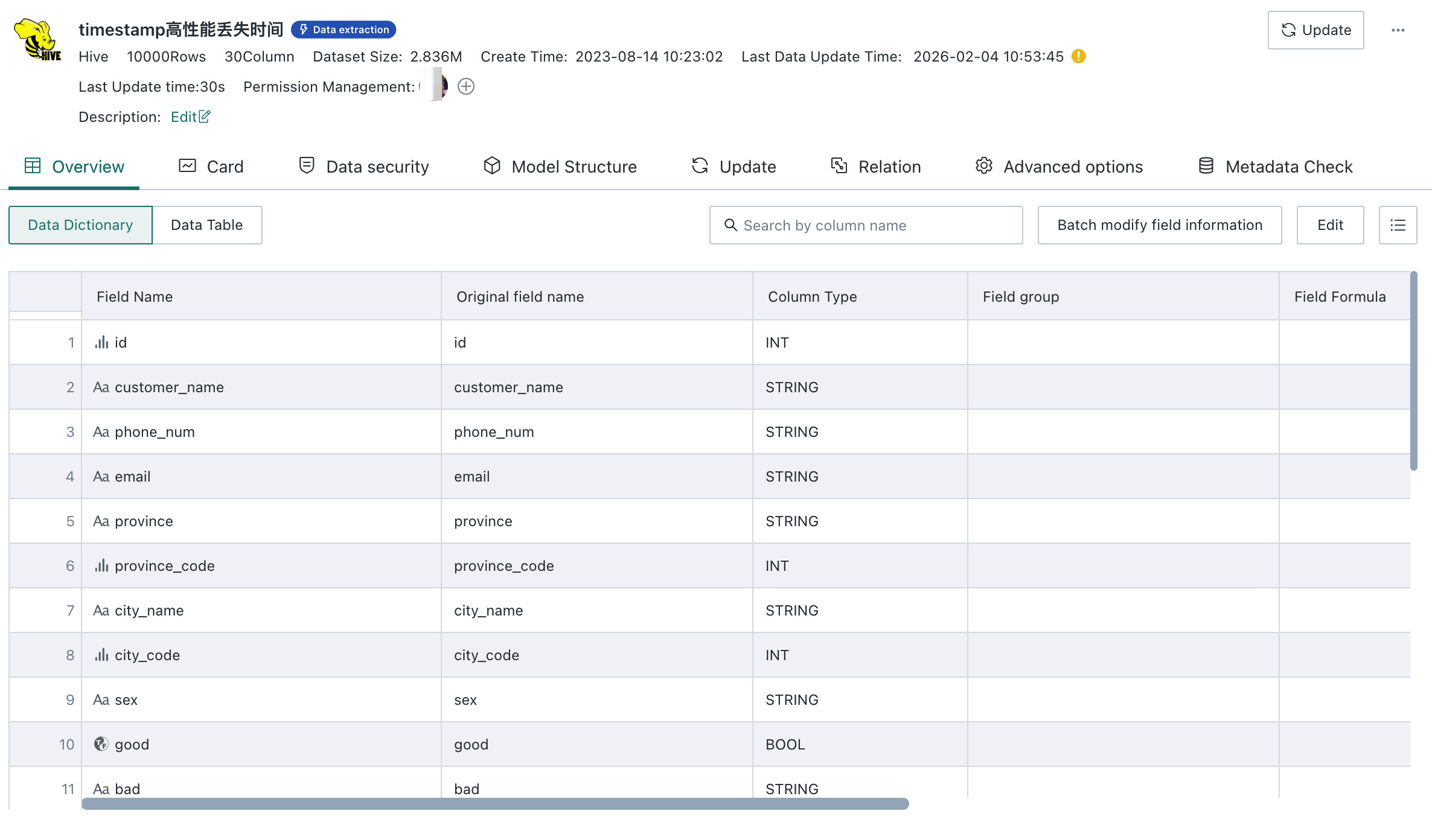
Confirmto start the mode switch. When the dataset is large, importing the data into ClickHouse may take some time. According to internal Guandata testing, importing a dataset with 10 million rows and 20 columns into ClickHouse takes about 2 minutes. Dataset updates also trigger re-import into ClickHouse, so it is recommended that High-Performance Query Tables be updated no more than once per day.The following example is a Hive database dataset with query acceleration enabled. On the surface it looks similar to a standard Hive dataset, but when it is used to build Cards, ClickHouse becomes the query engine and provides much faster performance.
Build Visual Analysis with High-Performance Query Tables
When creating Cards based on High-Performance Query Tables, users need to follow ClickHouse SQL syntax. ClickHouse currently supports window functions.
If Row- and Column-Level Permissions need to be applied on top of a High-Performance Query Table, the permission expression also needs to be written in ClickHouse SQL syntax. For example, if the store field in the current user's attributes contains a comma-separated list of store IDs under that user's management, the permission expression can be:
has(splitByChar(',',[CURRENT_USER.门店]),[店铺编号])
Notes
High-Performance Query Tableis generally suitable for single tables with more than 10 million rows and can significantly improve query performance on the Card side. For datasets smaller than 10 million rows, Spark-based computation usually already provides a good response experience, so using this mode is generally not recommended.- Try to avoid aggregation on overly fine-grained dimensions. If the query is clearly intended for detailed records, using the
Detail Tabledirectly usually provides better performance. - It is recommended to add filter conditions on the partition field during queries. This can greatly improve query efficiency. At the same time, partition fields should be designed around commonly used query filters.
- It is recommended to run the acceleration engine under the following environment conditions:
Software environment:
- On Windows, Chrome or Firefox is recommended.
- On iOS, Safari is recommended.
Hardware environment:
- CPU: Intel processor, 8 cores, 1.9 GHz or above, or equivalent
- Memory: 64 GB RAM or above
- Disk: 300 GB or above