Field Limits for Table Cards
Background
In version 5.6.0 and later, table cards have boundary controls on the number of fields that can be added. When the upper limit is reached, an error message appears. Adding boundary controls can:
- Improve stability and prevent dashboard loading timeouts caused by too many cards.
- Improve usability by exposing limits in advance and preventing performance or display issues.
Number of Fields That Can Be Dragged into the Drawing Area
Table Cards
| Chart Type | Dimension | Value | Comparison | Filter | Sort |
|---|---|---|---|---|---|
| Regular Table | 1. No subtotal or total configured: unlimited. 2. Subtotal or total configured: dimensions + comparison fields cannot exceed 31. If this limit is exceeded, subtotal and total display may be abnormal, including but not limited to subtotals or totals not displaying, or multiple subtotal/total rows appearing. An error message appears in the upper-right corner of the editing page:  3. Dynamic dimensions in regular tables have the same limit. | 124. When the 125th value field is dragged in, an error is reported, the value box no longer expands, adding is not allowed, and only replacement is allowed. | 1. No subtotal or total configured: unlimited. 2. Subtotal or total configured: dimensions + comparison fields cannot exceed 32. | 20 | 20 |
| Grouped Table | 64 | Unlimited | / | 20 | 20 |
| Detail Table | Unlimited detail fields | / | / | 20 | 20 |
| Carousel List | List aggregation primary key + fields in the field area cannot exceed 50. | / | / | 20 | 20 |
| Heat Map | 1 | 1 | 1 | 20 | 10 |
| Custom Report | When column total is enabled, dimension fields cannot exceed 31. If the limit is exceeded, subtotal and total are not displayed. |
Column Charts
| Chart Type | Dimension | Value | Color | Tooltip | Filter | Sort | Split |
|---|---|---|---|---|---|---|---|
| Column Chart | 4 | 2 | 1 | 20 | 20 | 20 | 1 |
| Bullet Chart | 4 | 2 | / | 20 | 20 | 20 | 1 |
| Others | Frontend limits are basically the same. |
Limit on the Number of Table Comparison Columns
Comparison Item Count Limit
- Default: 100.
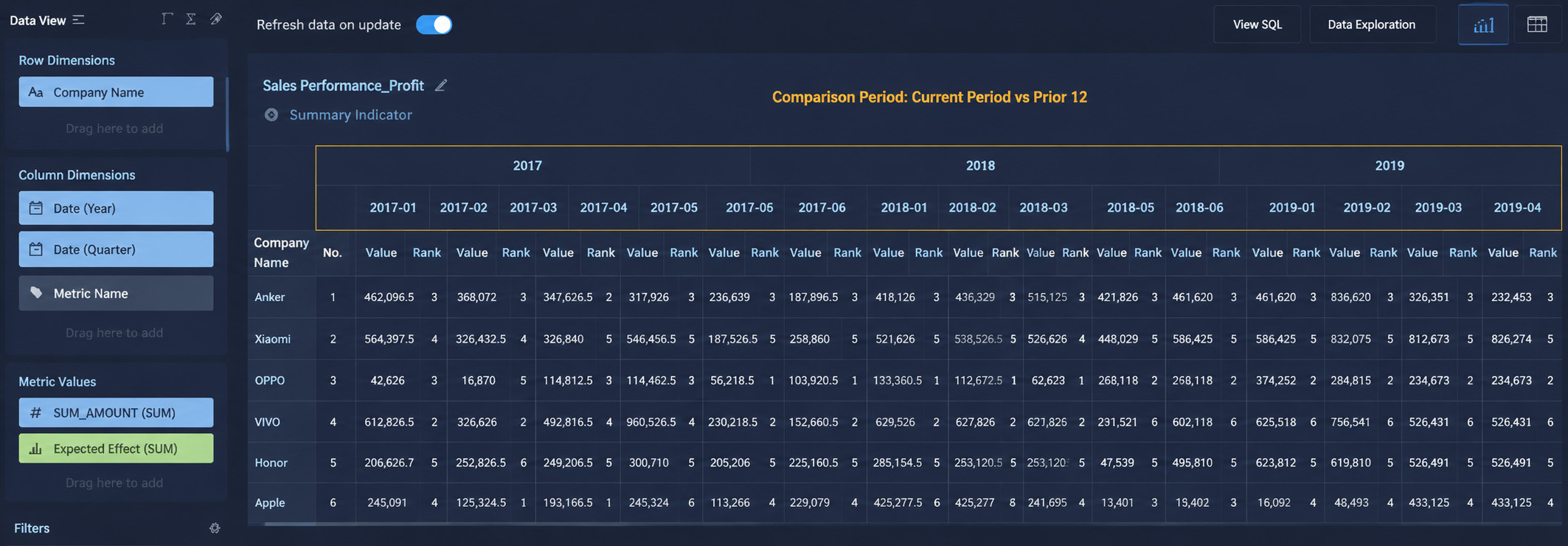
- For table cards, after columns are expanded horizontally based on comparison fields, the number of columns cannot exceed 100. If the limit is exceeded, the card reports an error.
- Relationship between comparison item count and column count:
- Column count = comparison item count * number of value fields.
- As shown below, when the comparison item count is 12 and the table has two value fields, the column count is 24.