Frontend Page Element Hiding
Guandata Dashboard pages are often embedded into customers' existing systems. Different embedding scenarios require different UI elements to be hidden, such as the Logo, navigation bar, and Card buttons. Guandata provides several default hiding modes, see details here, and also supports more fine-grained hiding mechanisms so you can combine specific elements into a custom hidden mode called Private Setting.
Overview of Open Capabilities
Guandata supports about 50 configurable options across the following major categories:
- Navigation Area
- Dashboard
- Dashboard Cards
- Card Detail Page
- Card Editing Page
- ETL Editing Page
- Large Screen Page
- Dashboard Page (Mobile)
List of modules and elements that support hiding:
| Location | Option Description | Unique Option Key | Notes |
|---|---|---|---|
| Global | Application Header | app_header | |
| Application Header - Right-side Action Area | app_toolbar | ||
| Left-side Page List | page_nav | ||
| Left-side Page List - Filter Publishing | page_operation_filter | ||
| Left-side Page List - Create Page: Custom List Page | page_operation_listview | ||
| Left-side Page List - Open Dashboard in New Tab | page_operation_open_in_new_tab | ||
| Dashboard Page | Page Header | page_header | |
| Page Header - Title Bar | page_header_titleBar | ||
| Page Header - Filter Bar (Including Buttons) | page_header_filterBar | ||
| Page Header - Filter Bar Expand/Collapse Button | page_header_filter | ||
| Page Header - Page Title | page_title | ||
| Page Header - Desktop/Mobile Layout Switch | page_operation_layout_switch | ||
| Page Header - Publish | page_operation_publish | ||
| Page Header - Quick Query | page_header_book | ||
| Page Header - Quick Query - Save | page_header_book_create | Added in version 6.6.0 | |
| Page Header - Quick Query - Actions | page_header_book_operator | ||
| Page Header - Edit | page_header_edit | Added in version 7.2.0 | |
| Page Header - Publish | page_header_publish | Added in version 7.2.0 | |
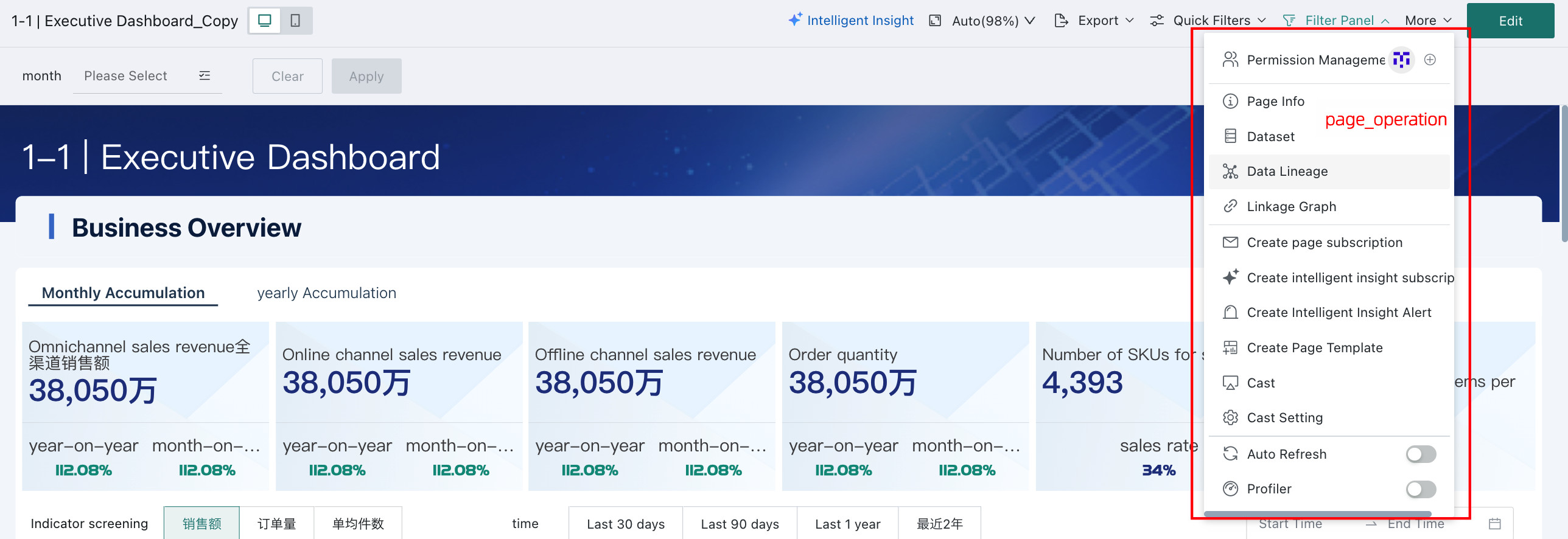
| Page Header - Right-side Actions - Permission Management | page_operation_auth | ||
| Page Header - Right-side Actions - Datasets | page_operation_datasets | ||
| Page Header - Right-side Actions - View Resource Lineage | page_operation_lineage | ||
| Page Header - Right-side Actions - Live Data (Auto Refresh) | page_operation_auto_update | ||
| Page Header - Right-side Actions - Page Subscription | page_operation_subscription | ||
| Page Header - Right-side Actions - Screen Casting / Casting Settings | page_operation_cast | ||
| Page Header - Right-side Actions - Batch Export PDF / Export as PDF / Export Image / Export View | page_operation_export | ||
| Page Header - Right-side Actions - Entry Button | page_operation_menu | Added in version 7.1.0 | |
| Dashboard Cards | Page - Card Header - Linked Interaction / Drill / Jump | card_header_link_drill_goto | |
| Page - Card Header - Applied Linked Conditions | card_header_filter | ||
| Page - Card Header - Card Information | card_header_info | ||
| Page - Card Header - Edit (iframe Card) | card_header_editIframe | ||
| Page - Card Header - Edit (image Card) | card_header_editImage | ||
| Page - Card Header - Edit (text Card) | card_header_editText | ||
| Page - Card Header - Maximize | card_header_magnify | ||
| Page - Card Header - Resize Column Width | card_header_resize | ||
| Page - Card Header - Show Data | card_header_toGrid | ||
| Page - Card Header - Show Chart | card_header_toGraph | ||
| Page - Card Header - Format Painter | card_header_formatPainter | ||
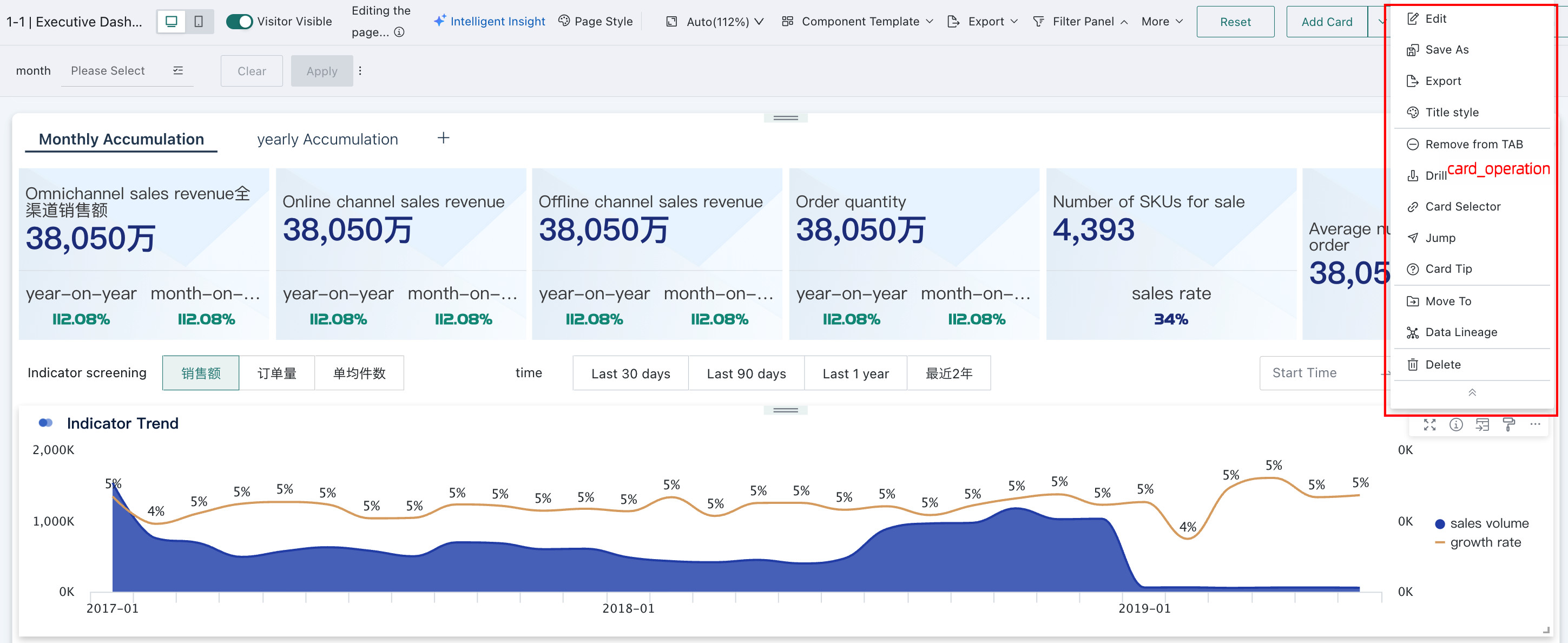
| Page - Card Header Actions - Go to Details | card_operation_detail | ||
| Page - Card Header Actions - Jump | card_operation_jump | ||
| Page - Card Header Actions - Export | card_operation_exportFile | ||
| Page - Card Header Actions - Alert | card_operation_alert | ||
| Page - Card Header Actions - Create Subscription | card_operation_subscription | ||
| Page - Card Header Actions - Manage Subscriptions | card_operation_manageSubscription | ||
| Page - Card Header Actions - View Query Statement | card_operation_script | ||
| Page - Card Header Actions - Save As | card_operation_save_as | ||
| Page - Card Header Actions - Move | card_operation_move | ||
| Page - Card Header Actions - Linked Interaction | card_operation_cardLink | ||
| Page - Card Header Actions - Feishu Integration Link | card_operation_feishuLinkShare | Added in version 7.1.0 | |
| Page - Card Header Actions - Generate Card Dataset | card_operation_generate_card_ds | Added in version 6.6.0 | |
| Page - Card Header Actions - View Resource Lineage | card_operation_view_lineage | Added in version 6.6.0 | |
| Page - Card Header Actions - Jump - Jump to Page | card_operation_jump_to_page | Added in version 6.6.0 | |
| Page - Spreadsheet-style Data Entry Card - Footer | card_report_form_footer | Added in version 6.6.0 | |
| Page - Table Card - Feedback Column | card_table_feedback | Added in version 6.6.0 | |
| Card Detail Page | Card Detail - Header | card_view_header | |
| Card Detail - Footer | card_view_footer | ||
| Card Detail - Actions - Manage Subscriptions | card_view_manageSubscription | ||
| Card Detail - Actions - Create Subscription | card_view_subscription | ||
| Card Detail - Actions - Save As | card_view_save_as | ||
| Card Detail - Actions - Alert | card_view_alert | ||
| Card Detail - Actions - Feishu Integration Link | card_view_feishuLinkShare | Added in version 7.1.0 | |
| Card Detail - Actions - Export | card_view_exportFile | Added in version 7.1.0 | |
| Card Detail - Actions - View Query Statement | card_view_script | Added in version 7.1.0 | |
| Card Detail - Actions - Generate Card Dataset | card_view_card_ds | Added in version 6.6.0 | |
| Card Detail - Actions - View Resource Lineage | card_view_view_lineage | Added in version 6.6.0 | |
| Card Editing | Card Editing - Jump to Dataset Preview | card_edit_ds_preview_go_detail | |
| Card Editing - Permission Management | card_edit_ds_preview_auth | ||
| Card Editing - Breadcrumb | card_edit_breadcrumb | ||
| Card Editing - Feedback Entry for Table Cards | card_edit_feedback | ||
| ETL Editing | ETL Editing - Header - Hide Current Directory and Click Events | etl_edit_hidden_catalogs | |
| ETL Editing - Header - Update Settings | etl_edit_update_settings | ||
| ETL Editing - Header - Save and Exit | etl_edit_save_and_exit | ||
| ETL Editing - Header - Save, Run, and Exit | etl_edit_save_and_run_then_exit | ||
| ETL Editing - Header - Save As | etl_edit_save_as | ||
| ETL Editing - Header - Cancel | etl_edit_cancel | ||
| Large Screen | Page Header - Title | screen_title | |
| Page Header - Actions - More (Three-dot Icon) | screen_operation | ||
| Page Header - Actions - Permission Management | screen_operation_auth | ||
| Page Header - Actions - Live Data (Auto Refresh) | screen_operation_auto_update | ||
| Page Header - Actions - Datasets | screen_operation_datasets | ||
| Page Header - Actions - View Resource Lineage | screen_operation_lineage | ||
| Editing Page - Hidden Cards - Copy Card from Dashboard | screen_edit_cardPool_copyFromDashboard | ||
| Editing Page - Card - Actions - Edit | screen_edit_operation_edit | ||
| Editing Page - Card - Actions - Linked Interaction | screen_edit_operation_cardLink | ||
| Editing Page - Card - Actions - Drill | screen_edit_operation_drill | ||
| Editing Page - Card - Actions - Jump | screen_edit_operation_jump | ||
| Editing Page - Card - Actions - Move | screen_edit_operation_move | ||
| Editing Page - Card - Actions - Save As (Including Save As for Hidden Cards) | screen_edit_operation_saveAs | ||
| Editing Page - Card - Actions - Remove | screen_edit_operation_remove | ||
| Page (Mobile) Note: if only the “Lock” option remains after hiding, “Lock” will also disappear. |
Mobile Page - Card Header (Hide All) | mobile_card_header | |
| Mobile Page - Card Header - Lock | mobile_card_header_lock | ||
| Mobile Page - Card Header - Card Hint | mobile_card_header_hint | ||
| Mobile Page - Card Header - Applied Linked Conditions | mobile_card_header_filter | ||
| Mobile Page - Card Header - Maximize | mobile_card_header_magnify | ||
| Mobile Page - Card Header - Linked Interaction / Drill / Jump | mobile_card_header_link_drill_goto | ||
| Mobile Page - App Navigation | mobile_page_nav | Added in version 6.6.0 | |
| Mobile Page - Page Favorite Button | mobile_page_fav_footer | Added in version 6.6.0 |
For the full frontend menu and option name reference, including diagrams and version notes, see Frontend Page Element Name Reference PDF. Some examples are shown below:
-
Global:
app_header,page_nav, andpage_header, as shown below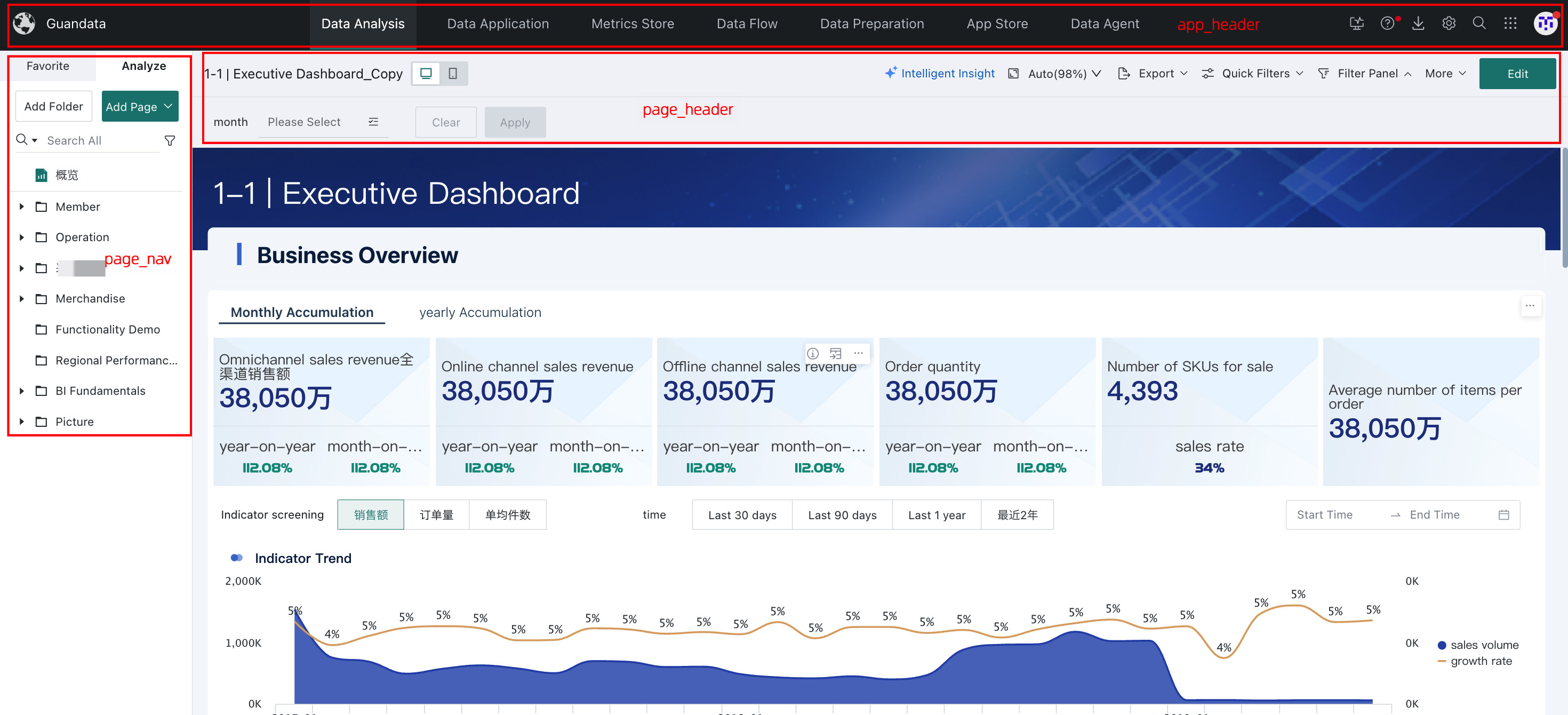
-
Dashboard page:
page_header_titleBar,page_header_filterBar,page_header, andpage_operation, as shown below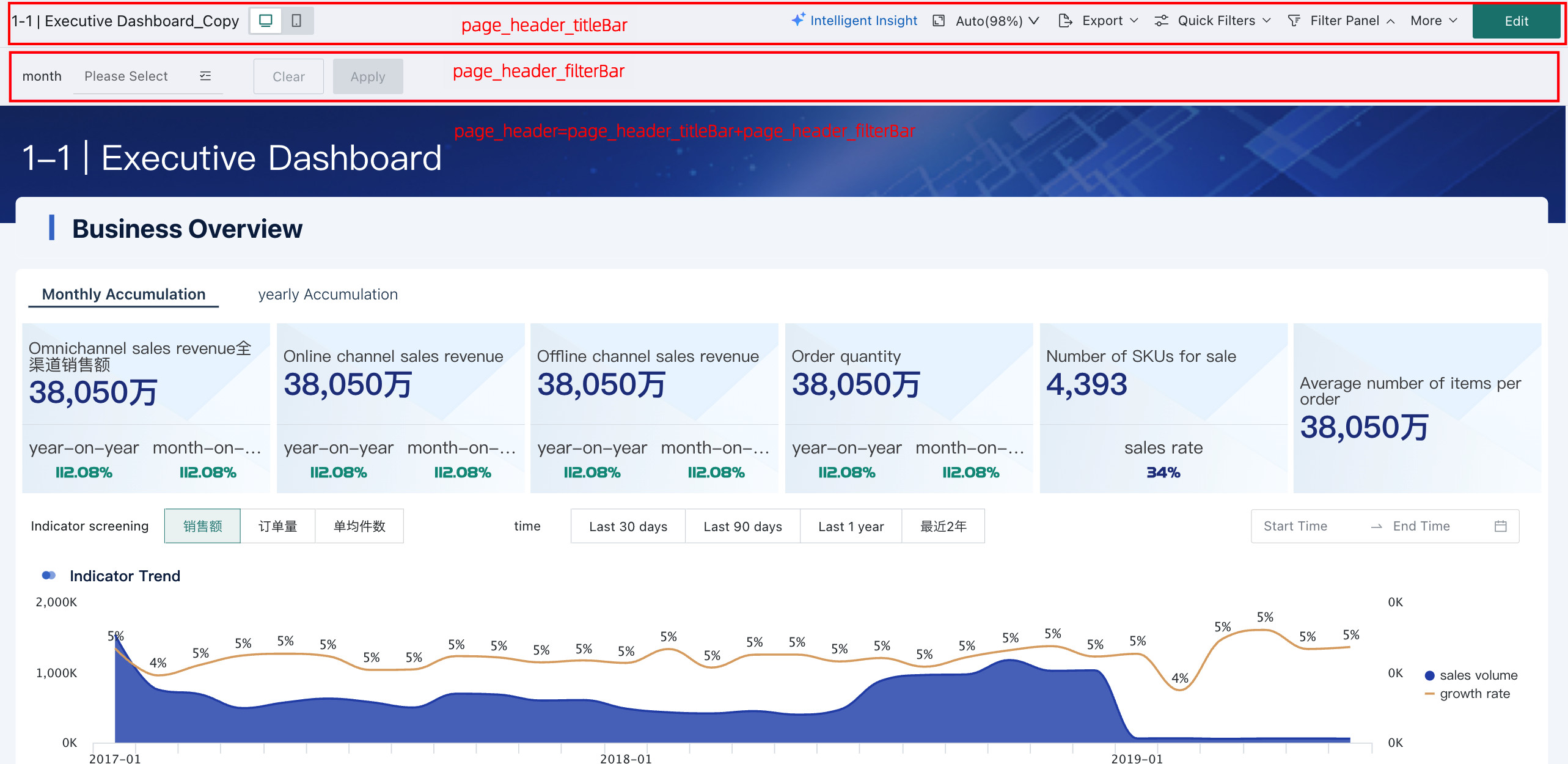
-
Dashboard Cards:
card_operation, as shown below