Floating-point Accuracy Issues
Background
Users sometimes encounter results from floating-point calculations or filter previews that differ from expectations. Most of these cases are related to floating-point precision. Binary storage causes inherent precision issues for floating-point numbers, and after multiple calculations the precision issue becomes more obvious. The following sections describe how to handle floating-point precision.
Test
Data Extraction
Create the following data in a CSV file:
col6,col7,col12,col6_2,col7_2,col12_2
0.999999,0.9999999,0.999999999999,0.999999,0.9999999,0.999999999999
1.000001,1.0000001,1.000000000001,1.000001,1.0000001,1.000000000001
Upload the CSV to Guandata BI, set the first three columns to DOUBLE, and set the last three columns to STRING. Previewing the data in BI shows the following actual display result:

If the floating-point number in the dataset is 0.999999 (col6), the frontend preview also shows 0.999999. However, if the floating-point number is 0.9999999 (col7, seven decimal places), the preview result is 1.
Cause: In Guandata BI, floating-point numbers have display precision. The default floating-point precision is six decimal places, and the seventh decimal place is treated as the error digit. The data stored by Spark at the underlying layer has higher precision, as shown by the STRING type. Calculations and filtering are performed based on the underlying stored data.
Data Calculation
Based on the dataset above, create an ETL that keeps only the required fields col7 and col7\_2. Subtract 0.5 from col7, multiply by 0.1, and then use round to approximate the value. The round function rounds based on the next truncated digit and keeps the specified number of decimal places.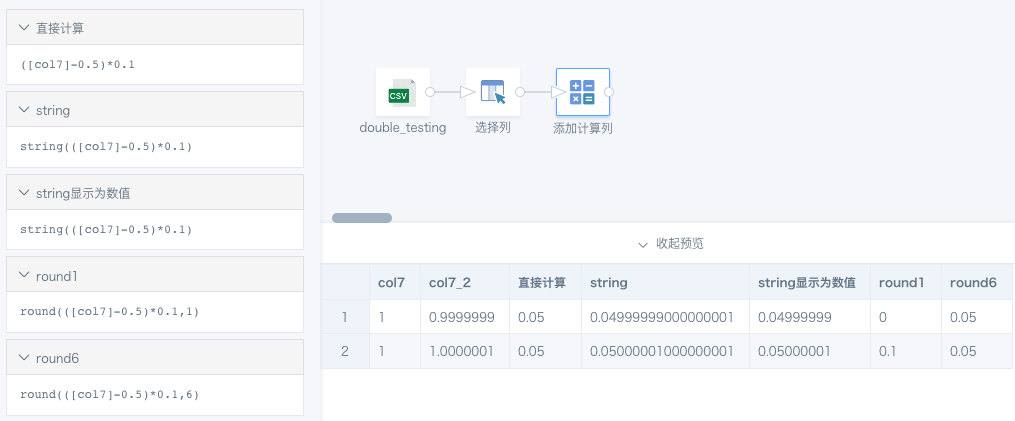
Data Filtering
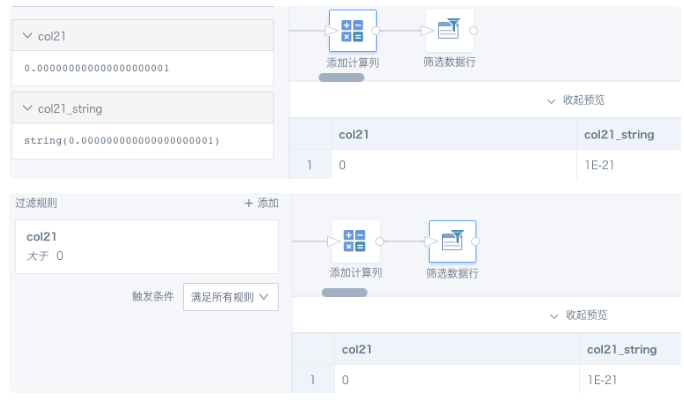
Create a dataset containing the value 0.000000000000000000001 (21 decimal places), or create a numeric field in BI. The preview displays it as 0. If the value is converted to STRING, it is displayed in scientific notation. In the example below, filtering by col21 > 0 can still return this row.
Solution
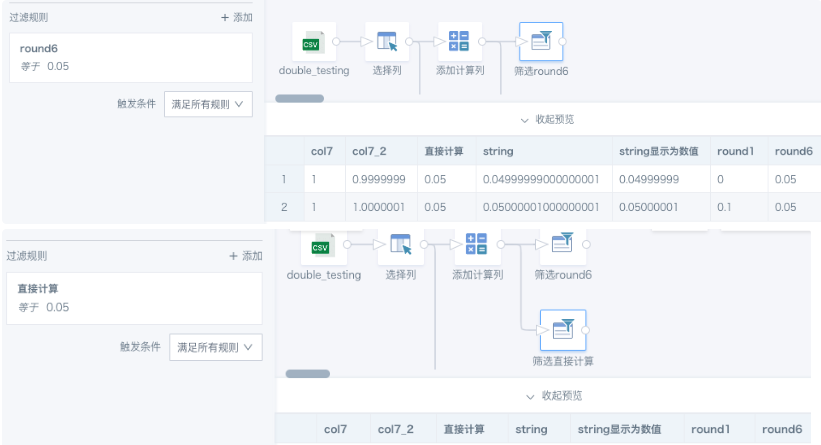
First use round(x) to get the desired precision, and then filter. For precision, round(6) is generally suitable because it matches the default BI display precision. If you know the original precision of your data, you can use that precision instead. You can also convert the field to a higher-precision decimal type, for example cast([Value] as decimal(15,6)), where 15 represents up to 15 digits and 6 represents decimal places.In the first case above, if round is not used to approximate the value, filtering for the 0.05 calculated from col7 returns no result. The comparison of the two filtering results is shown below.
FAQ
Why does an integer converted to text by a function include a decimal point?
Cause: When creating a calculated field in BI, selecting the numeric type or performing mathematical calculations on field values makes the output type DOUBLE by default. The system rounds data to six decimal places and automatically removes trailing zeros. For example, if the rounded value is 1.0, it displays as 1; if the value is 0.100000, it displays as 0.1.
Solution: If the value must remain an integer, use a function to convert it to an integer, such as int() or cast( as int).
Why is the rounding result incorrect?
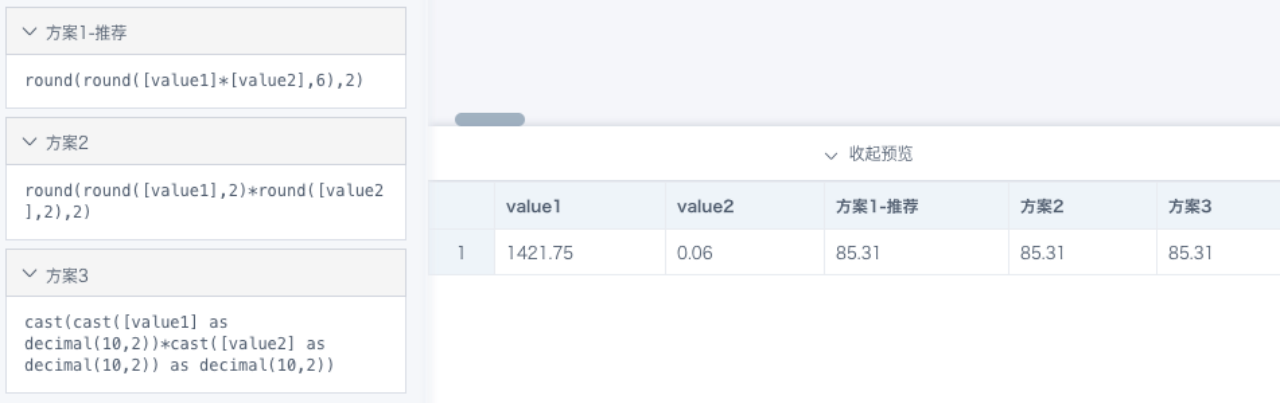
Example: 1421.75 * 0.06 = 85.305. Rounded to two decimal places, the result should be 85.31, but after round(2), the result is 85.3.
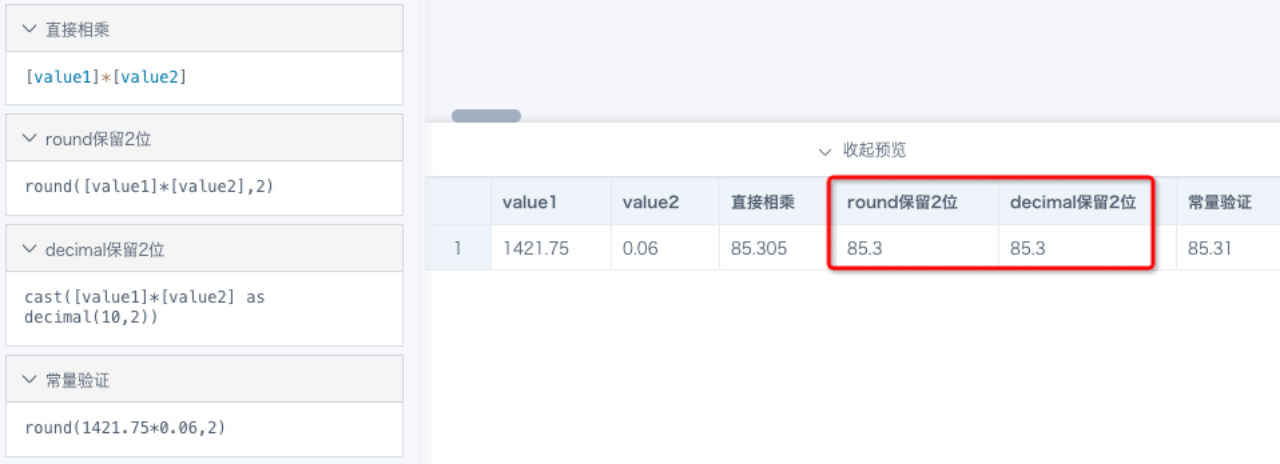
Cause: The values 1421.75 and 0.06 shown in BI are already rounded results and do not represent the original precise data. 85.305 is the result of rounding the calculation result to six decimal places, equivalent to round(6). It has different precision from round(2), so equality is not guaranteed.
Solution: A result of 85.3 after round(2) is also reasonable. If you need to continue rounding based on 85.305, use round(round([Value 1] * [Value 2], 6), 2). There may be multiple implementation methods, so apply them flexibly based on the actual situation, as shown below.
Why does the count result change and become inaccurate after filtering values > 0?
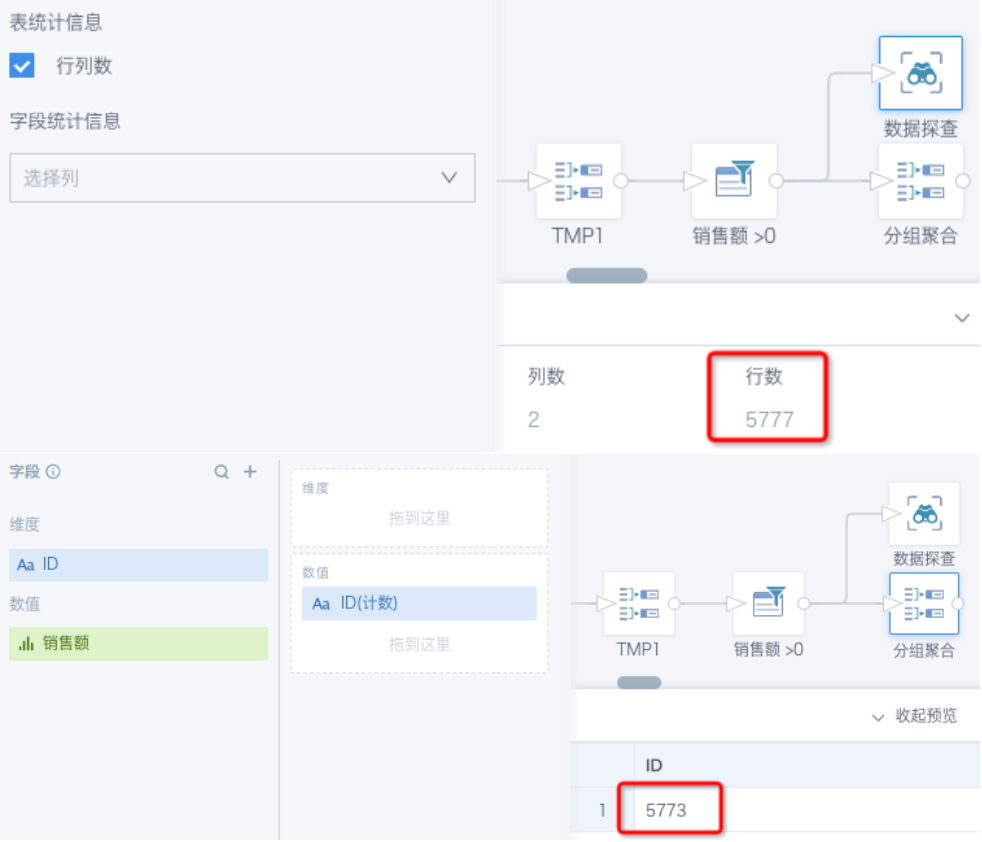
Cause: For each new query, previous data must be recalculated and filtered. Data precision may change in ways that are invisible to the naked eye each time, which can cause filtering errors.
Solution: Specify numeric precision before comparison. For example, filter by [Sales] > 0.000001, round([Sales], 6) > 0, or round([Sales], 6) > 0.000001.