Calculate YOY, Period-over-Period, and Column Share in Complex Reports
1. Requirement Background
During data analysis, you may need to view data for a custom time period in the same table (called "current period data" below), same-period data (data from the same time range last year), period-over-period data, and year-over-year data share by dimension or by column.
In card editing, the advanced calculation feature can directly calculate YOY and period-over-period values. However, because advanced calculation can be used only once, it cannot calculate the column share of YOY and period-over-period data.
2. Final Effect
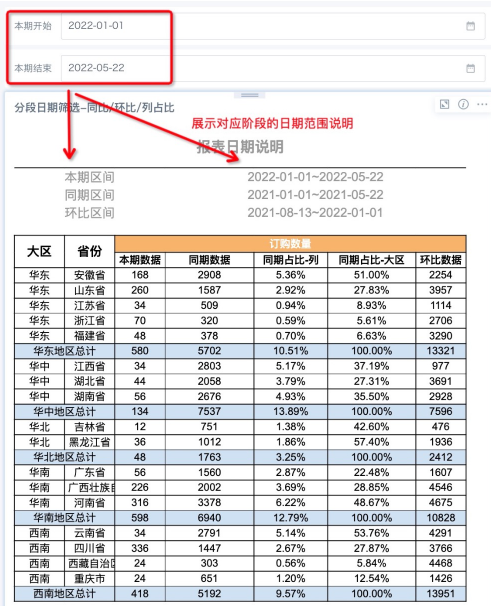
3. Solutions
Solution 1: Prepare the Data in ETL in Advance
-
Calculate the YOY data, period-over-period data, and total data for each dimension for each date. The totals are used to calculate share data for different dimensions.
-
When editing the card, drag the corresponding fields directly.
Note: Calculating YOY and period-over-period data for each date dimension makes it easier to link the card with external date filters after the card is created, whether by day, year, or month.
Solution 2: Process Directly in a Complex Report
Prepare Data
Create two date global parameters: "Current Period Start" and "Current Period End".
Create at least four views: "Date Description", "Current Period", "Same Period", and "Period-over-Period".
1. "Current Period" view:
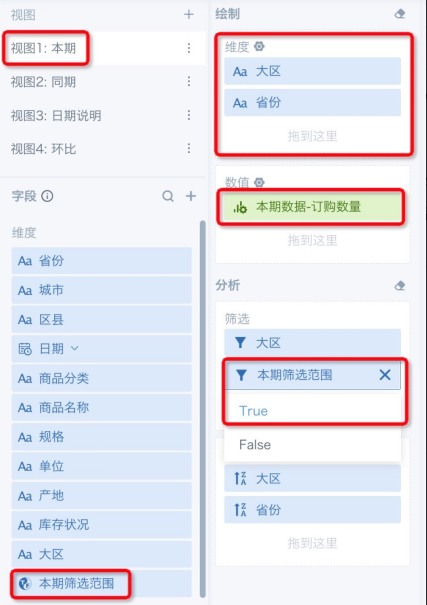
a. Create field "Current Period Filter Range": [Date] >= [DYNAMIC_PARAMS.Current Period Start] and [Date] <= [DYNAMIC_PARAMS.Current Period End]
b. Calculate "Current Period Data - Order Quantity": sum([Order Quantity]) over(partition by [Region],[Province],[Current Period Filter Range])
2. "Date Description" view: create four fields:

a. "Current Period Range": concat([DYNAMIC_PARAMS.Current Period Start],'~',[DYNAMIC_PARAMS.Current Period End])
b. "Same Period Range": concat(add_months([DYNAMIC_PARAMS.Current Period Start],-12),'~',add_months([DYNAMIC_PARAMS.Current Period End],-12))
c. "Period-over-Period Interval Days": datediff([DYNAMIC_PARAMS.Current Period Start],[DYNAMIC_PARAMS.Current Period End])
d. "Period-over-Period Range": concat(date_add([DYNAMIC_PARAMS.Current Period Start],[Period-over-Period Interval Days]),'~',date_add([DYNAMIC_PARAMS.Current Period End],[Period-over-Period Interval Days]))
3. "Same Period" view:
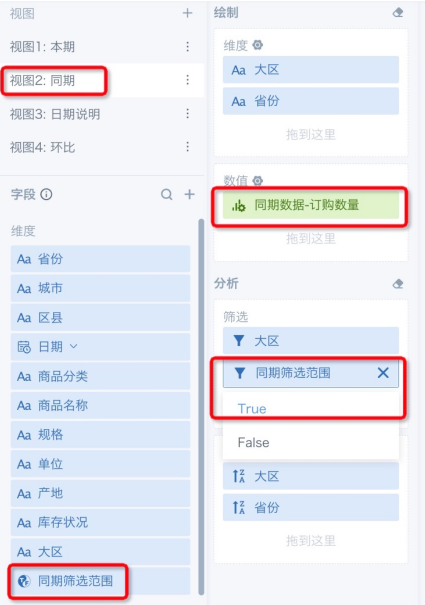
a. Create field "Same Period Filter Range": [Date] >= add_months([DYNAMIC_PARAMS.Current Period Start],-12) and [Date] <= add_months([DYNAMIC_PARAMS.Current Period End],-12)
b. Calculate "Same Period Data - Order Quantity": sum([Order Quantity]) over(partition by [Region],[Province],[Same Period Filter Range])
4. "Period-over-Period" view:
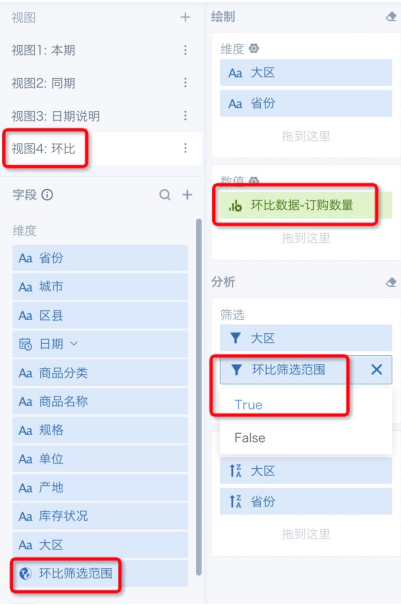
a. Create field "Period-over-Period Interval": datediff([DYNAMIC_PARAMS.Current Period Start],[DYNAMIC_PARAMS.Current Period End])
b. Create field "Period-over-Period Filter Range": [Date] >= date_add([DYNAMIC_PARAMS.Current Period Start],[Period-over-Period Interval]) and [Date] <= date_add([DYNAMIC_PARAMS.Current Period End],[Period-over-Period Interval])
c. Calculate "Period-over-Period Data - Order Quantity": sum([Order Quantity]) over(partition by [Region],[Province],[Period-over-Period Filter Range])
Edit Template
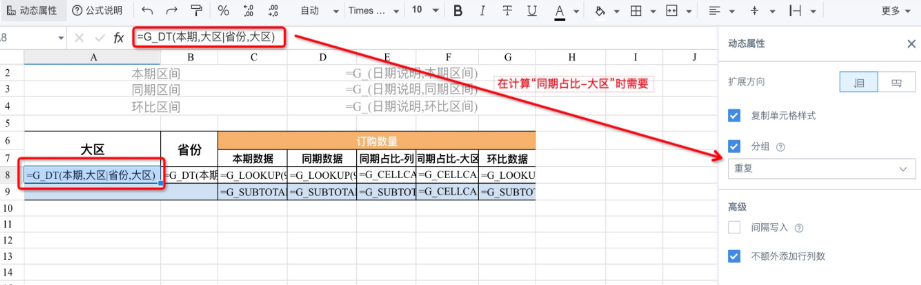
- The formula template is edited as follows:
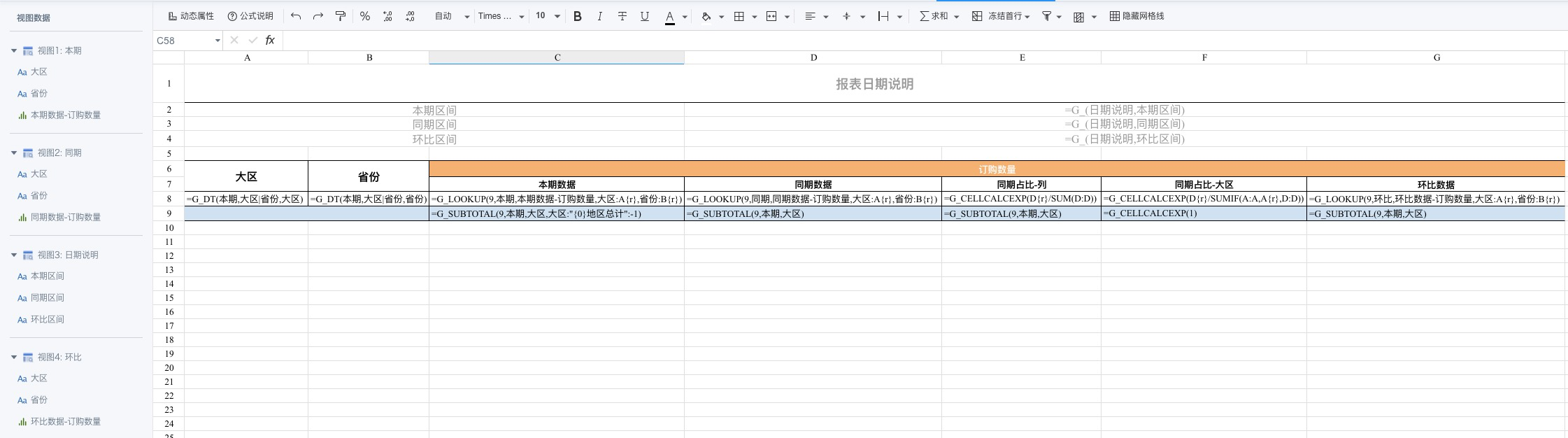
- The dynamic property configuration of fields that require attention is as follows: