Solutions for Third-party Cookie Security Policies
What Is Cross-domain?
If any of the protocol, domain name, or port of a request URL differs from the current page URL, it is cross-domain.
| Current page URL | Requested page URL | Cross-domain? | Reason |
| http://www.test.com/ | http://www.test.com/index.html | No | Same origin: protocol, domain name, and port are the same |
| http://www.test.com/ | https://www.test.com/index.html | Yes | Different protocols: http/https |
| http://www.test.com/ | http://www.baidu.com/ | Yes | Different primary domains: test/baidu |
| http://www.test.com/ | http://blog.test.com/ | Yes | Different subdomains: www/blog |
| http://www.test.com:8080/ | http://www.test.com:7001/ | Yes | Different ports: 8080/7001 |
Why Do Cross-domain Issues Occur?
They occur because of browser same-origin policy restrictions.
Same-origin policy is a convention and one of the most core and basic browser security features. Without same-origin policy, normal browser functions may be affected. The web is built on same-origin policy, and browsers are an implementation of that policy. Same-origin policy prevents JavaScript scripts from one domain from interacting with content from another domain. Same origin means that two pages have the same protocol, host, and port. This restriction prevents reading Cookies, LocalStorage, and IndexedDB from non-same-origin pages, accessing the DOM of non-same-origin pages, and sending AJAX requests to non-same-origin addresses.
What Is a Third-party Cookie?
If the domain of a Cookie stored by the browser and the URL in the address bar are same-origin, the Cookie is considered a first-party Cookie. Otherwise, it is a third-party Cookie, meaning a cross-domain Cookie from a non-same-origin page. Using the Tmall homepage as an example, among the Cookies set in the browser, Cookies whose domain value is *.tmall.com are first-party Cookies, shown in green, while all others are third-party Cookies, shown in red.
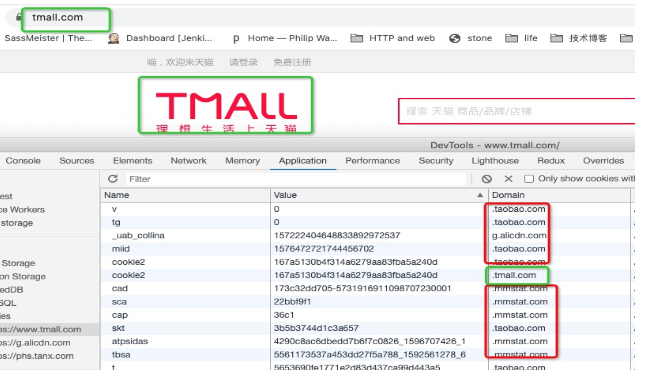
Third-party Cookies are commonly used for user behavior tracking and single sign-on.
When Website A accesses content or resources from Website B in some form, such as img or iframe, third-party Cookies are often involved.
Third-party Cookies can enable convenient features, such as multi-domain login, like Tmall vs. Taobao. However, abuse of third-party Cookies can also cause security issues or risks, such as CSRF and personal information leakage.
Where Are Third-party Cookies Used in Guandata Application Scenarios?
There are mainly two scenarios:
- The Guandata system is embedded into the customer's host system in the form of SSO + iframe. In this case, Guandata is the content provider, and Guandata Cookies are third-party Cookies relative to the host system.
- iframe content in Guandata's own system, such as iframe external link cards and Runqian form entry. In this case, the website pointed to by Runqian or the iframe external link card URL is the content provider, and the Cookies they provide are third-party Cookies relative to Guandata.
Impact of Chrome Security Policy Upgrades
Early Chrome versions did not apply any security controls to third-party Cookies. Starting from version 56, Chrome introduced a Cookie attribute named samesite to restrict third-party Cookie behavior, with three options:
- Strict: Only same-site requests are allowed.
- Lax: Same-site requests, or cross-site GET navigation behaviors that cause the page URL to change, including links and GET form submissions. For example, if a page on http://www.def.com embeds a link to http://www.abc.com, when the user clicks this link, the initial request carries Cookies from http://www.abc.com that are set to Lax. Cookies set to Strict are not carried. Such cross-site links also include links embedded in emails.
- None: No restriction. Cookies are carried in both same-site and cross-site requests, the same as the traditional behavior.
Starting from version 76, Chrome began upgrading the default value of samesite from none to Lax. Its behavior can be summarized as follows:
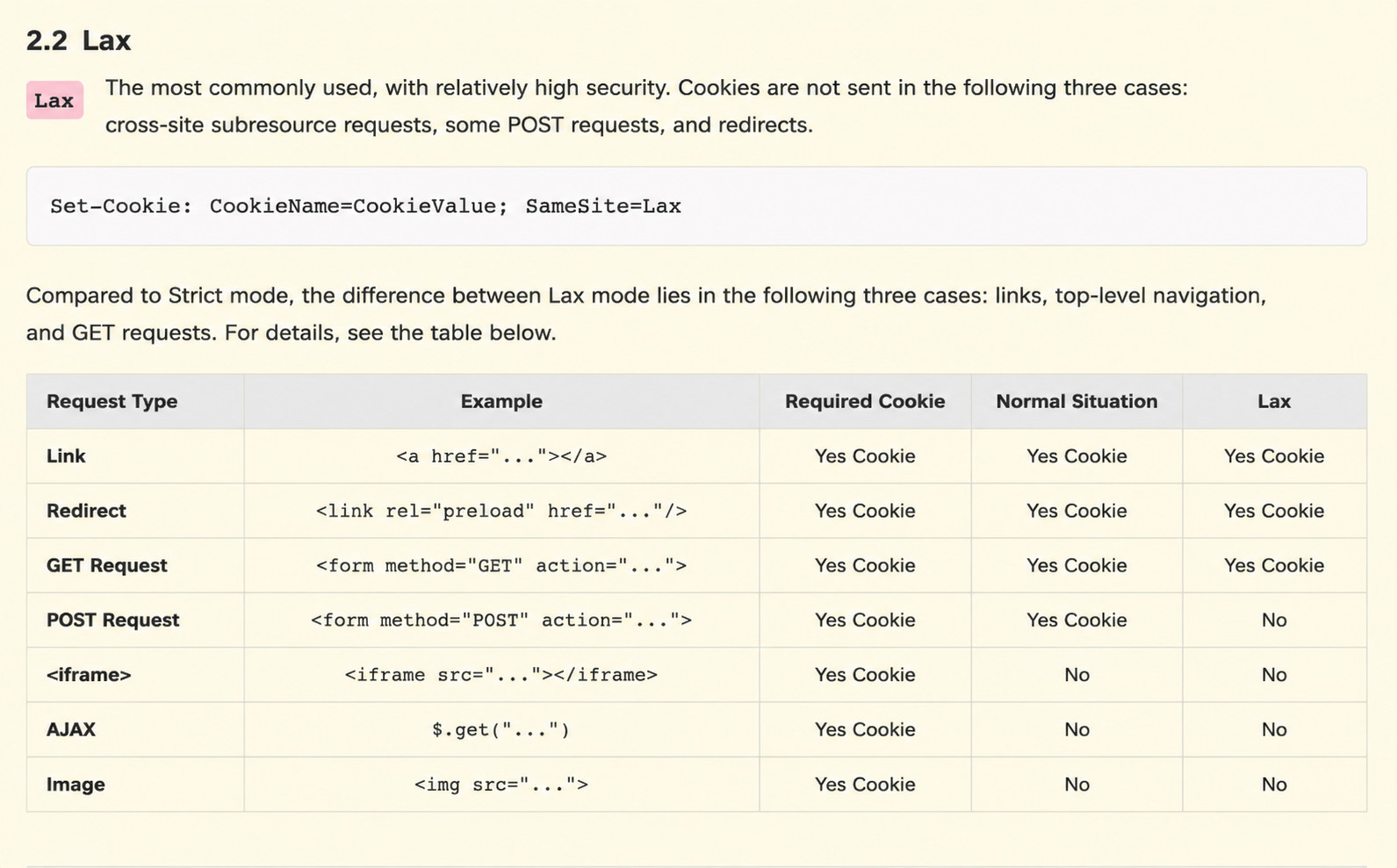
Therefore, for scenarios 2-a and 2-b, if the content provider does not configure a looser samesite security level, namely none, the Cookie is filtered by Chrome. For 2-a, our uIdToken is stored in a Cookie. If the frontend cannot obtain uIdToken, it considers the user not logged in and redirects to the login page.
Other browsers
- Safari has already completely blocked third-party Cookies, pending confirmation.
- Firefox and Edge will also gradually follow Chrome's behavior.
For Chrome, the possibility of completely blocking third-party Cookies in the future cannot be ruled out.
Solutions
Based on the issues above, we can provide the following solutions to users:
Solution A:
Deploy Guandata and the user's business system under the same domain name. This is the most recommended method.
Solution B:
Enable the switch in configuration.json. We will also use the header to solve token transmission. Note that this method reduces token security.
"CROSS_SITE_HEADER_TOKEN_ENABLED": true,