Routine Inspection Guide
Meaning of System Inspection
- A monitoring and alerting system triggers alerts only when the monitored target reaches a configured threshold. It has limited awareness of resource usage trends. In addition, alert effectiveness and the timeliness of alert handling greatly affect stable system operation.
- Regular inspection is an effective supplement to real-time monitoring. It uses manual or automated methods to collect system operation trend data, then performs judgment and risk control. This can effectively improve system reliability and reduce operational risk.
- Finding problems reflects awareness, solving problems reflects capability, and preventing problems reflects maturity. Early discovery and intervention control and eliminate risks at an early stage, minimizing losses caused by system unavailability.
Basic Inspection Steps
- Click the app launcher in the upper-right corner, select Admin Settings, then select Operations Management and Resource Monitoring.
- In the upper-right corner of Resource Monitoring, select data from the last 7 days.

- Healthy memory resource range: average usage below 80%, peak usage below 90%.
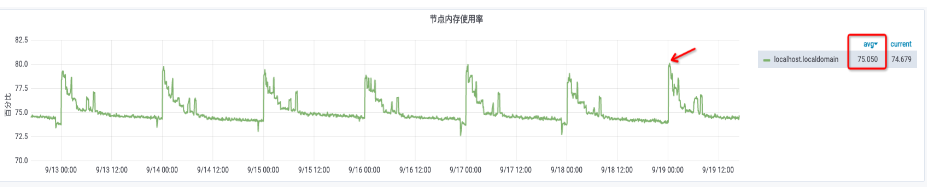
- Healthy CPU resource range: average usage below 60%, peak usage below 85%.

- Healthy storage resource range: peak usage below 85%.

Deep Inspection Feature
Cloud Inspection Atlas Patrol is a value-added feature module built into Guandata BI. This module focuses on BI cluster resources and system operation status, automatically generates visual diagnostic reports, effectively improves operations inspection efficiency, helps enterprises proactively understand current system load, discovers and resolves operations issues in advance, supports capacity planning, and ensures continuous, stable, and efficient system operation.