Complex Report Alternating Data Insertion Case Sharing
Scenario
In the scenario described in Implement Horizontal Expansion for Multi-Level Headers in Complex Reports, writing only one formula column achieves horizontal expansion for multiple fields. However, these metric fields can only use a unified calculation method and value format. If any of the following situations occur, you must set up a separate formula column for each metric field and configure alternating data insertion.
- The contents of multiple metric fields to be expanded come from different views.
- Multiple metric fields to be expanded require different calculation methods (such as sum, average, maximum, or inter-cell calculation).
- Multiple metric fields need different formats (such as amount and percentage).
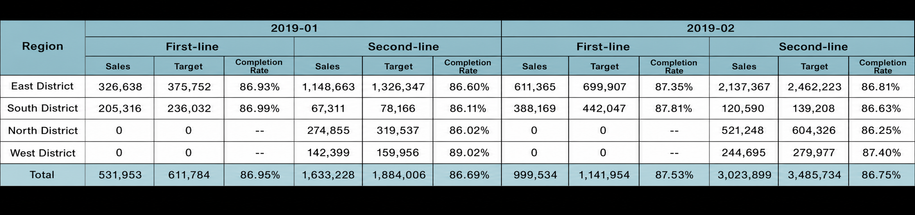
This article uses the same scenario as the previous case. It needs to horizontally expand retail revenue, target, and completion rate for each city tier in each month. The final effect is shown below.
Implementation Method
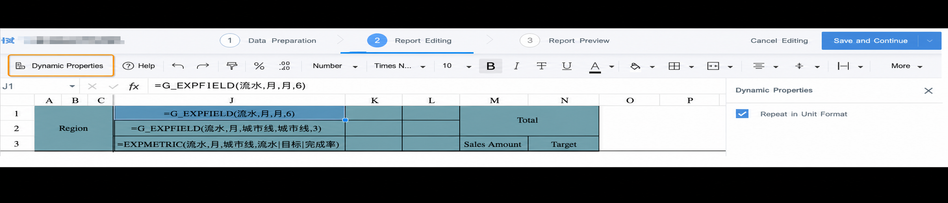
This is mainly implemented by using formulas in complex reports together with "Dynamic Properties" to alternately insert data during horizontal or vertical expansion.
Implementation Steps
Prepare Data
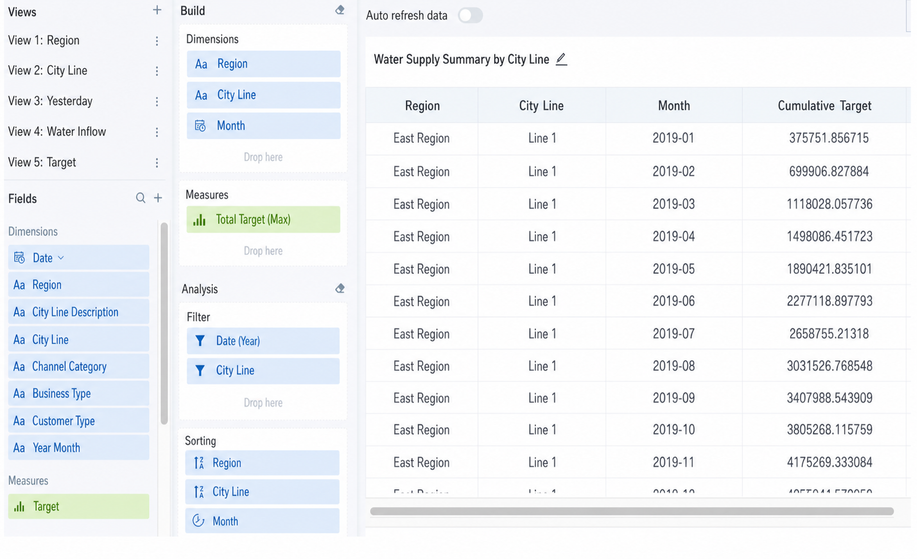
Create a complex report and a new view, then calculate the required data to be displayed. In this case, the horizontally expanded data "流水" comes from "累计流水" in the view "流水"; "目标" comes from "累计目标" in another view, "目标"; and "完成率" is calculated as cumulative revenue / cumulative target, so it cannot be calculated directly in the view. Here, the date range "2019" and the city tiers "一线" and "二线" are filtered.
Edit the Template
A. Header section. Enter the template editing interface. In this example, horizontal expansion starts from column J. For how to use the formulas in the header section, see Implement Horizontal Expansion for Multi-Level Headers in Complex Reports. Because there are three metric fields and two city tiers, the first-level header "月份" needs to merge 6 columns, the second-level header "城市线" needs to merge 3 columns, and the third level lists the text headers of the three fields to be displayed in the formula. All three formulas are placed in the same column. Dynamic properties do not need to be set. Add two columns after it and leave the header cells empty. (Note: the column widths in the figure below are not the final effect.)

B. Value Section
1) Revenue:
Formula:=G_LOOKUPEXP(9,流水,月|城市线,流水,累计流水,大区:A{r},月:J1,城市线:J2)**
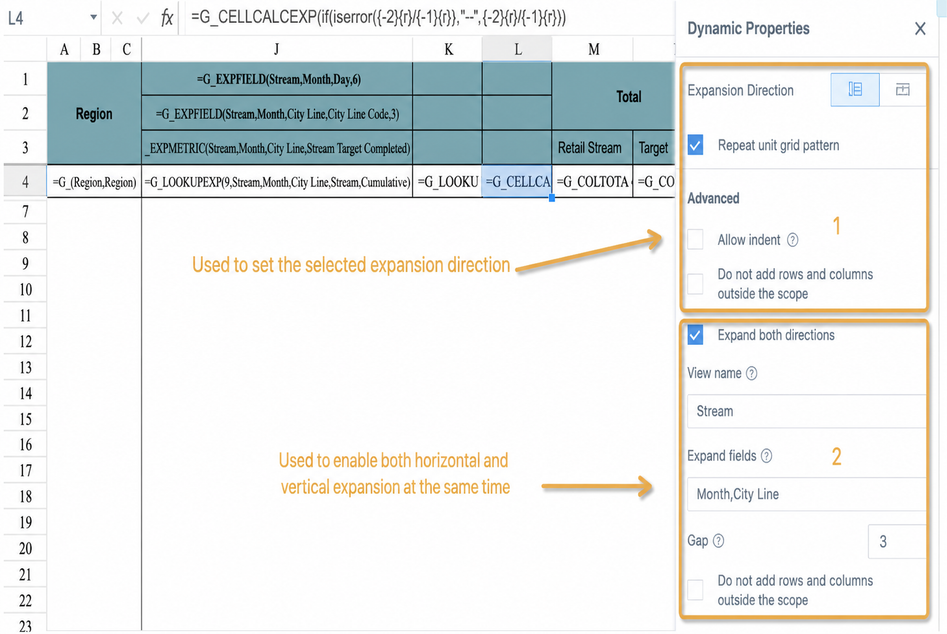
Dynamic Properties: Select Expand Metric Columns at Intervals. The "View Name" and "Interval Expansion Field" must be consistent with the derived-table view name and derived field in the formula. Set "Interval" to 3 (including the current column). Select Do Not Add Extra Rows or Columns. If this option is not selected, the following fields will start expanding only after this column finishes expanding, which inserts a large number of blank columns.
2) Target:
Formula:=G_LOOKUPEXP(9,流水,月|城市线,目标,累计目标,大区:A{r},月:J1,城市线:J2)**
Dynamic Properties:Same as "流水"
3) Completion Rate:
Formula:=G_CELLCALCEXP(if(iserror({-2}{r}/{-1}{r}),"--",{-2}{r}/{-1}{r}))******
Normally, a denominator of 0 or empty value causes a division error. Use the iserror function to detect the error, and use the if function to convert the error to "--". {-2}{r} means offsetting 2 columns to the left in the row of the cell where the current formula is used, corresponding to "流水". {-1}{r} means offsetting 1 column to the left in the same row, corresponding to "目标". For the specific syntax of inter-cell calculation, see Complex Report Inter-Cell Calculation Formulas.
Dynamic Properties: Set vertical expansion following the dimension field "区域" in column A, and select Copy Cell Style. Select Expand Metric Columns at Intervals. Because the inter-cell calculation formula does not use a derived table, you need to specify the view name and fields used to generate the derived table here. Use the same derived table as the horizontal expansion header and the previous G_LOOKUPEXP formula. **Set "Interval" to 3 (including the current column). As the last formula column in the horizontal expansion, do not select Do Not Add Extra Rows or Columns; selecting it may cause the report format to fail or directly report an error.
C. Column Total
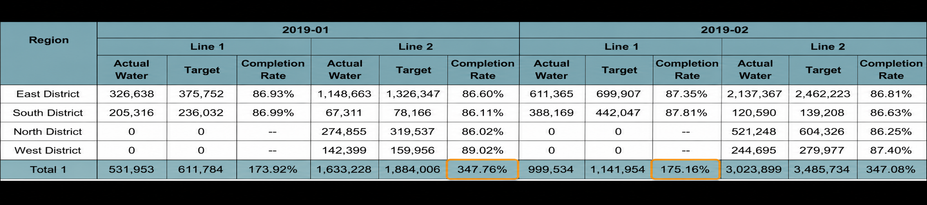
For totals of horizontally expanded columns, G_GRANDTOTAL is generally used. However, this formula sums data by default and cannot be set to other calculation methods (such as average or maximum). In this case, "完成率" is a percentage calculated through inter-cell calculation and cannot be summed directly. In addition, G_GRANDTOTAL automatically expands horizontally based on the derived table and does not support interval column expansion (alternating insertion calculation). Therefore, you also cannot use G_GRANDTOTAL for "流水" and "目标" while using an inter-cell calculation formula only for "完成率" (the calculation result will be overwritten).
The following figure shows the calculation effect when using =G_GRANDTOTAL(流水,月|城市线,3,J4:K4).
Recommended Method:
Revenue Total:=G_LOOKUPEXP(9,流水,月|城市线,流水,累计流水,月:J1,城市线:J2) The calculation method is the same as the "流水" column above, except that the query field "大区" is removed. The dynamic properties of the two formula cells are exactly the same.
Target Total:=G_LOOKUPEXP(9,流水,月|城市线,目标,累计目标,月:J1,城市线:J2) The dynamic properties are the same as above.
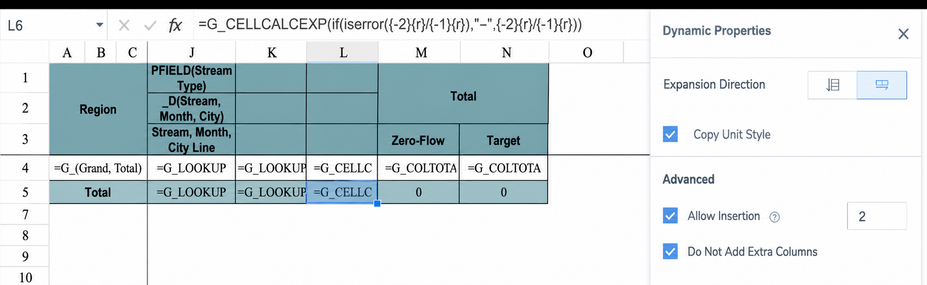
Completion Rate Total:*=G_CELLCALCEXP(if(iserror({-2}{r}/{-1}{r}),"--",{-2}{r}/{-1}{r})) ***Directly copy the inter-cell calculation formula above.
Dynamic properties: only horizontal expansion needs to be set. Set "Interval Write" to 2 (not including the current column). "Do Not Add Extra Rows or Columns" can be selected or left unselected because this is the last expansion formula in the template. The settings are shown below.
Preview and Save
Set the value format and style for each column separately. Click Save and Continue to preview the result in the next step. Then click Template Editing to return to the template and adjust formulas or styles until the desired effect is achieved. Finally, click Finish to save.