Different Calculation Methods for Column Totals in Complex Reports
All the complex report cases below require formulas in the new online editing mode, which are available in version 3.9.0 and later.
Case 1: Data Expands Vertically, No Horizontal Expansion, No Subtotal Calculation
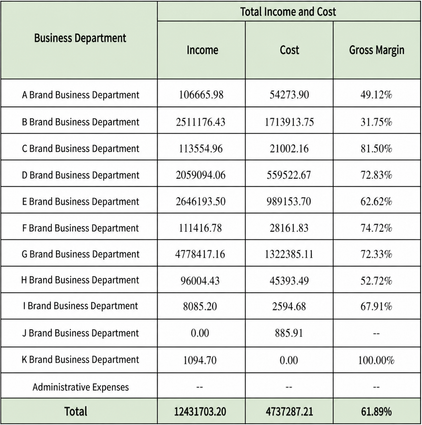
Using the figure above as an example, all four fields are set to expand vertically. "事业部", "收入", and "成本" directly reference fields in the view, while "毛利率" uses the inter-cell calculation formula =G_CELLCALCEXP, calculated as (收入 - 成本) / 收入. When calculating totals, revenue and cost only need to sum the data in their columns. The gross margin total needs to be calculated based on the revenue total and cost total calculated in the same row, without using other data. The calculation method is the same as the gross margin calculation for each business unit above in the same column.
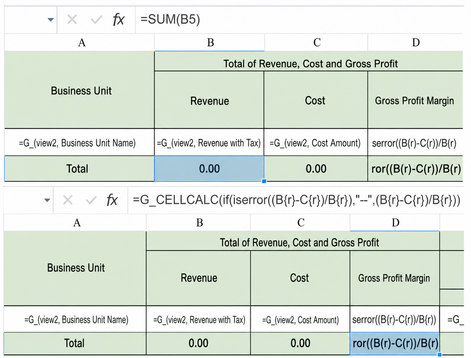
At this point, the revenue and cost totals can directly use Excel's built-in SUM( ) function, with the cell position or range to calculate entered inside it. For gross margin, directly copy the gross margin calculation formula above.
Case 2: Data Expands Horizontally, with Vertical Expansion and Subtotal Calculation Allowed
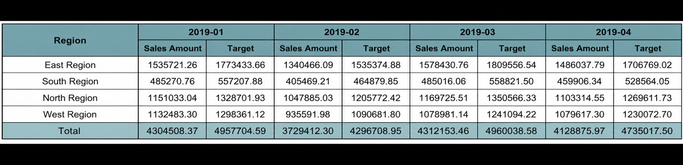
For example, in the figure above, the "区域" column expands vertically, the months on the right expand horizontally, and "零售流水" and "目标" expand horizontally by month. The "总计" below also needs to expand horizontally by month. Finally, a filter is used to filter by year or month to control the expansion range. At this point, the column total formula =G_GRANDTOTAL(view name, derived field 1|field 2..., number of metric fields, range) can automatically expand horizontally and calculate the sum. The specific usage is as follows:
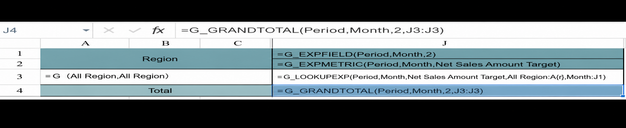
Formula explanation: =G_GRANDTOTAL(月份,月,2,J3:J3)** "月份" represents the source view name of the derived table. The "月" field comes from the view "月份". Use "月" to generate a derived table (deduplicating this field from the original table), which controls the number of expansions. For example, if the view contains 12 months, it expands horizontally 12 times. 2 means that two metrics, "零售流水" and "目标", need to be calculated. J3:J3 represents the statistical range of the values.
Case 3: Data Expands Vertically, with Subtotal Calculation, No Horizontal Expansion
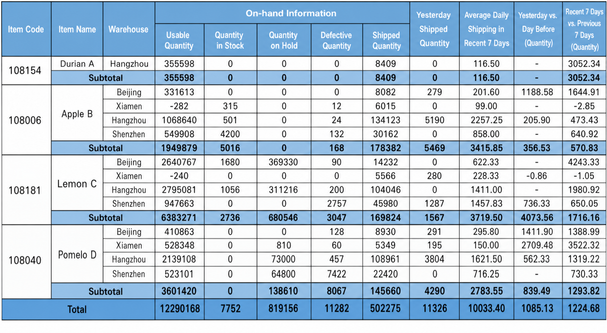
In the example above, the three columns on the left are dimension fields that expand downward vertically. The 7 columns in the middle, including "在库信息", "昨日出库", and "近 7 日日均出库", all reference data already calculated in the view. The last two columns use inter-cell calculation (available quantity / yesterday's outbound quantity; available quantity / average daily outbound quantity in the last 7 days; formula: =G_CELLCALCEXP(if(iserror(D{r}/I{r}),"-",D{r}/I{r}))). At the same time, subtotals also need to be calculated for each material.
In this scenario, if you follow the usage in Case 1 and fill the 7 middle columns of the total row with sum(D3), sum(D4), or sum(D3:D4), the calculated totals will be incorrect. See the effect below.
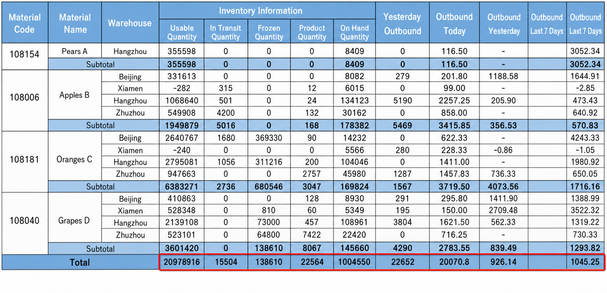
If you follow Case 2 and use the G_GRANDTOTAL formula, you will find that this formula must use a derived-table field. No matter which field in the view is used, it expands horizontally, and the number of expanded columns does not match expectations. It may even affect the calculation results of other formulas that follow.
The following figure uses the formula =G_GRANDTOTAL(总数量,物料编码,1,D3:D3). As the number of filtered material codes increases, more columns are added on the right. You can also see that the inter-cell calculation formulas originally set for "可售天数_ 昨日" and "可售天数_ 近 7 日" do not take effect. The actual calculation result is the sum of the values above.
This is because the scenario does not require horizontal expansion, but =G_GRANDTOTAL(总数量,物料编码,1,D3:D3) expands horizontally based on the deduplicated count of the field "物料编码" in the view "总数量". If the count exceeds 7, it overwrites the inter-cell calculation formulas and displays beyond the designed table boundary.

Solution
Method 1: In scenarios that do not require horizontal expansion, the actual number of expanded columns is 1, so the derived field must have a unique value. You can create a fixed field in any view with any content, and then drag it to the dimension area. Formula: =G_GRANDTOTAL(总数量,辅助列,7,D3:D3)** where 7 means that 7 metric fields participate in the sum calculation. You can also use =G_GRANDTOTAL(总数量,辅助列,1,D3:D3)** and fill it into the 7 cells separately, replacing D3:D3 with the range of the corresponding column.

Method 2: Create or copy a view and directly calculate the data total. The filter conditions must be consistent with the data view to be summarized above. If the data comes from different views, create multiple views. In the online template, directly drag fields from the view list on the left into the cells of the total row.

Case 4: Combining Multiple Horizontal Expansions with Fixed Columns
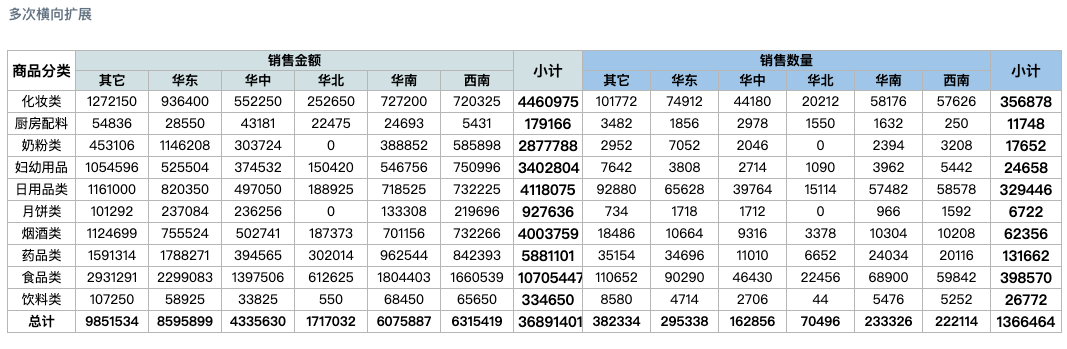
In the case above, there are two separate horizontal expansions, and the two subtotal columns are fixed columns following the horizontal expansions. If the G_GRANDTOTAL formula is used, only the first horizontal expansion can be calculated correctly. Using G_GRANDTOTAL for the second expansion causes an error during preview. This is because the column total (G_GRANDTOTAL) formula requires a calculation range. During the first dynamic expansion, the initial position of the calculation range is correct, and the dynamically expanded calculation range is also accurate. However, starting from the second expansion, the range to be calculated has changed dynamically, and the system cannot identify the changed range, causing the calculation to fail. If the Excel function SUM() is used, it cannot expand horizontally.
Solution

The first horizontal expansion still uses G_GRANDTOTAL. Subsequent horizontal expansions use derived-table formulas such as G_LOOKUPEXP/G_CELLCALCEXP. Fixed-column sums use G_LOOKUP/SUM() or other formulas.
Usage Explanation:
G_LOOKUPEXP/G_LOOKUP: Query fields must be specified. If there are no query conditions, create a constant helper column in the view (for example, a text constant field "总计") as the query condition. It applies to a wide range of scenarios and is suitable for any scenario that cannot be calculated with G_GRANDTOTAL or SUM.
G_CELLCALCEXP: Inter-cell calculation. After dynamic properties are set, it can compensate for the limitation that native Excel functions cannot expand horizontally. In this case, the nested SUM() cannot use a fixed range such as D3:D3; use offset coordinates instead. Notes for dynamic property settings: manually specify a derived table to control the number of columns, and select Do Not Add Extra Rows or Columns.
