Implement Row Totals in Complex Reports
Online editing mode syntax: =G_COLTOTAL(view name, field 1|field 2..., start calculation position, number of interval expansion columns for values, horizontal expansion offset)
Local editing mode syntax: &&=columnTotal9(<derived table>,<derived table field position>,<number of interval expansion columns for values>,<offset>)
The formulas are expressed differently in the two modes, but the implementation logic is the same. This document mainly introduces how to implement row totals in online editing mode.
Scenario 1: Measure Names Below and Comparison Items Above
Online Editing Mode
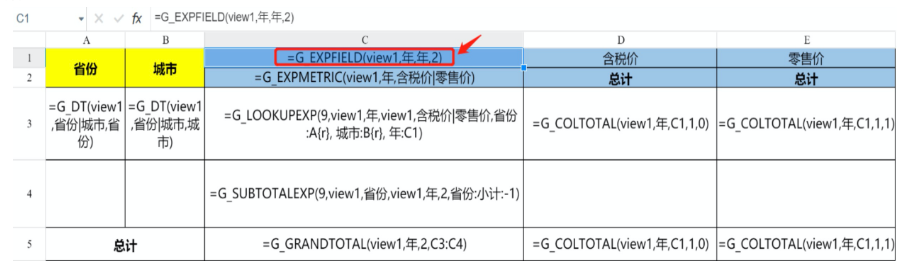
Tax-Inclusive Price total: =G_COLTOTAL(view1,Year,C1,1,0)
Retail Price total: =G_COLTOTAL(view1,Year,C1,1,1)

Formula breakdown:
-
G_COLTOTAL: row total. The default aggregation type is sum, sosumdoes not need to be written again. -
view1: view name. -
Year: a field in view
view1, indicating that values are summed by the Year field in the table. If there are multiple fields, concatenate them with|. -
C1: start calculation position.
-
1: number of interval expansion columns for values. In this case, 1 column is expanded, for a total of 2 columns. -
0: horizontal expansion offset. Because the horizontal expansion start position is C1 and Tax-Inclusive Price is expanded first, the offset is 0.
The offset for Retail Price total is 1, because Tax-Inclusive Price is expanded first, and Retail Price is expanded afterward.
Local Editing Mode
Tax-Inclusive Price total: &&=columnTotal9([DT|view1!Year],C1,1,0)
Retail Price total: &&=columnTotal9([DT|view1!Year],C1,1,1)
Scenario 2: Measure Names Above and Comparison Items Below
Online Editing Mode
Tax-Inclusive Price total: =G_COLTOTAL(view1,Year,C1,0,0)
Retail Price total: =G_COLTOTAL(view1,Year,D1,0,1)
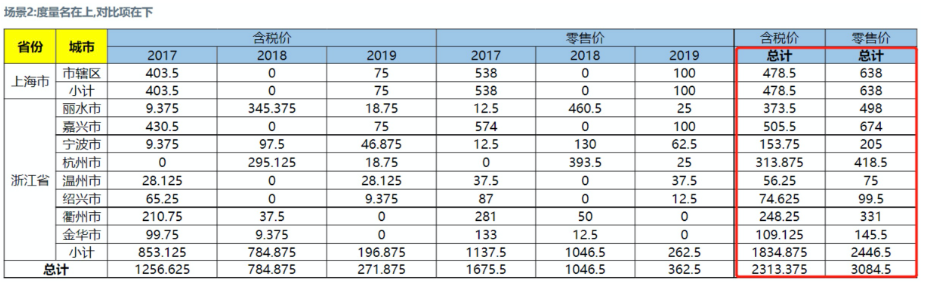
For the formula breakdown, refer to case 1. The differences are:
-
The number of interval expansion columns for values becomes 0, indicating that no interval is used for Tax-Inclusive Price. In other words, Tax-Inclusive Price is not written across columns.
-
The derived table field position for Retail Price changes to D1, because the horizontal expansion start position for Retail Price is D1.
-
Because the horizontal expansion start position D1 for Retail Price is after the first horizontal expansion of Tax-Inclusive Price (C1), the offset is 1.

Local Editing Mode
Tax-Inclusive Price total: &&=columnTotal9([DT|view1!Year],C1,0,0)
Retail Price total: &&=columnTotal9([DT|view1!Year],D1,0,1)
For specific formulas, see Complex Report Online Editing Mode Formula Description and Complex Report Local Editing Mode Formula Description.