Customize Weeks
Requirement Background
Sometimes a regular week, Monday to Sunday, cannot meet business needs, and a custom week is required.
For example: how can Thursday to Wednesday be defined as one week?
Implementation
Regular Dataset
- First, understand the function dayofweek([Date]) for getting the day of the week and weekofyear([Date]) for getting the week number.
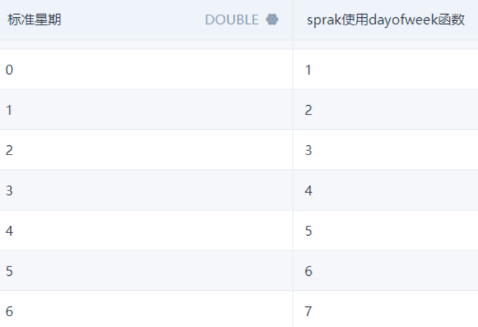
In Spark, a week runs from Sunday to Saturday, represented by 1 to 7, as shown below. To obtain the regular weekday, use dayofweek([Date]) - 1.
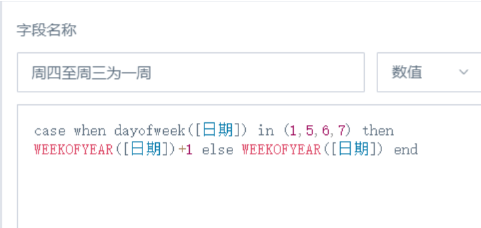
- To define Thursday to Wednesday as one week, Thursday, Friday, Saturday, and Sunday of each week should be pushed to the next week.
case when dayofweek([Date]) in (1, 5, 6, 7)
then WEEKOFYEAR([Date]) + 1
else WEEKOFYEAR([Date])
end
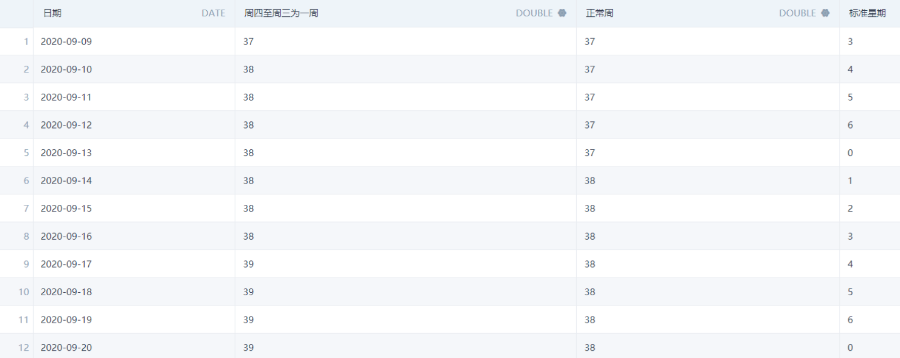
- Final result: using the standard weekday representation, Monday to Sunday as 1 to 0, Thursday to Wednesday has been implemented as one week.
High-Performance Dataset
- Use toDayOfWeek([Date]) to first obtain the day of the week for the date.
toDayOfWeek converts Date or DateTime to a UInt8 number containing the day of the week. Monday is 1 and Sunday is 7.
- Use a function to obtain the week number for the date.
toWeek(Date[, mode]) returns the week number for a Date or DateTime. The two-parameter form can specify whether the week starts on Sunday or Monday, and whether the return value should range from 0 to 53 or from 1 to 53. If the mode parameter is omitted, the default mode is 0.
- Add a judgment. If Thursday to Wednesday should be implemented as a custom week, then Thursday, Friday, Saturday, and Sunday should be pushed to the next week.
case when [Returned Day of Week] in (4, 5, 6, 7) then ([Regular Week] + 1) else [Regular Week] end
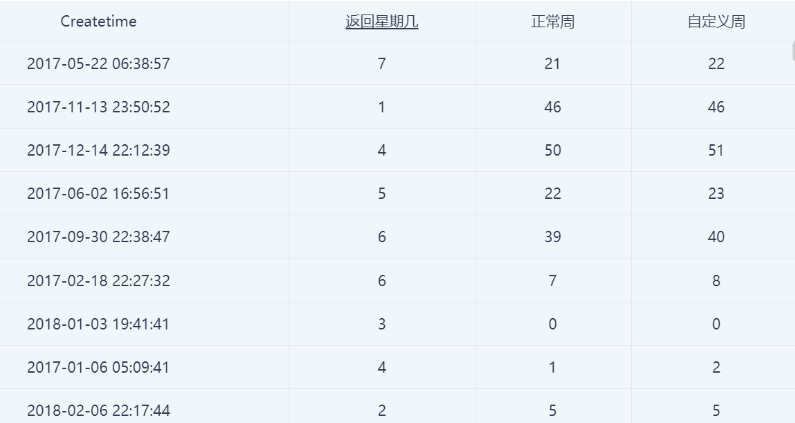
- The effect is as follows:
Note: The original date field must be Date or DateTime. If it is not, convert it first.
Date and datetime format definitions for the toDate/toDateTime functions: YYYY-MM-DD or YYYY-MM-DD hh:mm:ss.