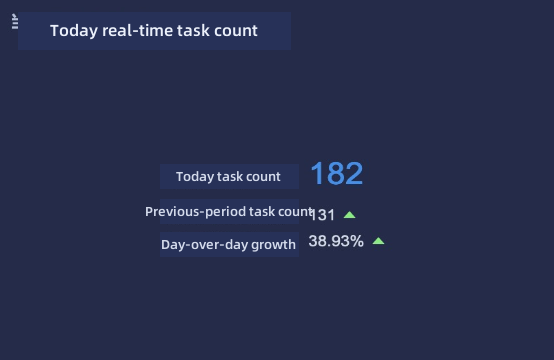
Calculate Period Comparison Accurate to a Specific Time
Requirement Background
BI's built-in period comparison feature can calculate only down to day granularity, and time macros can also be accurate only to the day. However, in many cases, users need to directly connect to a database, count the real-time data for today, and compare it with data from the same time period yesterday or another date. For example, if it is currently 3:30 PM, you need to count data from midnight today to 3:30 PM and compare it with data from midnight yesterday to 3:30 PM.
Prerequisites
- Direct dataset.
- The time field in the dataset is in datetime or timestamp format.
Approach
Calculation results in the card value field well cannot be used for secondary calculations. Therefore, create calculated fields to separately count data for fixed time ranges today and yesterday, then create another field to calculate the period comparison growth rate.
Implementation
The following uses a MySQL database as an example.
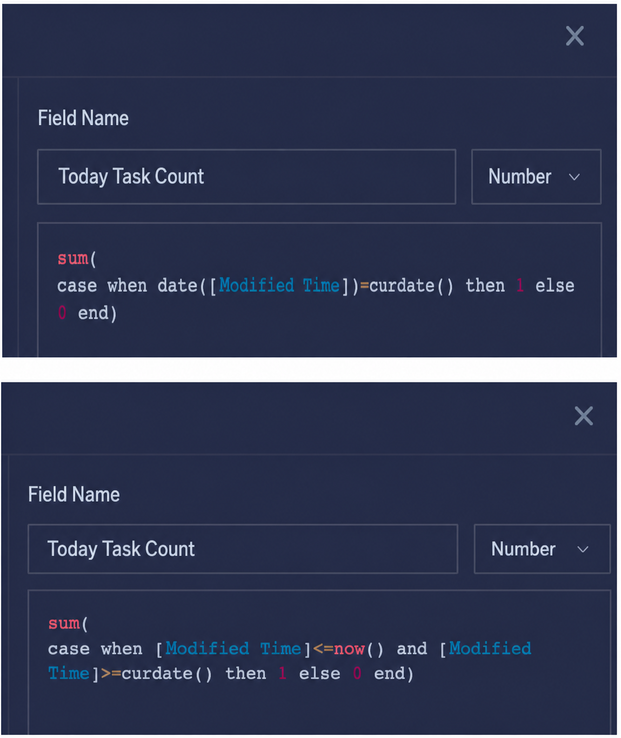
- Create a calculated field and use a formula to count today's task count. There are multiple ways to write the formula.
sum(
  case when date([修改时间])=curdate()
  then 1 else 0
  end
)
- Create a calculated field and use a formula to count yesterday's task count, from 00:00 to yesterday's current time point.
sum(
case when date([修改时间]) =date_sub(curdate(),interval ‘1’ day) and [修改时间]<=date_sub(now(),interval ‘1’ day) then 1
else 0
end)

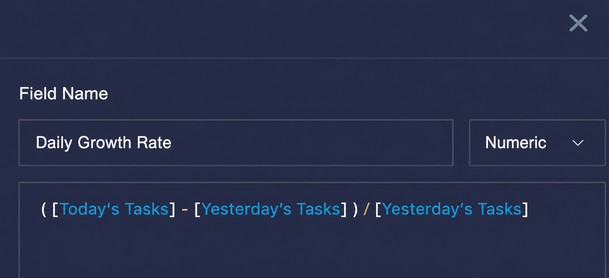
- Create a calculated field to calculate the growth rate.
- Drag all three new fields into the value field well.