TiDB Functions
Overview
Function and operator usage in TiDB is basically the same as in MySQL. For details, see Functions and Operators.
In SQL statements, expressions can be used in places such as the ORDER BY or HAVING clauses of a SELECT statement, the WHERE clause of SELECT/DELETE/UPDATE statements, or SET statements.
Type Conversion in Expression Evaluation
Type conversion in TiDB expression evaluation is basically the same as in MySQL. For details, see MySQL Type Conversion in Expression Evaluation.
Operators
| Operator | Description |
| AND, && | Logical AND |
| = | Assignment (can be used in SET statements or in the SET clause of UPDATE statements) |
| := | Assignment |
| BETWEEN ... AND ... | Tests whether a value is within a range |
| BINARY | Converts a string to a binary string |
| & | Bitwise AND |
| ~ | Bitwise NOT |
| \| | Bitwise OR |
| ^ | Bitwise XOR |
| CASE | CASE operator |
| DIV | Integer division |
| / | Division |
| = | Equality comparison |
| <=> | NULL-safe equality comparison |
| > | Greater than |
| >= | Greater than or equal to |
| IS | Tests whether a value is equal to a Boolean value |
| IS NOT | Tests whether a value is not equal to a Boolean value |
| IS NOT NULL | Non-null check |
| IS NULL | NULL check |
| << | Left shift |
| < | Less than |
| <= | Less than or equal to |
| LIKE | Simple pattern matching |
| - | Subtraction |
| %, MOD | Modulo |
| NOT, ! | Negation |
| NOT BETWEEN ... AND ... | Tests whether a value is outside a range |
| !=, <> | Not equal to |
| NOT LIKE | Does not match a simple pattern |
| NOT REGEXP | Does not match a regular expression pattern |
| ||, OR | Logical OR |
| + | Addition |
| REGEXP | Pattern matching with regular expressions |
| >> | Right shift |
| RLIKE REGEXP | Synonym |
| * | Multiplication |
| - | Unary minus |
| XOR | Logical XOR |
Operator Precedence
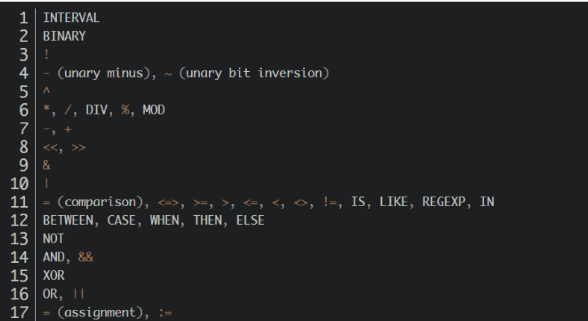
Operator precedence is shown in the following list, from highest to lowest. Operators on the same line have the same precedence.
Control Flow Functions
TiDB supports all control flow functions provided in MySQL 5.7.
| Function Name | Description |
| CASE | CASE operator |
| IF() | Constructs if/else logic |
| IFNULL() | Constructs NULL if/else logic |
| NULLIF() | Returns NULL if expr1 = expr2 |
String Functions
TiDB supports most string functions provided in MySQL 5.7.
Supported Functions
| Function Name | Description |
| ASCII() | Returns the numeric value of the leftmost character |
| BIN() | Returns a string representation of the binary value of a number |
| BIT_LENGTH() | Returns the bit length of a string |
| CHAR() | Returns a string made from the characters represented by integer code values |
| CHAR_LENGTH() | Returns the character length of a string |
| CHARACTER_LENGTH() | Same as CHAR_LENGTH() |
| CONCAT() | Returns the concatenated string |
| CONCAT_WS() | Returns strings concatenated with a separator |
| ELT() | Returns the string at the specified position |
| EXPORT_SET() | Returns a string where each set bit produces an on string and each unset bit produces an off string |
| FIELD() | Returns the first position of an argument in the following arguments |
| FIND_IN_SET() | Returns the position of the first argument within the second argument |
| FORMAT() | Returns a number formatted to the specified number of decimal places |
| FROM_BASE64() | Decodes a base-64 encoded string and returns the result |
| HEX() | Returns the hexadecimal representation of a decimal number or string value |
| INSERT() | Inserts a substring at the specified position, up to the specified number of characters |
| INSTR() | Returns the index of the first occurrence of a substring |
| LCASE() | Same as LOWER() |
| LEFT() | Returns the specified number of leftmost characters |
| LENGTH() | Returns the string length in bytes |
| LIKE | Performs simple pattern matching |
| LOCATE() | Returns the position of the first occurrence of a substring |
| LOWER() | Returns the argument in lowercase |
| LPAD() | Returns the string argument padded on the left with the specified string |
| LTRIM() | Removes leading spaces |
| MAKE_SET() | Returns a set of comma-separated strings whose positions correspond to the given bits argument |
| MID() | Returns a substring starting at the specified position |
| NOT LIKE | Negates simple pattern matching |
| NOT REGEXP | Negated form of REGEXP |
| OCT() | Returns the octal representation of a numeric value as a string |
| OCTET_LENGTH() | Same as LENGTH() |
| ORD() | Returns the character code of the leftmost character of the argument |
| POSITION() | Same as LOCATE() |
| QUOTE() | Escapes the argument for use in SQL statements |
| REGEXP | Matches a pattern by using a regular expression |
| REPEAT() | Repeats a string the specified number of times |
| REPLACE() | Replaces all occurrences of a specified string |
| REVERSE() | Reverses all characters in a string |
| RIGHT() | Returns the specified number of rightmost characters |
| RLIKE | Same as REGEXP |
| RPAD() | Pads a string the specified number of times |
| RTRIM() | Removes trailing spaces |
| SPACE() | Returns the specified number of spaces as a string |
| STRCMP() | Compares two strings |
| SUBSTR() | Returns the specified substring |
| SUBSTRING() | Returns the specified substring |
| SUBSTRING_INDEX() | Returns the substring before the specified occurrence of a delimiter in a string |
| TO_BASE64() | Returns the string argument converted to base-64 representation |
| TRIM() | Removes leading and trailing spaces |
| UCASE() | Same as UPPER() |
| UNHEX() | Returns the hexadecimal representation of a number as a string |
| UPPER() | Converts the argument to uppercase |
Unsupported Functions
- LOAD_FILE()
- MATCH
- SOUNDEX()
- SOUNDS LIKE
- WEIGHT_STRING()
Numeric Functions and Operators
TiDB supports all numeric functions and operators provided in MySQL 5.7.
Arithmetic Operators
| Operator Name | Description |
| + | Plus sign |
| - | Minus sign |
| * | Multiplication sign |
| / | Division sign |
| DIV | Integer division |
| %, MOD | Modulo operation; remainder |
| - | Changes the sign of the argument |
Mathematical Functions
| Function Name | Description |
| POW() | Returns the value of the argument raised to the specified power |
| POWER() | Returns the value of the argument raised to the specified power |
| EXP() | Returns e, the base of natural logarithms, raised to the specified power |
| SQRT() | Returns the square root of a non-negative number |
| LN() | Returns the natural logarithm of the argument |
| LOG() | Returns the natural logarithm of the first argument |
| LOG2() | Returns the base-2 logarithm of the argument |
| LOG10() | Returns the base-10 logarithm of the argument |
| PI() | Returns the value of pi |
| TAN() | Returns the tangent of the argument |
| COT() | Returns the cotangent of the argument |
| SIN() | Returns the sine of the argument |
| COS() | Returns the cosine of the argument |
| ATAN() | Returns the arctangent of the argument |
| ATAN2(), ATAN() | Returns the arctangent of two arguments |
| ASIN() | Returns the arcsine of the argument |
| ACOS() | Returns the arccosine of the argument |
| RADIANS() | Returns the argument converted from degrees to radians |
| DEGREES() | Returns the argument converted from radians to degrees |
| MOD() | Returns the remainder |
| ABS() | Returns the absolute value of the argument |
| CEIL() | Returns the smallest integer value not less than the argument |
| CEILING() | Returns the smallest integer value not less than the argument |
| FLOOR() | Returns the largest integer value not greater than the argument |
| ROUND() | Returns the nearest integer or the value rounded to the specified number of decimal places |
| RAND() | Returns a random floating-point value |
| SIGN() | Returns the sign of the argument |
| CONV() | Converts numbers between different bases and returns the string representation |
| TRUNCATE() | Returns the number truncated to the specified number of decimal places |
| CRC32() | Computes a cyclic redundancy check value and returns a 32-bit unsigned value |
Date and Time Functions
| Function Name | Description |
| ADDDATE() | Adds a time interval to a date |
| ADDTIME() | Adds time values |
| CONVERT_TZ() | Converts time zones |
| CURDATE() | Returns the current date |
| CURRENT_DATE(), CURRENT_DATE | Synonym for CURDATE() |
| CURRENT_TIME(), CURRENT_TIME | Synonym for CURTIME() |
| CURRENT_TIMESTAMP(), CURRENT_TIMESTAMP | Synonym for NOW() |
| CURTIME() | Returns the current time |
| DATE() | Extracts the date part from a date or datetime expression |
| DATE_ADD() | Adds a time interval to a date |
| DATE_FORMAT() | Returns a date/time value in the specified format |
| DATE_SUB() | Subtracts a specified time interval from a date |
| DATEDIFF() | Returns the number of days between two dates |
| DAY() | Synonym for DAYOFMONTH() |
| DAYNAME() | Returns the weekday name |
| DAYOFMONTH() | Returns the day-of-month part of the argument (1-31) |
| DAYOFWEEK() | Returns the weekday index for the argument |
| DAYOFYEAR() | Returns which day of the year the argument represents (1-366) |
| EXTRACT() | Extracts a single part from a date/time value |
| FROM_DAYS() | Converts a day count to a date |
| FROM_UNIXTIME() | Formats a Unix timestamp as a date |
| GET_FORMAT() | Returns a string that satisfies the date format |
| HOUR() | Extracts the hour part from a date/time expression |
| LAST_DAY | Returns the last day of the month in the argument |
| LOCALTIME(), LOCALTIME | Synonym for NOW() |
| LOCALTIMESTAMP, LOCALTIMESTAMP() | Synonym for NOW() |
| MAKEDATE() | Creates a date from a given year and day of year |
| MAKETIME() | Creates a time from given hour, minute, and second values |
| MICROSECOND() | Returns the microsecond part of the argument |
| MINUTE() | Returns the minute part of the argument |
| MONTH() | Returns the month part of the argument |
| MONTHNAME() | Returns the month name of the argument |
| NOW() | Returns the current date and time |
| PERIOD_ADD() | Adds a period, in months, to a year-month expression |
| PERIOD_DIFF() | Returns the number of months between periods |
| QUARTER() | Returns the quarter of the argument (1-4) |
| SEC_TO_TIME() | Converts seconds to HH:MM:SS format |
| SECOND() | Returns the second (0-59) |
| STR_TO_DATE() | Converts a string to a date |
| SUBDATE() | Synonym for DATE_SUB() when called with three arguments |
| SUBTIME() | Subtracts a time interval from a time |
| SYSDATE() | Returns the time at which the method executes |
| TIME() | Returns the time part of the argument |
| TIME_FORMAT() | Formats time |
| TIME_TO_SEC() | Returns the number of seconds represented by the argument |
| TIMEDIFF() | Returns a time interval |
| TIMESTAMP() | With one argument, returns a date or datetime expression. With two arguments, returns the sum of the arguments |
| TIMESTAMPADD() | Adds a time interval to a date/time expression |
| TIMESTAMPDIFF() | Subtracts a time interval from a date/time expression |
| TO_DAYS() | Converts the argument to the corresponding number of days, starting from year 0 |
| TO_SECONDS() | Converts a date or date/time argument to seconds, starting from year 0 |
| UNIX_TIMESTAMP() | Returns a Unix timestamp |
| UTC_DATE() | Returns the current UTC date |
| UTC_TIME() | Returns the current UTC time |
| UTC_TIMESTAMP() | Returns the current UTC date and time |
| WEEK() | Returns the week number of the year for the argument |
| WEEKDAY() | Returns the weekday index |
| WEEKOFYEAR() | Returns the calendar week number of the year for the argument |
| YEAR() | Returns the year of the argument |
| YEARWEEK() | Returns the year and week number |
GROUP BY Aggregate Functions
The MySQL GROUP BY aggregate functions supported by TiDB are as follows:
| Function Name | Description |
| COUNT() | Returns the number of retrieved rows |
| COUNT(DISTINCT) | Returns the number of distinct values |
| SUM() | Returns the sum |
| AVG() | Returns the average value |
| MAX() | Returns the maximum value |
| MIN() | Returns the minimum value |
| GROUP_CONCAT() | Returns the concatenated string |
- Unless otherwise stated, aggregate functions ignore NULL values by default.
- If an aggregate function is used in a statement without a
GROUP BYclause, it is equivalent to grouping all rows.
GROUP BY Modifiers
TiDB currently does not support GROUP BY modifiers such as WITH ROLLUP.
Window Functions
Window function usage in TiDB is basically the same as in MySQL 8.0. For details, see MySQL Window Functions.
The window functions supported by TiDB are as follows:
| Function Name | Description |
| CUME_DIST() | Returns the cumulative distribution of a set of values |
| DENSE_RANK() | Returns the rank of the current row in the partition, with consecutive ranks |
| FIRST_VALUE() | Expression value of the first row in the current window |
| LAG() | Expression value from the Nth row before the current row in the partition |
| LAST_VALUE() | Expression value of the last row in the current window |
| LEAD() | Expression value from the Nth row after the current row in the partition |
| NTH_VALUE() | Expression value of the Nth row in the current window |
| NTILE() | Divides the partition into N buckets and assigns a bucket number to each row in the partition |
| PERCENT_RANK() | Returns the percentage of rows in the partition that are less than the current row |
| RANK() | Returns the rank of the current row in the partition; ranks may be non-consecutive |
| ROW_NUMBER() | Returns the row number of the current row in the partition |
Other Functions
TiDB supports most miscellaneous functions provided in MySQL 5.7.