count_if Function Usage
Scenario
In Excel, COUNTIF is a commonly used statistical function for counting the number of cells that meet a condition. Its syntax is =COUNTIF(range, criteria). Spark SQL used in Guandata BI also has a similar count_if function, which returns the number of field values that meet a condition. However, when users use this function directly, the system displays the following error. Does Guandata not support this function, or is the usage incorrect?
It is not allowed to use an aggregate function in the argument of another aggregate function. Please use the inner aggregate function in a sub-query.
Correct Usage
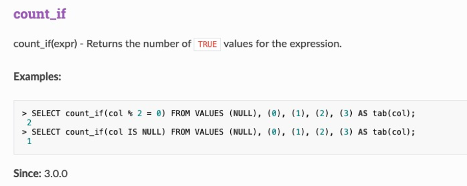
The count_if function is supported in Guandata non-direct and non-accelerated dataset overview pages, cards, and ETL, meaning all scenarios that use Spark SQL. However, it must be used with a window function. For window functions, see Window Function Usage Introduction.
Official usage documentation: https://spark.apache.org/docs/latest/api/sql/#count_if
Example
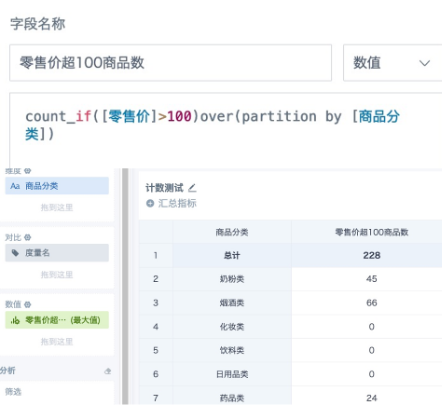
Calculate the number of products with retail price greater than 100 by product category. Drag the field into the value area, set the aggregation method to Maximum, and set the subtotal/total calculation method to Calculate Based on Aggregated Data - Sum. The formula and calculation effect are shown below.
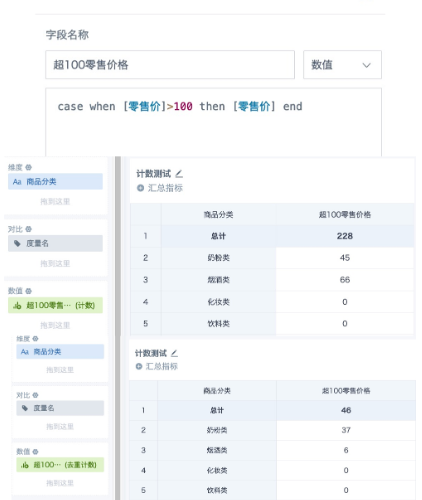
The count_if function counts data without deduplication. If deduplicated counting is needed, use the following alternatives.
Alternatives
1. Create a calculated field and use case when or if to filter data that meets the condition. Drag the field into the value area and set the aggregation method to Count. If deduplicated count is required, select Count Distinct. The subtotal/total calculation method can be either Calculate Based on Raw Data or Calculate Based on Aggregated Data > Sum.
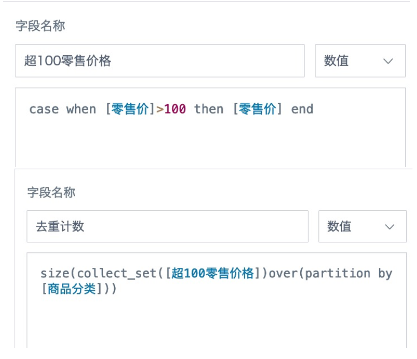
2. If the result after distinct count needs to be used for secondary calculation or filtering, create a calculated field and use the window function size(collect_set() over(partition by )) to calculate it. To display it in a report, drag it into the value area and set the calculation method to Maximum or No Processing. However, note that subtotal and total cannot be calculated normally with this method. When the data volume is large, window functions consume more resources and load slowly, so use this method with caution.