Basic Use of Regular Expressions
Common Regular Expression Syntax
Category | Character | Description |
Ordinary characters | [ ] | Matches all characters inside [ ]. For example, [aeiou] matches all e, o, u, and a letters in the string "google runoob taobao". |
[^ ] | Matches all characters except those inside [ ]. For example, [^aeiou] matches all letters except e, o, u, and a in the string "google runoob taobao". | |
[A-Z][a-z] | [A-Z] represents a range and matches all uppercase letters. [a-z] represents all lowercase letters. | |
. | Matches any single character except line breaks (\n and \r), equivalent to [^\n\r]. To match a literal dot, use \. | |
[\s\S] | Matches everything. \s matches all whitespace characters, including line breaks; \S matches non-whitespace characters, including line breaks. | |
\w\W | \w matches letters, digits, and underscores, equivalent to [A-Za-z0-9_]. \W matches non-letters, non-digits, and non-underscores, equivalent to '[^A-Za-z0-9_]'. | |
\d\D | \d matches digits 0-9, equivalent to [0-9]. \D matches any non-digit character. | |
Non-printing characters | \cx | Matches the control character specified by x. For example, \cM matches a Control-M or carriage return. x must be one of A-Z or a-z. Otherwise, c is treated as a literal 'c' character. |
\f | Matches a form feed character. Equivalent to \x0c and \cL. | |
\n | Matches a line feed character. Equivalent to \x0a and \cJ. | |
\r | Matches a carriage return character. Equivalent to \x0d and \cM. | |
\s | Matches any whitespace character, including spaces, tabs, form feeds, and so on. Equivalent to [ \f\n\r\t\v]. Note that Unicode regular expressions also match full-width spaces. | |
\S | Matches any non-whitespace character. Equivalent to [^ \f\n\r\t\v]. | |
\t | Matches a tab character. Equivalent to \x09 and \cI. | |
\v | Matches a vertical tab character. Equivalent to \x0b and \cK. | |
Special characters | $ | Matches the end position of the input string. If the RegExp object's Multiline property is set, $ also matches '\n' or '\r'. To match the $ character itself, use \$. |
( ) | Marks the start and end of a subexpression. Subexpressions can be captured for later use. To match these characters literally, use \( and \). | |
[ | Marks the start of a bracket expression. To match [, use \\[. | |
\ | Marks the next character as a special character, literal character, backreference, or octal escape. For example, 'n' matches the character 'n'. '\n' matches a line feed. The sequence '\\' matches "\", while '\(' matches "(". | |
^ | Matches the start position of the input string, unless used inside a bracket expression. When used inside a bracket expression, it means the character set in that bracket expression is not accepted. To match the ^ character itself, use \^. | |
{ | Marks the start of a quantifier expression. To match {, use \{. | |
| | Indicates a choice between two items, equivalent to "or". To match |, use \|. | |
Quantifiers | * | Matches the preceding subexpression zero or more times. For example, zo* matches "z" and "zoo". * is equivalent to {0,}. |
+ | Matches the preceding subexpression one or more times. For example, 'zo+' matches "zo" and "zoo", but not "z". + is equivalent to {1,}. | |
? | Matches the preceding subexpression zero or one time. For example, "do(es)?" can match "do", "does" in "does", and "do" in "doxy". ? is equivalent to {0,1}. | |
{n} | n is a non-negative integer. Matches exactly n times. For example, 'o{2}' does not match the 'o' in "Bob", but matches the two o characters in "food". | |
{n,} | n is a non-negative integer. Matches at least n times. For example, 'o{2,}' does not match the 'o' in "Bob", but matches all o characters in "foooood". 'o{1,}' is equivalent to 'o+'. 'o{0,}' is equivalent to 'o*'. | |
{n,m} | m and n are non-negative integers, and n <= m. Matches at least n times and at most m times. For example, "o{1,3}" matches the first three o characters in "fooooood". 'o{0,1}' is equivalent to 'o?'. Do not put spaces between the comma and the two numbers. |
Spark Regular Expression Functions
Category | Purpose | Function | Example | Result |
Validation | Determines whether a string matches a regular expression and returns true/false/null. | regexp(str, regexp) | regexp('abcde12345','D|d') | true |
rlike(str, regexp) | rlike('abcde12345','^A') | false | ||
regexp_like(str, regexp) | regexp_like('abcde12345','\\d+') | true | ||
Extraction | Extracts the first substring in a string that matches the regular expression based on the group index value. | regexp_extract(str, regexp[, idx]) | regexp_extract('ABCDE/ab(cde)','[A-Za-z]+',0) | ABCDE |
Extracts all substrings in a string that match the regular expression based on the group index value, and returns an array. | regexp_extract_all(str, regexp[, idx]) | regexp_extract_all('100-200, 300-400', '(\\d+)-(\\d+)',1) | [100, 300] | |
Replacement | Replaces all substrings that match the regular expression with the target string. | regexp_replace(str, regexp, rep[,position]) | regexp_replace('ABCDE/ab(cde)','[\/()]','.') | ABCDE.ab.cde. |
Split | Splits a long string into an array by substrings that match the regular expression. `limit` can specify the maximum number of elements after splitting. | split(str, regexp[, limit]) | split('ABCDE/ab(cde)','[\/()]') | [ABCDE, ab, cde, ] |
Spark uses Java regular expressions. The escape character \ must itself be escaped with \. For example, to match digits, use \\d instead of \d. For official documentation, see Spark SQL.
Application Scenarios
Extract Numbers
:::note[Note]REGEXP_EXTRACT can only extract the first substring that meets the condition. If multiple parts of a string meet the condition, it cannot accurately extract all of them.
:::
REGEXP_EXTRACT([String],'\\d+',0)
Comment: \d matches digits 0-9. + matches a character one or more times.
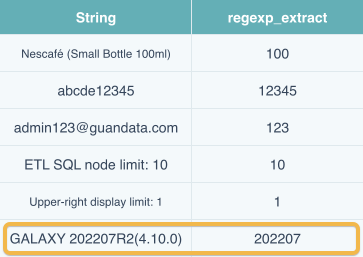
REGEXP_EXTRACT([String],'\\d+\\.?\\d*',0)
Comment: \\d+ extracts the digits before the decimal point. \\\\.? matches zero or one decimal point. \\d* extracts the digits after the decimal point; they may be absent or contain multiple digits.

REGEXP_EXTRACT([String],'\\d{1,2}\/\\d{1,2}\/\\d{2,4}',0)
Comment: \\d{1,2} means 1 to 2 digits and is used to match month and day. \\d{2,4} means 2 to 4 digits and matches the year. \/ matches a forward slash.

Extract Chinese Text
REGEXP_EXTRACT([String],'[\u4e00-\u9fa5]+',0)
However, this method does not apply to the case shown in the yellow box in the following figure. After the REGEXP_EXTRACT function is interrupted by a symbol or another character during extraction, it no longer matches the following characters. In this case, try using the REGEXP_REPLACE function. See the following figure for a comparison.
REGEXP_REPLACE([String],'[^\u4e00-\u9fa5]+','')
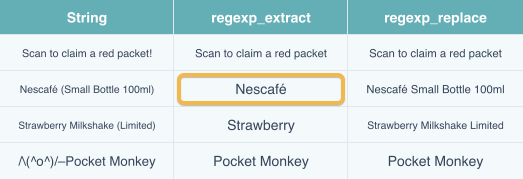
Comment: When the ^ symbol is outside [ ], it matches the character at the start position of the string. When ^ is inside [ ], it means not. Here, it replaces non-Chinese characters with an empty string.
Extract or Delete Content at a Specific Position
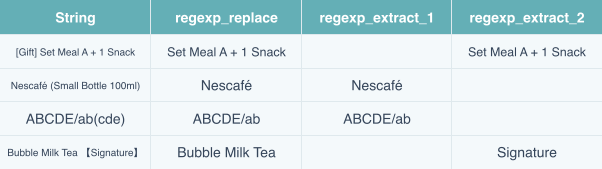
REGEXP_REPLACE([String],'[\\[(【]\\S*[\\])】]','')
Comment: [\\[(【] matches three types of opening brackets, and [\\])】] matches three types of closing brackets. \\S* matches zero or more non-whitespace characters.
If the bracketed part is fixed at the start or end of the string, you can also use the following formulas.
REGEXP_EXTRACT([String],'(\\S+)([\\[(【])',1)
REGEXP_EXTRACT([String],'([\\])】])(\\S+)',2)
Comment: Each group () is a group. (\\S+) matches zero or more non-whitespace characters and is group 1. ([\\[(【]) is group 2 and matches three types of opening brackets. Index 1 means extracting group 1, that is, all characters before the brackets. Index 2 means extracting group 2, that is, all characters after the brackets.
The following figure compares the three usage methods. If there is no match, an empty string is returned. There may be multiple ways to achieve the same effect; choose a suitable method for the actual scenario.
Extract characters inside brackets:
REGEXP_EXTRACT([String],'([\\[(【])(\\S*)([\\])】])',2)
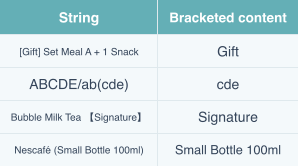
Practical Case
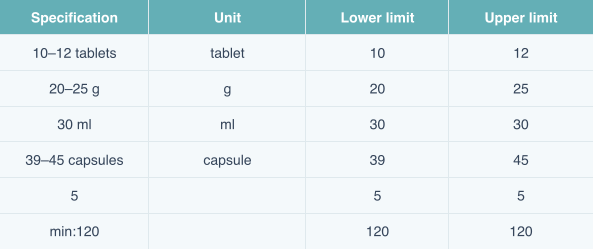
Requirement: Extract the unit, upper limit, and lower limit from drug specifications.
Approach:
Rule unit: If the specification unit is uniformly Chinese, you can extract it by using the Chinese text extraction method described above. If English specification units appear, that method no longer works, so use the following method (not the only solution).
REGEXP_EXTRACT([Spec],'[^-~\\s\\d]+',0)
Explanation: [^ ] means excluding all listed characters inside []; -~ matches the symbols - and ~; \s matches spaces; \\d matches digits; the final + means matching repeatedly one or more times. Together, the expression excludes -, ~, spaces, and digits, and extracts all remaining characters. The result is shown below. At this point, you can see that min: in the last row is not a specification unit, so you need to use REGEXP_REPLACE or REPLACE to remove the extra characters.
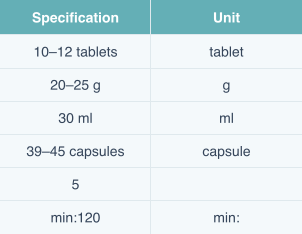
Lower limit: Extract the lower and upper limits of each record. For example, for 10-12 tablets, the lower limit is 10 and the upper limit is 12. Use \\d+ directly to extract the first numeric string.
REGEXP_EXTRACT([Spec],'\\d+',0)
Upper limit: First use .+[-~] to extract all - and ~ symbols and the characters before them, replace them with an empty value, and then use \\d+ to extract the remaining digits.
REGEXP_EXTRACT(REGEXP_REPLACE([Spec],'.+[-~]',''),'\\d+',0)
Final result: