Spark SQL Array Processing Functions and Applications
Definition
An array is an ordered sequence of elements. Each variable that makes up an array is called an array element. In programming, an array organizes multiple elements of the same type in an ordered form for easier processing. Based on element type, arrays can be divided into numeric arrays, character arrays, and other categories. Arrays are handled differently in different programming languages. This article lists only Spark SQL array functions and application cases.
Characteristics
- An array is a collection of elements of the same data type.
- Elements in an array are stored in a specific order. In memory, they are stored consecutively according to that order.
- Array elements are queried by using the array name and the element's position (index) in the array.
- In databases, arrays are displayed as string-like values enclosed in square brackets, with elements separated by commas, such as [1, 2, 3].
Main Functions
Array Generation and Conversion
Common Functions
Purpose | Function | Example | Result |
Merge multiple rows into one row and return a non-deduplicated array | collect_list(expr) | collect_list([Field]) where [Field] values are A,A,B,B,C,D | [A,A,B,B,C,D] |
Merge multiple rows into one row and return a deduplicated array | collect_set(expr) | collect_set([Field]) where [Field] values are A,A,B,B,C,D | [A,B,C,D] |
Merge multiple columns into one column | array(expr, ...) | array(1, 2, 3) | [1,2,3] |
Split a string by delimiter and return an array. | split(str, regex[, limit]) [, limit] limits the number of split elements and can be omitted. | split('A-B-C', '-'); split('A-B-C', '-',2) | [A,B,C]; [A,B-C] |
Split one row into multiple rows | explode(expr) | explode(array('A','B')) | A B |
Concatenate array elements into a string with a delimiter | array_join(array, sep[, nullRep]) [, nullRep] specifies the replacement for null values. If omitted, null values are removed. | array_join(array('hello', null ,'world'), ' ', ',') | hello, world |
concat_ws(sep[, str | array(str)]+) removes null values and can concatenate multiple arrays and strings. | concat_ws(',',array('hello', null ,'world')) | hello,world | |
Split text by punctuation and spaces into a nested array | sentences(str[, lang, country]) | sentences('Hi there! Good morning.') | [["Hi","there"],["Good","morning"]] |
Generate a sequence array that increases by a fixed step, for numeric and datetime types | sequence(start, stop, step) | sequence(1, 5); sequence(to_date('2021-01-01'), to_date('2021-03-01'), interval 1 month) | [1,2,3,4,5]; [2021-01-01,2021-02-01,2021-03-01] |
Common Scenarios
- Merge multiple rows in a dataset into one row, or split one row into multiple rows. This is mainly done by combining functions such as
concat_ws(collect_set( ))andexplode(split( )). For a specific case, see Merge and Split Data Rows with ETL. - When year-over-year or period-over-period data cannot align because data is missing, such as no sales records, you need to complete the data, or handle other scenarios that require a Cartesian product. For example, use the combined function
explode(sequence([Start Date],[End Date],interval 1 month))to complete a calendar. For a specific case, see ETL Data Completion Method. - Distinct count. The
count(distinct( ))function does not support window function usage. When the data volume is small, you can usesize(collect_set([Field])over(partition by [Group Column Name]))for distinct count. For a specific case, see Implement Windowing for Distinct Count.
Basic Array Operations
Common Functions
Purpose | Function | Example | Result |
Deduplicate array elements | array_distinct(array) | array_distinct(array(1, 2, 3, null, 3)) | [1,2,3,null] |
Return the number of array elements | size(expr) | size(array('b', 'd', 'c', 'a')) | 4 |
Remove all specified elements from an array | array_remove(array, element) (null cannot be removed) | array_remove(array(1, 2, 3, null, 3), 3) | [1,2,null] |
Return an array made by repeating an element the specified number of times | array_repeat(element, count) | array_repeat('123', 2) | ["123","123"] |
Extract a subarray of fixed length from a fixed position | slice(x, start, length) | slice(array(1, 2, 3, 4), 2, 2) | [2,3] |
Process all elements in an array with the specified method and return a new array | transform(expr, func) | transform(array(1, 2, 3), x -> x + 1); transform(array('A','B','C'),(x,i)->i||x) | [2,3,4]; [0A,1B,2C] |
Reverse array order | reverse(array) | reverse(array(2, 1, 4, 3)) | [3,4,1,2] |
Randomly sort an array | shuffle(array) | shuffle(array(1, 20, 3, 5)) | [3,1,5,20] |
Array sorting | array_sort(expr, func) `func` specifies the sorting method. If omitted, ascending order is used and null values are placed last. | array_sort(array('b', 'd', null, 'c', 'a')) | ["a","b","c","d",null] |
sort_array(array[, true/false]) In ascending order (true), null is placed first; in descending order (false), null is placed last. | sort_array(array('b', 'd', null, 'c', 'a'), true) | [null,"a","b","c","d"] |
Array Query and Calculation
Common Functions
Purpose | Function | Example | Result |
Return the maximum value in an array | array_max(array) | array_max(array(1, 20, null, 3)) | 20 |
Return the minimum value in an array | array_min(array) | array_max(array(1, 20, null, 4)) | 1 |
Query whether an array contains an element and return true/false | array_contains(array, value) | array_contains(array(1, 2, 3), 2) | true |
Query the position/index of an element in an array | array_position(array, element) | array_position(array('A','B','C'), B) | 2 |
Query the nth element in an array | element_at(array, n) n starts from 1. If n is negative, query from the end backward. | element_at(array('A','B','C'), -1) | C |
array[n] n starts from 0 and cannot be negative. | array('A','B','C')[0] | A | |
Filter an array with a specified condition or method and return an array containing matching elements | filter(expr, func) | filter(array(1, 2, 3), x -> x % 2 == 1) | [1,3] |
Query whether any element in an array meets a condition and return true/false | exists(expr, pred) Filter null values first, otherwise the result may return null. | exists(array(1, 2, 3), x -> x % 2 == 0) | true |
Query whether all elements in an array meet a condition and return true/false | forall(expr, pred) Filter null values first, otherwise the result may return null. | forall(array(1, 2, 3), x -> x % 2 == 0) | false |
Aggregate array elements into one result value by using a binary operation | aggregate(expr, start, merge, finish) | aggregate(array(1, 2, 3), 0, (acc, x) -> acc + x) sums elements in the array | 6 |
Common Scenarios
- User attributes are multi-value, and dataset row/column permissions need to be configured.
Multi-value user attributes are stored in the database as delimiter-joined strings. When used, they need to be split into arrays for processing. For example, the commonly used row permission formula array_contains(split([CURRENT_USER.City],','),[City]) uses split() to split the user attribute value by commas into an array, and then uses array_contains() to determine whether the array includes the value in the dataset field [City]. In this way, "Anshan" is matched exactly to "Anshan" and is not mistakenly matched to "Maanshan". For a related case, see Row Permission Usage Case Sharing.
- Multiple keywords with an "or" relationship need to fuzzy match a long string.
For example, to filter products whose titles contain flavor keywords such as "Original" or "Spicy", use exists(split([Flavor],','), x -> instr([Product Title],x)>0). For a related case, see Filter Fuzzy Matching Implementation Method.
Multiple Array Processing
Common Functions
Purpose | Function | Example | Result |
Concatenate arrays without deduplicating elements | expr1 || expr2 | array(1, 2, 3) || array(4, 5) || array(6) | [1,2,3,4,5,6] |
concat(col1, col2, ..., colN) | concat(array(1, 2, 3), array(4, 5), array(6)) | ||
Return a deduplicated list of elements that exist in array1 but not in array2 | array_except(array1, array2) | array_except(array(1, 2, 3), array(1, 3, 5)) | [2] |
Return the intersection of array1 and array2, deduplicated | array_intersect(array1, array2) | array_intersect(array(1, 2, 3), array(1, 3, 5)) | [1,3] |
Return the union of array1 and array2, deduplicated | array_union(array1, array2) | array_union(array(1, 2, 3), array(1, 3, 5)) | [1,2,3,5] |
Query whether array1 and array2 have an intersection of non-null values and return true/false | arrays_overlap(array1, array2) | arrays_overlap(array(1, 2, 3), array(3, 4, 5)) | true |
Merge a two-dimensional array into a one-dimensional array | flatten(arrayOfArrays) | flatten(array(array(1, 2), array(3, 4))) | [1,2,3,4] |
Common Scenarios
- Extract content from a long string.
For example, from the string GUANDATA 202109R2(3.10.3), extract the middle value 202109R2 and the value in parentheses 3.10.3. There are many extraction methods. element_at(flatten(sentences([Sprint])),3) first uses sentences() to split the string into a nested array, then uses flatten() to merge the nested array into a single array, and finally uses element_at() to extract the element by position. For details, see Spark SQL Text String Processing Functions and Applications.
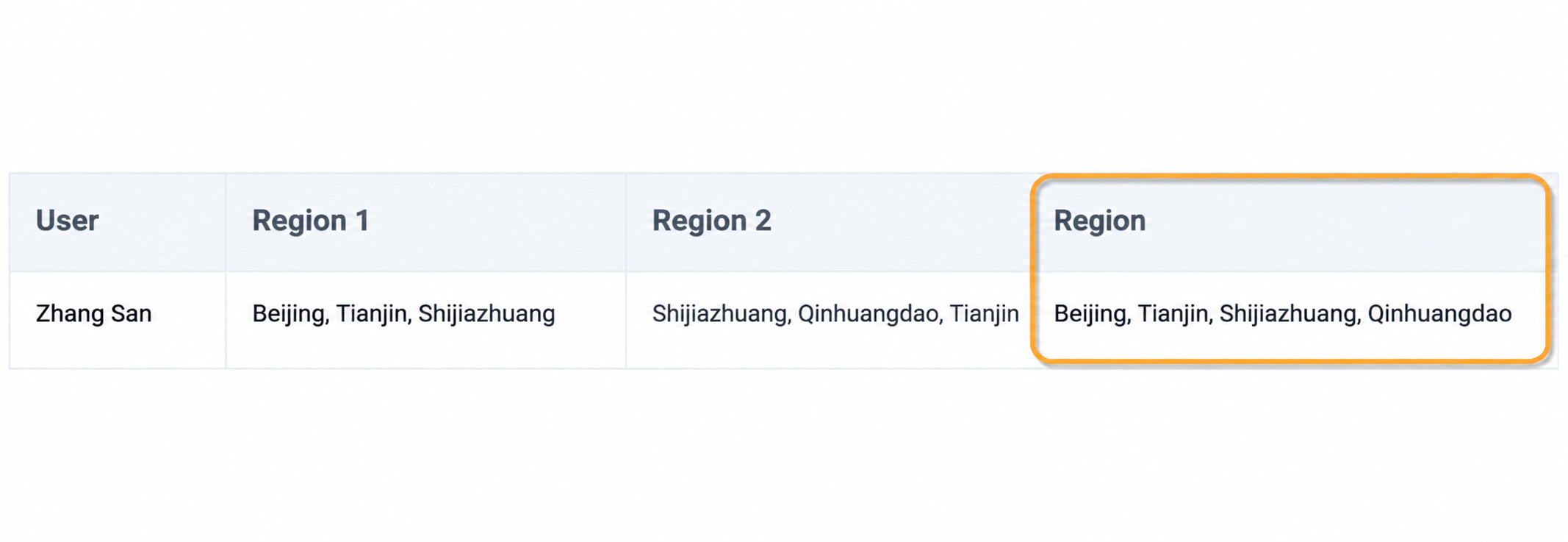
- Merge multiple long strings and remove duplicate content from the strings. For example, to achieve the following effect, use the following combined functions.
array_join(array_union(split([Region 1],','),split([Region 2],',')),',')
-- or --
concat_ws(',',array_distinct(split(concat_ws(',',[Region 1],[Region 2]),',')))
- The dataset field format is a single-layer or multi-layer nested JSON array, and JSON content needs to be extracted. Related case: Parse JSON with ETL.
When the data volume is large, try to avoid multi-layer nested functions. We recommend splitting the process into multiple calculated fields and operating step by step.