Practical Case for Letter Case in SQL Date Formats
This document applies only to Spark. DateFormatter is not universal across different direct databases. For details, see Spark Date Functions and Applications.
Uppercase Y and Lowercase y
Case 1: Calendar Year and Week-Based Year
Today is December 28, 2020. Use a time macro to get year, month, and day: {{{yesterday %YMMdd}}}. The returned value is 20211228.
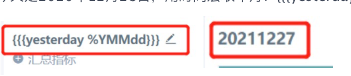
Cause
In SQL, y means Year, the calendar year, while Y means Week year.
Week year means the year that the week containing the current day belongs to. A week starts on Sunday and ends on Saturday. As long as the week crosses into a new year, that week is counted as part of the next year.
Example: The week of 2020-12-28 happens to cross the year boundary, and Week year starts counting from the previous Sunday. Therefore, yesterday, December 27, 2020, Sunday, is the first day of the cross-year week and belongs to the first week of 2021. This causes the result above.
Solution
Use lowercase y for the year:

Summary
- When formatting time, use lowercase y whenever possible.
Examples:
date_format(yyyy-MM-dd)
to_date(yyyy-MM-dd)
{{{yesterday %y}}}
Case 2: date_format Function
Why does date_format([Date], "YYYY-MM") identify December 31, 2019 as "2020-12"?
Cause
The correct usage of date_format is date_format([Date], "yyyy-MM"), not uppercase "YYYY". "YYYY" represents the week-based year. As the last day of 2019, this date is actually counted as the first week of 2020.
Solution
Write it as date_format([Order Date], "yyyy-MM"):

Note
The YYYY issue appears in two places: expressions for creating fields and time macros. Pay attention to both.
For example, write {{{today%yyyy-MM}}}, not {{{today%YYYY-MM}}}.
Uppercase MM and Lowercase mm
When using the to_date() function to convert dates, the result may not match. Example function: to_date([Date]), "yyyymmdd").
Cause:
Lowercase mm represents minutes. The correct format uses uppercase MM and should be written as: to_date([Date]), "yyyyMMdd").
