How to Correctly Replace Historical Data in an Incrementally Updated Dataset
Scenario
The dataset is configured for incremental updates and runs on a daily schedule.
After several days or a period of time, you find that historical data within a certain time range is incorrect or incomplete.
Possible cause: The database data update was delayed and was extracted into BI before the update was complete, so it needs to be extracted again.
Example: A MySQL extract dataset has incomplete data for 2021-02-21, so the data for that day needs to be updated again.
Recommended Method
1. Go to the dataset overview page, click the menu (...) after the Update button, and find Data Cleaning.

2. Click Create Rule, select the time field, select the data time range to clean, and click OK to save.
Date-time fields can be cleaned by date, in days. The cleaning range cannot be accurate to hours, minutes, and seconds.
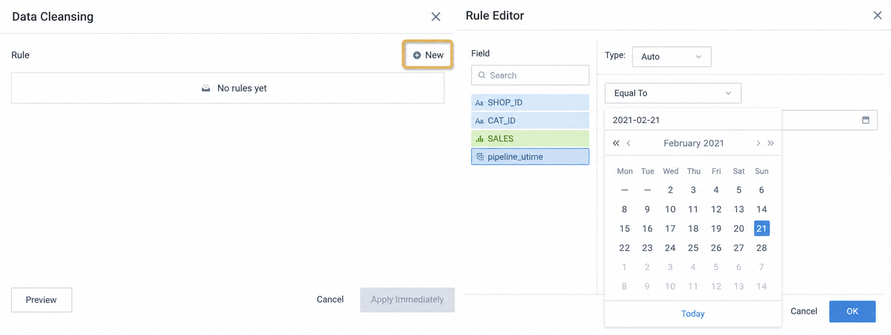
3. Click Preview in the lower-left corner to confirm the data, and then click Clean Now. Data for 2021-02-21 is deleted.

4. Click the Update button again, and directly modify the original SQL where query condition in the SQL input box.
If the original date field format is date-time, such as timestamp/datetime, first use the corresponding database function to convert it to date format, and then compare it with the date. You can also compare date-time with date-time, as long as the field types are consistent.

5. After previewing and confirming the data is correct, ensure the update method is Add New Data, and then click OK to trigger the dataset update.
At this point, the historical data has been replaced and updated. If associated ETL exists, rerun the ETL so the final card data is updated.
Not Recommended
1. Skip Data Cleaning, directly click the Update button, modify SQL, and expect the deduplication primary key to overwrite historical data.
Reason: Deduplication primary keys can use freely selected fields, so they may not fully identify duplicate data and delete the original historical data. After the update, the data retained in the dataset may not all be the latest data.
2. Directly modify the SQL in the model structure.
Reason: Modifying SQL in the model structure clears the original data and re-extracts it. If the data volume is large, the update takes a long time.
3. Directly modify the SQL in incremental update.
Reason: After modifying the date condition for the update, you must manually modify the incremental update SQL statement again, which means two operations are required. If you forget, each subsequent update will incrementally update historical data instead of the latest data.