Pre-cleaning Rule Usage Guide
Scenario
Fact tables in an enterprise data warehouse may change after they are extracted to the BI platform, such as when data is corrected or dirty data is removed. Therefore, BI-extracted fact tables often need to be cleaned based on certain rules first. For example, delete data from the last 7 days and then re-extract data from the last 7 days to keep BI-extracted data consistent with the enterprise data warehouse. These fact tables are usually large, often at the tens-of-millions level, so full re-extraction is time-consuming and resource-intensive. For this reason, data updates for Guan-index datasets include a pre-cleaning rule editor, allowing data administrators to clean data regularly according to specified rules before extraction.
Alternatively, after an extract dataset runs incremental updates for a long time, its data volume keeps growing, causing subsequent ETL runs to take longer and longer. However, only historical data within a fixed time range may be needed. Previously, historical data could only be cleaned manually through the Data Cleaning feature. Now, you can set pre-cleaning rules to slim down the dataset. For example, automatically clear historical data older than 1 year so the current dataset always keeps only data from the most recent year.
Path
In the Data Update tab of an extract dataset, select Incremental Update. Pre-cleaning Rule appears automatically below.
Usage
- Set the deduplication primary key and incremental update SQL statement first, and preview the data to ensure it is correct.
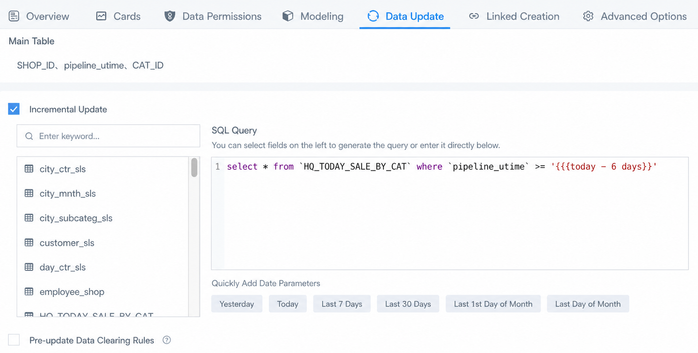
For example, assume you need to incrementally update data from the last 7 days on a daily schedule. If the date field itself is in date/datetime format, compare it directly with the time macro in the where condition, as shown below:
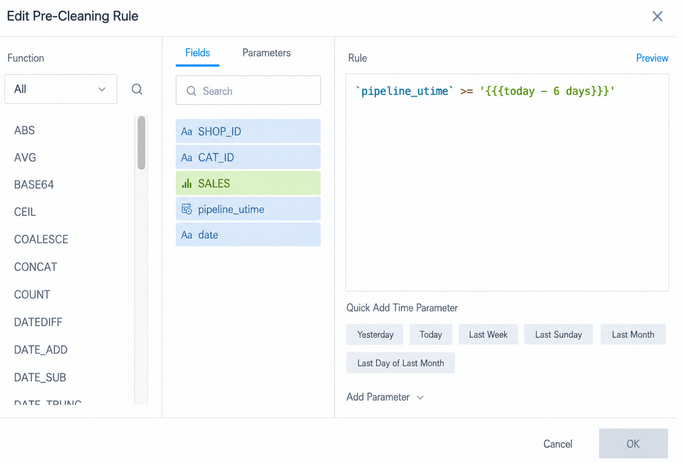
- Select Pre-cleaning Rule. In the pop-up settings box, enter the same time filter condition as in the incremental update. Preview to ensure the data is correct, click OK, and then click Apply in the lower-right corner to save the settings.
Notes
In the scenario above, the date field is in date/datetime format. The date-time judgment uses a time macro and does not use any function, so the pre-cleaning rule can directly copy and paste the condition after where.
However, when function formulas are needed, do not paste the condition statement unchanged. This is because Incremental Update queries data directly from the user's database and must use the SQL functions of that database. Pre-cleaning Rule deletes data already stored on the BI server and must use Spark SQL functions. The same applies to Data Cleaning, Row and Column Permissions, and Create Calculated Field. They all process data already stored on the BI server and require Spark SQL functions.
For example, the field date in a MySQL extract dataset is a text field (String) in the format 20220228. In incremental update, you can use DATE_FORMAT(`date`,'%Y-%m-%d') or STR_TO_DATE(`date`,'%Y%m%d') to convert the date format and compare it with the time macro.

However, in Pre-cleaning Rule, the Spark SQL syntax is: to_date(`date`,'yyyyMMdd') >= '{{{today - 6 days}}}' . Functions differ across databases. Even if the same function is available in multiple databases, the exact usage may differ. For example, the meanings of uppercase and lowercase y/m/d for year, month, and day differ across databases, so do not mix them casually.
