Dataset FAQ
Overview
This article introduces common dataset issues in the Guandata BI multi-source data integration module.
Datasets
Why do configured row and column permissions not take effect for an administrator or dataset owner?
Cause: Apply to Dataset Owners or Apply to Administrators is not enabled for the user's role.
Solution: At the bottom of Data Security > Row and Column Permissions for the dataset, enable the switch that corresponds to the user's role. If the user is both an administrator and a dataset owner, both Apply to Dataset Owners and Apply to Administrators must be enabled for row and column permissions to apply.
What is the difference between direct connection and guan_index extraction?
- Direct connection queries the database directly and is suitable for scenarios with high real-time query requirements. guan_index, also known as extraction, first extracts data from the database to the BI platform and then processes and calculates it directly in BI. It is suitable for scenarios with lower real-time requirements.
- When writing functions for cards based on direct-connection datasets, use the syntax of the corresponding database. For extracted datasets, use Spark syntax.
- Direct-connection datasets cannot be used in ETL.
Which syntax should be used in BI?
- Creating database datasets: Use the syntax of the corresponding database when creating a database dataset.
- Creating calculated fields or configuring row and column permissions: For direct-connection datasets/cards, use the corresponding database syntax. For extracted datasets/cards, use Spark syntax for normal types. For high-performance datasets, use ClickHouse syntax.
- In ETL, use Spark syntax for calculated fields and SQL input nodes.
How can an SQL query exclude unnecessary columns?
Background: You may not need to query all fields with select *. Also, when creating a dataset after a join operation, select * cannot be used because an error such as a field is not unique in Record may occur. The platform does not allow duplicate field names, so duplicate fields must be removed. However, when there are many fields, listing them one by one in SQL is tedious.
Solution: Query all fields in a database connection tool, then select and copy only the field names you need to keep.
Using MySQL as an example, query with Navicat as follows. The query result is automatically separated by commas for easy copying.
SELECT GROUP_CONCAT(COLUMN_NAME SEPARATOR ",") FROM information_schema.COLUMNS
WHERE TABLE_SCHEMA = 'db_name' AND TABLE_NAME = 'tb_name';
db_name: database name
tb_name: table name
Why does changing a column name with SQL in the dataset model structure not take effect?
Field association is selected by default. Set the target field to No Association.
If the dataset ID has been obtained, which table can be associated with the dataset Chinese name?
The dataset Chinese name is in the built-in dataset builtin_data_source.
Why does an error occur after copying the same row permission condition from one dataset to another?
Cause 1: Row and column permissions take effect only in the corresponding database, and SQL functions differ between databases.
Solution: For example, GuanIndex datasets correspond to the Spark computing engine, while direct-connection datasets correspond to the customer database. Edit appropriate SQL filter conditions based on the corresponding database.
Cause 2: The target dataset lacks fields used in the row permission condition, causing system validation to fail.
Solution: Modify the permission condition to ensure that the fields exist in the target dataset.
Can a folder be specified for datasets uploaded through the API?
No. The folder cannot be specified during API upload. By default, the dataset is stored in the root directory. After upload succeeds, you can move it manually.
What is the difference between appending data and replacing data in a manual table?
(1) Replacing data has two cases:
a. If the fields already existed before replacement, when replacing data and uploading the dataset, the replacement dialog follows the positions of the existing fields to be replaced instead of the order in the uploaded Excel file.
b. If a field does not exist during replacement, the new column is added at the end.
(2) Appending data: Appended data adds rows under the fields of existing columns.
Why does data volume expand when appending the exact same dataset to a manual table with a deduplication primary key selected?
Cause: The field selected as the deduplication primary key may contain null values. Null values cannot be judged as duplicates, so they are all retained, causing data volume to expand.
Solution: Fields containing null values must not be used as deduplication primary keys, whether for manual table data append or dataset incremental update primary key deduplication.
When uploading a manual table to create a dataset in Guandata BI, can compressed Excel and CSV files be used?
(1) When Excel is selected as the upload file type, compressed Excel files cannot be uploaded.
(2) When CSV is selected as the upload file type, a compressed Excel file can be selected, but the upload will fail. Compressed CSV files can be uploaded successfully. CSV supports uploading ZIP packages and automatic parsing.
What is the shortest refresh interval for guan_index extracted data?
Automatic scheduled updates can run up to four times per day. Configure the dataset update frequency based on business needs.
If higher real-time performance is required, such as viewing data every 15 minutes, consider using direct connection. It has higher real-time performance, but ETL cannot be used.
Updating datasets too frequently may involve the following risks:
(1) Data quality: Frequent data updates may reduce data quality. A large number of updates in a short time may cause data errors or missing data, so data accuracy and integrity must be ensured.
(2) System performance: Frequent data updates may negatively affect system performance. Each update consumes system resources. If the update frequency is too high, the system may slow down or even crash, so system performance and resource consumption must be evaluated.
(3) Database pressure: Frequent data updates consume significant database computing resources, computing time, and response time. Reduce database pressure to reduce the impact on the overall system.
Direct-connection databases also follow the cache validity period. Should URL trigger be selected?
(1) Direct connection generally queries the database directly, but querying the database every time creates heavy database pressure, so a cache mechanism is provided.
(2) The cache can be hit only when a card has the same query SQL and the cache version has not expired.
(3) URL trigger is only an external update triggering mechanism. Regardless of which update method triggers the update, a dataset update refreshes the cache version number.
(4) If real-time requirements are high, select Support Real-time Card Data. When real-time cards are supported, adjust the default cache validity time if some database pressure needs to be reduced.
Can tables from two data accounts be joined?
Tables from the same data account across databases can be associated in the dataset model structure. Cross-data-account association is not supported. Extract them separately and then use ETL to join the tables.
Why do extra columns still exist after replacing data in a manual table (CSV or Excel)?
Cause: Existing numeric columns are not directly deleted. After replacing with a new table, if an association is configured, the original column is directly replaced by the new associated field. If no association is configured, the column becomes null. Direct column deletion is not currently supported.
Can writing calculated field logic into dataset SQL shorten query time?
Example scenario:
A dataset with fewer than one million records currently takes more than 10 seconds to query. The dataset SQL takes less than one second on the big data platform, but dozens of year-over-year calculated fields and functions such as sum are added in Guandata.
The data likely uses a direct-connection dataset. The time consists of three parts: fetching data from the database, calculating in BI, such as dozens of year-over-year calculated fields and sum functions, and rendering the card style.
If complex calculations are placed in SQL, the time spent fetching data from the database will increase. To fundamentally solve this issue, calculate these complex metrics in advance in the lowest-level data warehouse, then directly fetch the results here. This is somewhat of a trade-off.
How can all table names in datasets be obtained in batches?
You can view the dataset SQL information in the dataset model structure to see which table the dataset uses.
Batch retrieval can be done through the API. To see the database table corresponding to a dataset, check the dataset query information. Refer to the following method:
How can I determine whether a dataset table uses full update?
The update method can be viewed on the dataset update page. If incremental update is not selected and the SQL statement has no time condition, it is a full update.
For full updates, note that updates work if the data structure in the customer ERP has not changed. If field names or the number of fields change, the changed parts will not be updated.
Full update is based only on the fields that have already been extracted. Newly added columns are not automatically updated.
(1) If fields change, update again.
(2) If no fields change and only content changes, no re-update is required.
Do read-only users not have the ability to export dataset CSV files?
Read-only users can export only Excel files, not CSV files. In addition, cards based on direct-connection datasets for normal users and owners can also export only Excel files.
If column permissions are configured for a dataset and unauthorized users see null values on the dataset overview page, can invisible columns be hidden directly?
The dataset details page is intended to display the complete data structure. If columns are hidden, information asymmetry occurs. For example, the page may indicate 10 columns, while users without column permissions can see only 5 columns, which is more likely to cause misunderstanding and make users think there is a system bug. If the data is made into a table card, fields without column permissions are hidden, so actual usage is not affected.
Why is a card alert for a real-time, no-cache direct-connection dataset not triggered?
Cause: Support Real-time Card Data is selected, but the Real-time Data switch is not enabled on the page. If the page is not accessed, page data is not updated and the alert is not triggered.
Do datasets support Save As?
Yes. Enable the switch in Admin Settings / System Settings / Advanced Settings / Allow Dataset Save As.
After adding a primary key, why does the retrieved data volume not match the original data volume?
Cause: Check whether the primary key contains many null rows. If the deduplication primary key contains null values and the column is numeric, all null rows are discarded, causing the data volume to decrease.
Solution: Process null values before extraction, or perform a full update.
Can datasets with duplicate names be uploaded?
Datasets with the same name cannot be uploaded to the same folder. Datasets with the same name are allowed in different folders.
Can the connection method be changed after a dataset is created?
No.
Why does preview fail when nested IF functions are used while creating a database dataset?
Cause: Nested IF functions have high time complexity that grows exponentially. If SQL with multiple nested IF functions is used on the preview page, preview timeout is likely.
Solution: Use case when instead of nested IF functions.
What are the default concurrency values for ETL, cards, and datasets?
The default concurrency for ETL automatic tasks is 1. The default concurrency for dataset automatic tasks is 4. For cards, extracted datasets have a default concurrency of 10, and direct connection has no limit.
These are default settings. If you previously requested concurrency adjustment, use the actual modified values. Administrators can go to Admin Settings > Operations Management > Parameter Configuration to modify ETL concurrency. To adjust card or dataset concurrency, contact after-sales support. R&D and operations will evaluate and perform the change. This parameter cannot be customized by customers.
The BI system has a large dataset update queue and pages cannot load
This is usually caused by a large task running and blocking other tasks. Check the task management page to find the task with the longest run time. After canceling the longest-running task, the system usually recovers automatically.
The dataset has data during preview, but no data after successful update, while the dataset still shows n rows and n columns
Troubleshoot from the following aspects:
(1) Whether filter conditions are configured for the dataset.
(2) Whether permission control is configured in the dataset data permission module and row permissions are enabled.
(3) If row or column permissions are enabled and Apply to Dataset Owners or Apply to Administrators is enabled for the user's role, users who are not covered by the corresponding permission rules may be unable to view the data.
Does a view dataset update automatically when the selected dependent dataset is updated? Does this need extra configuration?
View dataset update mainly means updating the model structure SQL. When the upstream dataset is updated, the data view is also updated.
Card Dataset Update Method
Prerequisite: Dataset A is used to create card B, and card dataset C is created based on card B.
(1) Card dataset structure: If card B is modified, card dataset C is not automatically synchronized. Manual update is required for synchronization.
(2) Card dataset data content: When original dataset A is updated, the data update of card dataset C is triggered.
What is the difference between real-time card data for direct-connection databases and real-time data in the paid module?
(1) Real-time card data for direct-connection databases is near real-time. Select Support Real-time Card Data, and set the dataset cache validity time to no cache to achieve near real-time page card data. However, this approach places significant pressure on the business database and cannot implement multi-source data fusion.
(2) The paid real-time data module uses a Lambda architecture and supports simple predefined calculations such as year-over-year and period-over-period comparison. It processes historical data and real-time data separately, enabling multi-source data fusion, supporting incremental updates, and consuming fewer computing resources.
From an operation perspective, Guandata built-in direct-connection data is easier to configure, while the paid real-time data module has some learning cost.
After uploading data through the API, the upload succeeds but the dataset has no data
Cause: "batchFinish": false /* Optional. Default is false. During batch upload, it indicates whether this is the last batch. When set to false, row count is not updated and card cache is not refreshed. */
Solution: Add "batchFinish": true to the request parameters. If it is not added, no update is performed by default.
Column names are changed with SQL in the model structure, but the change does not take effect
Cause: Fields are renamed in the data structure.
Solution:
(1) Recommended: Rename fields in the data structure, or set them to empty. The default is the field name from the model structure statement.
(2) After modifying the model structure, select No Association in the association pop-up window, then rename the field in the next pop-up window.
Differences Between Incremental Update Methods
Prerequisites for incremental update:
- The data source, such as the database, stores the creation time or update time of each record.
- There is a unique primary key column.
(1) When no deduplication primary key is set
Add new data: All data extracted by incremental update is added as new data.
Overwrite old data: Existing data is cleared, and the updated data is the data queried by the incremental update statement.
(2) When a deduplication primary key is set
Add new data: If the data extracted by incremental update has primary keys that duplicate existing data, the extracted data overwrites the existing data. Other extracted data is added as new data.
Overwrite old data: Existing data is cleared, and the updated data is the data queried by the incremental update statement.
What is the maximum supported file size when uploading data through Excel while creating a dataset?
In version 7.1, when creating a dataset, uploaded Excel (xlsx) files cannot exceed 500 MB. Older Excel files such as xls cannot exceed 5 MB, and the maximum row count cannot exceed 1,048,576 rows. CSV files, which can be compressed into ZIP files, cannot exceed 500 MB.
Can ETL datasets modify field names and field types in Data Overview > Data Structure?
When field names and types in an ETL dataset need to be modified, edit them directly in ETL. You can create calculated fields or grouped fields, and newly created fields can be edited.
How does a Web Service dataset extract fields?
(1) First visually inspect the returned data structure, or use a JSON tool, and identify the specific child node where the target field is located. For example, the figure below shows that refund_order is under data. In BI, write the path as $.data.refund_order[*] to obtain fields in refund_order.
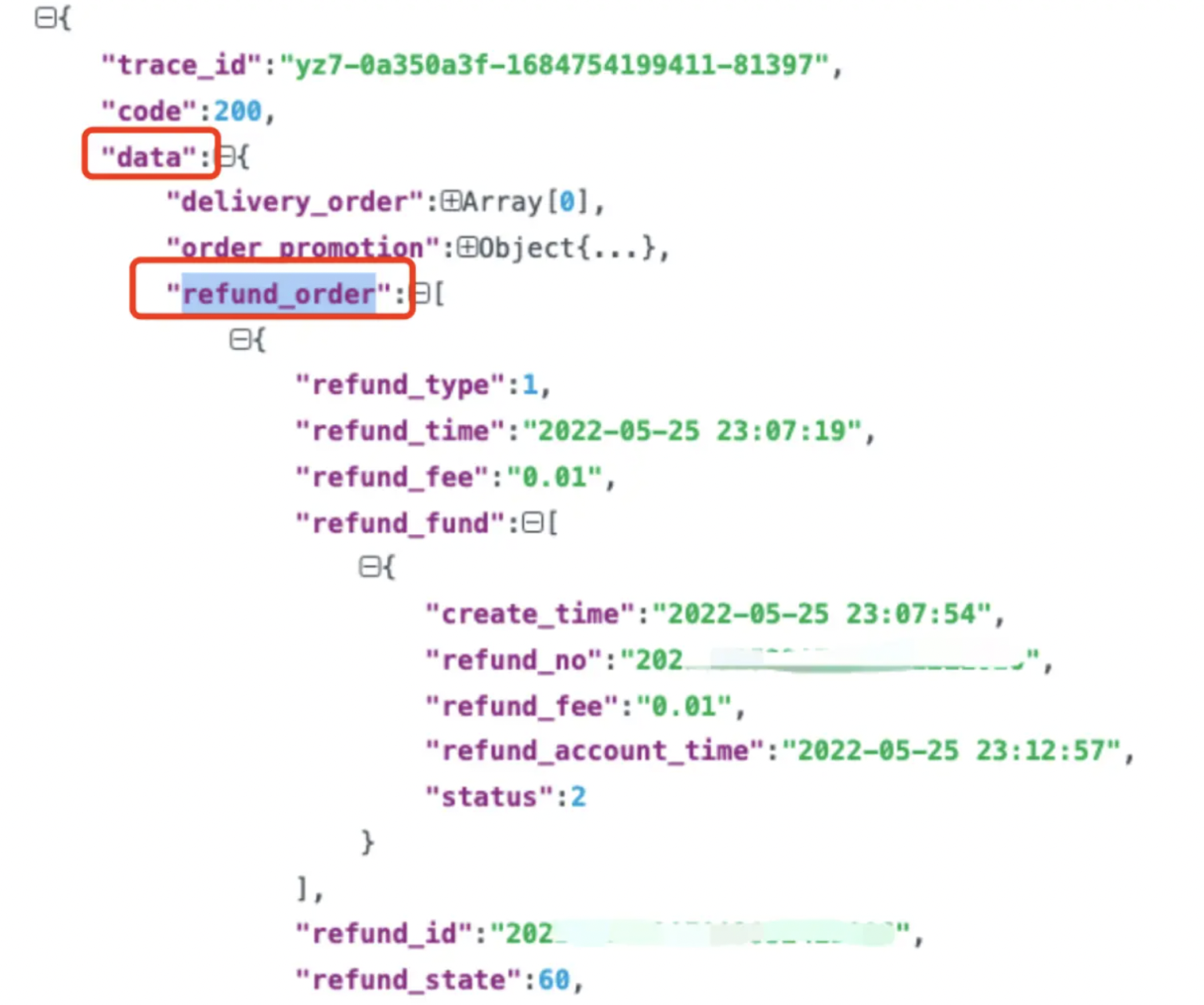
(2) How to obtain fields in refund_fundCurrently, Guandata BI does not support directly splitting nested arrays in JSON. Therefore, when using $.data.refund\_order\[*] to obtain fields in refund\_order, refund\_fund is extracted as a complete text field. After the dataset is created, use ETL functions to extract the values of each field in refund\_fund. For details, see Parse JSON with ETL.
The primary key in a table card has no null values, but historical data with null primary key fields exists in the dataset output through feedback form entry or knowledge feedback
Cause: The submitter of that form entry record lacked data permission for the primary key at the time. In other words, column permissions were enabled for the dataset used by the table card, and the field was set as invisible for that submitter.
Solution: Modify dataset column permissions, or process null values through ETL.
Why do text fields in a dataset display as garbled characters?
Cause: The user database uses a character encoding other than the UTF-8 encoding used by BI by default. After dataset update, BI directly reads this incorrectly encoded data. The following are four common scenarios of garbled Chinese characters:
| Garbled Example | Cause | Characteristics |
| ¹ÛÔ¶Êý¾Ý | GBK-encoded text read as ISO-8859-1 | Usually English letters with superscripts |
| ��Զ���� | GBK-encoded text read as UTF-8 | Usually question marks in black boxes |
| 瑙傝繙鏁版嵁 | UTF-8-encoded text read as GBK | Usually rare traditional Chinese characters |
| è§è¿æ°æ® | ISO-8859-1-encoded text read as UTF-8 | Contains lowercase Western letters and some symbols |
Solution: Change the character encoding of the source database to UTF-8. If locating and modifying the data source is difficult, re-encode this data in BI. First filter the problematic data, identify which garbled type it belongs to, and then use decode(encode([Field Name], 'Type 1'), 'Type 2') in a new field to re-encode the data.
Example: Take "¹ÛÔ¶Êý¾Ý". It is caused by reading GBK encoding as ISO-8859-1. Re-encode the corresponding field into ISO-8859-1, then decode it as GBK. The corresponding new field expression is decode(encode([Field Name], 'ISO-8859-1'), 'GBK'), as shown below:
Do data accounts support SSL certificate access?
For security reasons, Guandata supports mounting SSL certificates for access to some databases. If needed, contact your dedicated Guandata after-sales engineer or customer manager for further communication and handling.
All scheduled tasks do not run automatically after updating the license
Issue description:
After the old license expires and the license is updated, all scheduled tasks, such as datasets, ETL, and subscriptions, are not automatically triggered. After environment migration and activation of the new environment license, scheduled tasks become invalid.
Cause:
After the license expires and becomes invalid, BI services stop and all scheduled tasks stop. Even if the license is reactivated, scheduled tasks are not automatically triggered. For migration of BI 5.3.0 and later versions, after activating the new BI environment, guandata-server must be restarted; otherwise scheduled tasks become invalid.
Solution:
After reactivating the license, contact Guandata service personnel to restart the entire BI service.