User Behavior Analysis and Built-in Datasets
Overview
User behavior analysis uses metadata such as operation traces and behavior records from the Guandata BI platform to statistically analyze the usage of all users and user groups in the system.
Business Value
- Helps the IT or operations teams responsible for private deployments quickly understand and analyze how business users use the current BI platform.
- Helps IT, operations, security monitoring, or information security audit teams record internal data access and operation behavior completely and conveniently, build a security monitoring and information security audit mechanism, and protect enterprise data assets.
Feature Modules
The user behavior analysis feature currently consists of two main modules: built-in datasets and a built-in dashboard.
Built-in Datasets
Based on the underlying database and requests initiated from the web client, the system provides eight built-in datasets for user behavior analysis. These datasets are fully updated on a T+1 daily basis.
In private deployment environments, no user can modify, delete, or rename these datasets, even administrators or users with owner permissions. Users can still build secondary development on these datasets and customize the user behavior analysis logic required by the enterprise.
builtin_execute_record Table
This table is extracted from the underlying MySQL database and stores the execution status of datasets and ETL tasks.
| Table Name | Field Name | Field Type |
| builtin_execute_record | Domain | STRING |
| Resource ID | STRING | |
| Resource Type | STRING | |
| Start Time | TIMESTAMP | |
| End Time | TIMESTAMP | |
| Run Duration | LONG | |
| Status | STRING |
builtin_user Table
This table is extracted from the underlying MySQL database and stores user records.
| Table Name | Field Name | Field Type |
| builtin_user | Domain | STRING |
| User ID | STRING | |
| mobile | STRING | |
| STRING | ||
| Account | STRING | |
| Account Type | STRING | |
| Created Time | TIMESTAMP | |
| Last Modified Time | TIMESTAMP | |
| User Attributes | STRING | |
| Custom Role | STRING | |
| User Status | STRING |
builtin_card Table
This table is extracted from the underlying MySQL database and stores card records.
| Table Name | Field Name | Field Type |
| builtin_card | Card ID | STRING |
| Domain | STRING | |
| Parent Card ID | STRING | |
| Dataset ID | STRING | |
| Creator ID | STRING | |
| Card Name | STRING | |
| Card Type | STRING | |
| Chart Type | LONG | |
| Created Time | TIMESTAMP | |
| Last Modified Time | TIMESTAMP | |
| Page ID | STRING |
builtin_page Table
This table is extracted from the underlying MySQL database and stores page-related records.
| Table Name | Field Name | Field Type |
| builtin_page | Page ID | STRING |
| Domain | STRING | |
| Folder | STRING | |
| Creator ID | STRING | |
| Page Name | STRING | |
| Created Time | TIMESTAMP | |
| Last Modified Time | TIMESTAMP | |
| Page Type | STRING |
builtin_data_flow Table
This table is extracted from the underlying MySQL database and stores ETL-related records.
| Table Name | Field Name | Field Type |
| builtin_data_flow | ETL ID | STRING |
| Domain | STRING | |
| Creator ID | STRING | |
| Folder | STRING | |
| ETL Name | STRING | |
| Input Dataset | STRING | |
| Output Dataset | STRING | |
| Run Count | INT | |
| Successful Run Count | INT | |
| Last Run Duration | LONG | |
| Status | STRING | |
| Created Time | TIMESTAMP | |
| Last Modified Time | TIMESTAMP | |
| Scheduled Update Time | STRING | |
| Update Method | STRING | |
| Last Run Time | TIMESTAMP |
builtin_data_source Table
This table is extracted from the underlying MySQL database and stores dataset-related records.
| Table Name | Field Name | Field Type |
| builtin_data_source | Dataset ID | STRING |
| Domain | STRING | |
| Creator ID | STRING | |
| Folder | STRING | |
| Dataset Name | STRING | |
| Row Count | LONG | |
| Column Count | INT | |
| Scheduled Update Time | STRING | |
| Status | STRING | |
| Created Time | TIMESTAMP | |
| Last Modified Time | TIMESTAMP | |
| Dataset Type | STRING | |
| Last Run Time | TIMESTAMP | |
| Data Extraction Method | STRING |
user_and_user_group_relation_record Table
This table is extracted from the underlying MySQL database and stores user-to-user-group membership records.
| Table Name | Field Name | Field Type |
| user_and_user_group_relation_record | User ID | STRING |
| User Name | STRING | |
| User Group ID | STRING | |
| User Group Name | STRING | |
| Parent User Group ID | STRING | |
| Parent User Group Name | TIMESTAMP |
user_behavior_analysis_record Table
This table records HTTP request information initiated from the web client and stores detailed operation records for users and user groups.
| Table Name | Field Name | Field Type |
| user_behavior_analysis_record | Operation Time | TIMESTAMP |
| Domain | STRING | |
| Operation Name | STRING | |
| User Name | STRING | |
| User Group Name | STRING | |
| Resource ID | STRING | |
| Resource Type | STRING | |
| Resource Name | STRING | |
| Login Method | STRING | |
| Client Operating System | STRING | |
| Client Browser | STRING | |
| User ID | STRING | |
| Client IP | STRING |
builtin_directory Table
This table is extracted from the underlying MySQL database and stores records related to system folders.
| Table Name | Field Name | Field Type |
| builtin_directory | Folder ID | STRING |
| Folder Name | STRING | |
| Domain | STRING | |
| Creator ID | STRING | |
| Parent Folder ID | STRING | |
| Created Time | TIMESTAMP | |
| Last Modified Time | TIMESTAMP | |
| Resource Type | STRING |
builtin_userGroup Table
| Table Name | Field Name | Field Type |
| builtin_userGroup | Domain | STRING |
| User Group ID | STRING | |
| User Group Name | STRING | |
| Parent User Group ID | STRING | |
| Created Time | TIMESTAMP | |
| Last Modified Time | TIMESTAMP | |
| Custom Role | STRING |
Built-in Dashboard
Based on the eight built-in datasets described in Built-in Datasets, the user behavior analysis module provides a general visual dashboard for user behavior analysis. The page is named BI Platform User Behavior Analysis and covers three standard analysis areas: system overview, page and card usage, and security monitoring.
In private deployment environments, no user can modify this built-in dashboard, even administrators or users with owner permissions. The default administrator is the owner and can assign view or save-as permissions to other users. If the enterprise needs custom user behavior analysis logic, it can build secondary development on the eight built-in datasets provided by the system.
System Overview
| Page Module Name | Page Component Card Name | Card Description |
| System Overview | System Users | Total current system users |
| User Groups | Total current system user groups | |
| Page Count | Total current system pages | |
| Card Count | Total current system cards | |
| Active Users | Total current active users | |
| ETL Run Count & Average Run Duration | Total current system ETL run count and average ETL task run duration, in seconds | |
| Top 10 Active Users | Top 10 active users in the current system | |
| Top 10 Active User Groups | Top 10 active user groups in the current system | |
| Pareto Analysis of High-frequency User Operations | Statistics on high-frequency operation types and counts for active users in the current system | |
| Peak Period Monitoring | Total distribution of visits by login method for each hourly period each day in the current system | |
| Weekly Comparison of API Calls and Users in the Last 90 Days | Weekly trend comparison of API calls and users in the last 90 days |
Page and Card Usage
| Page Module Name | Page Component Card Name | Card Description |
| Page and Card Usage | Most Popular Pages and Dashboards | Word cloud of the most popular page and dashboard names in the current system |
| Weekly Comparison of New Cards and Card Creators in the Last 90 Days | Weekly trend comparison of new cards and card creators in the last 90 days | |
| User Group Card Access in the Last 30 Days | User group card access trends in the last 30 days | |
| Users and Visits for User Group Card Access in the Last 30 Days | Total users and visits for user group card access in the last 30 days |
Security Monitoring
| Page Module Name | Page Component Card Name | Card Description |
| Security Monitoring | User Export Behavior Monitoring | Daily user export behavior monitoring, including who exported and what was exported |
| User Delete Behavior Monitoring | Daily user deletion behavior monitoring, including who deleted and what was deleted |
Built-in Task Running Status Dashboard
To simplify IT operations work, Guandata provides a built-in task running dashboard in the BI platform. It visualizes all task running information so that abnormal tasks can be quickly located through the dashboard when exceptions occur.
To enable this feature, contact technical support.
Usage Notes
- Built-in dataset: task_status table
- Dashboard: Task Analysis Dashboard, which includes common metrics such as daily task run count, average card running time, 90th percentile query time, and tasks with long CPU time.
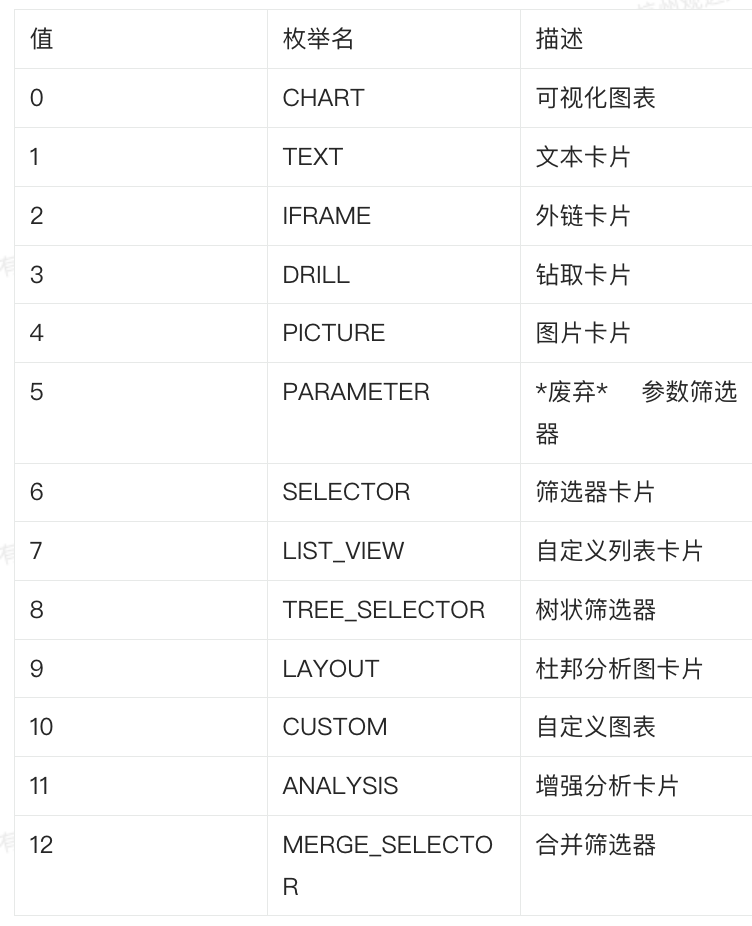
Card Type Reference Table