Audit Log
Overview
Audit Logs help enterprise IT and information security teams understand the security status of the BI system.
By providing a visual audit log interface, the system allows users to search and query audit log data more efficiently and allows administrators to download audit logs for further analysis. This helps users identify attacks and intrusions targeting the BI system, as well as internal violations and information leakage, and provides the necessary information for post-incident analysis and investigation.
Applicable Scenarios
-
Routine security auditing and awareness of system security posture
As enterprise IT or information security personnel maintaining the BI system, you may need to regularly understand which IP each user used to access the system and whether there were repeated login attempts from the same IP within a short period.
-
Post-incident investigation and accountability after a violation
As enterprise IT or information security personnel, you may receive feedback that a previously accessible Dashboard is now missing. Audit Logs can help identify who deleted the Dashboard or removed someone from the Dashboard visitors.
-
Enterprise-level security auditing and global administrator insight
As an enterprise manager, audit security is business-critical. You may want clear management visibility and global insight by viewing Audit Logs in the Admin Center for easier operations management.
Usage Guide
-
Fuzzy search is supported by operation target, operator, and time.
DescriptionWhen querying by Custom Time Range, the time range can be adjusted up to a maximum of 360 days, and the format must follow
YYYY-MM-DD HH:mm:ss. -
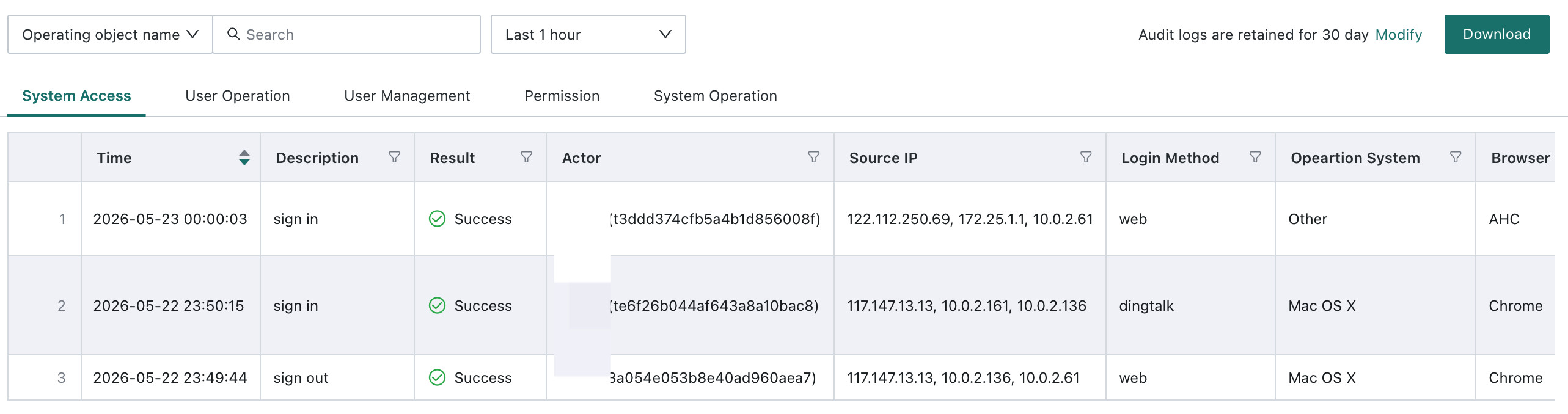
The current categories include system access records, user operations, user management, permission assignment, and system runtime and operation records:
- System Access Records: records user access to the system, including successful login, logout, and failed login logs.
- User Operation Records: records user operations on Resources, including create, modify or edit, move or delete, export, and file size and row or column counts during export. Supported Resources include Cards, Pages, Datasets, and ETL.
- User Management Records: records logs related to user management, including create, edit, and delete operations for users and user groups.
- Permission Assignment Records: records logs related to permission assignment for users and Resources, including permissions for users, user groups, Pages, folders, Datasets, and ETL. A new Assignment Details column is included in the list and displays detailed information about the operator and authorized objects in JSON format, for example:
{"operator": "admin", "authorizedUsers": ["user1", "user2"]}. - System Runtime and Operation Records: records system-level runtime and operational logs, including logs related to the data export switch and domain-update export whitelist.
- System Integration Records: records administrator operations for enterprise-level management. Operations performed in Admin Center > System Integration are also written to Audit Logs.
- Log download and retention settings:
- Administrators can export all types of filtered log detail data as Excel files.
- Administrators can set the log retention period in days. The minimum is 30 days and the maximum is 360 days.
- It is recommended to keep the retention period within a reasonable range. If logs are kept for too long, they may consume excessive server storage space.
-
Viewing administrator operations
Administrator operations under Admin Center > System Integration are recorded as audit logs and displayed under System Runtime and Operations on the Admin Center > Operations Management > Audit Logs page, so administrators can review the audit status in time.

Notes
- Audit log data is written to the database every 5 minutes, based on the server's latest startup time, or whenever 500 rows of data have accumulated.
- Because servers may mask the real IP address by default, the operator IP shown may not be the real IP address. If you need the real operator IP address, contact Guandata sales or Guandata Assistant.
- If the log retention period is reduced from a larger value to a smaller value, such as from 60 days to 30 days, the system will automatically clear expired logs during the early morning, and this cleanup cannot be reversed. Please proceed with caution.